Confidence Scores for Straight-Through Processing: Automation Thresholds (August 2026)
Confidence scores decide which extracted documents clear automation and which go to a human, but the thresholds only work if you set them per field and keep recalibrating. This guide covers the routing bands, why per-field scores compound badly across a 40-field document, and what compliance regimes actually require.


If your straight-through processing rate is dropping, or your review queue is growing without a clear reason, check threshold calibration before blaming extraction quality. A useful routing policy treats confidence, field criticality, and document type as separate inputs.
TL;DR:
- Extraction confidence scores operate at the field level rather than the document level. A single doc can score 0.95 on one field and 0.58 on another.
- Use 0.90 as an initial straight-through processing threshold. Scores from 0.70 to 0.89 warrant a secondary check, and scores below 0.70 route to human review.
- If field scores are calibrated probabilities and errors are independent, a 40-field mortgage application where every field scores 0.95 has only a 13% chance of being fully accurate end to end.
- For high-consequence fields, evaluate a threshold of 0.95 or higher and keep field-level citations. RESPA, HIPAA, and SOX don't prescribe either control, so validate the policy against your own risk tolerance.
- Unsiloed AI scores every extracted field by default, returning a grounding score and an extraction score per field. Bounding-box citations are one flag away, via
enable_citations.
What an Extraction Confidence Score Actually Measures
An extraction system typically assigns each field a score between 0 and 1 that reflects its confidence in the value. A score of 0.97 on an invoice total signals more certainty than a score of 0.61 on a handwritten date. Poor scan quality, overlapping characters, or an unfamiliar format can lower that score. Confidence score reliability explains how to test whether those scores match observed accuracy.
The score is per field rather than per document, so a single document can return a 0.95 on a vendor name and a 0.58 on a line-item quantity in the same pass. That granularity is what makes the score actionable in a straight-through processing pipeline.
Unsiloed's API reference publishes five interpretation bands for that number, running from 0.9 and above as very likely correct down to below 0.6 as likely needing manual verification. Those bands say how much to trust a value while leaving the routing action open, so the three-band scheme below collapses them into the decisions a pipeline actually has to make. Treat it as a starting point and adjust per your field types and risk tolerance.
What Determines an Extraction Confidence Score
The confidence value reflects several inputs measured at extraction time:
- Scan quality below 300 DPI, the vendor-recommended minimum, blurs letter boundaries and degrades character resolution before the model sees the input, a constraint covered in document data extraction.
- Handwritten fields, which vary in stroke weight, spacing, and letterform in ways printed text doesn't.
- Fields with no clear delimiter, like an amount buried mid-sentence in a contract clause.
- Uncommon layouts or domain-specific formatting the model rarely sees, even on a clean image, a limitation covered in are LLMs good enough for document extraction.
- A poor match between the extracted value and the expected format for that field, such as a date, currency amount, or tax identifier.
- Weak context corroboration, for example a total that doesn't match the sum of the itemized amounts above it.
Fields can also carry a bounding-box citation pointing back to the source region. Citations are usually a request-time option rather than a default, so check whether your extractor returns them before designing a review UI around them.
| Confidence Range | Routing Decision |
|---|---|
| 0.90 and above | Straight-through processing |
| 0.70 to 0.89 | Secondary check before passing downstream |
| Below 0.70 | Human review queue |
Why the Threshold Varies by Field
The bands above are a starting point, not a fixed rule. The right cutoff for a given field depends on what that field controls downstream.
- The same 0.85 score might clear automation on a low-risk field like a vendor name and trigger review on a high-risk one like a loan amount.
- Track results separately for clean PDFs, scans, and each document class. The same threshold can perform differently across those groups when a model's scores are not equally calibrated for each one.
Calibrate thresholds per field type and document class, then monitor error rates to confirm the bands hold, a process covered in the guide to AI document extraction.
Why the Multi-Field Compounding Problem Breaks Per-Field Thresholds
Single-field errors are manageable, but a pipeline that extracts dozens of fields needs every required value to be right. High per-field scores don't guarantee that the whole document is accurate.
If each score is a calibrated probability and field errors are independent, a mortgage application with 40 fields scoring 0.95 has a probability of 0.95⁴⁰, roughly 13%, that every field is correct. Under those assumptions, a document where every individual field looks reliable has only a 1-in-8 chance of being fully accurate end to end.
Real field errors are often correlated. A blurred page, unfamiliar layout, or failed table boundary can affect several fields at once, so don't treat 13% as a measured document-accuracy rate. Use the calculation to show why per-field thresholds are insufficient, then measure document-level accuracy on reviewed production samples.
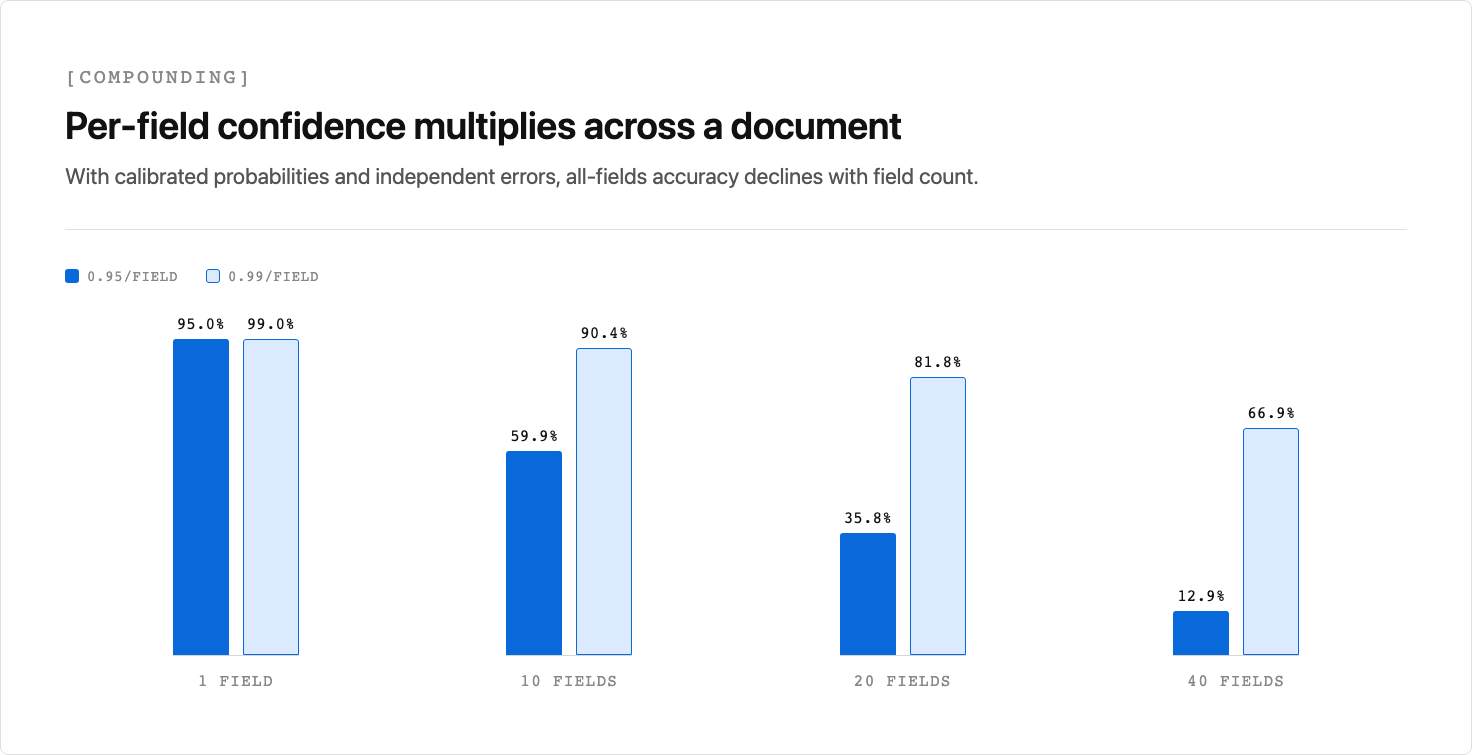
Azure Document Intelligence's confidence scoring guidance makes a related point about tables. A cell can score well while its row scores badly, because a correct cell surrounded by misses isn't a correctly extracted row. Read table confidence top down: table before rows, rows before cells. The same logic scales to whole documents, and the compounding math above is what it looks like at 40 fields.
This is why straight-through processing thresholds can't be set field by field in isolation. Data extraction automation also needs document-level validation across all required fields.
Two practices help:
- Weight fields by consequence: a loan amount misread carries more downstream risk than a middle initial.
- Investigate document classes that fail aggregate checks despite strong individual scores. The cause may be score miscalibration, correlated extraction errors, or a model that needs retraining.
When to Automate: Straight-Through Processing Criteria
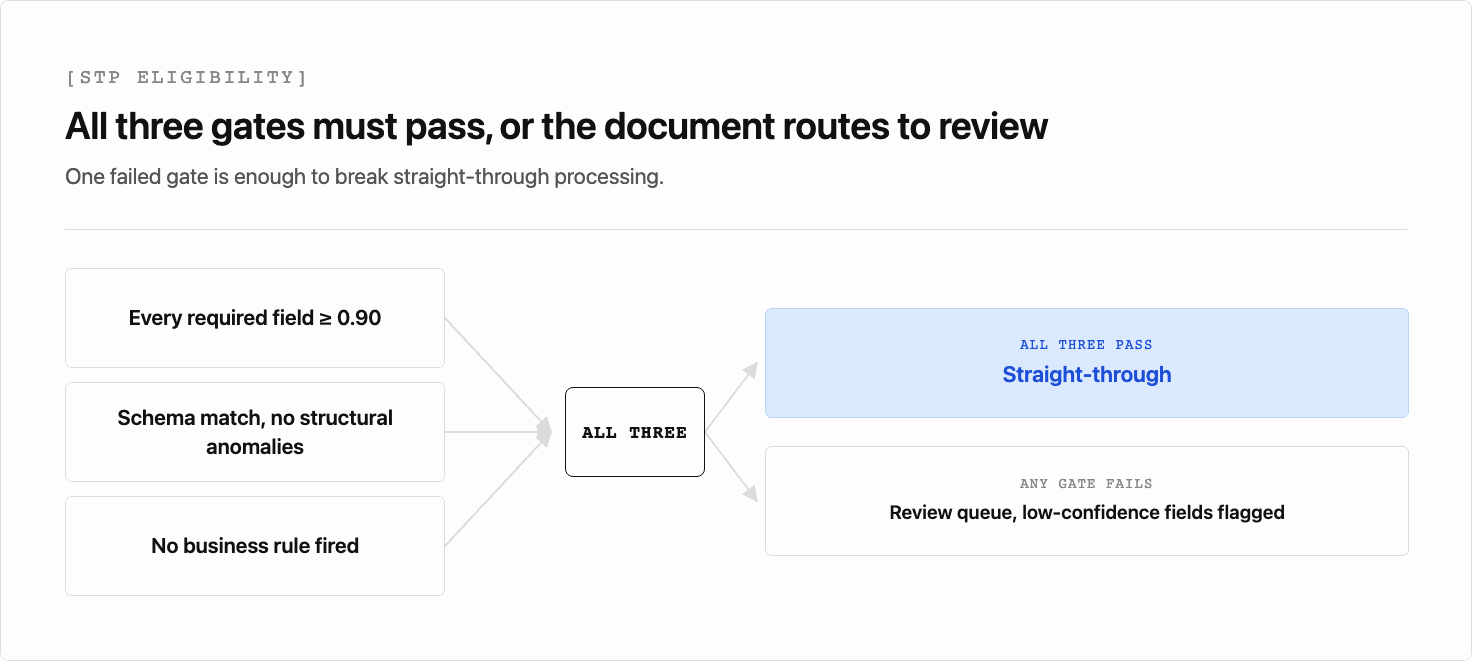
Straight-through processing (STP) works when every required field clears its confidence threshold, the document type matches an expected schema, and no business rule flags the record for exception handling. All three conditions must hold at once.
IBM's overview of straight-through processing defines STP as transaction processing completed end to end without human intervention, noting it is not all-or-nothing. STP is measured as a rate, the percentage of the process that runs automated. That framing fits a document pipeline. A failed confidence check moves one record off the automated path and lowers the rate, rather than breaking some absolute guarantee.
What Makes a Document Eligible for Straight-Through Processing
Three conditions determine whether a document routes straight through without human review:
- Every required field scores 0.90 or above, resolved against the source layout with high certainty.
- The document type matches the expected schema, with no structural anomalies: missing pages, rotated sections, or unexpected field positions.
- No downstream business rule fires on the extracted values, such as a total that exceeds an approval limit or a date range that falls outside policy bounds.
When all three hold, the record moves forward without a queue touch. When any one fails, the document routes to review with the low-confidence fields flagged. If citations are enabled, the review screen can also show the relevant source region.
When to Flag for Review: Building the Document Automation Review Layer
Low confidence scores signal uncertainty. Your routing policy uses that signal to identify records that need a human check before they proceed.
A well-designed review queue does three things: routes flagged documents to the right reviewer, surfaces the specific fields that triggered the flag, and records the reviewer's decision to feed back into future threshold calibration.
What Belongs in a Review Queue
Not every low-confidence extraction needs the same treatment. Routing logic should account for:
- Field criticality: a 0.72 score on a borrower's legal name carries more risk than the same score on a secondary mailing line.
- Document type: unfamiliar layouts or new document categories warrant a higher auto-approval threshold until enough reviewed samples exist to calibrate safely.
- Reviewer expertise: tax line items and medical codes require domain-specific reviewers instead of a general queue.
How to Calibrate and Maintain Confidence Score Thresholds Over Time
Confidence thresholds aren't static. Document volume, vendor formats, and regulatory requirements shift, and a threshold calibrated at deployment drifts out of alignment if left unattended.
A practical calibration process has five steps:
- Build a labeled validation set for each document class and include the poor scans and unusual layouts you expect in production.
- Choose the routing value for each field. When an API returns multiple scores, use the lowest relevant score unless validation shows another combination predicts errors better.
- Test candidate thresholds per field and measure error leakage among auto-approved records, not only overall extraction accuracy.
- Add document-level gates for required fields, schema checks, and business rules before allowing straight-through processing.
- Re-baseline after an upstream change, such as a new document supplier, form redesign, or scanner hardware refresh. Failures on multi-page tables are another common trigger.
Straight-through processing rates are a useful proxy for threshold health. A drop in STP rates without a corresponding increase in caught errors suggests the threshold has drifted too conservative, while climbing error rates in automated outputs suggest it's too permissive. Monitoring both together gives a clearer signal than either metric alone.
How to Close the Confidence Score Feedback Loop
Review decisions lose most of their value if they stop at correction. Store the original value, both scores, the corrected value, the document class, and the reviewer decision. At a regular cadence, compare observed accuracy within each score band against the score the model reported, a process covered in document data extraction software. Adjust a threshold only when enough reviewed examples show that a field or document class is systematically miscalibrated.
Confidence Score Thresholds in Compliance-Sensitive Industries
In finance, legal, and healthcare workflows, an extraction error costs more than a quick correction. It can trigger a compliance violation, a delayed closing, or a misrouted claim. For high-consequence fields, evaluate 0.95 as a starting threshold and require validation data before allowing a field to clear without human review.
Regulatory pressure reinforces this, though less directly than vendor copy tends to imply. None of RESPA, HIPAA, or SOX names a confidence threshold, and none requires bounding-box citations. What they require is narrower and mostly about controls. HIPAA's Security Rule, for example, mandates audit controls: mechanisms that record and examine activity on systems holding protected health information, rather than a specific accuracy score.
Mortgage servicers under RESPA, healthcare document processing APIs working within HIPAA, and institutions subject to SOX may choose stricter thresholds and field-level citations because a silent extraction error is the kind of gap an auditor asks about later. A score alone doesn't show where the value came from, which is why citations can matter as much as the score. That is a risk decision layered on top of the law rather than a line item in it.
When Confidence Score Thresholds Alone Aren't Enough
For high-consequence workflows, layer additional controls on top of confidence scoring:
- Require human sign-off on designated fields regardless of score. Social Security numbers, loan amounts, and diagnosis codes are candidates because the downstream cost of an error may be too high for a threshold to mitigate.
- Cross-field validation checks that flag documents where extracted values are internally inconsistent, even if each individual field scores above the automation threshold.
- Audit logs that record every extraction decision, the score at the time, and the identity of any human reviewer who cleared or corrected the record.
In these environments, optimize for an acceptable error-leakage rate rather than the highest straight-through processing rate. A lower automation rate is the right trade when the additional review prevents high-consequence errors.
How Unsiloed AI Handles Confidence Scores and Straight-Through Processing
Every extracted field is scored by default, with no opt-in flag required. The score is a pair rather than a single number. Each field carries a grounding_score and an extraction_score, both on a 0-to-1 scale, inside a score object. For a conservative first routing policy, use the lower of the two scores, then validate that choice against your reviewed documents. The output is structured JSON from a dual-stream vision model that processes semantic content and structural layout cues simultaneously, detailed in document parsing APIs for RAG.
Bounding-box citations are a separate opt-in. Pass enable_citations=true and each field also gets a citation object with bbox coordinates, the page number, and the page dimensions to scale against. Leave it off and citation comes back null while the scores still populate. Threshold routing works either way, so the flag matters when you need the audit trail rather than the decision.
Final Thoughts on Confidence Score Thresholds and Straight-Through Processing
Confidence scoring gives your review layer something concrete to act on at the field level, beyond a pass/fail on the whole document. The 0.90 threshold is a starting point, and high-consequence fields may need a higher bar. Pair field thresholds with document-level validation, measure error leakage on reviewed samples, and recalibrate when production results drift. To see this in action, book a demo with Unsiloed.
FAQs
What Confidence Score Threshold Should I Set for Straight-Through Processing?
Use 0.90 as an initial evaluation threshold because it matches the top band in Unsiloed's API reference. For high-consequence fields, evaluate 0.95 as a more conservative starting point. Keep either value only if a labeled validation set shows that the resulting error-leakage rate is acceptable.
How Does the Multi-Field Compounding Problem Affect Document Automation Review?
If scores are calibrated probabilities and errors are independent, 40 fields at 0.95 each give a roughly 13% probability that all 40 are correct. Real errors can be correlated, so measure document-level accuracy rather than using that calculation as a forecast. Track aggregate pass rates alongside individual scores, and weight fields by downstream consequence rather than treating every field as an equal input.
How Do Extraction Confidence Scores Work in Unsiloed AI's Vision API?
Every field is scored by default as a grounding_score and extraction_score pair, both 0 to 1, inside a score object. Bounding-box citations are a separate opt-in. Pass enable_citations=true for a citation object with bbox coordinates, or leave it off and citation returns null while the scores still populate.
When Should I Recalibrate Extraction Confidence Thresholds After Deployment?
Recalibrate after any upstream change that alters the confidence distribution, such as a new document supplier, a form redesign, or a scanner hardware refresh. Any of these can invalidate thresholds set at launch. Straight-through processing rate is the signal to watch, covered above.
How Does Field-Level Confidence Differ From Element-Level OCR Confidence?
Element-level optical character recognition (OCR) confidence estimates whether the system recognized a piece of text correctly. Field-level extraction confidence applies to the schema value your workflow uses, such as a loan amount, tax identifier, or borrower name. Unsiloed AI scores each schema-extracted field individually by default, which lets the routing policy apply different thresholds according to each field's downstream consequence.