How to Extract Data From a PDF Form With Python (and Into Excel)
How to extract data from a PDF form with Python: read fillable fields with pypdf, extract flattened PDFs and scans with Unsiloed, check the amounts with arithmetic, and export the result to Excel or CSV.


This guide uses Python to extract data from a PDF form into JSON, check the amounts, and export them to Excel. If the PDF is fillable, we can read its stored fields directly with pypdf. A flattened PDF or a scan has no stored fields, so the values have to be read from the page itself.
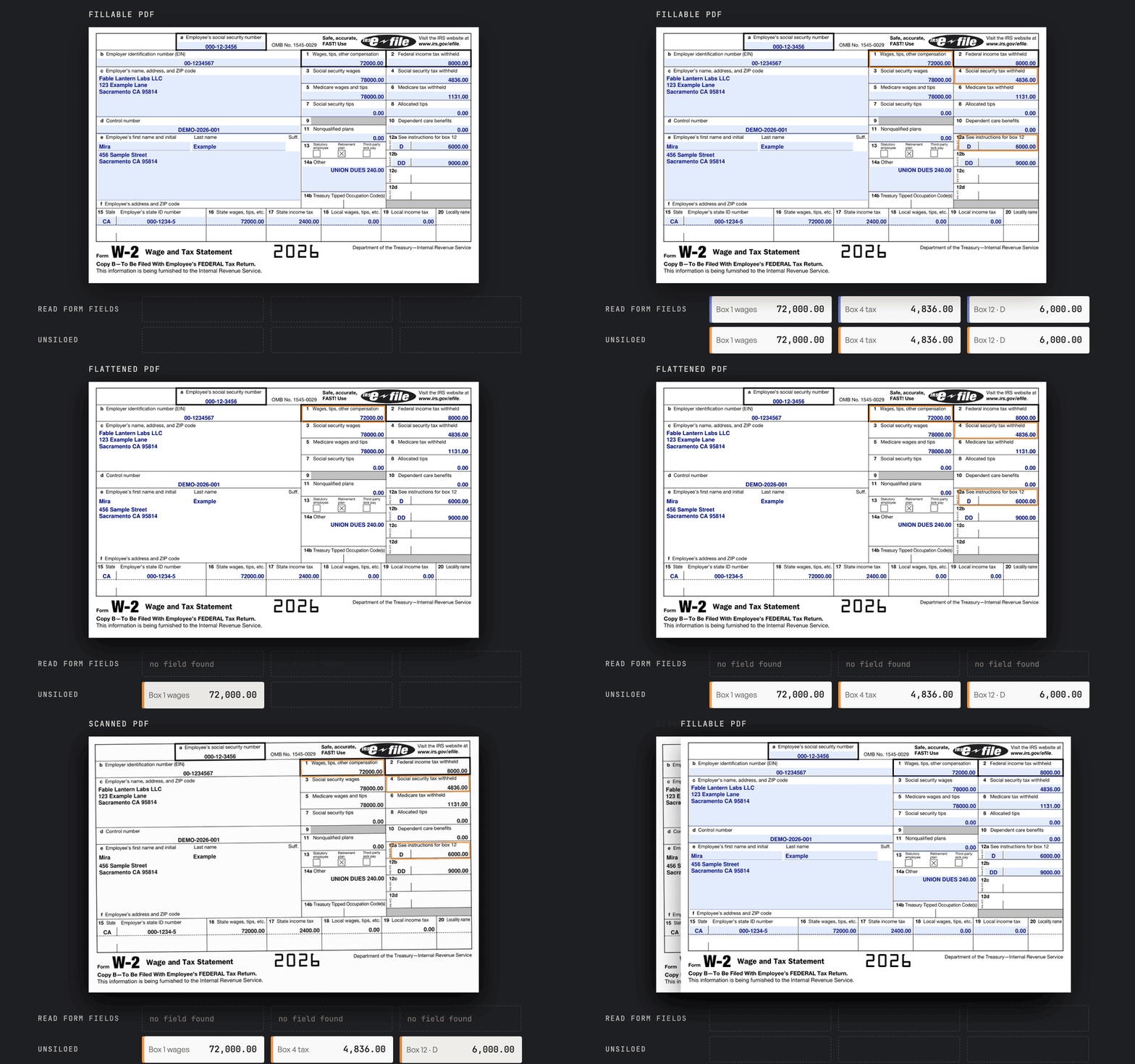
The example throughout is an IRS Form W-2. A W-2 is the yearly statement a US employer gives each employee. It shows what the employee earned and how much tax the employer withheld from their pay. We use the same W-2 in three versions: a fillable form, a flattened PDF, and a scan.
How PDF Forms Store Data
A PDF can look like a form without containing interactive fields. Check its storage format before choosing an extraction method.
Fillable PDFs come in two formats: AcroForm, the standard PDF form format, and XFA, an older XML-based format.
| Form Type | Where the Values Live | Extraction Approach |
|---|---|---|
| Fillable AcroForm | Named fields in the PDF form tree | Read field values with pypdf |
| XFA | XML form data that can override the displayed PDF page | Inspect the XFA data or render with an XFA-capable viewer |
| Flattened PDF | Text or drawing instructions painted onto the page | Extract page content and associate values with labels |
| Scanned form | Pixels in a page image | Read the image with OCR or a document extraction API |
In a fillable PDF, the stored value and the value you see on the page are kept separately. The pypdf form documentation describes both. When a PDF is flattened, the values stay on the page but the stored fields are removed.
Optical character recognition (OCR) turns text in an image into machine-readable text. OCR alone isn't enough for a form, though. We also need to know which box each amount belongs to.
How to Extract Data From a PDF Form With Python
To try this yourself, download the fillable W-2 from the IRS, fill in the Copy B page, and save that page as its own PDF. The IRS file holds several copies of the form that reuse the same field names, so a single page keeps the output simple. Printing it to PDF gives you a flattened copy, and scanning a printout gives you a scan. The code uses pypdf, requests, pandas and openpyxl, which you can install with pip install pypdf requests pandas openpyxl.
A fillable PDF stores each value in a named field, and we use pypdf to read those fields.
from pypdf import PdfReader

fields = PdfReader("w2-fillable.pdf").get_form_text_fields()
print(fields["f2_09[0]"], fields["f2_12[0]"])
72000.00 4836.00
The field names are internal IDs like f2_09[0], not the box labels printed on the form. Here, f2_09[0] is Box 1 and f2_12[0] is Box 4. You have to work out which field is which box, for example by its position on the page, and redo that mapping for every different form.
When Field Extraction Fails on Flattened PDFs and Scans
The same call finds nothing in the flattened copy or the scan.
for name in ("fillable", "flattened", "scan"):
    fields = PdfReader(f"w2-{name}.pdf").get_form_text_fields()
    print(name, len(fields) if fields else "no fields")
fillable 44
flattened no fields
scan no fields
Both copies still show every value on the page. They fail in different ways:
- Flattened PDF: the page still has text that a PDF library can read, but it comes out as loose words and numbers, with no link to the box each one sits in.
- Scan: the page is an image with no text in it at all.
Extract PDF Form Data Into a JSON Schema With Unsiloed
Unsiloed is a document extraction API. A schema tells Unsiloed which fields to return and in what shape. The same schema works on all three versions of the form, because Unsiloed reads what's printed on the page rather than the stored fields. It uses OCR when the page has no text a PDF library can read, as with a scan. This one follows the form's layout:
- The employer and the employee are separate objects.
- Box 12 is a list of code and amount pairs.
- State tax rows are a list, so a form with two states gives two rows.
def field(kind, description):
    return {"type": kind, "description": description}

def obj(properties):
    return {"type": "object", "properties": properties, "required": list(properties)}

schema = obj({
    "employer": obj({"name": field("string", "Box c employer name"),
                     "ein": field("string", "Box b employer identification number")}),
    "employee": obj({"name": field("string", "Box e employee full name"),
                     "ssn": field("string", "Box a Social Security number")}),
    "control_number": field("string", "Box d control number"),
    **{f"box_{i}": field("number", f"Dollar amount printed in box {i}") for i in range(1, 7)},
    "box_12": {"type": "array", "description": "Each filled Box 12 code and amount",
               "items": obj({"code": field("string", "Box 12 letter code"),
                             "amount": field("number", "Amount beside the code")})},
    "state_rows": {"type": "array", "description": "Each filled state row, boxes 15-17",
                   "items": obj({"state": field("string", "Box 15 state"),
                                 "state_wages": field("number", "Box 16 state wages"),
                                 "state_tax": field("number", "Box 17 state income tax")})},
})
Save this as schema.py. Repeated rows work the same way in insurance certificate extraction, where each policy is one row.
Box 12 holds amounts that each need a letter code to make sense. In the example:
- Code D, $6,000: the employee's contributions to a 401(k), a US workplace retirement plan.
- Code DD, $9,000: the cost of health insurance provided through the employer.
Submit the Form and Read the Response
We send the PDF and the schema to the extraction endpoint, then poll until the job finishes. Keep the .pdf extension on the uploaded filename, because the API uses it to decide how to read the file. We use the gamma model and turn on citations, which record where on the page each value was found.
import json, os, time
import requests
from schema import schema

BASE = "https://prod.visionapi.unsiloed.ai"
HEADERS = {"api-key": os.environ["UNSILOED_API_KEY"]}

def extract(path):
    with open(path, "rb") as f:
        job = requests.post(
            f"{BASE}/v2/extract",
            headers=HEADERS,
            files={"pdf_file": (path, f, "application/pdf")},
            data={"schema_data": json.dumps(schema), "model": "gamma", "enable_citations": "true"},
        ).json()
    while True:
        result = requests.get(f"{BASE}/extract/{job['job_id']}", headers=HEADERS).json()
        if result["status"] in ("completed", "failed"):
            return result
        time.sleep(3)

json.dump(extract("w2-fillable.pdf"), open("w2-fillable.json", "w"))
A completed job holds the extracted record under result. Each value comes wrapped in an object with its score and citation. Here is Box 4 from the scan:
{
  "score": {
    "grounding_score": 0.996,
    "extraction_score": 0.996
  },
  "value": 4836.0,
  "citation": {
    "bbox": [
      516,
      69,
      549,
      79
    ],
    "page": 1,
    "page_width": 562.0,
    "page_height": 369.0
  }
}
The score has two parts, grounding_score and extraction_score, each between 0 and 1. A low value in either is a sign to check the field. The citation gives the page and a box around the value.
All three versions of the W-2 came back with the same values. A correct value can still get a low score, so set review thresholds by field and document type rather than trusting every value automatically.
Validate Extracted PDF Form Data
An extracted value can match the page and still be wrong, because the form itself was filled in wrongly or edited. Most forms contain rules that their fields must follow, and we use Python to check those rules before the data goes anywhere:
- Totals: a total should equal the sum of the lines above it, as on an invoice.
- Rates: a tax or fee should be a fixed percentage of another amount.
- Allowed values: codes and categories should come from a known list.
A form that breaks a rule goes to a person for review instead of into the spreadsheet.
On a W-2, Social Security tax in Box 4 should be 6.2% of the wages in Box 3, and Medicare tax in Box 6 should be 1.45% of Box 5. Box 12 codes come from a fixed IRS list.
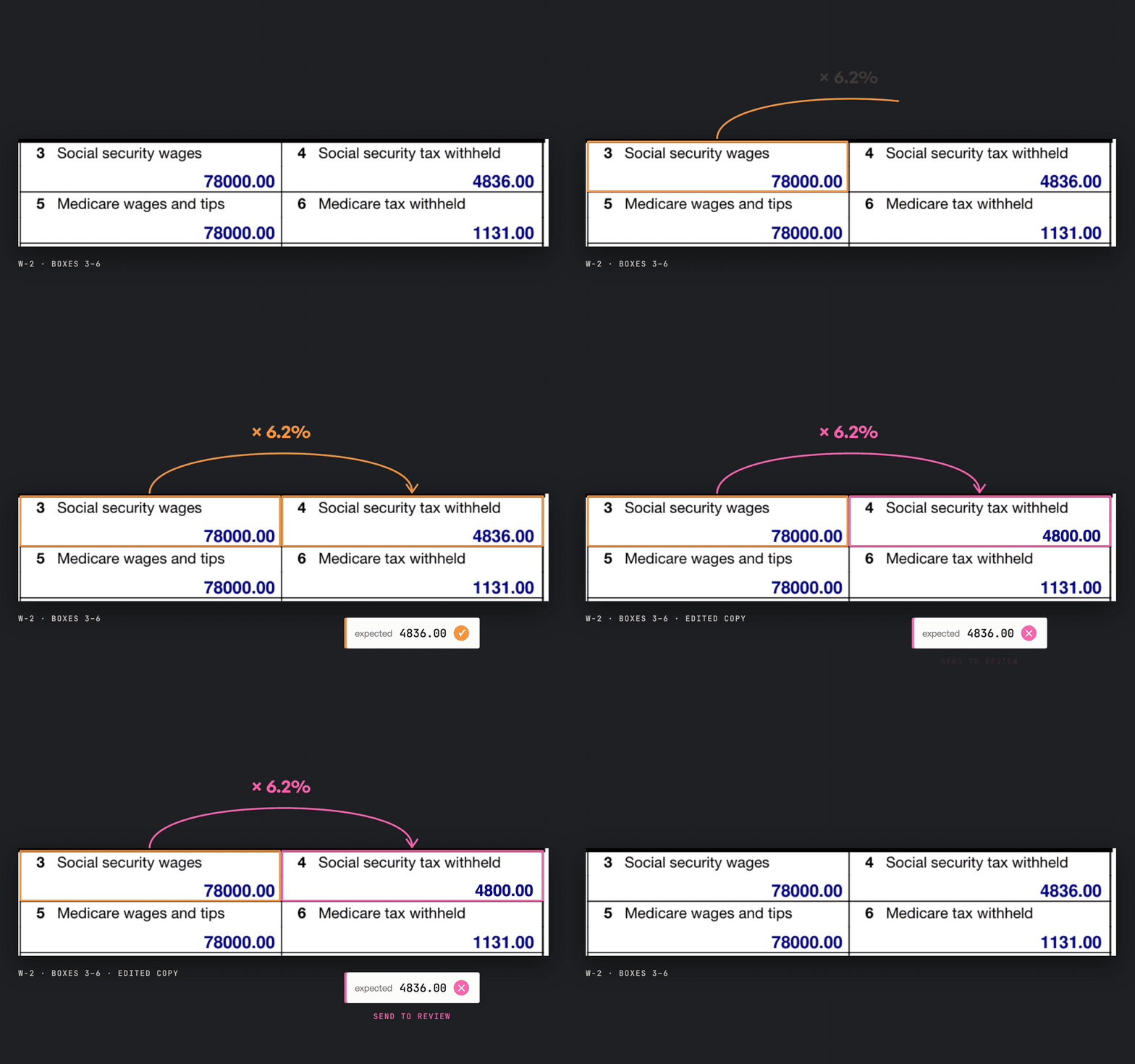
The IRS withholding rates add two limits. Social Security tax stops at a yearly wage cap, which is $184,500 in 2026, and wages above $200,000 carry an extra 0.9% of Medicare tax.
BOX12_CODES = set("A B C D E F G H J K L M N P Q R S T V W Y Z AA BB DD EE FF GG HH II TA TP TT".split())

def values(item):
    """Strip the score and citation wrapper from every extracted value."""
    if isinstance(item, dict):
        return values(item["value"]) if "value" in item else {k: values(v) for k, v in item.items()}
    if isinstance(item, list):
        return [values(v) for v in item]
    return item

def check_w2(form):
    problems = []
    expected_box_4 = round(min(form["box_3"], 184_500) * 0.062, 2)
    expected_box_6 = round(form["box_5"] * 0.0145 + max(0, form["box_5"] - 200_000) * 0.009, 2)
    if abs(form["box_4"] - expected_box_4) > 0.05:
        problems.append(f"Box 4 is {form['box_4']:,.2f}, expected {expected_box_4:,.2f}")
    if abs(form["box_6"] - expected_box_6) > 0.05:
        problems.append(f"Box 6 is {form['box_6']:,.2f}, expected {expected_box_6:,.2f}")
    for row in form["box_12"]:
        if row["code"] not in BOX12_CODES:
            problems.append(f"Unknown Box 12 code {row['code']}")
    return problems
Save this as check.py. The values function removes the score and citation wrapper, leaving plain values. We allow a five-cent difference for rounding.
All three versions of the example W-2 pass. On an edited copy, check_w2 returns Box 4 is 4,800.00, expected 4,836.00. Forms with tips or other special payroll cases follow different rules, so send those to review instead of checking them this way.
Names have nothing to check them against, and ID numbers can only be checked for format. Compare those with the box each citation points to.
Extract Data From a PDF Form to Excel or CSV
Most forms hold two kinds of data:
- Fields that appear once per form, like a name, an ID number or a total.
- Sections that repeat, like the line items on an invoice or the state rows on a W-2. The number of rows changes from one form to the next.
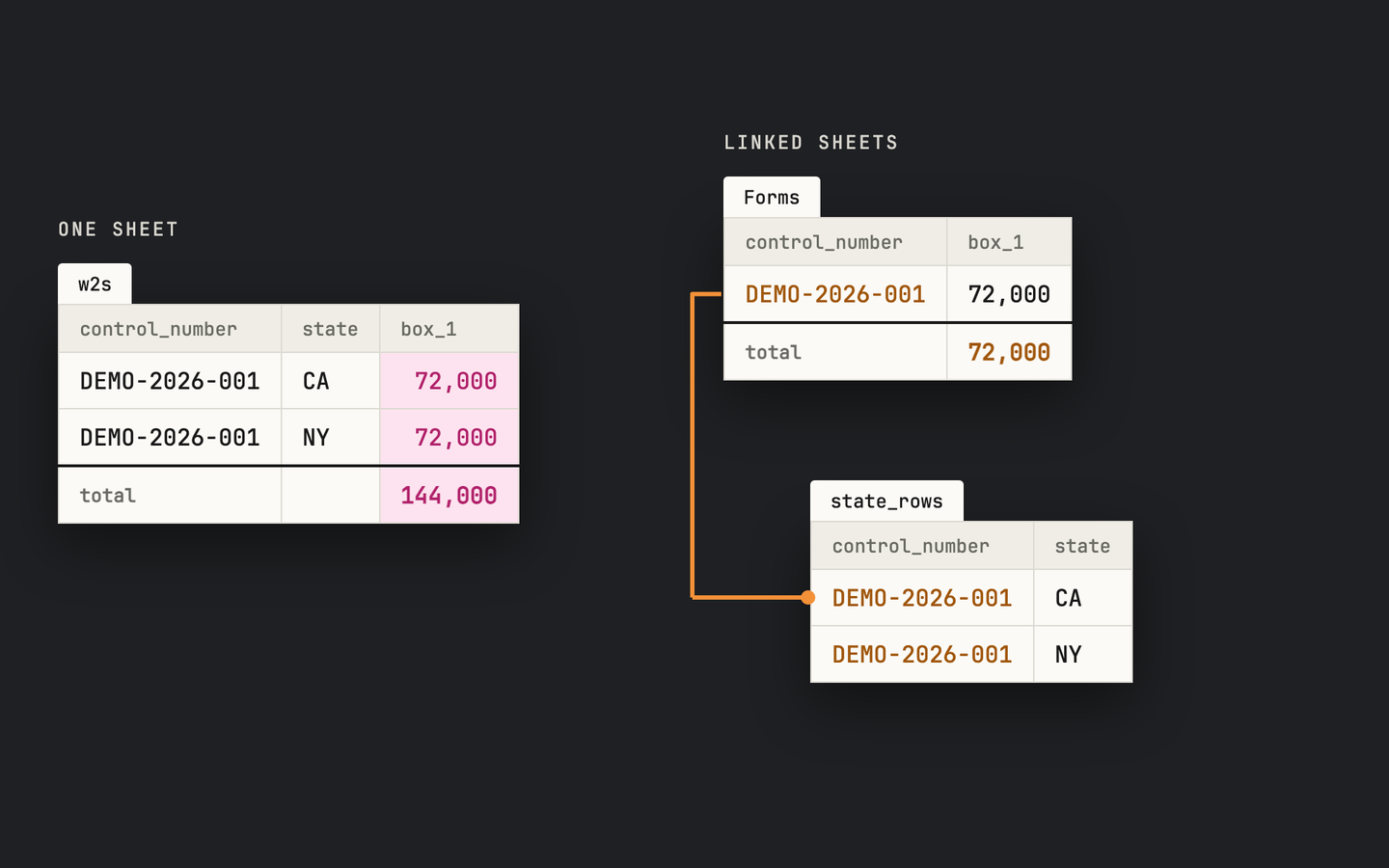
One sheet can't hold both cleanly. If a W-2 lists two states, putting it on one sheet gives two rows, the wages appear on both, and the wages total counts them twice.
Instead, put the fields that appear once on a main sheet, with one row per form. Give each repeated section its own sheet, and add the form's ID to every row so it links back to its form. On a W-2, use the control number if the employer filled it in, or the filename if not.
import json
import pandas as pd
from check import values, check_w2

form = values(json.load(open("w2-fillable.json"))["result"])
if check_w2(form):
    raise SystemExit("Fix or review the form before exporting")

repeated = ["box_12", "state_rows"]  # the sections that repeat in the schema
with pd.ExcelWriter("w2s.xlsx") as writer:
    summary = pd.json_normalize({k: v for k, v in form.items() if k not in repeated})
    summary.to_excel(writer, sheet_name="Forms", index=False)
    for name in repeated:
        rows = pd.DataFrame(form[name])
        rows.insert(0, "control_number", form["control_number"])
        rows.to_excel(writer, sheet_name=name, index=False)
The workbook has a Forms sheet with a row for the W-2, plus one sheet for each repeated section that links back to it through the control number. To export many forms, collect each form's summary and rows tables with pd.concat before writing. For CSV files, call to_csv on summary and on each rows table instead of writing them to the workbook. If you're opening the CSV in Excel, import the SSN and EIN columns as text so Excel doesn't change them.