Loss Run Data Extraction: Turn Insurance Reports Into Structured JSON
How to extract every claim from a multi-page loss run report into JSON with Python and the Unsiloed API, one page per request, then check each claim and policy period against the report''s own totals rows before the claims reach a rating model or spreadsheet.

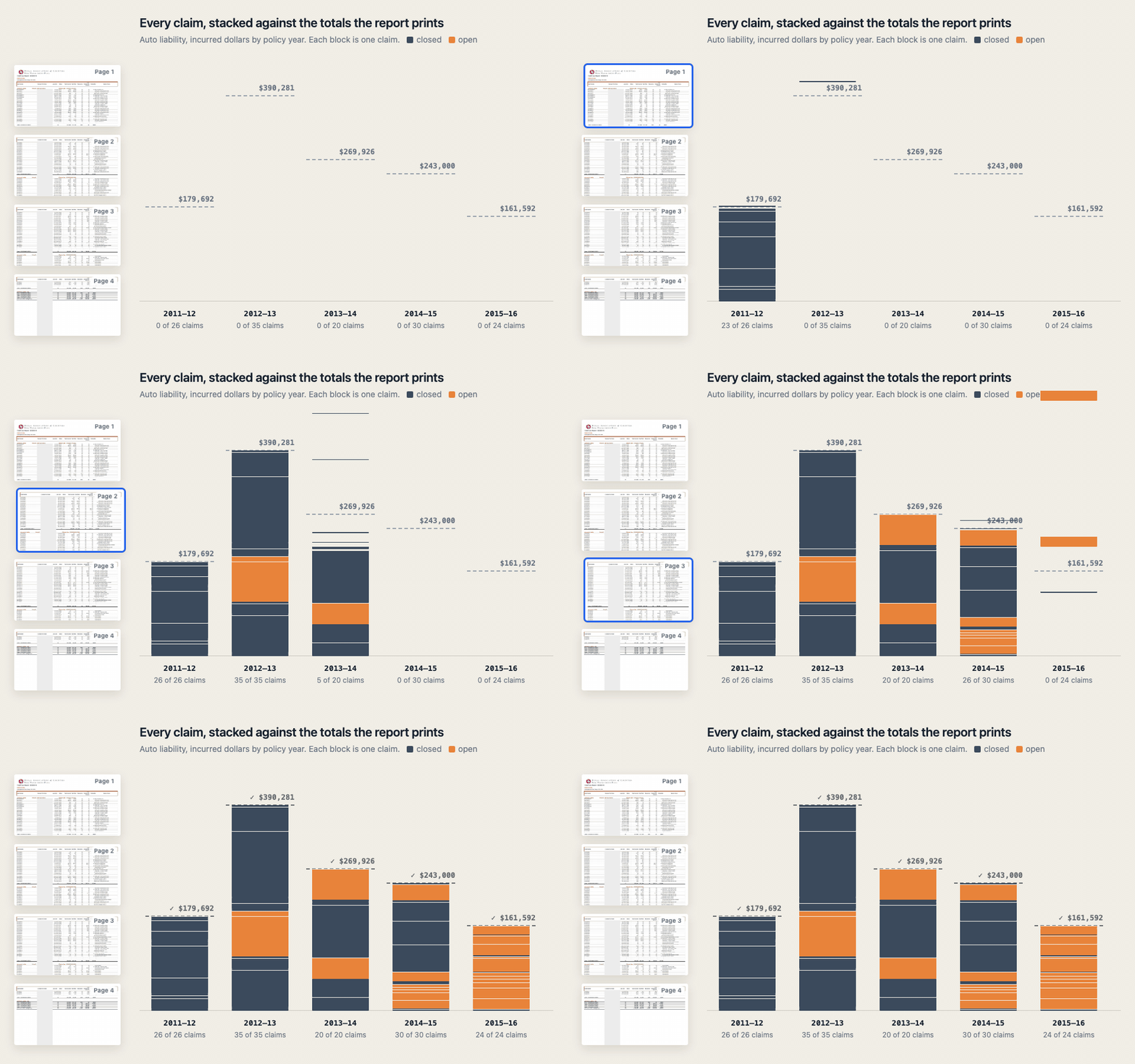
A loss run report lists every claim against a policy, and it also lists what those claims add up to. Each claim's incurred amount follows from its other money columns, and every policy period ends in a totals row that has to agree with the claims above it. That gives you a way to check an extraction against the report itself.
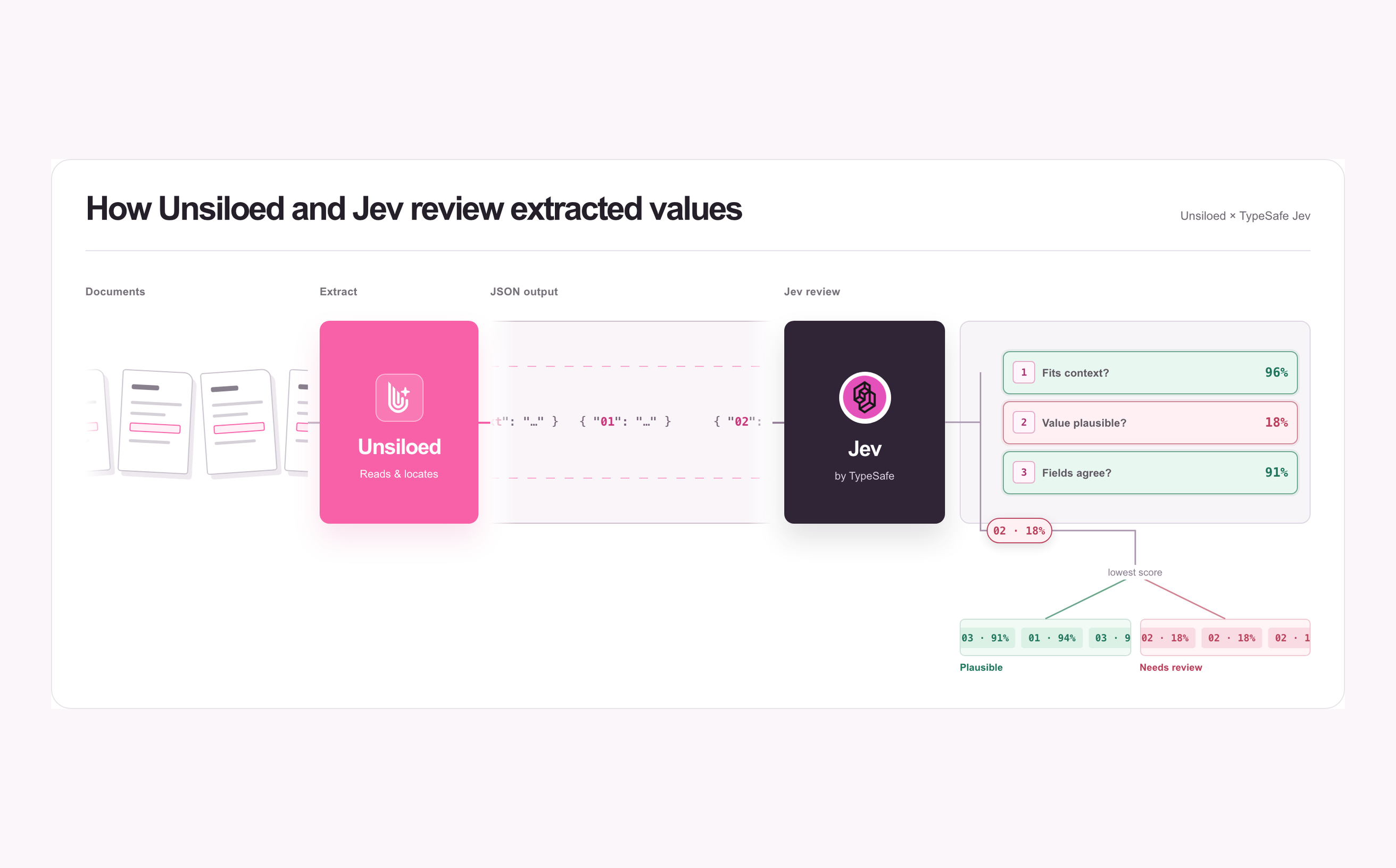
In this guide, we use Python and the Unsiloed API to extract a loss run report to JSON. The extraction API returns every claim as its own object, with a confidence score on each value and a box marking where it sits on the page. Then we use Python to check every claim against the report's own totals before the claims reach a rating model, a submission, or a spreadsheet.
The example throughout is a loss run report that Cameron County, Texas, published with an insurance bid. It comes from the Texas Association of Counties Risk Management Pool and lists 426 claims across auto liability, auto physical damage, and general liability, over five policy years and 13 pages.
What a Loss Run Report Contains
A loss run is the claims history of a commercial insurance policy, usually covering the last five years. Underwriters use it to price a new policy or a renewal, and brokers collect one from each of a client's prior carriers when they shop the account.
Most loss runs share the same parts, whatever the carrier:
- A header naming the insured, the carrier, and the valuation date, which is the date the figures were current as of. Open claims keep changing after that date.
- Sections by line of coverage and policy period, such as auto liability for 07/01/2013 to 07/01/2014, each headed by its policy number.
- One row per claim, with the claim number, loss date, status (open, closed, or reopened), a cause or description, and the money columns.
- A totals row per section with the claim count and the sum of each money column, and often a summary table that repeats those totals for each year.
The money columns are what an underwriter reads most closely. Paid is what has been paid so far, the reserve is what the adjuster still expects to pay, and incurred is the two together, as Milliman's guide to casualty actuarial terms defines them.
Carriers add their own columns to that core. The Cameron County report adds two more columns. Recoveries are money recovered on a claim, such as from an at-fault driver's insurer, and the deductible is the part of the loss the insured pays itself. On that report, incurred equals paid minus recoveries plus the reserve and the deductible.
Why Loss Run Data Extraction Is Hard
Loss runs have no standard form. Each carrier, risk pool, and claims administrator prints its own report. An account with three prior carriers arrives as three layouts.
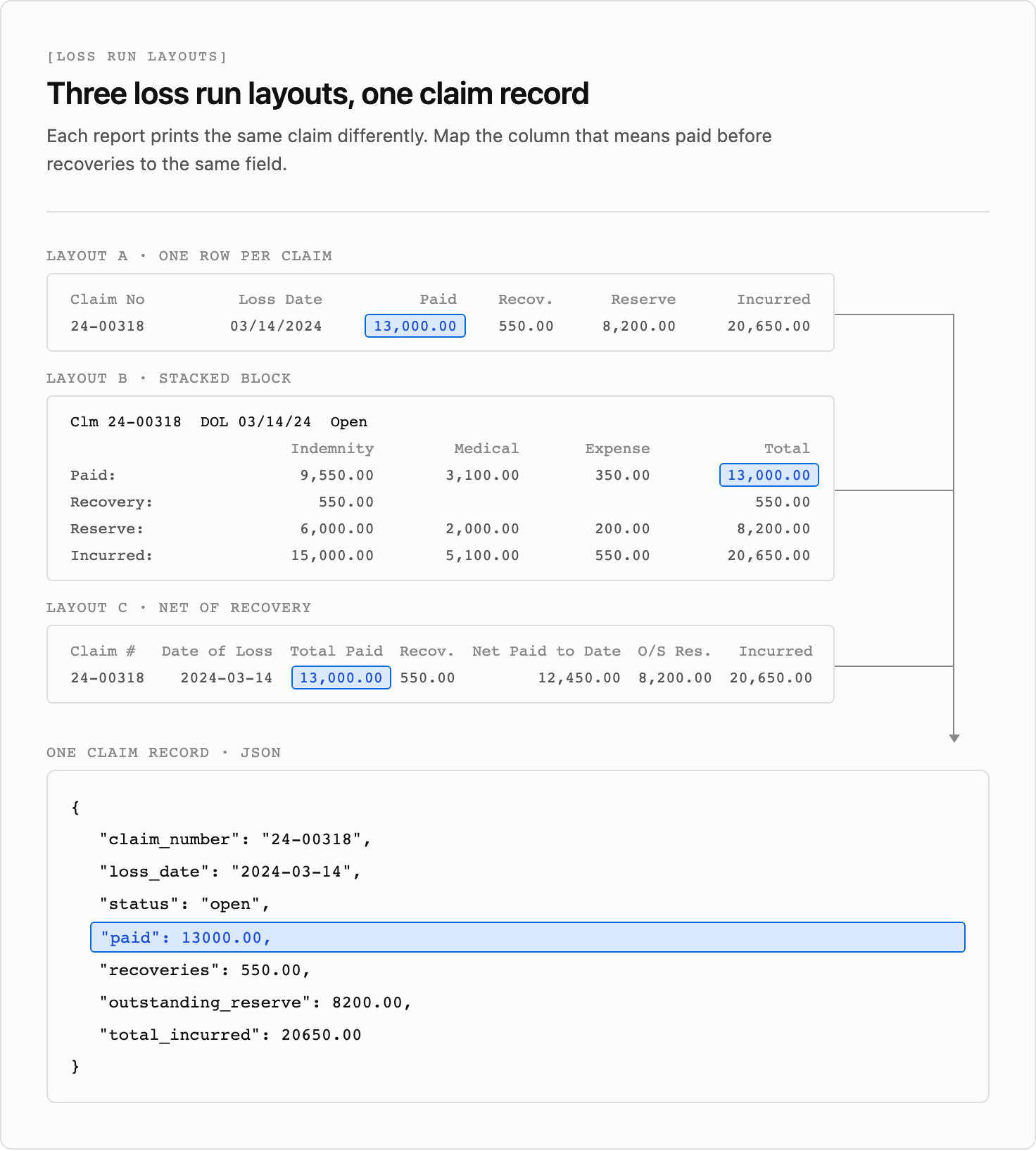
- Column sets differ. One carrier splits paid and reserve into indemnity, medical, and expense, another prints a single paid column, and another adds recoveries or a deductible. The names differ too, with one report printing "Pool Paid", another "Total Paid", and another "Net Paid to Date", which deducts recoveries.
- Claims span several printed lines. Some carriers print each claim as a stacked block of three or four lines, with the claim number, dates, and amounts on different lines of the block. A line-based parser reads each line as a separate claim.
- Totals sit between the claims. Section totals, grand totals, and summary tables all look like claim rows without a claim number. A parser that reads every row as a claim counts the losses twice.
- Sections continue across pages. A section heading prints once, and the claims on the next page don't repeat which line of coverage or policy period they belong to. That's a known weak point of page-by-page extraction, and we handle it when we merge the pages later in this guide. On the Cameron County report, the auto physical damage summary table starts on page 7 and finishes on page 8.
- Some reports are scans. Printed and rescanned along the way, they have no text layer at all.
Loss run data extraction that reads the rendered page uses the column headers and the visual grouping rather than fixed coordinates. It can keep a stacked claim block together as one claim and label a totals row as totals. It can still misread an amount or put a row in the wrong section, which is what the checks later in this guide catch.
How to Extract Loss Run Data to JSON With Python
The Unsiloed extraction endpoint takes a document and a JSON schema and returns a value for each field in the schema, with a confidence score and, when citations are enabled, the field's location on the page. A field that isn't printed on the page comes back as null.
Send a long loss run one page per request. Each request then covers a few dozen rows, and the pages run in parallel. The schema describes one page as a single rows array, with claims and totals rows in the order they're printed:
"rows": {
  "type": "array",
  "description": "Every claim row and every Totals row on the page, top to bottom, in the order printed.",
  "items": {"type": "object", "properties": {
    "row_type": {"type": "string", "description": "claim, or totals for a row that starts with Totals"},
    "line_of_business": {"type": "string", "description": "Coverage heading of the section this row sits under, such as Automobile Liability. Null if the heading isn't printed on this page above the row."},
    "policy_period": {"type": "string", "description": "For a claim, the Effective Date range of its section heading. For a totals row, the date range printed on the row. MM/DD/YYYY-MM/DD/YYYY. Null if not printed on this page."},
    "claim_number": {"type": "string"},
    "loss_date": {"type": "string", "description": "As printed, such as Jul 21, 2011"},
    "status": {"type": "string", "description": "Open, Closed, or Reopened"},
    "claim_count": {"type": "number", "description": "Count of Claims, totals rows only"},
    "total_incurred": {"type": "number"},
    "paid": {"type": "number", "description": "Pool Paid column"},
    "recoveries": {"type": "number"},
    "outstanding_reserve": {"type": "number", "description": "Total Outstanding Reserve column"},
    "deductible": {"type": "number"},
    "cause_of_loss": {"type": "string"}
  }}
}
One array keeps claims and totals in printed order, which we need when we merge the pages. The null instructions stop the model from guessing a section for rows continued from the previous page, and we fill those in during the merge. The top level of the schema adds insured and valuation_date.
The schema leaves out the claimant name column. The checks don't use it, and on liability lines it names members of the public. Leaving it out keeps those names out of the structured data you pass downstream. The source PDF still contains them.
Splitting the PDF takes a few lines with the pypdf library, and each page goes to the API as a multipart request with requests. In the snippets that follow, path is the loss run file, API is https://prod.visionapi.unsiloed.ai, API_KEY is your Unsiloed API key, and schema is your full schema loaded as a dict:
import io, json, time
from concurrent.futures import ThreadPoolExecutor
import requests
from pypdf import PdfReader, PdfWriter

def split_pages(path):
    for page in PdfReader(path).pages:
        writer, buffer = PdfWriter(), io.BytesIO()
        writer.add_page(page)
        writer.write(buffer)
        yield buffer.getvalue()

def extract_page(pdf_bytes):
    job = requests.post(
        f"{API}/v2/extract",
        headers={"api-key": API_KEY},
        files={"pdf_file": ("page.pdf", pdf_bytes)},
        data={"schema_data": json.dumps(schema), "model": "gamma", "enable_citations": "true"},
    ).json()
    while True:
        status = requests.get(f"{API}/extract/{job['job_id']}", headers={"api-key": API_KEY}).json()
        if status["status"] in ("completed", "review", "failed"):
            return status
        time.sleep(5)

with ThreadPoolExecutor(max_workers=4) as pool:
    jobs = list(pool.map(extract_page, split_pages(path)))
Completed and review jobs both carry the extracted fields in their result. We stop on a page that failed and flag a page with review status for a person to check, both at the start of the merge.
The filename in the upload tuple matters, because the API picks how to decode the file from its extension.
Each value in the result arrives in the same envelope, with its value, a confidence score, and a citation:
"paid": {
  "value": 20000,
  "score": {"grounding_score": 0.98, "extraction_score": 0.98},
  "citation": {"bbox": [605, 261, 642, 273], "page": 1, "page_width": 1100.0, "page_height": 850.0}
}
The bbox is [x1, y1, x2, y2] from the top-left corner of the page, in units of that citation's own page_width and page_height. Every citation says page 1, since each request is a single page. We record each row's page when we merge them.
Merging a Multi-Page Loss Run Into One Claims List
To merge the pages, we walk through them in order and carry the last section heading forward. A claim at the top of page 2 inherits the line of coverage and policy period from page 1. A totals row inherits only the line of coverage. Its policy period comes from its own printed dates, and a grand total row, which covers every period, keeps a null period. A page that comes back with review status, or with no rows at all, goes on a list for a person, because a page that loses every row also loses its totals rows, and the checks can't catch what isn't there:
from datetime import datetime

def v(field):
    return field["value"]

def as_date(text, fmt):
    return datetime.strptime(text, fmt).date().isoformat() if text else None

failed = [n for n, job in enumerate(jobs, start=1) if job["status"] == "failed"]
if failed:
    raise SystemExit(f"Extraction failed on pages {failed}: rerun them")
flagged_pages = [n for n, job in enumerate(jobs, start=1)
                 if job["status"] == "review" or not v(job["result"]["rows"])]

pages = [job["result"] for job in jobs]
rows, line, period = [], None, None
for number, page in enumerate(pages, start=1):
    for row in v(page["rows"]):
        row["page"] = number
        if v(row["line_of_business"]):
            line = v(row["line_of_business"]).removesuffix(" Totals")
        row["line_of_business"]["value"] = line
        if v(row["row_type"]) == "claim":
            period = v(row["policy_period"]) or period
            row["policy_period"]["value"] = period
            row["loss_date"]["value"] = as_date(v(row["loss_date"]), "%b %d, %Y")
        rows.append(row)

claims = [r for r in rows if v(r["row_type"]) == "claim"]
totals = [r for r in rows if v(r["row_type"]) == "totals"]
The removesuffix call handles summary tables, which print the line of coverage as a heading such as "General Liability Totals". The loss dates come back as printed, and we convert them to ISO dates during the merge, using this report's Jul 21, 2011 format. A carrier that prints 07/21/2011 needs %m/%d/%Y instead.
Carrying the heading forward assumes every section heading is followed by a claim on the same page. If a heading sits alone at the bottom of a page, its claims inherit the previous section instead, and the totals checks in the next section catch it, because both sections' counts stop matching.
Validating Loss Run Data With Totals Checks
A loss run states its numbers twice, once per claim and once per section, which gives you independent ways to confirm the extraction:
- Each claim's incurred amount. It agrees with the claim's own paid, recoveries, reserve, and deductible columns.
- Each period's totals. The claims in a section add up to its totals row, in count and in every money column.
- Each line's grand total. All the claims for a line of coverage add up to its grand total row, and the summary tables' repeats of each period total match too.
- Placement. Every claim falls under some totals row, its loss date falls inside its policy period, and no claim number appears twice. The loss date check holds for occurrence policies, and every claim in this report passes it. A claims-made policy can cover losses from before the policy period, so drop that check for those.
The Cameron County report prints whole dollars, and each printed figure is rounded on its own, so a claim's columns can disagree with its total by a dollar or two, and a section's sum can drift by up to half a dollar per claim. The checks allow for that rounding, but a missing amount stops them, because counting it as zero would let the report pass:
AMOUNTS = ["total_incurred", "paid", "recoveries", "outstanding_reserve", "deductible"]

def amt(field):
    if v(field) is None:
        raise ValueError("Missing amount: send the loss run to review")
    return v(field)

problems = []

for c in claims:
    gap = amt(c["paid"]) - amt(c["recoveries"]) + amt(c["outstanding_reserve"]) \
        + amt(c["deductible"]) - amt(c["total_incurred"])
    if abs(gap) > 2:
        problems.append(f"{v(c['claim_number'])}: incurred is off by {gap:,}")

for t in totals:
    line, period = v(t["line_of_business"]), v(t["policy_period"])
    covered = [c for c in claims if v(c["line_of_business"]) == line
               and period in (None, v(c["policy_period"]))]
    label = f"{line} {period or 'all periods'}"
    if len(covered) != amt(t["claim_count"]):
        problems.append(f"{label}: {len(covered)} claims extracted, the report counts {amt(t['claim_count'])}")
    for name in AMOUNTS:
        listed = sum(amt(c[name]) for c in covered)
        if abs(listed - amt(t[name])) > len(covered) / 2 + 1:
            problems.append(f"{label} {name}: {listed:,} in the claims, {amt(t[name]):,} in the totals")

checked = {(v(t["line_of_business"]), v(t["policy_period"])) for t in totals}
seen = set()
for c in claims:
    number = v(c["claim_number"])
    if (v(c["line_of_business"]), v(c["policy_period"])) not in checked:
        problems.append(f"{number}: no totals row covers this claim")
    start, end = (as_date(d, "%m/%d/%Y") for d in v(c["policy_period"]).split("-"))
    if not v(c["loss_date"]) or not start <= v(c["loss_date"]) < end:
        problems.append(f"{number}: loss date {v(c['loss_date'])} is outside {v(c['policy_period'])}")
    if number in seen:
        problems.append(f"{number}: listed twice")
    seen.add(number)

problems = list(dict.fromkeys(problems))  # summary tables repeat the period totals
On the Cameron County report, all 426 claims and all 32 totals rows pass. The totals rows are the 15 section totals, the summary tables that repeat them, and the grand totals for auto liability and general liability.
What a Failed Totals Check Means
The checks target the two errors a person reviewing a long claims table misses most easily, a claim that drops out and an amount read with a digit missing. If the extraction skipped a 2011 auto liability claim with no payments on it, and read another claim's paid and incurred amounts as $2,000 instead of $20,000, the checks would print:
Automobile Liability 07/01/2011-07/01/2012: 25 claims extracted, the report counts 26
Automobile Liability 07/01/2011-07/01/2012 total_incurred: 161,692 in the claims, 179,692 in the totals
Automobile Liability 07/01/2011-07/01/2012 paid: 153,445 in the claims, 171,445 in the totals
Automobile Liability all periods: 134 claims extracted, the report counts 135
Automobile Liability all periods total_incurred: 1,226,492 in the claims, 1,244,492 in the totals
Automobile Liability all periods paid: 857,186 in the claims, 875,187 in the totals
The per-claim check passes on the misread claim, because its paid and incurred columns both lost the same digit and still agree with each other. Only the section total catches it, which is why the checks compare in both directions.
Each failure tells you where to look first:
- A claim whose incurred amount is off names the claim. Compare its row with the page through the citation boxes. If the extraction matches the page, the carrier's columns don't follow the formula you assumed. Check how this report defines incurred.
- A section whose count or sums don't match its totals points to a missing or extra claim, a claim assigned to the wrong section at a page break, or a misread amount. A gap equal to one claim's amount suggests a missing, duplicated, or misplaced claim, and a gap that's a multiple of 9 suggests transposed digits or a dropped zero, such as $20,000 read as $2,000. Check the rows against the page before deciding which.
- A claim with no totals row usually means a section heading was read differently on two pages, leaving its claims and its totals with different labels.
When to Trust Confidence Scores Versus Totals Checks
Each value's extraction_score says how confident the model is in what it read. A low score marks a value worth a second look. On the Cameron County report, about 2 in 100 claim fields score below 0.9, so a reviewer checks a small share of the report instead of all 426 claims. On a scanned copy of the first page, the one claim number the extraction misread scored 0.63, and the same threshold sent it to review.
The scores and the totals checks catch different errors, so use both. The totals checks catch a dropped claim or a misread digit wherever it sits, whatever its score. Scores catch what the arithmetic can't see, such as claim numbers, dates, statuses, and causes of loss, or two small misreads that offset each other within the rounding tolerance. Route every low-scoring field to review:
REVIEW_BELOW = 0.9
review = [(v(c["claim_number"]), name, v(c[name])) for c in claims
          for name in ("claim_number", "loss_date", "status", "cause_of_loss", *AMOUNTS)
          if (c[name]["score"]["extraction_score"] or 0) < REVIEW_BELOW]
The checks prove the extracted values agree with each other, but they can't prove the values match the page. Errors that cancel out still pass, such as two misread claims in one section that offset each other. That's why a missing value stops the checks instead of passing them, and why the citation boxes matter.
A failed check goes to review too, with the citation boxes for the section's claims, so the reviewer looks at one section of the report instead of 13 pages. For how to pick the threshold, see setting confidence score thresholds for document automation.
Exporting Loss Run Claims to CSV or Excel
Once a loss run has no failed checks, no low-confidence fields, and no flagged pages left to review, we use a few lines of Python to write the claims to CSV. The check at the top stops the export while any of those lists has anything in it, and every row carries the insured and the valuation date:
import csv

if problems or review or flagged_pages:
    raise SystemExit("Send this loss run to review before exporting")

insured, valued = v(pages[0]["insured"]), v(pages[0]["valuation_date"])
columns = ["line_of_business", "policy_period", "claim_number", "loss_date", "status",
           "total_incurred", "paid", "recoveries", "outstanding_reserve", "deductible", "cause_of_loss"]
with open("claims.csv", "w", newline="") as f:
    writer = csv.writer(f)
    writer.writerow(["insured", "valuation_date", *columns])
    writer.writerows([insured, valued, *(v(c[name]) for name in columns)] for c in claims)
Open the file in Excel or Google Sheets, or load it alongside the claims from the account's other carriers. Keep the valuation date with each claim, because two loss runs from the same carrier list the same claims at different amounts as reserves change.
FAQ
What is a loss run report?
A loss run report is a carrier's record of the claims made against a commercial insurance policy, usually for the last five years. It lists each claim's date, status, cause, and the amounts paid and reserved, and underwriters use it to price a new policy or a renewal.
How do you read a loss run report?
Start with the valuation date, since every amount is current only as of that date. Then read each policy period's totals for the claim count and incurred losses, and look at open claims and large reserves, which are the amounts most likely to change.
Can you extract data from a scanned loss run?
Yes. Vision-based extraction reads the rendered page rather than a PDF text layer, so scanned loss runs need no separate OCR step. Run the totals checks on every scan, since they catch claims a poor scan dropped from a section whose totals row survived, and review low-scoring fields, which the totals don't cover.
How do you combine loss runs from different carriers?
Pick one basis for each amount, such as paid before recoveries, and map every carrier's columns to it in the schema descriptions. Where a carrier prints only net paid, extract its recoveries too and add them back. Matching the incurred check to a carrier's columns proves its extraction adds up, but it doesn't make its amounts comparable with another carrier's. Run the checks on each report against its own totals, then combine the claims into one table by policy period.