Document Review With Unsiloed and TypeSafe Jev
Separate uncertain readings from implausible values with source evidence, typed Jev questions, and a prescription walkthrough.
An extraction pipeline can read a value correctly and still pass bad data downstream. A clearly printed extra zero survives excellent optical character recognition (OCR).
Using Unsiloed and TypeSafe’s Jev together helps us check for OCR failures and general mistakes in a document. Unsiloed extracts structured fields and locates them on the page. Jev judges the extracted information against focused questions. We can combine these results to decide which fields need review.
Jev Turns Focused Questions Into Typed Answers
A Jev request separates the information it considers (state) from the decisions it makes (questions). In our workflow, state contains the records Unsiloed extracted and the context needed to interpret them. Each question tells Jev what to check and which answer type to return; it can also define criteria for the possible answers.
The type determines what our code receives. A Noul returns the probability that a statement is true. A Choice selects from named options; a Score evaluates a rubric of ordered levels. Choice and Score also return a probability distribution and a confidence value summarizing its concentration. Noul has no separate confidence field.
The three types can share state in a single request, as the diagram shows. Later, we'll use only Noul in our example.

A Noul value of 0.04 means a 4% probability of yes to our question, a strong no. It does not mean “Jev is 4% confident.” Values near either end indicate a clear direction; values near the middle deserve caution.
Send Unsiloed’s Extracted Fields to Jev, Then Route the Results
Unsiloed preserves what is printed and provides confidence scores that help identify ambiguous readings. For our example, we use a medication list with six rows. A coffee stain obscures one dose, while another row contains a clearly printed but implausible quantity. We'll follow both through extraction and Jev's checks.
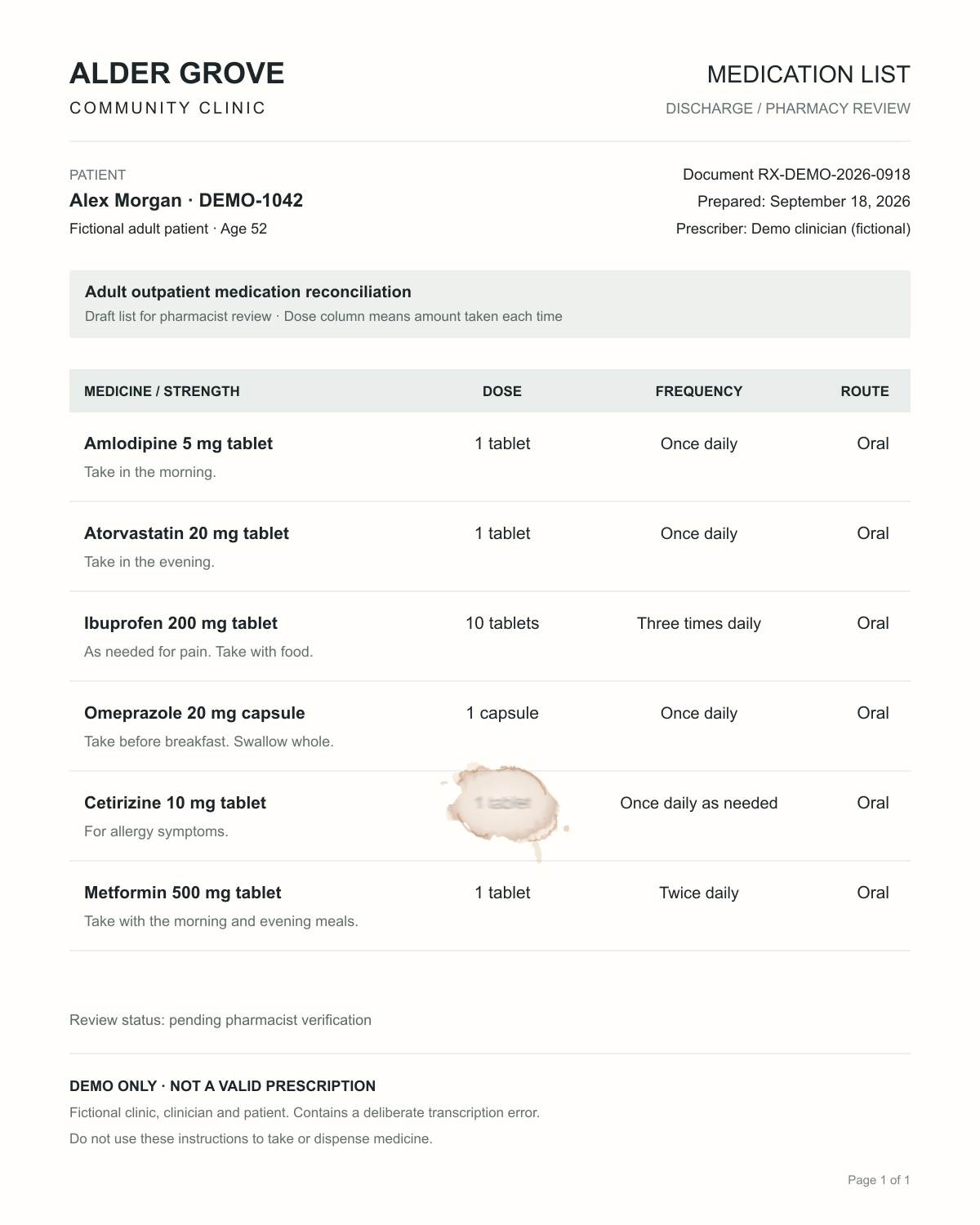
Our extraction schema defines the fields Unsiloed should return for each medication. It requests the complete dose cell, including quantity and unit, without correcting surprising quantities or guessing obscured text from usual prescribing practice. Enable source citations with enable_citations=true and wait for the extraction job to complete before constructing Jev’s state.
Each field has two Unsiloed confidence scores: extraction_score measures confidence in the extracted value, while grounding_score measures confidence that the value was located in the document. Both range from zero to one. The citation identifies its page and bounding box, the rectangle around the source text.
Here is the stained cetirizine dose from the saved response, with pixel coordinates on the original 1,200 × 1,500 image:
{
  "value": "1 tablet",
  "score": { "grounding_score": 0.76, "extraction_score": 0.74 },
  "citation": {
    "page": 1,
    "bbox": [582, 975, 649, 994],
    "page_width": 1200,
    "page_height": 1500
  }
}
Assign each medication row an ID, such as row-5, and keep it with the extracted fields and their citations. This lets our code match Jev’s answer to the same row later. Keep the citations so reviewers can locate each extracted field on the original page.
Send Jev the extracted values and context. It judges the instruction as extracted, without seeing the image or Unsiloed scores. We ask one Noul question per row: is this dose and frequency plausible for this medicine? All six rows share one request, with each question evaluated independently.
In the server-side module that connects the two APIs, construct this request (one row and its question shown):
const request = {
  model: "jev-1.13.0",
  state: {
    context: "Check for obvious quantity, unit or frequency errors. " +
      "Dose means amount taken each time, not supply quantity. " +
      "Do not assess patient-specific safety or propose corrections.",
    careContext: "Adult outpatient medication reconciliation, age 52",
    medications: [{
      id: "row-5", medicine: "Cetirizine 10 mg tablet",
      dose: "1 tablet", frequency: "Once daily as needed",
      route: "Oral", instructions: "For allergy symptoms."
    }]
  },
  questions: {
    "row-5": {
      type: "noul",
      instructions: {
        question: "Is the extracted dose and frequency plausible on its " +
          "face for this medicine and strength in the stated adult " +
          "outpatient context, without an obvious quantity or " +
          "frequency transcription error?",
        row_id: "row-5"
      },
      criteria: {
        true: "Plausible on its face; no obvious quantity, unit or frequency error.",
        false: "Clearly implausible; warrants review of the original prescription."
      }
    }
  }
};
The context and criteria are shortened here; the recorded request contains the exact text and all six rows. We use row-5 as the question ID so our code can match the answer to that row. We also include it as row_id inside the instructions so Jev knows which record to judge: question IDs are not sent to the model.
Post the request as JSON to https://api.typesafe.ai/v1/systemone. Authenticate with your TypeSafe API key in the Authorization: Bearer <API_KEY> header, keeping the key on the server. The recorded answer at answers["row-5"] is { "type": "noul", "noul": 0.94 }. Match that answer to the saved row-5 extraction using the shared ID.
Our code now decides whether the row needs review. For the reading check, we take the lowest Unsiloed score across the row’s fields, so a low score on any field flags the whole row. For the plausibility check, we use Jev’s noul value.
In the same module, pass those two values as reading and plausible to this function. It returns the reasons to send the row for review, or an empty array when neither check flags it. These demo rules also flag missing or invalid scores:
const valid = n => Number.isFinite(n) && n >= 0 && n <= 1;
function reviewReasons(reading, plausible) {
  return [
    ...(!valid(reading) || reading < 0.90 ? ["Verify source reading"] : []),
    ...(!valid(plausible) || plausible < 0.50 ? ["Review instruction"] : [])
  ];
}
Here, a reading score below 0.90 or a plausibility answer below 0.50 triggers review. These are example cutoffs: test them against manually reviewed documents before using them in production. Jev answers near 0.50 may also need review because neither yes nor no is clearly favored.
Keep both reasons when both checks fail. A plausible instruction can still contain misread text, so a high Jev answer must not cancel a low Unsiloed score. Save the original extraction and Jev request and response alongside the reviewer’s decision so you can later check why a row was flagged and how it was resolved.
Follow the Flagged Rows From Extraction to Review
Step through the saved API results to see what Unsiloed reads, what Jev checks, and why the two flagged rows need different kinds of review.
For the stained cetirizine dose, Unsiloed extracts “1 tablet” with an extraction score of 0.74 and a grounding score of 0.76. Jev returns 0.94 for plausibility, but it never sees the stain. That judgment depends on the extracted text being right. The reading check still flags the row because someone must confirm the obscured mark.
The ibuprofen row reverses the pattern. Unsiloed reads “10 tablets, three times daily” with both scores at 0.99; Jev returns 0.04 for the same plausibility question. The reviewer needs to investigate the clearly printed instruction. Neither model substitutes an assumed intended dose.
Each check flags a review need the other misses. The other four rows clear both demo thresholds, as the recorded responses show. The explanations and routing labels come from our application; Jev returns the typed answers, not those explanations.
How Much Jev Adds Per Document
One medication list in this demo produces a Jev request with six questions and 1,812 input tokens. At Jev 1.13.0’s published price of $42 per billion input tokens, with output free (checked September 30, 2026), that adds $0.000076 per document. Processing 100,000 similar documents would add about $7.61 in Jev charges.
This is a Jev-only estimate; Unsiloed extraction and human review cost separately. Your actual charge depends on the text and questions sent. For a closer estimate, take the input_tokens from a representative Jev response and apply the published rate.