ACORD 25 Data Extraction: Turn Certificates of Insurance Into Validated JSON
How to get an ACORD 25 certificate of liability insurance into validated JSON with Python and the Unsiloed API, using confidence scores to route fields to review and code that checks expiry, limits, holder, and additional insured status.


A subcontractor emails a PDF before they start work on your site. It's an ACORD 25, the one-page Certificate of Liability Insurance that is the standard proof of coverage in US commercial insurance, and someone on your team has to read it to find out which insurers are on it, which policy covers what, what the limits are, when each policy ends, and whether your company is named anywhere. Then they type all of that into a COI tracker, and do it again next year when the policies renew.
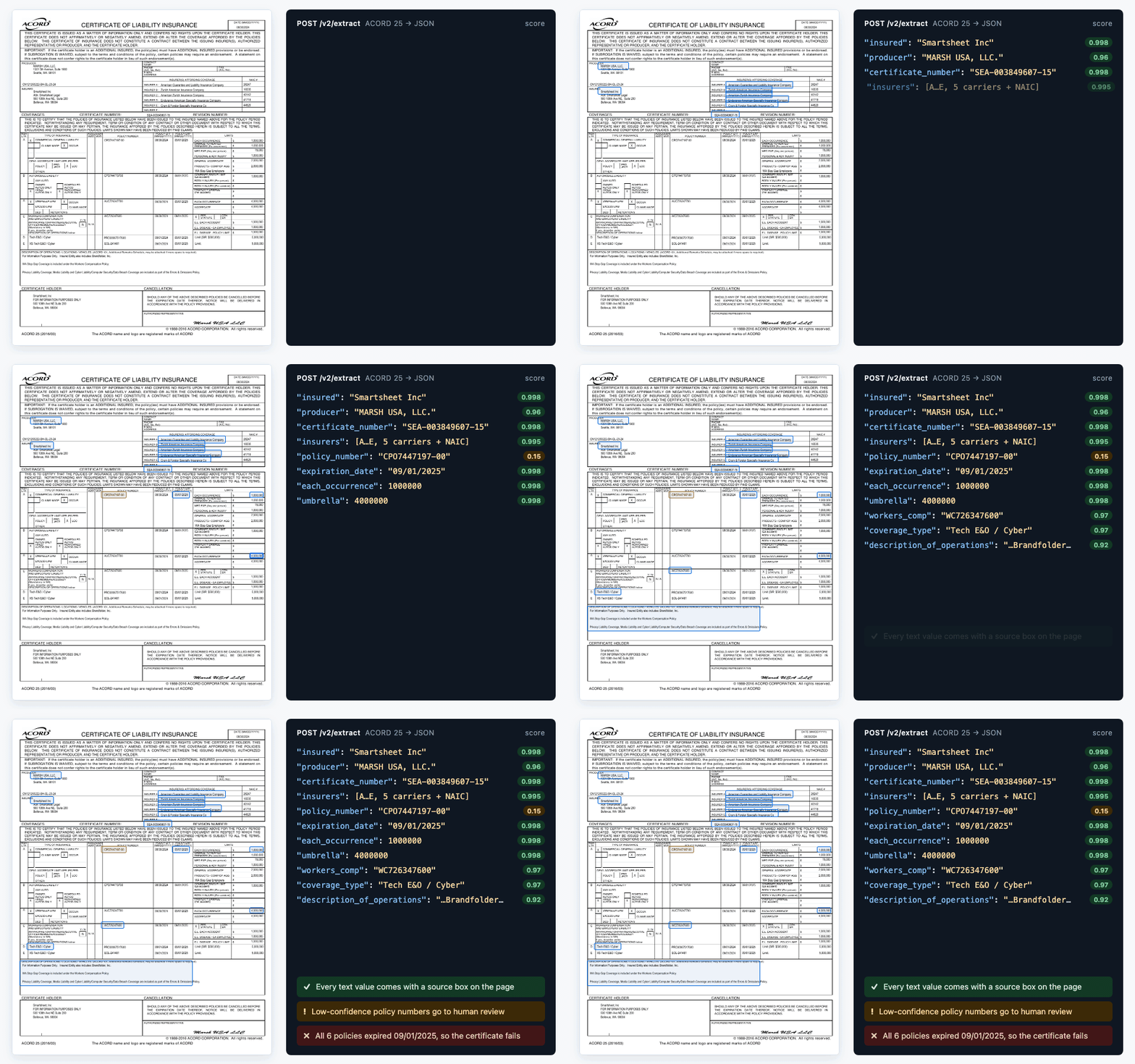
This guide automates that work with Python and the Unsiloed API. The extraction API turns a certificate into JSON, with a confidence score on every field and a box marking where each text value sits on the page. Python checks then decide whether the certificate of insurance meets your requirements, which is the harder part.
The example throughout is the 2024–25 certificate of liability insurance that Smartsheet published on its website, which has six policies, five insurers, and two non-standard rows.
What's on an ACORD 25 Certificate of Liability Insurance
ACORD, the insurance industry's standards body, publishes the ACORD 25 form. The edition is printed in the bottom-left corner, for example ACORD 25 (2016/03). ACORD released a 2025/12 edition in December 2025, but older ones still circulate. A sample certificate the City of Pontiac posted in 2025 is on the 2010/05 layout.
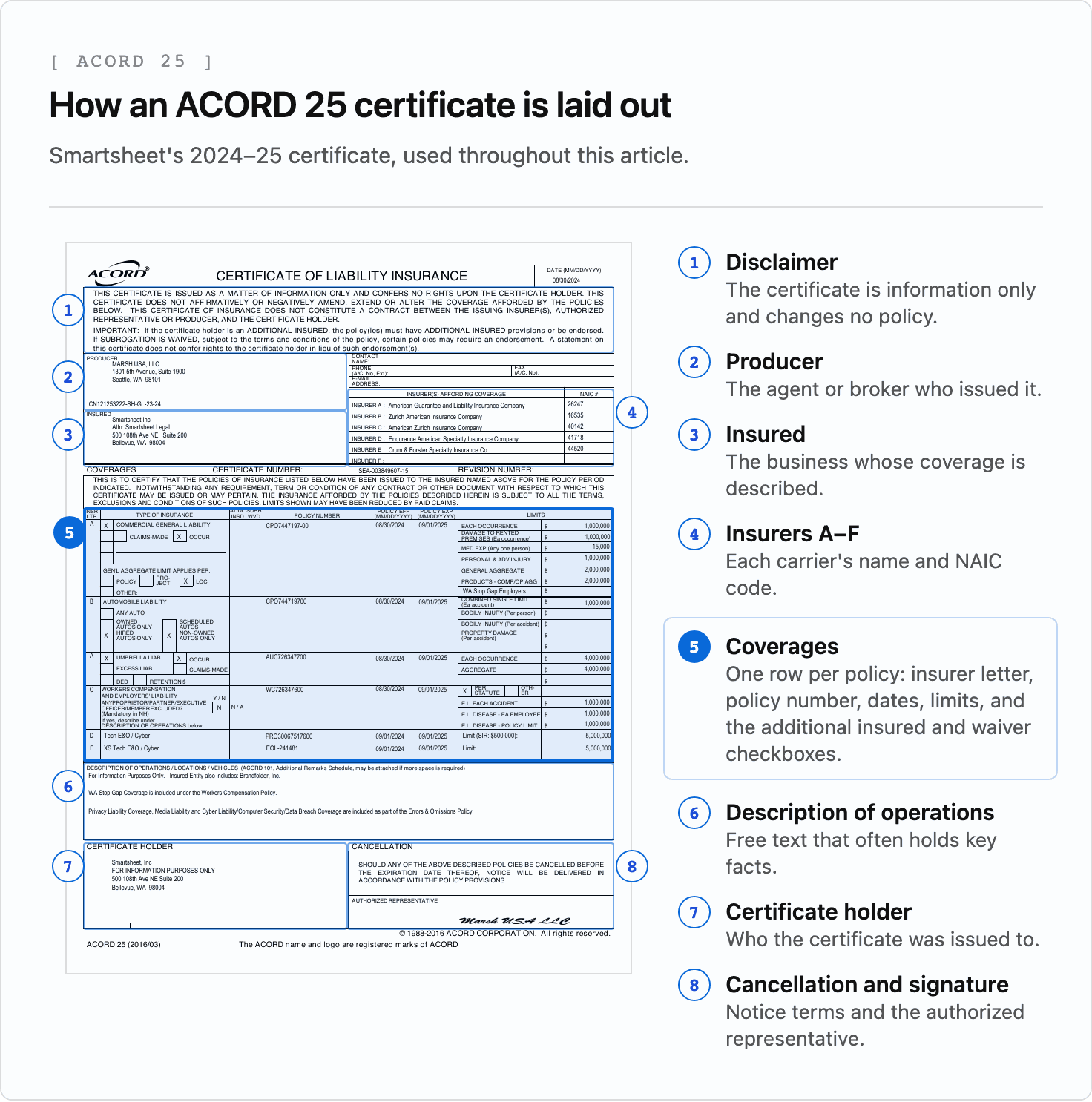
The six sections you extract from are:
- Producer: the agent or broker who issued the certificate. On the Smartsheet certificate, that's Marsh USA.
- Insured: the business whose coverage is being described.
- Insurers affording coverage: up to six insurance companies, lettered A through F, each with its NAIC number, the five-digit company code assigned by the National Association of Insurance Commissioners.
- Coverages: a table with one row per policy. Each row has an insurer letter, policy number, effective and expiration dates, limits, and two narrow checkbox columns,
ADDL INSD(additional insured) andSUBR WVD(subrogation waived). - Description of operations: a free-text box for everything that doesn't fit elsewhere.
- Certificate holder: who the certificate was issued to.
The coverages table links back to the insurers block by letter. A row marked C means the policy is written by whichever company is listed as insurer C, so you can't tell who covers workers' compensation without reading two parts of the page together.
The form's header states, "This certificate is issued as a matter of information only and confers no rights upon the certificate holder." A certificate describes policies but doesn't change them, which matters when you check for additional insured status.
Where Template-Based OCR Breaks on ACORD 25 Forms
Because the form is standardized, it looks like a job for zonal OCR: draw a box around each field once and read the same coordinates on every certificate. In practice, certificates break that approach in five ways.
- Editions drift. The
2010/05,2016/03, and2025/12editions all circulate, with boxes shifted by a few points and some labels reworded, so fixed coordinates need re-tuning per edition. - Rows don't follow the printed labels. The Smartsheet certificate puts Tech E&O / Cyber and an excess Tech E&O / Cyber policy in rows D and E, where the form only provides blank lines. Their limits are written as
Limit (SIR: $500,000):andLimit:, not as any printed label. - Important facts live in free text. On the Smartsheet certificate, the description box says another company, Brandfolder, Inc., is also an insured entity, and that Washington stop gap coverage sits under the workers' compensation policy. Neither fact is spelled out anywhere else on the page.
- Letters point across the page. Reading each box in isolation gives you a policy row and an insurer list, and joining them by letter is extra logic you have to write and maintain per edition.
- Certificates arrive as scans and flattened PDFs. Your pipeline has to handle certificates generated by agency software and ones that were printed, signed, and scanned before they reached you.
Extraction that reads the page the way a person does doesn't depend on fixed coordinates. It finds the policy row, reads its letter, and follows it to the insurer, wherever the row sits.
How to Extract ACORD 25 Data to JSON With Python and the Unsiloed API
The Unsiloed extraction endpoint takes a document and a JSON schema and returns each schema field filled in, with a confidence score and the field's location on the page. The schema describes the form, and its field descriptions point the model at the right part of the page. The coverages table is the part that needs care:
"policies": {
  "type": "array",
  "description": "Every coverage row in the COVERAGES table that has a policy number",
  "items": {"type": "object", "properties": {
    "insurer_letter": {"type": "string", "description": "INSR LTR column"},
    "coverage_type": {"type": "string"},
    "policy_number": {"type": "string"},
    "effective_date": {"type": "string", "description": "POLICY EFF (MM/DD/YYYY)"},
    "expiration_date": {"type": "string", "description": "POLICY EXP (MM/DD/YYYY)"},
    "additional_insured": {"type": "boolean", "description": "True only if the ADDL INSD column is marked for this row"},
    "limits": {"type": "array", "items": {"type": "object", "properties": {
      "name": {"type": "string", "description": "Limit label, e.g. EACH OCCURRENCE"},
      "amount": {"type": "number"}
    }}}
  }}
}
Policies and limits are arrays of objects, so a certificate with three policies and one with six both fit, and each limit keeps its own label. That's how a non-standard line like Limit (SIR: $500,000): on a cyber policy survives intact. The insurers block follows the same pattern, with a letter, name, and NAIC code per row, and the producer, insured, certificate holder, and description of operations are plain objects and strings.
Sending the document is a multipart request with Python's requests library. In the snippets that follow, path is the certificate file, API is https://prod.visionapi.unsiloed.ai, API_KEY is your Unsiloed API key, schema is your full schema loaded as a dict, and result is the result object from the finished job:
with open(path, "rb") as f:
    job = requests.post(
        f"{API}/v2/extract",
        headers={"api-key": API_KEY},
        files={"pdf_file": (os.path.basename(path), f)},
        data={"schema_data": json.dumps(schema), "model": "gamma", "enable_citations": "true"},
    ).json()
The response carries a job_id. Poll GET /extract/{job_id} until its status is completed, and the extracted fields are in its result.
The filename goes in the upload tuple because the API picks how to decode the file from its extension, so the same request accepts a PDF, a PNG, or a JPEG. enable_citations adds the page location to each value, and confidence scores come back with or without it.
Reading the Extraction Response
The result mirrors your schema, with one entry per field and every policy and limit as its own object in the arrays. Each value arrives in the same envelope:
"policy_number": {
  "value": "WC726347600",
  "score": {"grounding_score": 0.97, "extraction_score": 0.97},
  "citation": {"bbox": [212, 479, 260, 490], "page": 1, "page_width": 612.0, "page_height": 792.0}
}
The bbox is [x1, y1, x2, y2] from the top-left corner, measured in units of that citation's own page_width and page_height. Fields in one response don't share a single page size, so divide each box by its own citation's dimensions rather than one page size for the whole response. Normalized this way, the boxes land on their values.
Boolean fields such as additional_insured return a value and a score but no citation box.
The same request works on scans and other images, since extraction reads the rendered page rather than a PDF text layer. Multi-line boxes are where image input differs. On a rendered PNG of the example certificate, the FOR INFORMATION PURPOSES ONLY line lands in the certificate holder's name rather than its address, so compare the holder name line by line rather than as one string.
How Confidence Scores Flag ACORD 25 Fields for Review
Each value's extraction_score says how confident the model is in what it read, and a low score doesn't mean the value is wrong. On the Smartsheet certificate, the general liability policy number CPO7447197-00 is read correctly but consistently scores low. Scores also vary between requests for the same document, so treat them as a routing signal rather than a fixed property of a field.
Route the fields your checks depend on to review when they score low:
def v(field):
    return field["value"]

REVIEW_BELOW = 0.9  # a starting point; tune it on your own certificates
review = []
for p in v(result["policies"]):
    for name in ("policy_number", "effective_date", "expiration_date", "additional_insured"):
        field = p[name]
        if field["score"]["extraction_score"] < REVIEW_BELOW:
            review.append((name, v(field), field["citation"]))
This flags correct values too, and that's the right trade. Nobody can sanity-check a policy number from context, so a low score on one says "look at this." With the citation box attached, the person reviewing it goes straight to a highlighted region of the certificate instead of searching the page. Routing everything under 0.9 to review sends a person only the flagged fields, with the location on the page for every field that has a citation. Boolean checkbox fields come back without one, so point the reviewer at the policy row instead.
A high score reflects the model's confidence without verifying the value, so the checks in the next section run on every certificate regardless of score.
Validating a Certificate of Insurance Against Your Requirements
Whether a certificate is acceptable depends on your contract with the vendor, which sets minimum limits, required coverage types, and how your company must be named.
Say a hypothetical company, Acme Logistics LLC, requires policies in force today, a $1M per-occurrence general liability limit, additional insured status on that policy, and a certificate issued to it. Each requirement becomes a few lines against the extracted JSON:
problems = []
policies = v(result["policies"])
today = date.today()

for p in policies:
    starts = datetime.strptime(v(p["effective_date"]), "%m/%d/%Y").date()
    ends = datetime.strptime(v(p["expiration_date"]), "%m/%d/%Y").date()
    if not starts <= today < ends:
        problems.append(f"{v(p['coverage_type'])} {v(p['policy_number'])}: not in force today ({starts:%m/%d/%Y} to {ends:%m/%d/%Y})")

gl = next((p for p in policies if "GENERAL LIABILITY" in v(p["coverage_type"]).upper()), None)
if gl is None:
    problems.append("No general liability policy on the certificate")
else:
    limits = {v(l["name"]).upper(): v(l["amount"]) for l in v(gl["limits"])}
    if limits.get("EACH OCCURRENCE", 0) < 1_000_000:
        problems.append("General liability each-occurrence limit is under $1M")
    if not v(gl["additional_insured"]):
        problems.append("ADDL INSD not marked on general liability: request the additional insured endorsement")

holder_lines = [line.strip().lower() for line in v(v(result["certificate_holder"])["name"]).splitlines()]
if "acme logistics llc" not in holder_lines:
    problems.append("Certificate holder is not Acme Logistics LLC")
Common Reasons a Certificate of Insurance Fails Validation
Against the Smartsheet certificate, those checks report:
COMMERCIAL GENERAL LIABILITY CPO7447197-00: not in force today (08/30/2024 to 09/01/2025)
AUTOMOBILE LIABILITY CPO744719700: not in force today (08/30/2024 to 09/01/2025)
UMBRELLA LIAB AUC726347700: not in force today (08/30/2024 to 09/01/2025)
WORKERS COMPENSATION AND EMPLOYERS' LIABILITY WC726347600: not in force today (08/30/2024 to 09/01/2025)
Tech E&O / Cyber PRO30067517600: not in force today (09/01/2024 to 09/01/2025)
XS Tech E&O / Cyber EOL-241481: not in force today (09/01/2024 to 09/01/2025)
ADDL INSD not marked on general liability: request the additional insured endorsement
Certificate holder is not Acme Logistics LLC
The limit passes, but the certificate fails the other three checks:
- Policy dates. A certificate is a snapshot taken on its issue date, and it doesn't update itself when the policies renew. The Smartsheet certificate was issued on 08/30/2024 and every policy on it ended on 09/01/2025. Store expiration dates per policy, not per certificate, so you can ask for a renewal certificate before the earliest one lapses. The check also fails a policy whose effective date hasn't arrived yet, which happens when a certificate is issued ahead of a renewal.
- Holder. A certificate issued to someone else, like the Smartsheet one, doesn't meet a requirement that your company be named as the holder, so ask for a replacement. Even a certificate naming you is informational, so whether the policies cover the work in your contract is a separate question for the policy documents.
- Additional insured. Additional insured status comes from the policy's own provisions or an endorsement, and the form's header says a statement on the certificate doesn't confer it. That's why the check above treats the checkbox only as a prompt. An empty
ADDL INSDcolumn means you ask for the endorsement, and a ticked one means you ask for a copy of it before relying on the mark.
A policy row whose insurer letter has no matching entry in the insurers block leaves you unable to say who writes that policy, so add a check that treats it as a failure. Use each insurer's NAIC code to look up the carrier's AM Best financial strength rating and require a minimum, such as A- or better.
Extracting ACORD 125 and Other ACORD Forms
Other ACORD forms work the same way with their own schema. ACORD 125, the commercial insurance application, is the applicant information section that accompanies line-of-business sections such as ACORD 126 for general liability. FormsBoss's ACORD 125 reference describes it as a required part of every commercial submission except workers' compensation and medical professional liability. It runs to four pages, with repeating blocks for locations, prior carriers, and loss history, so its schema leans on arrays of objects even more than the ACORD 25 one does.
If you're building submission intake, model each repeating block as an array of objects, give every field a description that names its printed label, and route low-confidence values to review just as you would for certificates.
FAQ
What is an ACORD 25 form?
ACORD 25 is the Certificate of Liability Insurance, a one-page form an insurance agent or broker issues to show that a business holds certain liability policies. It lists the insurers, policy numbers, policy dates, and coverage limits, plus who the certificate was issued to. It's informational only and doesn't change the policies or grant rights to the certificate holder.
Can you extract data from a scanned ACORD 25?
Yes. Vision-based extraction reads the rendered page rather than a PDF text layer, so scanned PDFs and images work without a text layer. Multi-line boxes are where image input differs, so compare names line by line and route low-confidence values to review.
Does an ACORD 25 prove someone is an additional insured?
No. A mark in the ADDL INSD column is the agent's statement, but additional insured status comes from the policy's provisions or an endorsement. If your contract requires it, ask for a copy of the endorsement as well as the certificate.
How do I read the INSR LTR column on an ACORD 25?
Each policy row has an insurer letter, A through F, that points to the matching row in the "Insurers affording coverage" block near the top of the form. Follow the letter to find which insurance company writes that policy and its NAIC code.