Pay Stub OCR: Extract Income, Deductions, and Employer Details With Python
How to extract pay stub data to JSON with Python and the Unsiloed API, verify gross and net pay with arithmetic checks, route low-confidence fields to review, and turn a pay stub into annual income.

A pay stub prints its own arithmetic. The earnings lines add up to gross pay, gross pay minus taxes and deductions is net pay, and a year-to-date total is normally at least the same total for this period. That gives you a way to check pay stub OCR output against the stub itself.
In this guide, we use Python and the Unsiloed API to extract a pay stub to JSON, with the employer, the pay period, every earnings line, and every tax and deduction. The extraction API returns a confidence score on each value and a box marking where it sits on the page. Then we use Python to check the figures against each other and turn a stub that passes into an income record with annualized gross pay.
The examples are two public sample pay stubs. The first is the sample paycheck stub the University of South Carolina publishes for its employees, a salaried PeopleSoft stub that's embedded in the PDF as a low-resolution image. The second is an hourly stub from Oklahoma College Start's guide to reading a pay stub, cropped and with its numbered callouts removed.
What's on a Pay Stub and How to Read It
Payroll systems print pay stubs in different layouts, but most share the same parts:
- A header with the employer's name and address, the employee's name and ID, the pay period's start and end dates, and the pay date.
- Earnings lines, one per kind of pay, such as regular pay, overtime, or holiday pay. Hourly lines show hours and a rate. Each line shows the amount for this period and, on most stubs, the year to date.
- Taxes withheld, usually federal income tax, Social Security, Medicare, and state income tax, each for this period and the year to date.
- Deductions, such as health insurance or a 401(k) contribution. Pre-tax deductions come out before income tax is calculated, and after-tax deductions come out after.
- A summary with gross pay, total taxes, total deductions, and net pay, which is what the employee is paid.
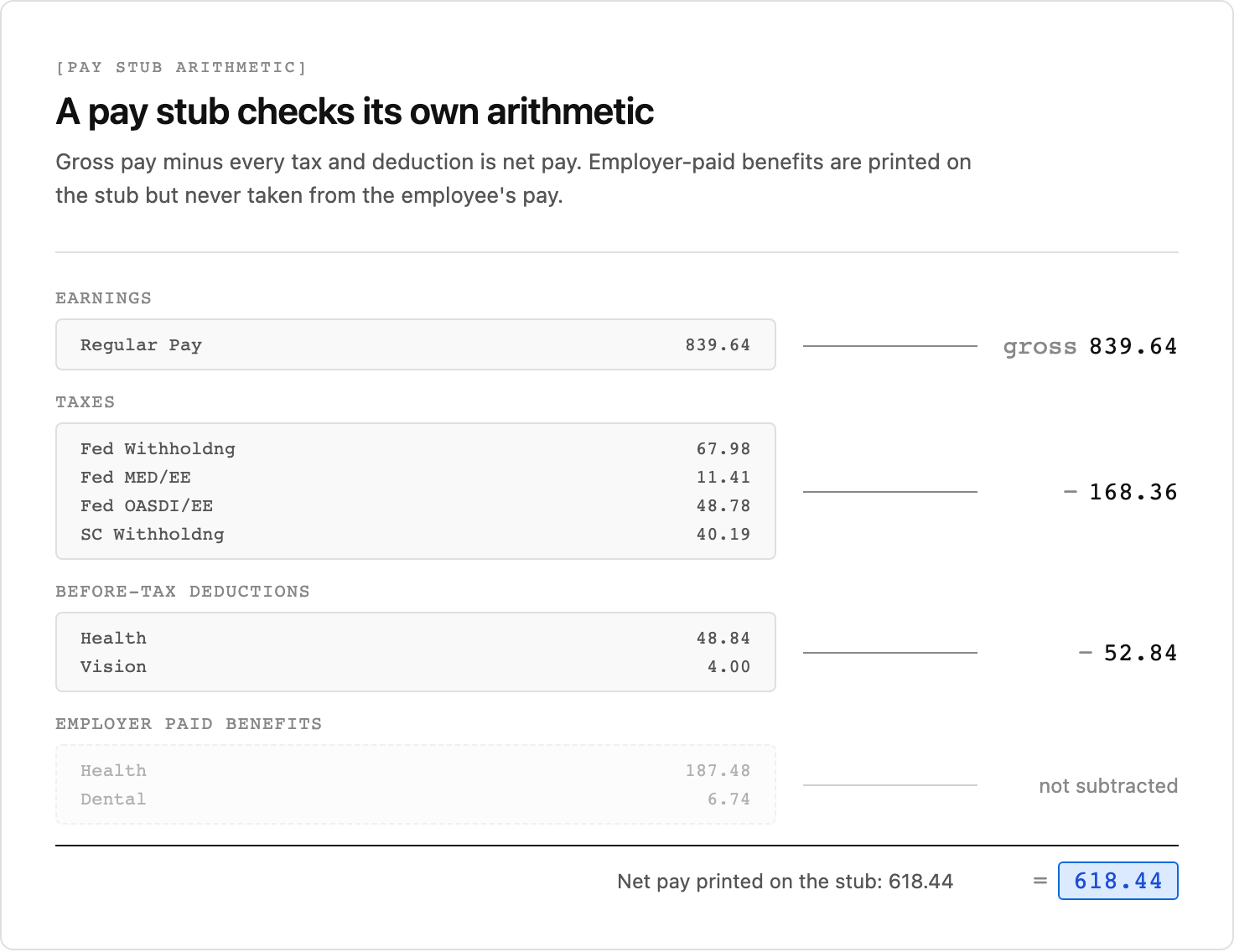
Some stubs add sections that aren't taken from the employee's pay. The University of South Carolina stub lists employer-paid benefits, the employer's share of health and dental premiums, next to the employee's deductions, and a net pay distribution showing how the net pay was split between two bank accounts.
Payroll systems also name the same tax differently. The university stub prints Social Security as "Fed OASDI/EE", for Old-Age, Survivors, and Disability Insurance, employee share, and Medicare as "Fed MED/EE". The Oklahoma stub combines both on one line called "Medicare/SSA".
Why Pay Stub OCR Is Hard
Plain OCR turns a pay stub into lines of text. The hard part is knowing what each number means:
- There's no standard layout. Each payroll provider prints its own stub, and an employer that changes providers changes its stub. A template written for one layout misreads the next.
- Sections sit side by side. The university stub prints earnings and taxes as two tables next to each other, and before-tax deductions, after-tax deductions, and employer-paid benefits as three. Reading across a line mixes their numbers together.
- Employer-paid benefits look like deductions. They have a description, a current amount, and a year to date, exactly like a deduction. Counting them as deductions makes net pay come out wrong.
- Deductions sit among the taxes. The Oklahoma stub lists a 401(k) contribution under "Withholdings", alongside federal and state tax.
- Stubs arrive as photos and screenshots. An applicant often sends a phone photo or a screenshot from a payroll portal rather than the PDF.
Extraction that reads the rendered page uses the headings and the table structure to decide which section a number belongs to, which lets it tell an employer-paid benefit from a deduction on a layout it hasn't seen before. It can still misread a figure or put a line in the wrong section, and the checks later in this guide catch that.
How to Extract Pay Stub Data to JSON With Python
The Unsiloed extraction endpoint takes a document and a JSON schema and returns a value for each field in the schema, with a confidence score and, when citations are enabled, the field's location on the page. A field that isn't printed on the page comes back as null.
The schema asks for the header fields, an array of earnings lines, an array of taxes and deductions, and the summary amounts:
{
  "type": "object",
  "properties": {
    "employer_name": {"type": "string"},
    "employer_address": {"type": "string"},
    "employee_name": {"type": "string"},
    "employee_id": {"type": "string"},
    "pay_period_start": {"type": "string", "description": "First day of the pay period, as printed"},
    "pay_period_end": {"type": "string", "description": "Last day of the pay period, as printed"},
    "pay_date": {"type": "string", "description": "Check date or pay date, as printed. Null if not printed."},
    "earnings": {
      "type": "array",
      "description": "Every earnings line, such as regular pay, overtime, or holiday pay. Not the totals row.",
      "items": {"type": "object", "properties": {
        "description": {"type": "string"},
        "hours": {"type": "number", "description": "Hours for this pay period. Null if not printed."},
        "rate": {"type": "number", "description": "Hourly rate. Null if not printed."},
        "current": {"type": "number", "description": "Amount for this pay period"},
        "ytd": {"type": "number", "description": "Year-to-date amount. Null if not printed on this line."}
      }}
    },
    "deductions": {
      "type": "array",
      "description": "Every tax and every deduction taken from the employee's pay, one per line. Not totals rows, and not benefits the employer pays.",
      "items": {"type": "object", "properties": {
        "description": {"type": "string"},
        "kind": {"type": "string", "description": "tax for income, Social Security, and Medicare taxes; pre_tax for deductions the stub lists as before-tax or pre-tax; post_tax for after-tax and Roth deductions; unknown if the stub doesn't say"},
        "current": {"type": "number"},
        "ytd": {"type": "number", "description": "Null if not printed on this line"}
      }}
    },
    "gross_pay": {"type": "number", "description": "Total gross pay for this period"},
    "gross_pay_ytd": {"type": "number"},
    "net_pay": {"type": "number", "description": "Net pay for this period"},
    "net_pay_ytd": {"type": "number", "description": "Null if not printed"}
  }
}
Taxes and deductions share one array because the net pay check subtracts both, and because stubs like the Oklahoma one don't separate them. The kind field keeps the distinction for anything downstream that needs it, and unknown marks a deduction the stub doesn't classify, such as the Oklahoma stub's 401(k), which could be a traditional or a Roth contribution. The array's description excludes employer-paid benefits and totals rows, which would otherwise be subtracted twice or subtracted when they were never taken from the employee's pay.
The null instructions tell the model to leave a field empty when the stub doesn't print it, such as the rate on a salaried line, instead of working one out from the hours and the amount.
A pay stub is usually one page, so it goes to the API as a single request. In the code that follows, path is the pay stub file, API is https://prod.visionapi.unsiloed.ai, API_KEY is your Unsiloed API key, and schema is the schema above loaded as a dict:
import json, os, time
import requests

def extract_stub(path):
    with open(path, "rb") as f:
        response = requests.post(
            f"{API}/v2/extract",
            headers={"api-key": API_KEY},
            files={"pdf_file": (os.path.basename(path), f)},
            data={"schema_data": json.dumps(schema), "model": "gamma", "enable_citations": "true"},
            timeout=120,
        )
    response.raise_for_status()
    job_id = response.json()["job_id"]
    while True:
        response = requests.get(f"{API}/extract/{job_id}", headers={"api-key": API_KEY}, timeout=30)
        response.raise_for_status()
        job = response.json()
        if job["status"] in ("completed", "review", "failed"):
            return job
        time.sleep(5)

job = extract_stub(path)
if job["status"] == "failed":
    raise SystemExit("Extraction failed: rerun this pay stub")
stub = job["result"]
Both requests set a timeout, because a status request that stalls would otherwise wait forever. The same request works for a PDF, a PNG screenshot, or a JPEG photo. The filename in the upload tuple matters, because the API picks how to decode the file from its extension.
Each value in the result arrives in the same envelope, with its value, a confidence score, and a citation:
"net_pay": {
  "value": 1788.25,
  "score": {"grounding_score": 0.99, "extraction_score": 0.99},
  "citation": {"bbox": [262, 185, 303, 198], "page": 1, "page_width": 612.0, "page_height": 223.2}
}
The bbox is [x1, y1, x2, y2] from the top-left corner of the page, in units of the citation's page_width and page_height. The earnings and deductions arrays use the same envelope, and each line inside them is an object of envelopes.
We ran both sample stubs through this code, along with a PNG of the university stub and a simulated phone photo of it, rotated, blurred, and saved as a low-quality JPEG. Every run returned every field correctly, including the null rate on the salaried stub and the missing pay date on the Oklahoma one. The extraction left the university's employer-paid health and dental premiums out of the deductions, as the schema asked.
How to Verify Pay Stub Data With Arithmetic Checks
A pay stub states its numbers more than once, which gives you ways to verify the extracted pay stub data without looking at the page:
- Earnings add up to gross pay. The current amounts on the earnings lines sum to the gross pay in the summary.
- Hours times rate. On an hourly line, the hours multiplied by the rate equal the line's amount, within a cent.
- Gross minus deductions is net. Gross pay minus every tax and deduction equals net pay.
- Year to date is at least this period. Every year-to-date amount, including gross and net pay, is normally at least as large as the same amount for this period. The check skips negative lines, such as a benefit credit, whose year to date grows more negative.
We use Python to run the checks in whole cents, because adding dollar amounts as floating-point numbers can leave a difference of a fraction of a cent between two totals that agree. A missing amount stops the checks instead of counting as zero, which could let a stub pass:
def v(field):
    return field["value"]

def cents(field):
    if v(field) is None:
        raise ValueError("Missing amount: send this pay stub to review")
    return round(v(field) * 100)

def dollars(amount):
    return f"${amount / 100:,.2f}"

earnings, deductions = v(stub["earnings"]), v(stub["deductions"])
gross, net = cents(stub["gross_pay"]), cents(stub["net_pay"])
problems = []

listed = sum(cents(e["current"]) for e in earnings)
if listed != gross:
    problems.append(f"Earnings lines add up to {dollars(listed)}, gross pay is {dollars(gross)}")

for e in earnings:
    if v(e["hours"]) is not None and v(e["rate"]) is not None:
        expected = round(v(e["hours"]) * v(e["rate"]) * 100)
        if abs(expected - cents(e["current"])) > 1:
            problems.append(f"{v(e['description'])}: hours times rate is {dollars(expected)}, "
                            f"the stub prints {dollars(cents(e['current']))}")

taken = sum(cents(d["current"]) for d in deductions)
if gross - taken != net:
    problems.append(f"Gross pay minus deductions is {dollars(gross - taken)}, net pay is {dollars(net)}")

for name in ("gross_pay", "net_pay"):
    if v(stub[f"{name}_ytd"]) is not None and cents(stub[f"{name}_ytd"]) < cents(stub[name]):
        problems.append(f"Year-to-date {name.replace('_', ' ')} {dollars(cents(stub[f'{name}_ytd']))} "
                        f"is less than this period's {dollars(cents(stub[name]))}")
for line in [*earnings, *deductions]:
    if v(line["ytd"]) is not None and 0 < cents(line["current"]) and cents(line["ytd"]) < cents(line["current"]):
        problems.append(f"{v(line['description'])}: year to date is less than this period")
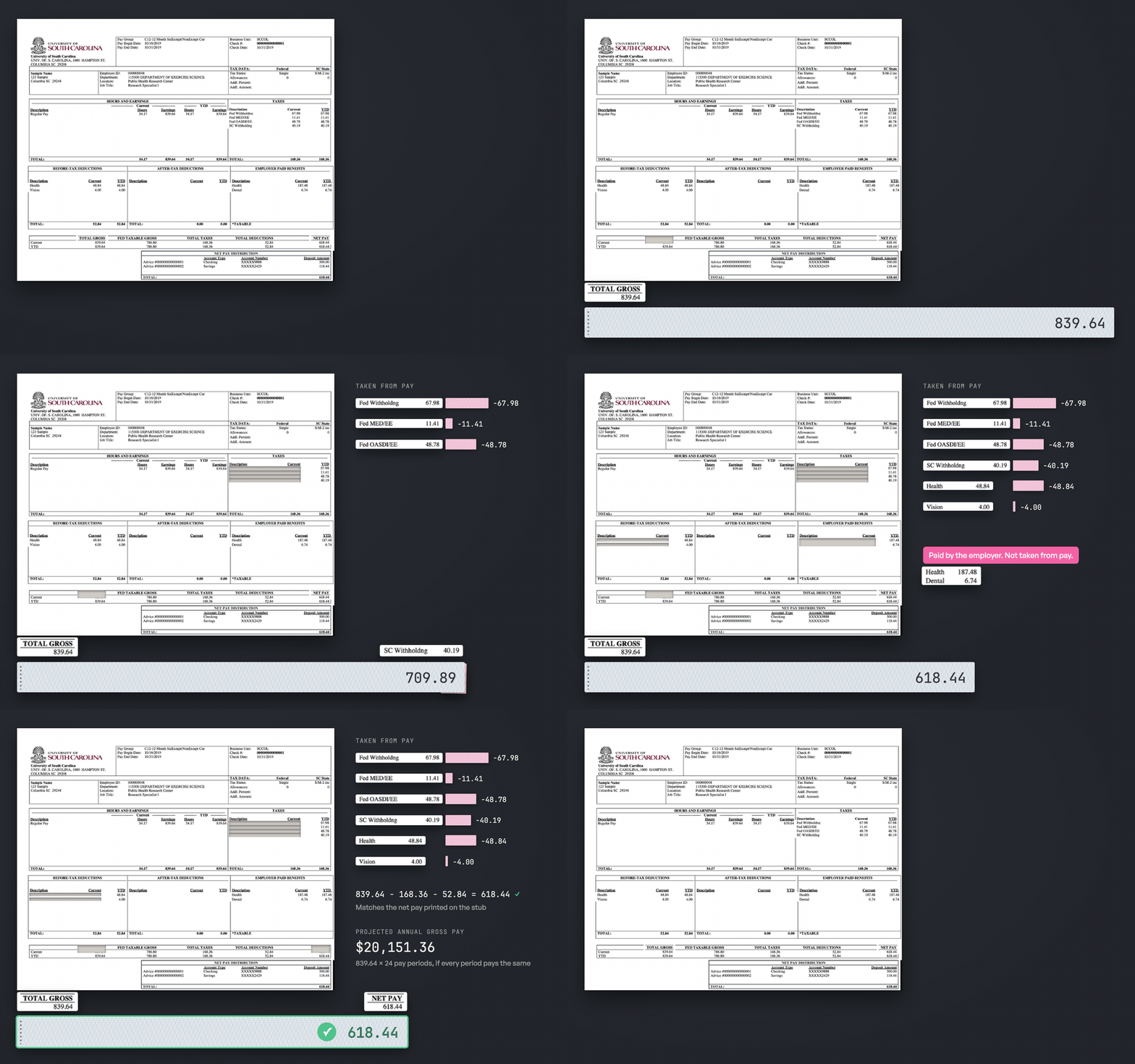
Both sample stubs pass every check. On the university stub, $839.64 in gross pay minus $168.36 in taxes and $52.84 in deductions leaves the $618.44 net pay it prints. On the Oklahoma stub, 80 hours at $25.00 is the $2,000.00 gross, and $211.75 in withholdings leaves $1,788.25.
The checks test the stub's arithmetic, not its tax amounts. The Oklahoma stub's $29.00 Medicare/SSA line is 1.45% of $2,000, the Medicare rate alone, while Social Security and Medicare together take 7.65% of most wages. That's fine on a teaching example, and it's a question to ask about a stub from an applicant.
How Failed Checks Flag Misreads and Edited Pay Stubs
To see the checks fail, we edited a copy of the university stub the way someone inflating their income might, raising gross pay from $839.64 to $889.64 and net pay from $618.44 to $668.44 in the summary row. The edit keeps the summary consistent, since $889.64 minus the same taxes and deductions is $668.44, and the net pay check passes. The extraction read both edited figures as printed, and three other checks add a problem:
Earnings lines add up to $839.64, gross pay is $889.64
Year-to-date gross pay $839.64 is less than this period's $889.64
Year-to-date net pay $618.44 is less than this period's $668.44
The edit missed the earnings line the summary totals and the year-to-date figures below it. Because a stub has to agree with itself in several places at once, an edit that changes one number without the numbers that depend on it breaks a check somewhere else.
Each failure tells you where to look:
- Earnings that don't add up to gross pay point to a missed or misread earnings line, or a misread gross pay. Compare both with the page through their citation boxes.
- Hours times rate that doesn't match usually means a misread digit in one of the three numbers, or a line that pays a premium the rate doesn't show, such as a shift differential.
- Net pay that doesn't match points to a missed deduction, an employer-paid benefit extracted as a deduction, or a reimbursement paid with the wages, which adds to net pay without being part of gross pay. A gap equal to one printed line's amount names the line.
- A year-to-date amount smaller than the period usually means a misread, a correction such as an earlier reversed payment, or a figure that was changed without updating the rest of the stub. It's a reason to look, not proof of a problem.
Figures that agree with each other don't prove the stub is genuine, because a careful edit that changes every related number passes the checks. To verify income for a loan or a lease, confirm the stub with the employer or with payroll records as well. For the other signals fraud teams look for, see detecting fraud in AI-generated documents.
When to Trust Confidence Scores Versus Arithmetic Checks
Each value's extraction_score says how confident the model is in what it read. The checks cover the amounts, but they can't see a misread employer name, a pay date, or a deduction classified as the wrong kind. We use Python to send every low-scoring field to review, and every required field that came back empty:
REVIEW_BELOW = 0.9
REQUIRED = ["employer_name", "employee_name", "pay_period_start", "pay_period_end"]

fields = {name: field for name, field in stub.items() if name not in ("earnings", "deductions")}
for section in ("earnings", "deductions"):
    for i, line in enumerate(v(stub[section])):
        for name, field in line.items():
            fields[f"{section}[{i}].{name}"] = field

review = [(name, v(field)) for name, field in fields.items()
          if v(field) is not None and field["score"]["extraction_score"] < REVIEW_BELOW]
review += [(name, None) for name in REQUIRED if v(stub[name]) is None]
The v(field) is not None condition skips fields the stub doesn't print, such as the rate on a salaried line, whose score can be anything from 0 to 0.99. Fields the income record can't do without go on the REQUIRED list instead, and an empty one goes to review whatever its score. Each field is named by its section and row number, such as earnings[0].current, because two lines can share a description.
On the university stub, every printed field scored at least 0.9 in every run, and nothing went to review. On the Oklahoma stub, one field went to review in each of two runs, the 401(k) line's kind at 0.7 in one and the placeholder employee name "Employee Name" at 0.86 in the other. The values were right, and the low scores sent them to a person. For how to pick the threshold, see setting confidence score thresholds for document automation.
The scores also flagged the edited stub in four of five runs. In those runs the two edited figures scored between 0 and 0.7, while every other field scored at least 0.92. In the fifth run they scored as high as the rest, which is why the arithmetic checks run on every stub. A low score doesn't prove an edit, but it puts the stub in front of a reviewer with the citation boxes pointing at the figures in question.
How to Calculate Annual Income From a Pay Stub
A pay stub that passes the checks and has nothing left to review can become an income record. Most downstream uses need annual income, which takes the number of pay periods in a year. The stub doesn't print its pay frequency, but the pay period dates imply it:
- Weekly periods are 7 days, 52 a year.
- Biweekly periods are 14 days, 26 a year.
- Semimonthly periods run from the 1st to the 15th and from the 16th to the end of the month, 24 a year.
- Monthly periods run from the 1st to the end of the month, 12 a year.
We use Python to work out the frequency from the dates, and to stop with the reasons if the stub still has problems, fields to review, or more than one earnings line:
import calendar
from datetime import datetime

def as_date(field):
    for fmt in ("%m/%d/%y", "%m/%d/%Y", "%Y-%m-%d"):
        try:
            return datetime.strptime(v(field) or "", fmt).date()
        except ValueError:
            pass
    return None

start, end = as_date(stub["pay_period_start"]), as_date(stub["pay_period_end"])
per_year = None
if start and end:
    days = (end - start).days + 1
    month_end = calendar.monthrange(end.year, end.month)[1]
    same_month = (start.year, start.month) == (end.year, end.month)
    if same_month and (start.day, end.day) == (1, month_end):
        per_year = 12
    elif same_month and (start.day, end.day) in ((1, 15), (16, month_end)):
        per_year = 24 if days != 14 else None
    else:
        per_year = {7: 52, 14: 26}.get(days)

reasons = problems + [f"Check {name} on the page" for name, _ in review]
if per_year is None:
    reasons.append("Pay frequency unclear from the period dates")
if len(earnings) != 1:
    reasons.append("More than one earnings line to annualize")
if reasons:
    raise SystemExit("Send this pay stub to review:\n" + "\n".join(reasons))

income = {
    "employer": v(stub["employer_name"]),
    "employee": v(stub["employee_name"]),
    "pay_period": [start.isoformat(), end.isoformat()],
    "pay_periods_per_year": per_year,
    "gross_pay": gross / 100,
    "net_pay": net / 100,
    "gross_pay_ytd": v(stub["gross_pay_ytd"]),
    "annualized_gross_pay": round(gross * per_year / 100, 2),
}
We check both ends of a semimonthly period, because a biweekly period can also start on the 16th, as the Oklahoma stub's January 16 to 29 period does. The one period that fits both, February 16 to 29 in a leap year, goes to review rather than to a guess, along with dates in a format we don't parse and periods of any other length. Two consecutive stubs settle the frequency when it matters.
For the university stub, the record shows a semimonthly period from 2019-10-16 to 2019-10-31 and annualized gross pay of $20,151.36. Annualizing one period assumes every period pays the same. The result is a projection, not the qualifying income a lender calculates. A bonus or overtime would be multiplied too, which is why a stub with more than one earnings line goes to review. Hourly pay can vary from period to period even on a single line, so treat an hourly projection with the same caution. Compare the projection with the year-to-date gross, which on the university stub equals this period's pay, so the stub alone doesn't show a pay history. The payroll deposits on the applicant's bank statements are another check on the net pay.
FAQ
What is pay stub OCR?
Pay stub OCR is reading the text and numbers on a pay stub image or PDF with software. Pay stub data extraction goes a step further and returns them as labeled fields, such as gross pay, net pay, and each tax and deduction, ready to check and use in code.
Can you extract data from a photo of a pay stub?
Yes. Vision-based extraction reads the rendered image, so a phone photo or a screenshot works the same way as a PDF. Run the arithmetic checks on photos too, and review any low-scoring fields, since a blurred digit is more likely on a photo than on a PDF.
How do you verify a pay stub is genuine?
Check that its figures agree with each other. Gross pay should match the earnings lines, net pay should match gross pay minus deductions, and every year-to-date figure should normally be at least as large as this period's, unless an earlier payment was reversed. An edit that skips one of those figures fails a check. A careful forgery can pass all of them. When income matters, confirm it with the employer or payroll records.
What's the difference between gross pay and net pay?
Gross pay is what an employee earns in the pay period before anything is taken out. Net pay is what's left after taxes and deductions, and it's the amount paid into the employee's bank account.