Are LLMs Good Enough for Document Extraction in 2026?
Frontier LLMs can read a PDF, but reading one and being trusted with it are two different things. Here's where a raw LLM is good enough, where a dedicated document model earns its place, and how to make the output trustworthy.
Every frontier large language model (LLM) can now read a scanned PDF receipt or invoice, or a hastily snapped photo of one, and give you structured data with its context intact. So are dedicated document extraction models dead?
Not yet. The AI document layer — the specialized models that sit between raw files and your application, with Unsiloed as one example — is a growing category, because "can read a PDF" and "can be trusted with the PDF" turn out to be very different claims.
This guide covers when an LLM is good enough on its own, and when a specialized model earns its place. The examples throughout compare Claude Opus 4.8 with Unsiloed.
TLDR:
- For clean, one-off documents, a frontier LLM is good enough. Snap a photo, ask in plain language, get the answer.
- On dense, degraded, or handwritten documents, LLMs fail quietly, inventing values and dropping rows, because the model only ever sees a downscaled image of the page.
- To trust the output, stack cheap checks: per-value confidence scores and citations, internal reconciliation, and reading each page more than once. It never hits 100%, but it beats manual review on accuracy, speed, and cost.
- Ingesting many documents into search or RAG is a pipeline, not a prompt. A dedicated model ships that pipeline as API calls, while raw Claude leaves you to build it yourself.
- Cost is roughly a cent a page either way, and free tiers win at low volume.
- Bottom line: use the LLM as the brain and a dedicated document model as the eyes.
When LLMs Are Enough
You might expect a post at this URL to argue LLMs are never good enough. Often they are. For everyday, one-off tasks, with a little prompting, a frontier model does the job.
Take splitting a restaurant bill. You snap a photo, ask in plain English, and the model reads the receipt, does the math, and hands back the answer in one shot.
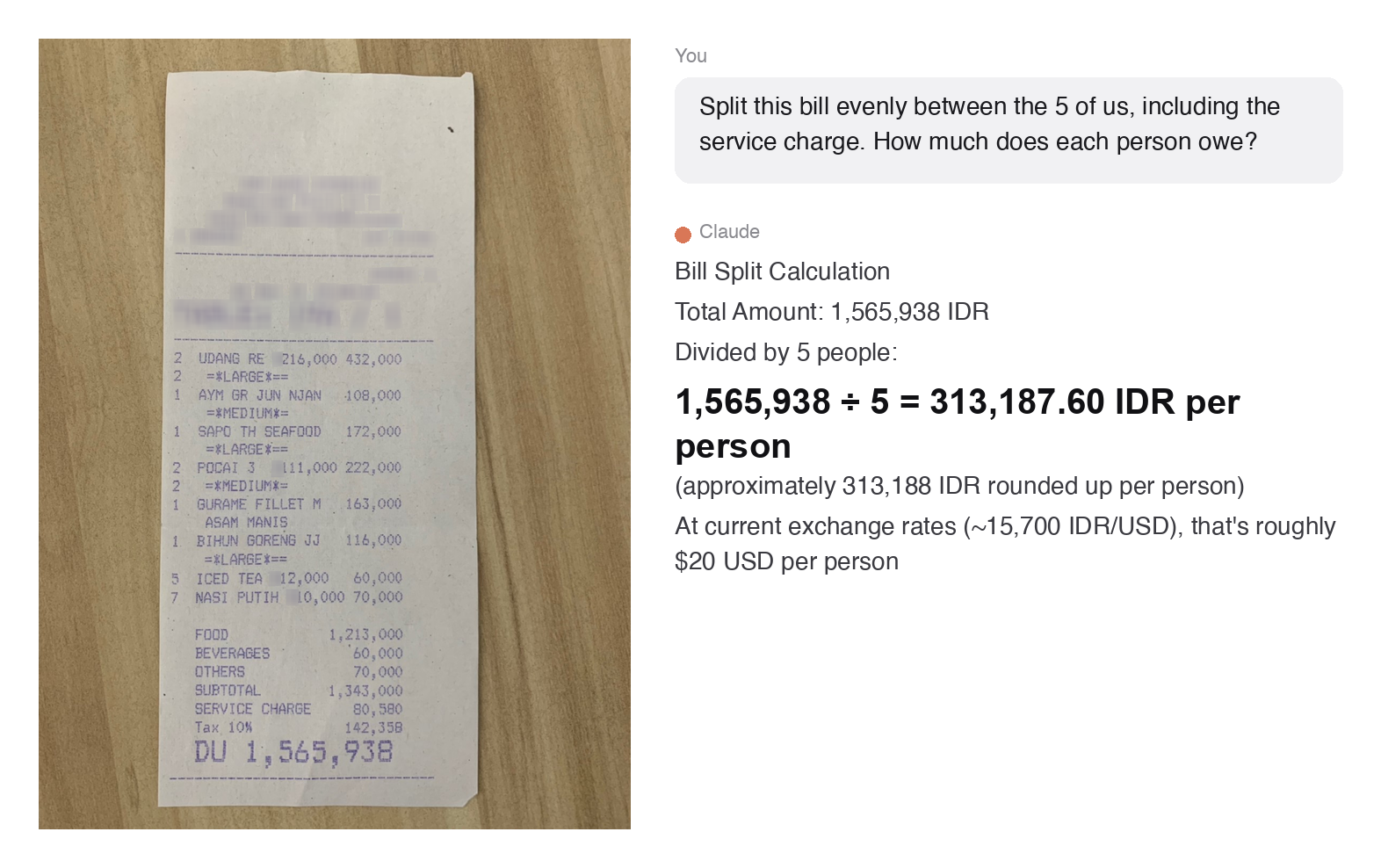
This is the sweet spot for an LLM: a clean document, a one-off task, and a question in plain language. The model handles the reading and the reasoning in one step.
The trouble starts when any of those conditions break.
LLMs Fall Apart When 'Pretty Good' Isn't Enough
When documents get more complex, LLMs begin to struggle. A vision model downscales every page to a fixed resolution, so on a dense, small-print, or large-format page much of the detail is gone before it even starts reading. Handwriting and faint scans push the gap widest of all. The failures that follow are the dangerous kind: not blanks or refusals, but plausible-looking wrong values, with nothing to flag which ones to distrust.
The example below shows all of this at once with a real 277-row government procurement register. Same simple prompt as the receipt, a far harder document:
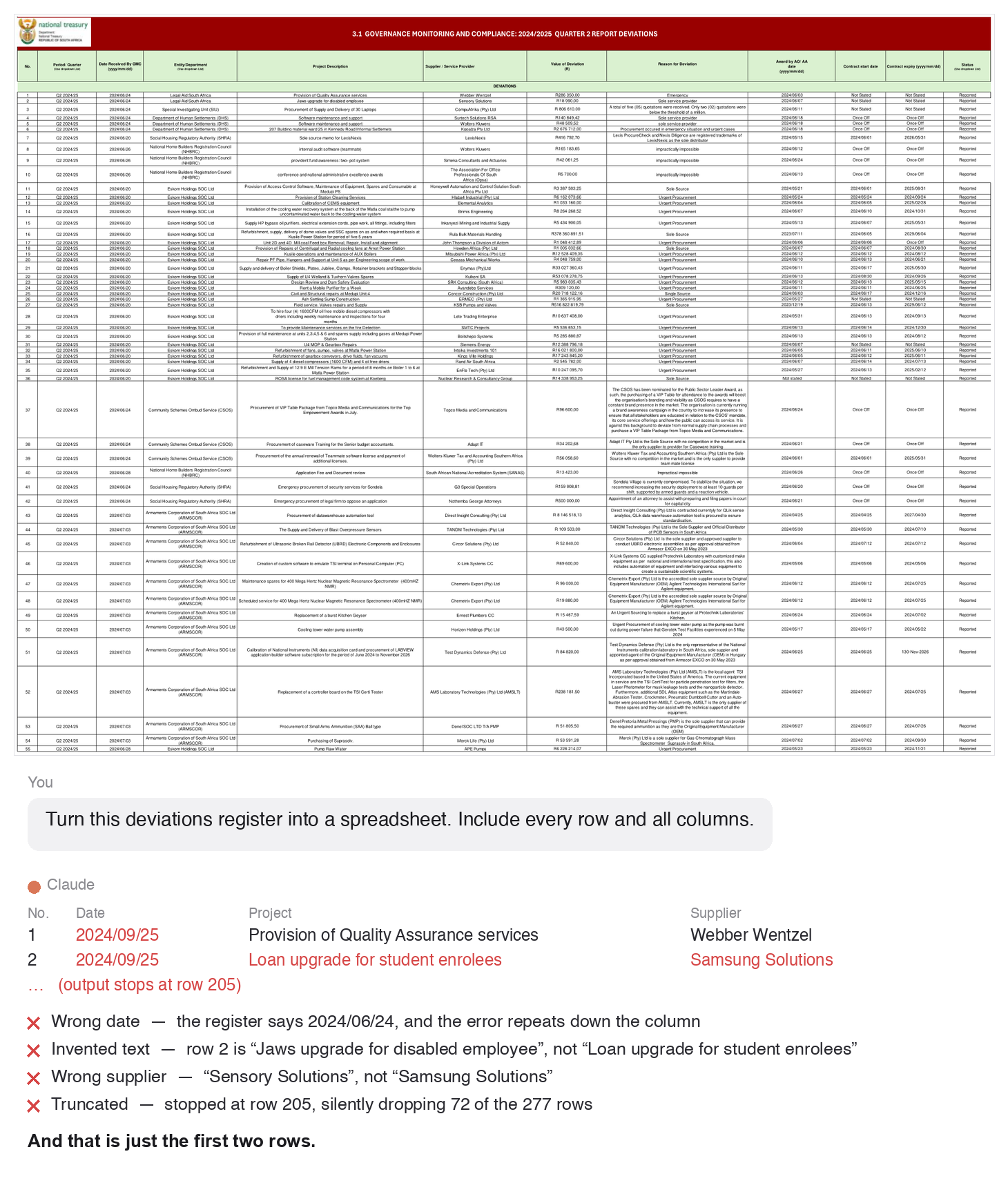
The model invented a project description, misread a date and repeated it down the column, changed a supplier's name, and quietly stopped a quarter of the way through the table. None of these errors announce themselves, so you only catch them by checking the output against the source, which defeats the point of automating the extraction in the first place.
When Accuracy Matters
For a lot of work, "mostly right" is fine. For an invoice total, a dosage, or a financial filing, it isn't. You can't blindly trust the output, but you can't check every field by hand either. The way through is to stack a few checks, starting with the one a specialized model gives you out of the box.
Start With Confidence Scores and Citations
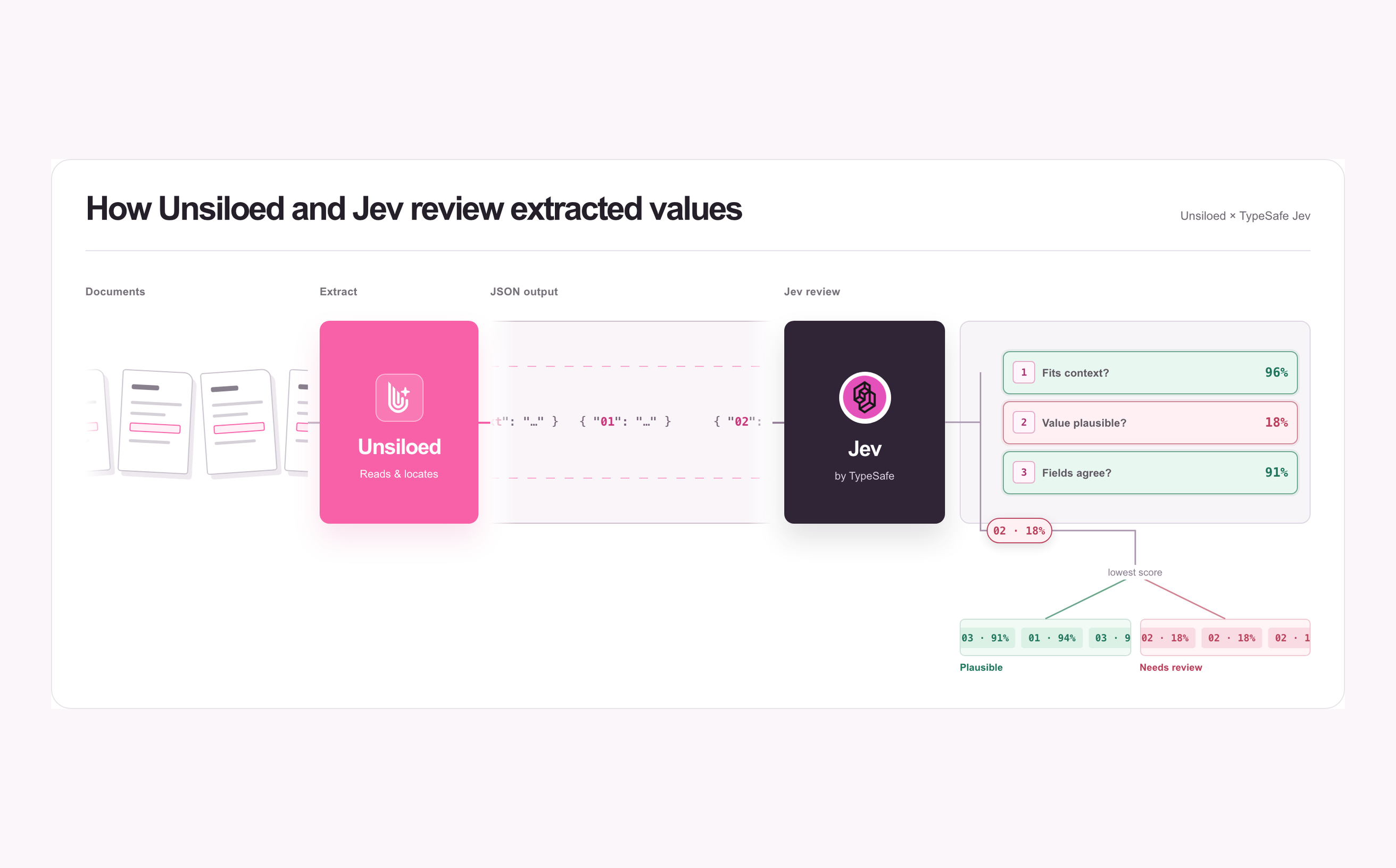
This is the check that comes built in. A specialized model returns every value with a confidence score and a citation box on the page. Sort by confidence, accept the high-confidence values, and a reviewer opens only the flagged ones, where the box drops them onto the exact cell to confirm or fix. An LLM hands back a bare string, so with raw Claude you'd be building this layer yourself.
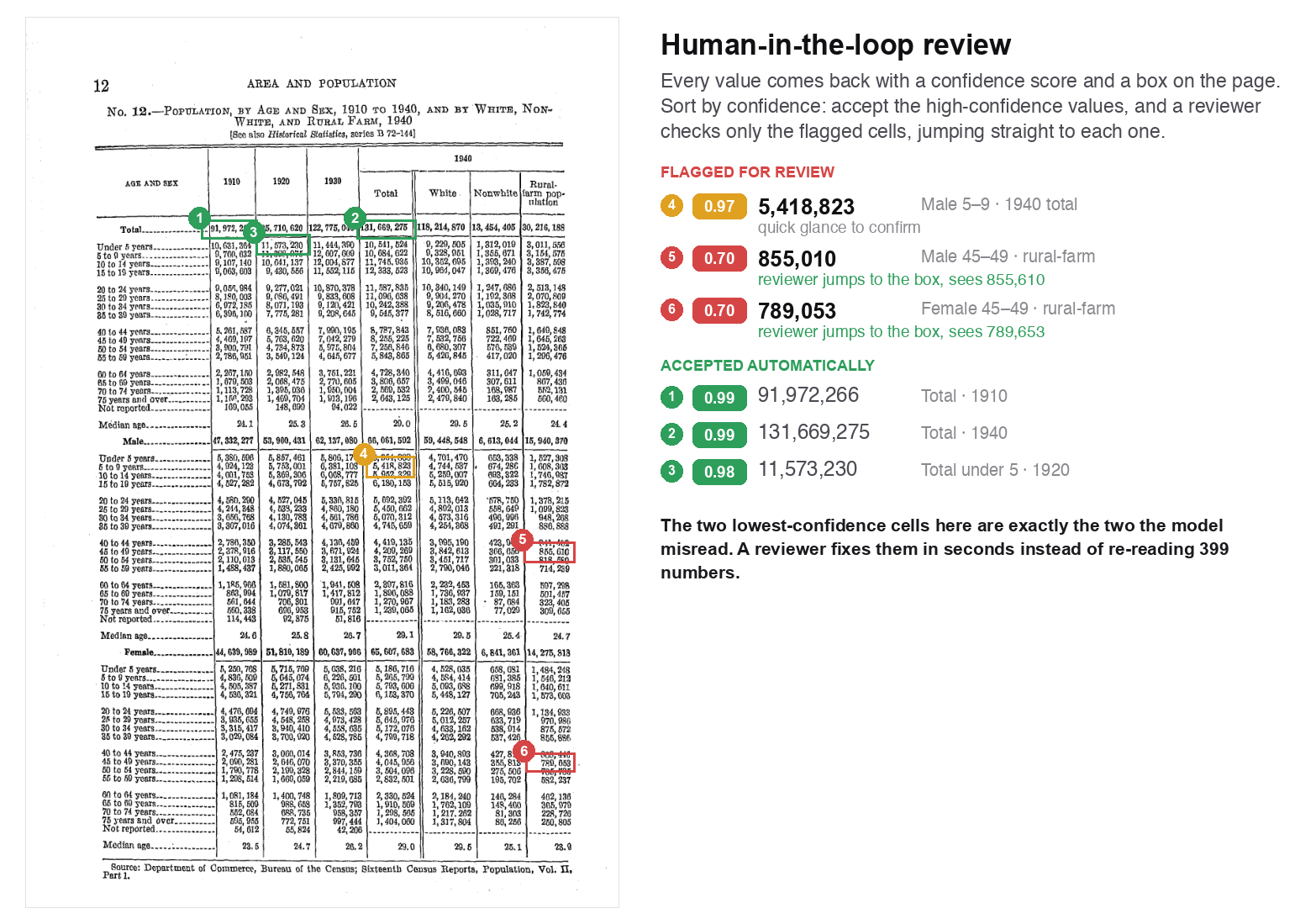
But confidence scores and a reviewer aren't enough on their own. A 0.97 score sounds reassuring until you run it across thousands of documents, where even a small error rate adds up to hundreds of wrong values. And the score isn't a guarantee: a model is sometimes confidently wrong, so those mistakes score high and never reach the review queue. Confidence tells you where to look first, not everywhere the errors are. (How much a confidence score is worth varies wildly by vendor — when we ran six extraction APIs over the same hostile documents, several returned scores that never moved, no matter what they got wrong.) So you layer more checks on top.
Let the Data Check Itself
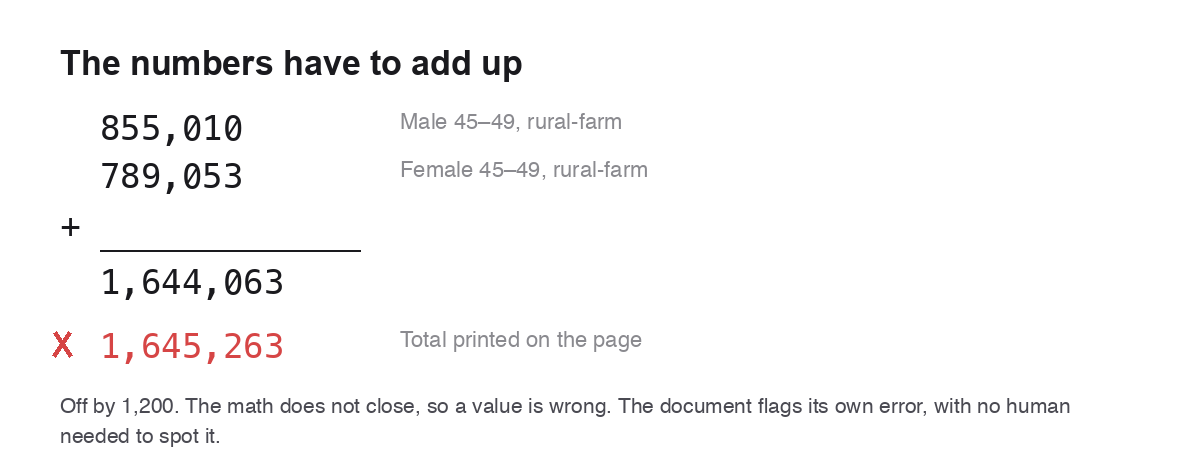
Most documents have numbers that must agree: line items sum to a total, columns add up, a tax is a fixed percentage. Check those relationships and the data catches its own errors, no human needed.
Read It More Than Once
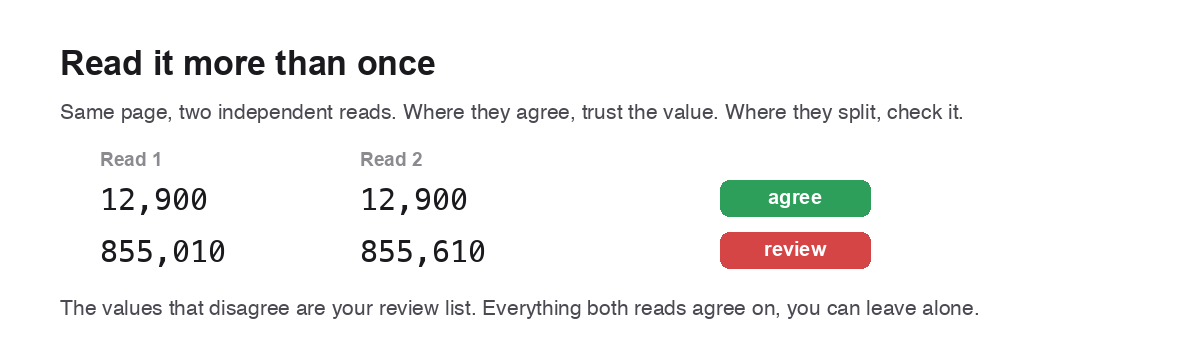
Read the same page twice, by a different model or from a cleaned-up image. Where the two reads agree, the value is almost certainly right. Where they disagree, you have found a cell to check.
It's never 100%, and that's fine. Stack these and confidence climbs, though never to certainty, and some errors will slip through. The goal is to be more accurate, faster, and cheaper than a human checking every field. A specialized model with stacked checks like these clears that bar easily.
When One Document Becomes a Thousand
Everything so far has been using one document. Real work is often a folder of thousands of contracts, a daily stream of invoices, or a knowledge base feeding a retrieval-augmented generation (RAG) system. That needs a pipeline.
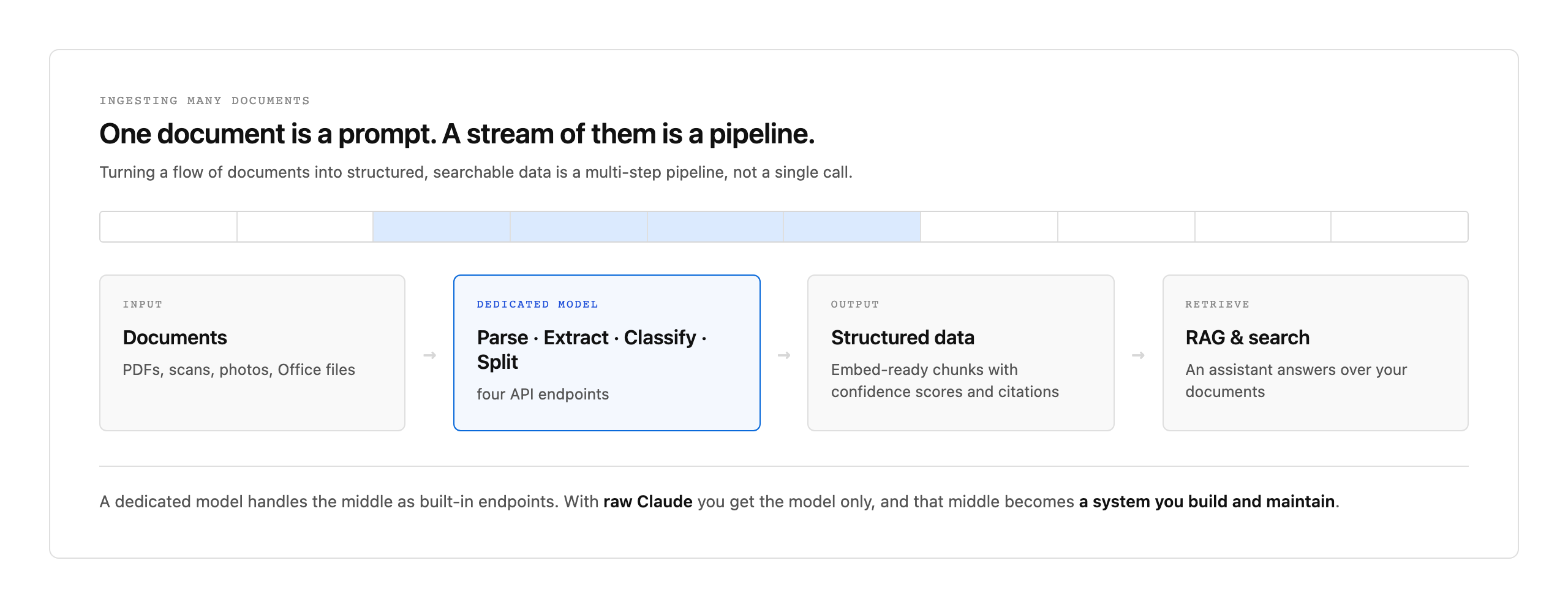
A dedicated document model gives you the whole pipeline as API calls: parse, extract, classify, and split are separate endpoints, chunks come back ready to embed, and every value carries its confidence and citation. With raw Claude you get only the model and build the rest yourself. For a handful of documents that plumbing isn't worth it and raw Claude is the faster path, but the more you process, and the longer it has to keep running, the more a specialized model earns its place by handing it to you out of the box.
What It Costs: Tokens vs Per-Page Pricing
The two approaches bill in different units. An LLM charges per token, so a page costs whatever its image and the returned text add up to. A dedicated parser like Unsiloed charges a flat rate per page, regardless of how dense the page is.
A single-page extraction with Claude runs around 1,400 input tokens (Claude caps a page image at roughly 1,600 visual tokens regardless of its source resolution) plus 150 to 250 output tokens. At mid-2026 API rates, that works out to:
| Reader | Cost per page |
|---|---|
| Claude Haiku 4.5 | $0.0022 |
| Claude Sonnet 4.6 | $0.0065 |
| Claude Opus 4.8 | $0.0108 |
| Unsiloed (paid tiers) | $0.010 to $0.015 |
Notice the spread on the LLM side. The cheapest per-page number, Haiku, is also the model most likely to produce exactly the invisible, plausible-looking errors from earlier in this post — on the LLM side, the low price and the low reliability are the same thing. To get output you can trust from a raw LLM you move up to the capable tiers, and the gap to a dedicated parser narrows to fractions of a cent.
The free tier changes the math again at low volume: Unsiloed's first 2,000 pages a month are free, while an LLM bills from page one. Below that, running your documents through the free tier costs nothing an LLM would have charged for.
Use the LLM as the Brain, Not the Eyes
This was never really a competition. An LLM is good enough to be the brain of a document workflow: it reads a clean page, does the reasoning, and answers in plain language. It's not good enough to be the eyes on a hard example.
So the choice is simple:
- Use an LLM on its own when the document is clean, the task is one-off, the volume is low, and a wrong value is cheap.
- Use a dedicated model when documents are dense, degraded, or handwritten, when accuracy has to be checkable, or when you're running a pipeline over many of them.
- For any serious workflow, use both: let the LLM orchestrate, picking the fields, running the checks, and answering the question, while the dedicated model does the reading and hands back confidence scores and citations.
So, are LLMs good enough for document extraction in 2026? For a clean page and a one-off question, yes. For the documents that actually matter (dense, messy, high-stakes, or arriving by the thousand), no, not on their own. The reliable setup isn't an LLM instead of a dedicated model, but an LLM enhanced by one.