PDF Parsing in Node.js: A Complete Technical Guide (June 2026)
Learn how to use pdf-parse v2 in Node.js for text, tables, images, browser and Next.js workflows, plus when a vision-first parser is a better fit.


pdf-parse extracts text from a clean, digital-native PDF with little code. On scanned files, multi-column reports, or tables, the result can be empty or lose the layout your pipeline needs.
This guide uses Node.js 20.16 or newer and pdf-parse v2. You'll build a runnable script for text extraction, learn how to request metadata, selected pages, images, and tables, and decide when a document needs OCR or layout-aware parsing instead.
TLDR:
- pdf-parse extracts text, document information, embedded images, and detected tables from PDFs.
- Requires Node.js 20.16.0+, 22.3.0+, 23.0.0+, or 24.0.0+ for its documented Node.js support.
getText()is not OCR, and text-only output may not retain the structure your application needs.- Start with
getText(), then addgetInfo(),getImage(), orgetTable()only when your output contract needs them. - Unsiloed AI can return confidence and bounding-box information in its parsing responses.
What Is pdf-parse and When Should You Use It?
pdf-parse is a JavaScript/TypeScript package built on pdf.js. Its current API can extract text and document information, and also exposes image and table extraction methods. You can provide PDF data as a buffer or a URL.
It suits the following uses:
- Extracting text from digital-native PDFs.
- Batch processing documents in a Node.js pipeline.
- Reading metadata such as author and creation date.
The library has real limits worth knowing before you build around it:
- pdf-parse does not perform OCR. A scan without a usable text layer needs OCR or another vision-based preprocessing step.
getText()returns text rather than a guaranteed semantic representation of rows, columns, lists, or headings. Test it on the layouts your application receives.- The package provides
getTable()andgetImage()for table and embedded-image workflows. Evaluate their output on representative documents rather than assuming text extraction will reconstruct every layout.
Build and Run a pdf-parse Extractor
The next three steps are sequential. Complete them in order to create the project, build a local text extractor, and check its output against a representative PDF.
Step 1: Create the Node.js Project
Set up the project: Create a project directory and install pdf-parse with npm:
mkdir pdf-parse-demo
cd pdf-parse-demo
npm init -y
npm install pdf-parse
Check your runtime: Before building a production pipeline, confirm that your runtime is supported. Per the pdf-parse npm documentation, supported versions are 20.16.0+, 22.3.0+, 23.0.0+, and 24.0.0+. Versions 21.x, 19.x, and anything earlier are unsupported.
Add test files: Copy a representative digital-native PDF into the project directory as document.pdf. Keep at least one scan and one layout-heavy document for the validation workflow later in this guide.
Step 2: Extract Text From a Local PDF
The v2 API uses the PDFParse class rather than a bare function call. Its parsing methods are asynchronous, so use promises or async/await throughout.
Create the script: Create parse-local.mjs in the project directory:
import { readFile } from "node:fs/promises";
import { PDFParse } from "pdf-parse";

async function extractText(filePath) {
  const buffer = await readFile(filePath);
  const parser = new PDFParse({ data: buffer });

  try {
    const result = await parser.getText();
    console.log(`Pages: ${result.total}`);
    console.log(result.text);
  } finally {
    await parser.destroy();
  }
}

const filePath = process.argv[2] ?? "./document.pdf";
await extractText(filePath);
Step 3: Run and Validate the Extractor
The first run establishes whether flat text is sufficient for the document and downstream task you care about.
Run it: Run the script against the PDF you copied into the project:
node parse-local.mjs ./document.pdf
The script prints the parsed page count followed by the extracted text. If the output is empty, out of reading order, or missing the structure your application needs, don't try to repair it with string splitting yet. Test the table method or route the file to OCR or layout-aware parsing. For PDF to JSON conversion, text output is often only a starting point.
Adapt the Extractor for Other Inputs and Outputs
Each subsection below is an independent variation on the working local extractor from Step 2. Start from the original parse-local.mjs each time rather than applying these changes one after another.
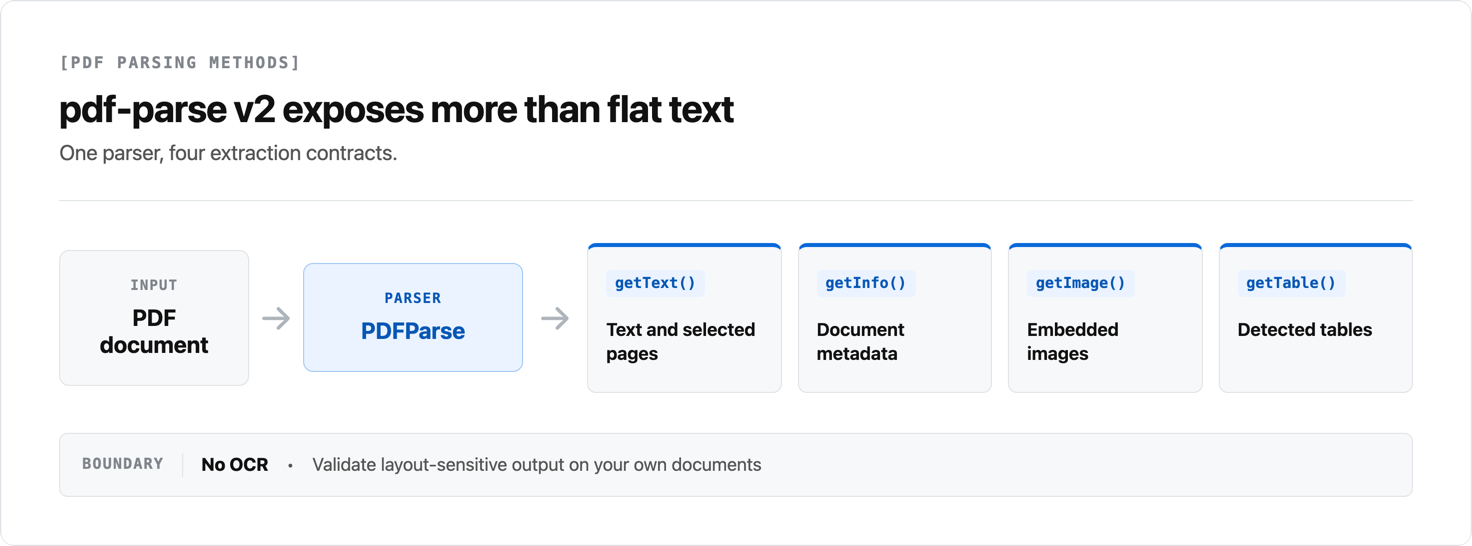
The available methods cover text and selected pages, metadata, embedded images, and detected tables. The diagram shows how those outputs branch from the same parser instance.
Parse a PDF From a Remote URL
Create the URL variant: Create parse-remote.mjs when the PDF is available through a URL:
import { PDFParse } from "pdf-parse";

async function extractFromUrl(url) {
  const parser = new PDFParse({ url });

  try {
    const result = await parser.getText();
    console.log(`Pages: ${result.total}`);
    console.log(result.text);
  } finally {
    await parser.destroy();
  }
}

const url = process.argv[2];
if (!url) throw new Error("Pass a PDF URL as the first argument");
await extractFromUrl(url);
Run it: Pass a direct PDF URL:
node parse-remote.mjs https://bitcoin.org/bitcoin.pdf
The remote server must allow the request and return PDF data. For untrusted URLs, validate the host, response size, and content type before parsing.
Inspect PDF Metadata
The getInfo() method returns document information. Common fields include Title, Author, Creator, and Producer, though these values are supplied by the authoring tool and may be empty.
Modify the local script: In parse-local.mjs, replace the getText() call and both output lines with:
const result = await parser.getInfo();
const { Title, Author, Creator, Producer } = result.info ?? {};
console.log({ Title, Author, Creator, Producer });
Keep the existing try and finally blocks so the parser is always destroyed.
Extract Selected Pages With getText()
Modify the local script: In parse-local.mjs, replace the getText() call and its output lines with the following code to extract pages 1 and 3:
const result = await parser.getText({ partial: [1, 3] });
console.log(result.text);
The partial array uses one-based page numbers. Use getText() without partial when you need the full document. The current v2 API does not use the legacy pagerender callback.
Extract Embedded Images
PDFs can store images as raw binary streams, so text extraction does not expose them. pdf-parse v2 provides getImage() for embedded-image extraction and returns images by page. Use an image threshold to exclude small decorative images when appropriate.
Modify the local script: In parse-local.mjs, replace the getText() call and its output lines with:
const result = await parser.getImage({ imageThreshold: 80 });
for (const page of result.pages) {
  console.log(`Page ${page.pageNumber}: ${page.images.length} images`);
}
This reports image counts without printing image buffers or base64 data to the terminal. Lower imageThreshold only when the default excludes an image your application needs.
Extract Tables
PDFs can store tables as visually formatted text with no semantic structure, so text extraction can lose or scramble them. The getText() method does not promise a semantic table model. pdf-parse v2 also provides getTable() for detected tables. Verify it against your files, especially where tables have merged cells or spanning headers.
Modify the local script: In parse-local.mjs, replace the getText() call and its output lines with:
const result = await parser.getTable();
for (const page of result.pages) {
  console.log(`Page ${page.num}`);
  console.dir(page.tables, { depth: null });
}
Compare the resulting rows and columns with the source PDF. A successful method call does not prove that merged cells, spanning headers, or multi-page tables were reconstructed correctly.
When a text-only result is not sufficient, options include:
- Coordinate-based reconstruction: group positioned spans by Y-axis position and infer columns from X-axis gaps.
- Heuristic line detection: infer rows from horizontal whitespace gaps.
- Vision-based parsing: identify the table visually and evaluate its output on representative files.
For varied production documents, test whether the output preserves the information your downstream application needs, including coordinates, reading order, and table boundaries.
Run a Separate Browser Proof of Concept
Browser support is a separate deployment path, not the next change to the Node.js script. pdf-parse v2 supports CJS and ESM in Node.js and the browser, but the browser build needs its matching worker.
Create the Browser Entry Point
Create the browser files: Create index.html and place document.pdf beside it. This example pins the package to major version 2 and configures the matching worker:
<pre id="output">Parsing…</pre>

<script type="module">
import { PDFParse } from "https://cdn.jsdelivr.net/npm/pdf-parse@2/dist/pdf-parse/web/pdf-parse.es.js";

PDFParse.setWorker(
  "https://cdn.jsdelivr.net/npm/pdf-parse@2/dist/pdf-parse/web/pdf.worker.mjs",
);

const parser = new PDFParse({ url: "/document.pdf" });
try {
  const result = await parser.getText();
  document.querySelector("#output").textContent = result.text;
} finally {
  await parser.destroy();
}
</script>
Serve the Browser Example Over HTTP
Run it: Serve the directory over HTTP rather than opening the file directly:
npx --yes serve .
Open the local URL printed by serve. For production, install and bundle the web build instead of depending on a public CDN at runtime.
Plan for Production Runtimes
For a Next.js application, test the selected Node or web build in the exact route/runtime you deploy. Do not rely on a generic webpack externalization rule as a substitute for that test.
Deployment considerations:
- The pdf-parse documentation lists Next.js + Vercel, AWS Lambda, Netlify, and Cloudflare Workers among supported targets.
- Vercel's Node.js runtime provides Node.js APIs. Check its bundle limits for your deployment.
- AWS Lambda has deployment-package limits, so account for the complete bundle, layers, and runtime dependencies.
Recommended Workflow for Reliable PDF Extraction
Use a representative test set before you choose a parser or ship a pipeline:
- Start with the simplest contract. Run
getText()on a digital-native PDF and confirm that the text and page count match the source. - Test the structure you consume. If your application reads tables or images, run
getTable()orgetImage()and compare the returned elements with the PDF. Do not infer success from a nonempty response. - Define acceptance checks. Record expected pages, headings, table columns, required fields, and failure conditions for each document class.
- Route failures deliberately. Send scans to OCR. Send documents where position or reading order changes the answer to a layout-aware or vision parser.
- Measure on production-shaped documents. Benchmark accuracy, latency, memory, and error handling on the same layouts and file sizes your application receives.
Use pdf-parse when its output passes those checks. Choose a different parser when fixing its output would require layout reconstruction, OCR, or document-specific string heuristics.
Comparing pdf-parse with pdf2json and Similar Packages
Each JavaScript PDF library has a different tradeoff.
| Library | Best For | Key Tradeoff |
|---|---|---|
| pdf-parse | Text, document information, embedded images, and detected tables | Does not perform OCR; validate extraction quality on your PDFs |
| pdf2json | Converting PDF text and interactive form elements to JSON for Node.js/server-side processing | Choose it when its JSON-oriented output fits your workflow |
| pdfjs-dist | Building a PDF viewer or using the PDF.js display layer | Lower-level display APIs require more integration work than a text-only wrapper |
| pdfreader | Callback-driven PDF items with text and x/y coordinates; rule-based table parsing | Consumers assemble the emitted items into their own data structure |
| pdf-parse-new | A package that documents worker-thread and child-process parsing strategies | Treat its performance statements as package self-reports and benchmark your workload |
Choose pdf-parse for text extraction from clean, digitally generated PDFs. Review document parsing software options when you need OCR or layout-aware extraction.
Troubleshooting pdf-parse in Node.js
The following configuration and input failures have direct fixes.
For a custom browser build, configure the web worker with PDFParse.setWorker() as shown in the package documentation. Use the worker file that matches the build you ship.
Password-protected PDFs can be supplied with a password load parameter. Handle PasswordException, and always call destroy() in finally to release parser resources.
These practices reduce unnecessary processing and make failures easier to diagnose:
- Use
partialwithgetText()when you only need selected pages, rather than parsing the full document by default. - Catch parser errors such as invalid-PDF, password, format, response, and abort errors, then log enough context to reproduce the failing input.
- Keep v2 imports on the documented
pdf-parsepackage entry point; do not use the legacypdf-parse/lib/pdf-parse.jspath.
Vision-First Parsing for Production Document Pipelines
Use a vision-first parser when your documents need layout, table, or scanned-page handling.
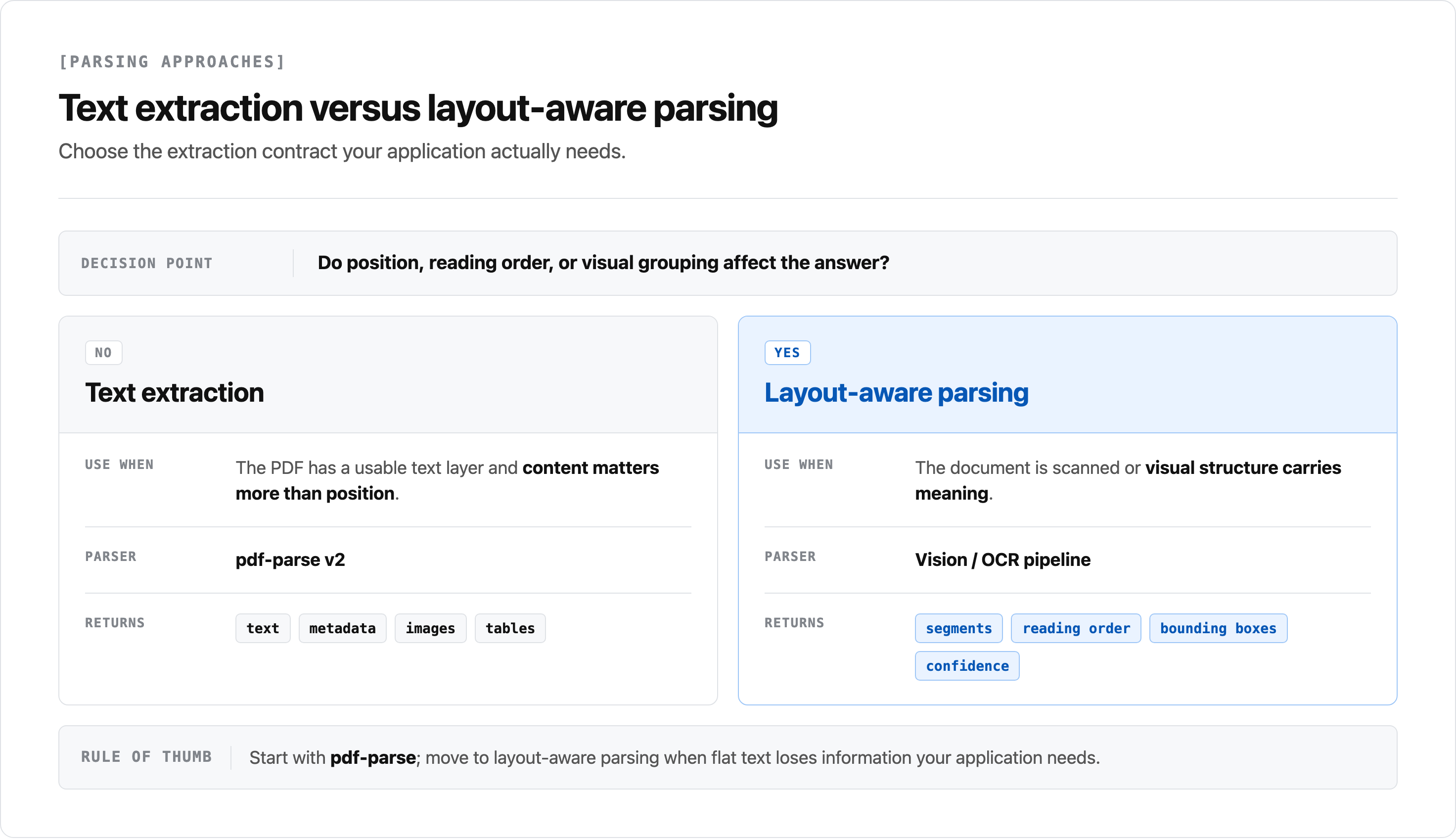
Unsiloed AI can return page-numbered segments with segment-level confidence and bbox values from its /parse endpoint, alongside OCR word entries that include text, confidence, and bbox. In a live check on 2026-08-07, its /v2/extract endpoint returned each requested schema field as a value with grounding_score and extraction_score. Citations were null for that test. Treat citations and bounding boxes as response fields to inspect for your endpoint and document, not universal per-field guarantees. See text extraction and structured document data extraction for related implementation context.
For a deeper comparison, see the document parser tools comparison.
When to Choose pdf-parse for Node.js Projects
pdf-parse is a good fit for Node.js projects when its text, metadata, image, or table methods produce the output your PDFs require. For scans and layout-sensitive workflows, book a demo to evaluate vision-first parsing on representative documents.
FAQ
The following answers address common pdf-parse implementation questions.
Can I use pdf-parse for scanned PDFs?
pdf-parse alone does not perform OCR, so a scanned document without a usable text layer needs an OCR or vision-based preprocessing step before text extraction can be reliable.
How do I extract table structure from PDFs in Node.js?
Use getTable() in current pdf-parse v2 when detected-table output suits your documents, and test it against merged cells, spanning headers, and multi-page tables. getText() is text output rather than a guaranteed semantic table model. When the result is not adequate, coordinate-based reconstruction or a vision-based parser are alternatives to evaluate on your representative files.
Does pdf-parse work in Next.js API routes?
Yes. pdf-parse documents Next.js + Vercel as a supported target. Use the Node or web build appropriate to the route/runtime, configure a web worker for browser use, and test the deployed bundle with the PDFs your application accepts.
What is the difference between pdf-parse and pdfjs-dist?
pdf-parse provides a higher-level API for text, document information, images, and detected tables. pdfjs-dist is the PDF.js distribution used when you need its viewer or display-layer capabilities. Choose based on the output and integration surface you need, then measure the resulting bundle for the version you deploy.
How do I choose a document processing solution with low error rates?
Error rates depend on document structure, the selected extraction method, and how you validate results. Test text, table, image, OCR, and vision-based approaches against representative documents and define acceptance checks for the fields your workflow uses. When confidence, locations, or citations are important, inspect the actual API response for the endpoint and document type you plan to deploy.