What Are the Best APIs for Converting PDFs to Structured JSON? (April 2026)
You need JSON from a 40-page financial filing, but your current tool either strips all structure or takes 20 minutes to process. Your extraction pipeline works fine on simple PDFs but falls apart when tables span multiple columns or images contain embedded labels. Most structured data extraction too


You need JSON from a 40-page financial filing, but your current tool either strips all structure or takes 20 minutes to process. Your extraction pipeline works fine on simple PDFs but falls apart when tables span multiple columns or images contain embedded labels. Most structured data extraction tools force you to choose between speed and accuracy, between OCR-only approaches that miss visual context and LLM-based methods that hallucinate on ambiguous content. What you actually need is something vision-first that processes image tokens alongside text, handles multimodal content without breaking, and returns confidence scores so you know when to flag uncertain outputs before they reach production.
TLDR:
- PDF to JSON APIs extract structured data from unstructured documents using vision models, OCR, and schema-based extraction
- Top APIs provide word-level citations, confidence scores, and bounding boxes to validate every extracted field
- Vision-first architectures outperform OCR-only tools on tables, charts, and complex layouts by 40%+ in accuracy
- Unsiloed AI handles 20+ file formats with dual-stream vision models and processes 10M+ pages weekly for Fortune 150 banks
- Compare APIs on multimodal accuracy, hierarchy preservation, processing speed, and compliance before production deployment
What Are PDFs to JSON APIs?
PDFs are everywhere in enterprise workflows, but they're built for humans to read, not machines to parse. A PDF to JSON API sits between your raw documents and whatever AI system or application needs to consume them, converting unstructured content into structured, machine-readable data your code can actually work with.
The core job is straightforward: take a document with unpredictable layouts, nested tables, embedded images, and inconsistent formatting, then produce clean JSON that downstream systems can reliably process. Where things get complicated is in the execution. Generic text extraction strips away structure. OCR-only approaches miss visual context. And LLMs alone hallucinate when source data is ambiguous or dense.
A PDF to JSON API worth using in production needs to understand documents the way a human does: reading order, layout hierarchy, table relationships, and the difference between a header and a footnote.
That's why the better APIs in this space are vision-first, using computer vision models alongside OCR to preserve document structure before outputting JSON. The result is something your RAG pipeline, AI agent, or automation workflow can actually trust.
These APIs typically expose two distinct modes. First, parsing: converting full documents into structured chunks with preserved hierarchy. Second, schema-based extraction: pulling specific fields into a defined JSON shape with confidence scores attached. Both serve different jobs, and a solid API handles both.
How to Choose a PDF to JSON API
When choosing a PDF to JSON API, the demo environment is rarely the hard part. The real test is a 40-page financial filing, a scanned form, or a slide deck full of charts.
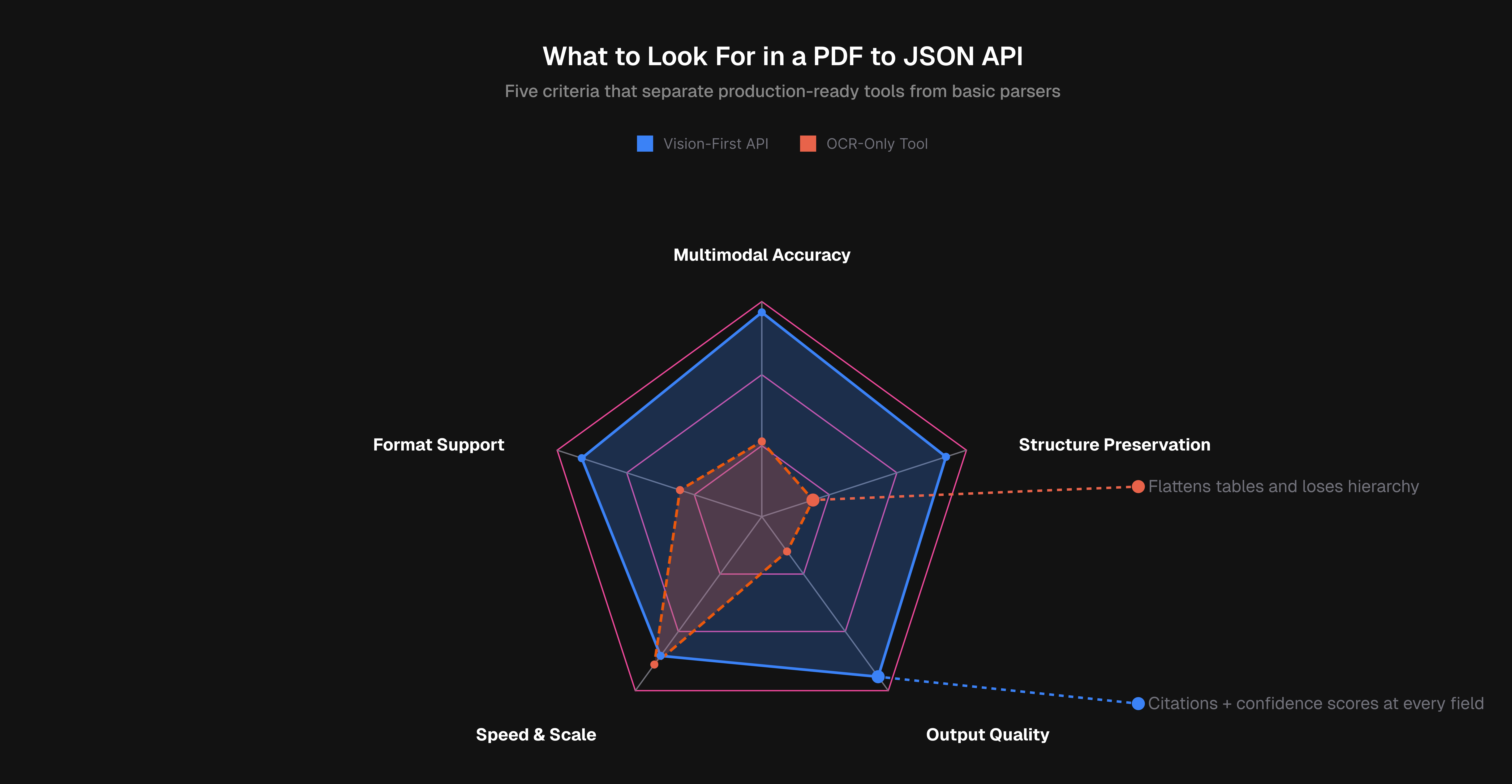
Accuracy on Multimodal Content
Tables are where most tools fail first. A parser that flattens merged cells into garbled text will break any downstream system depending on it. Look for APIs that use vision models to understand table structure, embedded images, and chart data.
Structure and Hierarchy Preservation
A useful JSON response should identify a block as a section header instead of a plain string. Reading order, parent-child relationships, and layout hierarchy all matter for RAG pipelines that need to reason about document context.
Output Quality: Citations and Confidence Scores
Every extracted field should carry a confidence score and a source location reference. According to Parseur, the best extraction APIs offer field-level confidence scoring to flag uncertain outputs before they reach downstream systems. Without this, errors propagate silently.
Processing Speed and Scalability
Async job handling matters the moment you move beyond single documents. Check batch processing support, throughput ceilings, and whether latency stays consistent under load.
Format Support
Scanned images, DOCX files, PPTX decks, and spreadsheets should all be in scope. An API limited to born-digital PDFs will create gaps in any real-world workflow.
Best Overall PDF to JSON API: Unsiloed AI
We built Unsiloed AI for the documents that break other tools: dense financial filings, scanned legal forms, clinical records packed with tables and images. The goal was a production-grade API that treats document structure as a first-class concern, not an afterthought.

What Unsiloed AI Offers
- Dual-stream vision architecture that processes image tokens alongside text to capture both semantic content and visual layout
- Schema-based extraction with word-level citations, bounding boxes, and confidence scores for every field
- Multimodal support for charts, plots, images, and complex nested tables
- 20+ file format support including PDFs, PPTX, DOCX, Excel, and scanned documents
Core Strengths
The dual-stream architecture is what separates Unsiloed from generic parsers. Instead of treating a PDF as a flat text stream, our vision model reads actual image tokens alongside text, which is how it correctly handles merged table cells, multi-column layouts, and figures with embedded labels. Extracted fields come back with word-level citations and confidence scores, so validation workflows know exactly where each value came from and how certain the model is.
Advantages
The API covers parsing, classification, and document splitting in a single system. Async job handling keeps large document batches moving without blocking. Outputs are structured JSON and Markdown for RAG and LLM ingestion. SOC 2 compliance and on-premise deployment options make it viable for Fortune 150 banks and NASDAQ-listed companies with strict data requirements. We process millions of pages weekly across finance, legal, and healthcare.
Unsiloed outperforms tools like LlamaIndex, Gemini, Mistral, and Unstructured.io, particularly on multimodal documents where layout complexity is highest.
LlamaIndex
LlamaParse is LlamaIndex's document parsing API, built to convert PDFs and other file formats into markdown for RAG pipelines.
There are some clear tradeoffs worth knowing. LlamaParse requires separate API keys for OpenAI and your vector database, which adds setup friction. Usage caps at 1,000 pages per day in preview mode, and high-resolution parsing runs up to 20x slower than fast mode. For teams processing complex documents at scale, that performance gap becomes a real bottleneck.
What They Offer
- Multi-format parsing across PDFs, PPTX, DOCX, and XLSX
- Table extraction into markdown and semi-structured output
- Natural language instructions to guide parsing behavior
- Native integrations with vector databases like Elasticsearch and Pinecone
Pulse
Pulse builds extraction APIs using proprietary Vision Language Models trained for documents and spreadsheets, using OCR-based bounding box annotations across document types.
What They Offer
- Vision models scoped to documents and spreadsheets
- Bounding box extraction with OCR coverage on tables and graphs
- SOC 2 Type 2 and HIPAA compliance
- Fast API integration for quick setup
The tradeoff is scope: Pulse handles parsing and extraction well, but lacks classification and document splitting. Production workflows that require document routing will need additional tooling on top.
Unstructured
Unstructured offers open-source components and a SaaS API for ingesting and preprocessing documents across PDFs, HTML, DOCX, and 20+ formats.
What They Offer
- Open-source library with partition functions for automatic file type detection
- Pre-built connectors for AWS S3, GitHub, and Google Cloud Storage
- API and self-hosted deployment options
The open-source flexibility is genuinely useful for teams with engineering bandwidth to manage it. Setup requires installing format-specific dependencies and system-level packages like Tesseract and Poppler, which creates real maintenance overhead in production. The high-resolution strategy for complex PDFs can also run 20x slower than fast mode, and accuracy on documents with embedded charts or diagrams stays inconsistent compared to vision-first approaches.
Good for teams starting with open-source tooling. Less suited for production workflows where accuracy on multimodal documents is non-negotiable.
Reducto
Reducto pairs traditional computer vision with Vision-Language Models to parse documents for LLM pipelines.
There are a few things worth noting about what the API covers and where it stops:
- VLM-based layout understanding across 30+ document formats including PDFs, Excel, and PowerPoint
- Parse, Extract, Split, and Edit endpoints
- Structured JSON output with bounding boxes and layout type annotations
The VLM approach gives Reducto better structural awareness than pure OCR tools, which helps with complex layouts. The gap shows up at the workflow layer. There is no built-in classification, so routing documents to the right pipeline requires you to wire that logic yourself. Validation is also your responsibility, since there is no confidence scoring to flag uncertain extractions before they reach downstream systems.
A reasonable fit for AI teams that need solid document parsing and are prepared to build their own validation and routing logic around it. Less suited for production environments where you need a full document processing stack ready to go.
Extend
Extend does not appear to be a standalone document parsing API comparable to the other tools in this list. Search results for "Extend" in the context of PDF to JSON conversion surface Adobe PDF Services API information, suggesting this refers to an Adobe product extension or a capability bundled within a larger suite instead of a dedicated extraction API.
If you're considering Extend as a document processing option, confirm whether you're looking at Adobe's PDF Services API or a separate product entirely. Adobe PDF Services covers PDF manipulation, generation, and basic extraction, but it is an enterprise Adobe product instead of a purpose-built document intelligence API designed for LLM pipelines.
Feature Comparison Table
| Feature | Unsiloed AI | LlamaIndex | Pulse | Unstructured | Reducto |
| Vision-First Architecture | Yes | No | Yes | No | Yes |
| Word-Level Citations | Yes | No | Yes | No | Yes |
| Confidence Scores | Yes | No | Yes | No | Yes |
| Document Classification | Yes | No | No | No | No |
| Document Splitting | Yes | No | No | No | Yes |
| Schema-Based Extraction | Yes | No | Yes | No | Yes |
| Hierarchical Chunking | Yes | Yes | No | No | No |
| On-Premise Deployment | Yes | No | No | Yes | No |
| Bounding Boxes | Yes | Yes | Yes | Yes | Yes |
| 20+ File Formats | Yes | Yes | No | Yes | Yes |
| SOC 2 Compliance | Yes | No | Yes | No | No |
| Open Source Option | No | Yes | No | Yes | No |
Why Unsiloed AI Is the Best PDF to JSON API
The dual-stream vision architecture is what sets Unsiloed AI apart in production. Where competing tools lose structure on complex layouts or hallucinate on dense tables, the vision model captures both content and visual hierarchy simultaneously, producing JSON you can actually trust.
Word-level citations, confidence scores, classification, and splitting are all built in. No stitching together multiple tools. No custom validation layer. For AI teams in finance, legal, and healthcare processing high-stakes documents at scale, that completeness matters. Get started with Unsiloed AI today.
Final Thoughts on Structured Data Extraction
Document intelligence APIs either preserve structure or they don't, and that gap shows up fast in production. Structured data extraction works when the API understands layout beyond plain text, which is why vision models matter for anything beyond basic parsing. Your workflow deserves more than guesswork, so try Unsiloed AI on the documents that matter most.
FAQ
Which PDF to JSON API works best for teams just getting started versus those processing documents at enterprise scale?
If you're prototyping or working with straightforward documents, open-source options give you flexibility to experiment without upfront costs. For enterprise production workflows handling complex multimodal documents where extraction accuracy is non-negotiable, look for vision-first APIs with confidence scoring, compliance certifications, and on-premise deployment support.
How do I choose between parsing and schema-based extraction for my use case?
Use parsing when you need to convert entire documents into structured chunks for RAG pipelines or knowledge bases where you want to preserve reading order and hierarchy. Choose schema-based extraction when you need specific fields pulled into a predefined JSON structure, like extracting invoice line items or contract dates with citations back to source locations.
What makes complex tables and charts fail in most PDF extraction tools?
Traditional OCR reads text sequentially without understanding visual layout, so merged cells, nested headers, and multi-column structures get flattened into garbled output. Vision models that process image tokens alongside text can correctly interpret table boundaries, cell relationships, and embedded chart labels the way a human reader would.
Can I trust extracted data without manual verification if the API provides confidence scores?
Confidence scores let you automate verification by setting thresholds for what gets flagged for human review versus what passes straight through. Fields with scores above 95% typically require minimal checking, while anything below 80% should trigger validation workflows before reaching downstream systems.
When should I consider moving from a free or open-source tool to a production API?
Make the switch when manual error correction takes more engineering time than the API costs, when compliance requirements demand SOC 2 or HIPAA certifications, or when processing volume exceeds what you can reliably handle with self-hosted infrastructure and maintenance overhead.