How to Use JsonReader.setLenient(true) to Accept Malformed JSON (March 2026 Guide)
If you've ever deployed code that works locally but explodes in production with use JsonReader.setLenient(true) to accept malformed JSON, you know the frustration. The error message tells you exactly what to do, but doing it blindly creates worse problems downstream because lenient mode hides API co


If you've ever deployed code that works locally but explodes in production with use JsonReader.setLenient(true) to accept malformed JSON, you know the frustration. The error message tells you exactly what to do, but doing it blindly creates worse problems downstream because lenient mode hides API contract violations and silently accepts corrupted responses. The root cause is almost always non-JSON content hitting your parser: redirected HTML pages, authentication errors returned as plain text, or truncated responses that never completed. Before you reach for .setLenient(), you need to see what's actually coming over the wire, validate it externally, and decide whether the problem is your parser being too strict or your data pipeline being broken. We'll cover both scenarios and show you when lenient mode is the right tool versus when it's just technical debt in disguise.
TLDR:
- setLenient(true) lets Gson parse non-standard JSON like unquoted keys or trailing commas
- Most errors at line 1 column 1 mean you received HTML or plain text instead of JSON
- Lenient mode hides API bugs and data corruption - fix the source instead of masking failures
- Log raw response bodies before parsing to catch non-JSON content in Retrofit or Android apps
- Unsiloed AI extracts structured JSON from PDFs with schema validation and confidence scores
Understanding the JsonReader.setLenient(true) Error
When Gson's JsonReader encounters input that doesn't conform to the JSON spec, it throws a MalformedJsonException with a message like:
Use JsonReader.setLenient(true) to accept malformed JSON at line 1 column 1 path $
Gson is telling you exactly what happened: the parser received input it couldn't interpret as valid JSON, and it's suggesting a way to relax that behavior.
By default, JsonReader operates in strict mode, expecting well-formed JSON per RFC 8259. No trailing commas, no comments, no unquoted keys, and no bare primitives at the top level. Lenient mode loosens those rules, accepting a wider range of non-standard input without throwing
an exception.
This error surfaces in Java apps, Android, Retrofit2, Flutter projects using Lottie, and anywhere Gson is the underlying parser. The trigger is almost always the same: the response body or file your code is trying to parse isn't valid JSON.
Common Causes of Malformed JSON Errors
Most malformed JSON errors trace back to a handful of recurring issues. Knowing which one you're dealing with saves a lot of time.
- Unquoted or single-quoted keys:
{name: "value"}or{'name': 'value'}both break strict parsing - Trailing commas:
{"key": "value",}is invalid per RFC 8259, even though JavaScript tolerates it - Incorrect literal casing:
True,False, orNULLinstead oftrue,false,null - Unescaped control characters inside strings, like raw newlines or tab characters
- A bare primitive at the top level: a server returning just
"hello"or42without a wrapping object or array, similar to multi-page tables breaking extraction pipelines - HTML error pages or plain-text responses arriving where JSON is expected, which is common in Retrofit2, Firestick app integrations, and Cinema HD setups
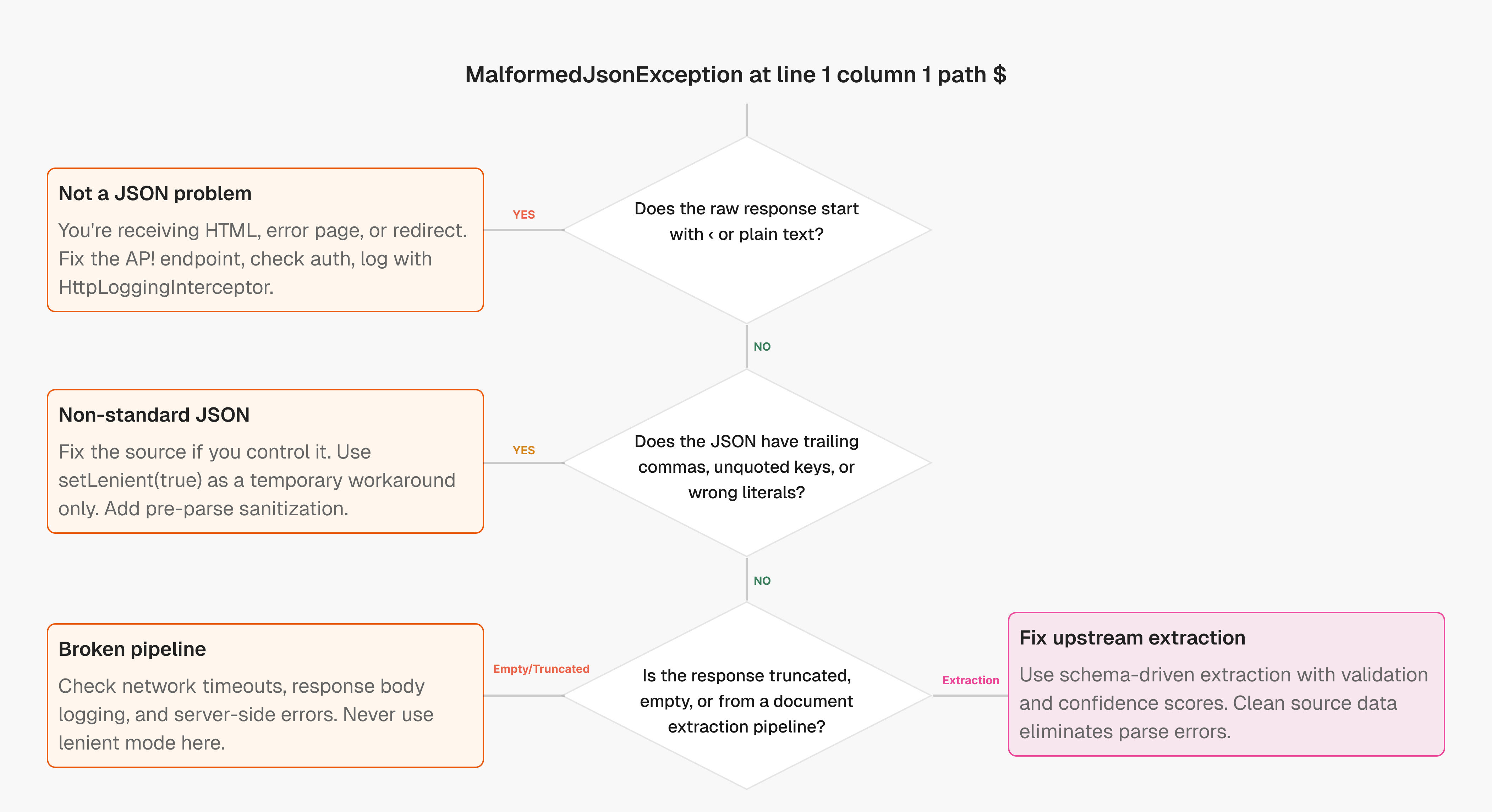
That last one is worth calling out. A tracked Gson issue confirms that many line 1 column 1 path $ errors come from non-JSON responses, not broken JSON. The parser hits < or a space character immediately and fails before reading a single valid token.
Implementing JsonReader.setLenient(true) in Java
There are a few different ways to apply lenient mode depending on your setup, though this is a brittle fix similar to section references failing after chunking.
Standalone JsonReader
JsonReader reader = new JsonReader(new StringReader(jsonString));
reader.setLenient(true);
Gson gson = new Gson();
MyObject obj = gson.fromJson(reader, MyObject.class);
GsonBuilder Configuration
For global lenient parsing across your app:
Gson gson = new GsonBuilder()
    .setLenient()
    .create();
MyObject obj = gson.fromJson(jsonString, MyObject.class);
Retrofit2 Integration
Retrofit doesn't expose JsonReader directly, so configure it through a custom GsonConverterFactory:
Gson gson = new GsonBuilder()
    .setLenient()
    .create();

Retrofit retrofit = new Retrofit.Builder()
    .baseUrl("https://api.example.com/")
    .addConverterFactory(GsonConverterFactory.create(gson))
    .build();
Moshi
Moshi has no direct lenient mode equivalent. If you're hitting use JsonReader.setLenient(true) to accept malformed JSON at path $ with Moshi, intercept and sanitize the response before it reaches the parser:
val rawJson = response.body?.string() ?: ""
val adapter = moshi.adapter(MyObject::class.java)
val result = adapter.fromJson(rawJson)
Moshi will throw on malformed input, so you must fix the source or pre-process the string.
Gradle
There is no Gradle-level flag for lenient mode. Any reference to "gradle use JsonReader setLenient true" points to a misunderstanding. The fix lives in your app code, not your build config.
The Risks of Using Lenient Mode
Lenient mode solves the immediate error, but it can quietly introduce worse problems downstream.
When you relax parsing rules, Gson accepts input that was never meant to be valid. A response that's partially corrupted, truncated, or structured differently than expected may parse without throwing an exception, giving you silent data loss instead of a clear failure. That's harder to debug than a stack trace.
There are a few specific risks to keep in mind:
- Masked API contract violations: if a backend starts returning malformed responses due to a bug, lenient mode hides the regression
- Silent field mismatches: unquoted keys or unexpected literals may map to null fields with no warning
- Security exposure: accepting arbitrary input formats widens the attack surface for injection or unexpected behavior in downstream systems
As the futurestud.io Gson lenient guide notes, lenient mode is intended for parsing relaxed JSON formats, not for tolerating broken API responses indefinitely.
Treat it as a temporary workaround while you fix the actual source, not a permanent configuration.
Debugging Malformed JSON at the Source
Before reaching for lenient mode, spend a few minutes confirming what you're actually receiving.
The error message itself is your first clue. line 1 column 1 path $ almost always means the response starts with something other than { or [. Log the raw response body before parsing:
String raw = response.body().string();
System.out.println(raw); // Is this actually JSON?
For Retrofit2, add an OkHttp HttpLoggingInterceptor at BODY level to capture full request and response payloads. This surfaces HTML error pages, empty bodies, and redirected responses immediately.
Once you have the raw string, paste it into JSONLint or a similar validator. It will point to the exact line and character causing the parse failure, which is far faster than reading stack traces. As copyprogramming.com notes, most decode failures come from receiving non-JSON content instead of structurally broken JSON.
Fix the source, then remove lenient mode if you added it.
Environment-Specific Implementations
The fix is the same in principle across environments, but the wiring differs enough to be worth spelling out.
Android (Retrofit + Gson)
Pass a lenient Gson instance into GsonConverterFactory as shown in the Implementing section. If the error persists, check for empty or HTML responses before suspecting Gson.
Flutter (Lottie)
Lottie parses .json animation files internally. If you see this error, the asset file is likely corrupted or truncated during the build. Re-export from the source and verify the file loads cleanly outside Flutter first.
Firestick / Cinema HD
These apps typically surface the error when a media source returns an HTML error page instead of a valid JSON feed. The fix is on the server or source side, not in the app parser settings.
Java (Server-Side)
Use GsonBuilder().setLenient() scoped only to the specific service handling the problematic feed. Avoid setting it globally.
Alternatives to Lenient Parsing
Lenient mode is a patch. These are the actual fixes.
There are several approaches worth considering depending on how much control you have over the data pipeline.
Server-Side Validation
If you control the API, run responses through a JSON schema validator before they leave the server. Catching malformed output at the source means clients never see bad input in the first place.
Custom TypeAdapters
Gson lets you register a TypeAdapter to handle non-standard input gracefully without relaxing global parsing rules. Scoped error handling beats blanket leniency every time.
API Contract Enforcement
Define an explicit response contract and lint against it in CI, or request a demo to see how schema-driven extraction prevents these issues. If the contract breaks, fail the build instead of the parser.
Pre-Parse Sanitization
Strip known offenders like trailing commas or unquoted keys with a lightweight regex pass before handing the string to Gson. It keeps strict mode intact without requiring server access.
| Approach | When to Use | Implementation Complexity | Maintenance Risk |
| Strict Mode (Default) | Use whenever possible with well-formed JSON from trusted APIs that follow RFC 8259 standards | Zero configuration required - Gson's default behavior with no code changes needed | Lowest risk - catches contract violations immediately and fails fast on malformed input |
| JsonReader.setLenient(true) | Temporary workaround for third-party APIs you cannot control that return non-standard but parseable JSON | Single line configuration change in GsonBuilder or JsonReader initialization | High risk - masks API bugs, hides data corruption, and accepts input that may cause downstream failures |
| Custom TypeAdapters | Handle specific known deviations in JSON structure while keeping strict parsing for everything else | Moderate - requires writing and registering adapter classes for each non-standard type | Medium risk - scoped to specific fields, but requires maintenance as API evolves |
| Server-Side Validation | Best practice when you control the API - validate JSON schema before responses leave the server | Requires schema definition and validation pipeline integration in backend services | Lowest risk - prevents malformed responses from reaching clients in the first place |
| Pre-Parse Sanitization | Clean known issues like trailing commas or unquoted keys before passing to strict parser | Low to moderate - regex or string manipulation before parsing, no parser config changes | Medium risk - must identify all patterns to sanitize, but keeps strict mode benefits |
| Schema-Driven Extraction | Converting unstructured documents to JSON where output quality determines parse success | Requires structured extraction API with schema validation and confidence scoring | Lowest risk - produces clean, validated JSON that never requires lenient parsing |
Structured Data Extraction from Complex Documents
Most setLenient errors aren't really parser problems. They're data quality problems that surface at parse time.
When documents like PDFs, invoices, or reports get converted to JSON through brittle extraction pipelines, the output is often inconsistent: missing fields, unescaped characters, or bare strings where objects are expected. Unsiloed AI solves this by making unstructured data LLM-ready from the start. By the time your parser sees it, the damage is done.
Schema-driven extraction solves this upstream. One approach is using an extraction API that outputs structured JSON against a custom schema you define, with confidence scores and word-level citations on every field. There's no ambiguity about whether a field parsed correctly because traceability is built into the output itself.
That determinism is what eliminates the malformed JSON problem at the root. Choose your plan to get started with structured extraction that prevents parse errors before they happen. Clean extraction means your parser never needs lenient mode in the first place.
Final Thoughts on Fixing JSON Parser Errors
When you see use JsonReader setLenient true in your stack trace, resist the urge to flip that switch and move on. You're looking at a data quality failure, not a parser configuration problem. Log the raw response, validate it against your expected contract, and fix whatever is producing broken output before it reaches your code. For extraction pipelines that turn documents into JSON, schema-driven approaches output clean data that never needs lenient parsing. Book a demo to see how structured extraction eliminates malformed JSON at the source.
FAQ
How do I turn on lenient mode in Retrofit2?
Create a custom Gson instance with lenient parsing set to true, then pass it to GsonConverterFactory when building your Retrofit client - the configuration applies to all API calls made through that Retrofit instance.
What causes the "line 1 column 1 path $" error?
This error means the parser encountered something other than a valid JSON opening character at the very start of the response, typically an HTML error page, plain text, or whitespace where JSON was expected.
Should I use setLenient(true) as a permanent solution?
No, lenient mode should be a temporary workaround while you fix the actual data source - it masks API contract violations and can hide bugs that cause silent data loss instead of clear failures.
Can I apply lenient parsing in Moshi the same way as Gson?
Moshi does not have a direct lenient mode equivalent, so you need to either fix the JSON source or intercept and sanitize the response string before it reaches the Moshi parser.
When should I consider fixing the source instead of using lenient mode?
Always start by logging the raw response and validating it - if you're receiving HTML, empty bodies, or truncated responses, the fix belongs on the server or API side, not in your parser configuration.