
What's the Best PDF Parser for RAG Pipelines? We Tested the Top Options in April 2026
Your vector database is full of semantically broken chunks because the parser you're using treats every PDF like a wall of plain text. Tables lose their structure, multi-column layouts scramble reading order, and document hierarchy disappears entirely. We tested the best PDF parsers for RAG pipeline


Your vector database is full of semantically broken chunks because the parser you're using treats every PDF like a wall of plain text. Tables lose their structure, multi-column layouts scramble reading order, and document hierarchy disappears entirely. We tested the best PDF parsers for RAG pipelines against the kinds of documents that break most extraction tools: financial reports with nested tables, regulatory filings with complex layouts, and technical documents with charts and footnotes. Here's what separates parsers that work in production from those that only work in demos. Effective RAG applications depend on clean document parsing from the start.
TLDR:
- Vision-first parsers outperform text-based tools on tables by preserving structure and layout
- Word-level citations and confidence scores let you flag uncertain extractions in production
- Most parsers lack on-premises deployment, ruling them out for compliance-heavy industries
- Unsiloed AI combines schema-based extraction with bounding boxes and hierarchical chunking
- Unsiloed AI processes complex documents for Fortune 150 banks with deterministic outputs
What is a PDF Parser for RAG Pipelines?
A PDF parser for RAG pipelines extracts text, tables, images, and document structure, then converts everything into machine-readable formats like Markdown or JSON that can be chunked, embedded, and indexed in a vector database.
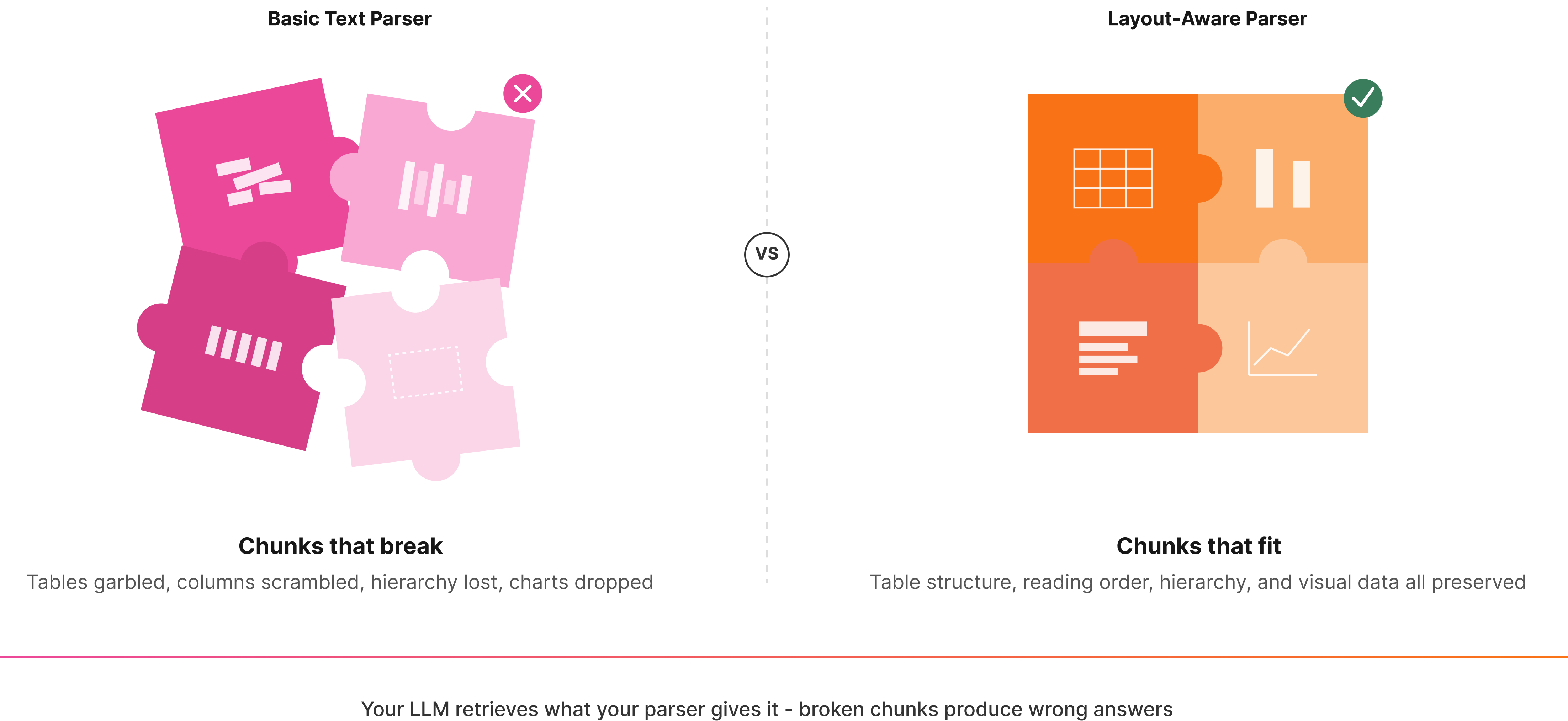
Basic text extraction tools treat a PDF like a flat string of characters. A parser built for RAG understands that a table in a financial report carries rows, columns, and relationships. A section header signals hierarchy. Lose that context, and your retrieval layer has no idea what belongs together.
When a parser drops layout and structure, the chunks going into your vector database are semantically broken. Your LLM retrieves the wrong context, generates confident-sounding but incorrect answers, and you spend weeks debugging retrieval quality instead of shipping.
Layout-awareness is the core requirement. A RAG-ready parser preserves reading order, document hierarchy, and visual relationships between elements, keeping tables intact instead of turning them into garbled noise.
How We Tested PDF Parsers for RAG Pipelines
We focused on criteria that actually matter in production RAG systems, since not all PDF parsers fail in the same way. Some drop table structure entirely. Others preserve text but scramble reading order across multi-column layouts.
Table Extraction Accuracy
Tables are where most parsers fall apart. We measured TEDS (Tree Edit Distance-based Similarity) scores and F1 scores for cell-level extraction, but weighted LLM-based semantic evaluation more heavily. That approach reaches a Pearson correlation of r=0.93 with human judgment versus r=0.68 for TEDS alone, a gap that matters when processing financial statements or regulatory filings where a misread table row is a real error.
Reading Order and Layout Preservation
Multi-column documents, sidebars, and footnotes all break naive top-to-bottom text extraction. We checked whether each parser correctly sequences content across columns and maintains logical reading flow.
Structure and Hierarchy Recognition
Headers, subheadings, and list nesting carry semantic weight for chunking. A parser that flattens everything into plain text removes the signals your chunker needs to group related content correctly.
Confidence Scoring and Traceability
Production pipelines need to know when to trust an extraction and when to flag it for review. We checked whether each tool returns field-level confidence scores and source citations.
Multimodal Handling
Charts, diagrams, and embedded images are common in documents RAG pipelines process. We assessed whether each parser extracts or describes visual elements instead of silently dropping them.
Processing Speed
Latency and throughput at scale matter. A parser that takes minutes per page is not a viable infrastructure layer for teams processing high document volumes.
Best Overall PDF Parser for RAG Pipelines: Unsiloed AI
Unsiloed AI is built around a proprietary dual-stream architecture that processes image tokens alongside text, capturing both semantic content and structural layout simultaneously. Most parsers read a document linearly. Unsiloed reads it the way a human does, understanding that a table is a table, a chart is a chart, and a footnote belongs at the bottom.
What Unsiloed offers for RAG pipelines:
- Vision-first parsing with layout detection, table structure recognition, and reading order preservation that outperforms LlamaIndex, Gemini, Mistral, and Unstructured.io on public benchmarks
- Schema-based extraction with word-level citations, bounding boxes, and confidence scores for full traceability back to source documents
- Deterministic outputs with asynchronous processing designed for production-grade pipelines in finance, legal, and healthcare
- Support for 20+ file formats including PDFs, DOCX, PPTX, images, and scanned documents with native understanding of tables, charts, formulas, and figures
Every extracted field returns a confidence score between 0 and 1, so your pipeline knows exactly when to trust an output and when to flag it for review. In compliance-heavy industries, that is the difference between a system that scales and one that breaks quietly.
For teams processing high document volumes where a misread table row has real consequences, Unsiloed is the only parser purpose-built for that environment.
Docling
Docling is an open-source library developed by IBM Research, now hosted under the LF AI & Data Foundation. It converts PDFs, DOCX, PPTX, and other formats into Markdown or JSON using layout analysis and table structure recognition models.
Here's what it brings to the table:
- Local execution with no API dependency, making it viable for air-gapped environments
- Multi-format support including Office documents, images, audio, and LaTeX
- Plug-and-play integrations with LangChain, LlamaIndex, Crew AI, and Haystack
- A hybrid chunker designed to produce hierarchical chunks for RAG tasks
It works well for teams that want a free, locally-run option for standard documents. Where it falls short is in production: Docling lacks element-level bounding boxes and confidence scores, so there's no built-in mechanism for flagging uncertain extractions. It also struggles with nested tables and charts compared to vision-first approaches.
Tensorlake
Tensorlake breaks documents into semantic segments and applies specialized models per region instead of running a single pass over a full page. It combines document ingestion APIs with serverless workflow capabilities for teams building agentic applications.
What They Offer
- Layout-aware extraction handling tables, handwritten text, and multi-column formats
- Serverless Python-based workflows for end-to-end document processing pipelines
- Agentic runtime with durable functions and managed compute that scales with usage
Customers frequently compare it against Azure, AWS Textract, and open-source options like Docling. Dense charts, nested visual elements, and plots expose architectural limits, and there are no word-level citations or field-level confidence scores, making it harder to build reliable flagging logic into your pipeline.
LlamaIndex
LlamaParse is LlamaIndex's proprietary parsing service, built for RAG over complex PDFs. It uses vision-language models to extract text and visual elements while preserving document structure, outputting clean Markdown.
There are a few things worth noting about what the service offers before getting into its limitations.
- Managed API service supporting PDFs, PPTX, DOCX, and images
- Customizable parsing instructions via LLM prompts for preprocessing, formatting, and summarization
- Native integration with the LlamaIndex framework for quick RAG pipeline setup
If you're already building in the LlamaIndex ecosystem, LlamaParse is a natural fit. The setup is fast and the integration is clean.
The gaps show up in production. LlamaParse has no on-premises deployment path, which rules it out for compliance-heavy industries or air-gapped environments. Images require workarounds instead of native extraction. There's also no schema-based extraction with field-level confidence scores or bounding box citations, so you can't build reliable flagging logic into your pipeline without adding it yourself.
Unstructured
Unstructured offers both an open-source Python library and a managed API, covering file types including plain text, HTML, XML, emails, PDFs, DOCX, and PPTX.
What They Offer
- Element-wise text extraction with OCR support for scanned documents
- Layout analysis via detectron2 and table extraction features
- Auto-detection of file types with partitioning strategy options
- Flexible deployment through open-source library or managed service
The open-source path appeals to teams with straightforward extraction needs and limited budgets. That said, the free library struggles with complex tables, losing row and column structure due to weak table detection and poor OCR alignment. Quality has declined on complex layouts, and there is no schema-based extraction, no field-level confidence scores, and no bounding box citations, meaning reliable flagging logic requires building everything yourself.
Reducto
Reducto is a team out of MIT building vision models for document ingestion, serving teams from startups to Fortune 10 enterprises. Their layout segmentation model classifies every text block, table, image, and figure, then applies specialized processing per element type.
Here's a quick look at what they offer:
- Agentic OCR for parsing, plus Split, Extract, and Edit capabilities covering most document workflow stages
- Vision-based processing that converts graphs to tabular data and summarizes images
- Python, Node.js, and Go SDKs for developer integration
Extraction quality on complex layouts is genuinely strong, particularly for insurance and financial documents. That said, there's no on-premises option, which rules it out for compliance-driven environments with data sovereignty requirements. Enterprise pricing requires a sales call, making cost estimation opaque. It also lacks hierarchical chunking, reading order preservation, word-level citations, and confidence scores, all things RAG retrieval pipelines tend to depend on.
Feature Comparison Table of PDF Parsers for RAG
Here's how the six parsers stack up across the features that matter most for production RAG pipelines.
| Feature | Unsiloed AI | Docling | Tensorlake | LlamaIndex | Unstructured | Reducto |
| Vision-First Architecture | Yes | No | Yes | Yes | No | Yes |
| On-Premises Deployment | Yes | Yes | No | No | Yes | No |
| Schema-Based Extraction | Yes | No | Yes | No | No | Yes |
| Word-Level Citations | Yes | No | No | No | No | No |
| Confidence Scoring | Yes | No | No | No | No | No |
| Bounding Box Support | Yes | No | No | No | No | Yes |
| Hierarchical Chunking | Yes | Yes | No | No | No | No |
| Open Source Option | No | Yes | No | No | Yes | No |
| Multi-Format Support | Yes | Yes | Yes | Yes | Yes | Yes |
| Real-Time Processing | Yes | Yes | Yes | Yes | Yes | Yes |
Word-level citations and confidence scoring are what separate parsers built for production from those built for prototypes. Every other parser reviewed here supports at least a few of the criteria above, but only Unsiloed returns traceable, auditable extractions at the field level.
Why Unsiloed AI is the Best PDF Parser for RAG Pipelines
Every parser reviewed here handles some subset of the problem. None handles all of it.
Unsiloed AI is the only parser that combines vision-first layout understanding, schema-based extraction, word-level citations, field-level confidence scores, and on-premises deployment in a single production-ready API. That combination matters for finance, legal, and healthcare teams where a misread table or a silent extraction failure has real consequences downstream.
If you're building a RAG pipeline that needs to handle complex documents reliably at scale, book a demo and start parsing with Unsiloed AI.
Final Thoughts on PDF Parsing for RAG Pipelines
A PDF parser built for RAG needs to do more than pull text off a page. It has to preserve document structure, keep tables intact, and give you confidence scores at the field level so your pipeline knows when to trust an extraction. Unsiloed AI delivers vision-first parsing with word-level citations and traceability that other tools skip entirely. If you're processing documents where accuracy matters, book a demo and see how it handles your files.
FAQ
How do I choose the right PDF parser for my RAG pipeline?
Start by identifying your deployment constraints and document complexity. If you need on-premises deployment for compliance-sensitive data, your options narrow to Unsiloed AI, Docling, or Unstructured. For complex tables in financial or legal documents, focus on parsers with vision-first architectures and confidence scoring to catch extraction errors before they reach production.
Which PDF parser works best for teams just starting with RAG?
Docling or the open-source Unstructured library are good starting points if you're prototyping with standard documents and want zero API costs. Both integrate quickly with LlamaIndex and LangChain, letting you test retrieval quality without infrastructure overhead. Move to a production-grade parser like Unsiloed AI once you hit quality issues with tables or need audit trails.
Can a PDF parser handle charts and images in documents?
Vision-first parsers like Unsiloed AI, Tensorlake, and Reducto natively extract and describe visual elements including charts, diagrams, and embedded images. Text-based parsers like Docling and older versions of Unstructured typically drop these elements or require separate preprocessing steps, leaving gaps in your retrieved context.
What's the difference between open-source and managed PDF parsing services?
Open-source libraries like Docling run locally with full control over deployment and zero recurring costs, but you're responsible for scaling, updates, and quality improvements. Managed APIs handle infrastructure and model updates for you, with the tradeoff of vendor dependency and usage-based pricing. On-premises deployment splits the difference for teams with data sovereignty requirements.
When should I focus on confidence scores over raw extraction speed?
Focus on confidence scores when incorrect extractions have downstream consequences, such as financial reporting, contract analysis, or clinical documentation. A parser that flags uncertain fields lets your pipeline route edge cases to human review instead of silently propagating errors into your vector database and LLM responses.