Document Parser Tools: A Technical Comparison for Developers in May 2026
Your document parser choice determines whether your RAG pipeline retrieves coherent context or fragmented nonsense. A parser that flattens a multi-column invoice into a single text blob will produce chunks that make no semantic sense to your LLM. This guide breaks down the architecture patterns behi


Your document parser choice determines whether your RAG pipeline retrieves coherent context or fragmented nonsense. A parser that flattens a multi-column invoice into a single text blob will produce chunks that make no semantic sense to your LLM. This guide breaks down the architecture patterns behind OCR-first versus vision-based parsing, walks through the open-source Python libraries that handle complex layouts without falling apart, and shows you which output formats preserve the reading order and table boundaries your downstream workflows depend on.
TLDR:
- Document parsers split into OCR-first and vision-based approaches; vision parsers preserve structure better for RAG pipelines but cost more.
- Python libraries like PyMuPDF and pdfplumber handle basic PDFs, while AI-native parsers maintain layout for complex documents.
- Schema-based extraction returns typed fields with confidence scores, preventing silent failures in production data pipelines.
- Open-source options like Docling and LlamaParse excel at multi-column layouts but add latency compared to text-layer-only parsers.
- Unsiloed AI provides vision-first parsing with deterministic extraction, word-level citations, and confidence scores for production RAG systems.
Document Parsing Fundamentals: OCR vs Vision-Based Approaches
Traditional OCR engines read documents by scanning pixel patterns to identify characters, relying on clean layouts and consistent fonts to produce accurate output. When documents contain skewed scans, mixed fonts, or handwriting, OCR accuracy drops sharply.
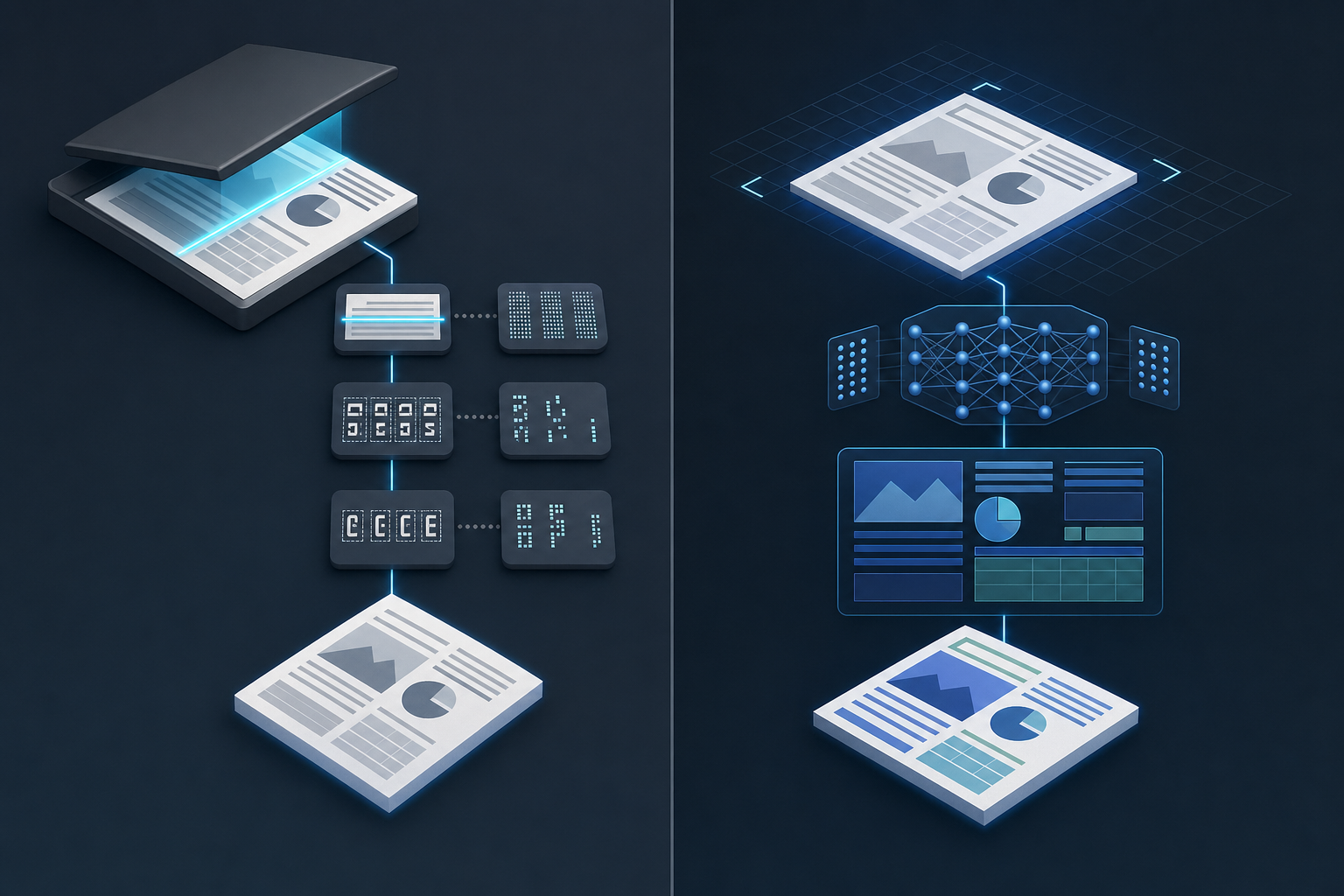
Vision-based approaches treat each page as an image and pass it through a visual model that interprets layout, typography, and content together. This produces better results on complex documents like invoices, forms, and multi-column reports.
There are two dimensions worth separating here:
- OCR-first pipelines extract raw text before any semantic processing, which works well for typed documents but loses structural context like table boundaries and section hierarchies.
- Vision-based parsers preserve spatial relationships between elements, making them better suited for RAG pipelines and LLM input where document structure affects retrieval quality.
For developers choosing between approaches, the tradeoff is speed versus fidelity. OCR pipelines are faster and cheaper at scale, while vision-based parsing returns richer structured output at higher compute cost.
Architecture Patterns in Document Parser Systems
Two dominant patterns appear in production document parser systems.
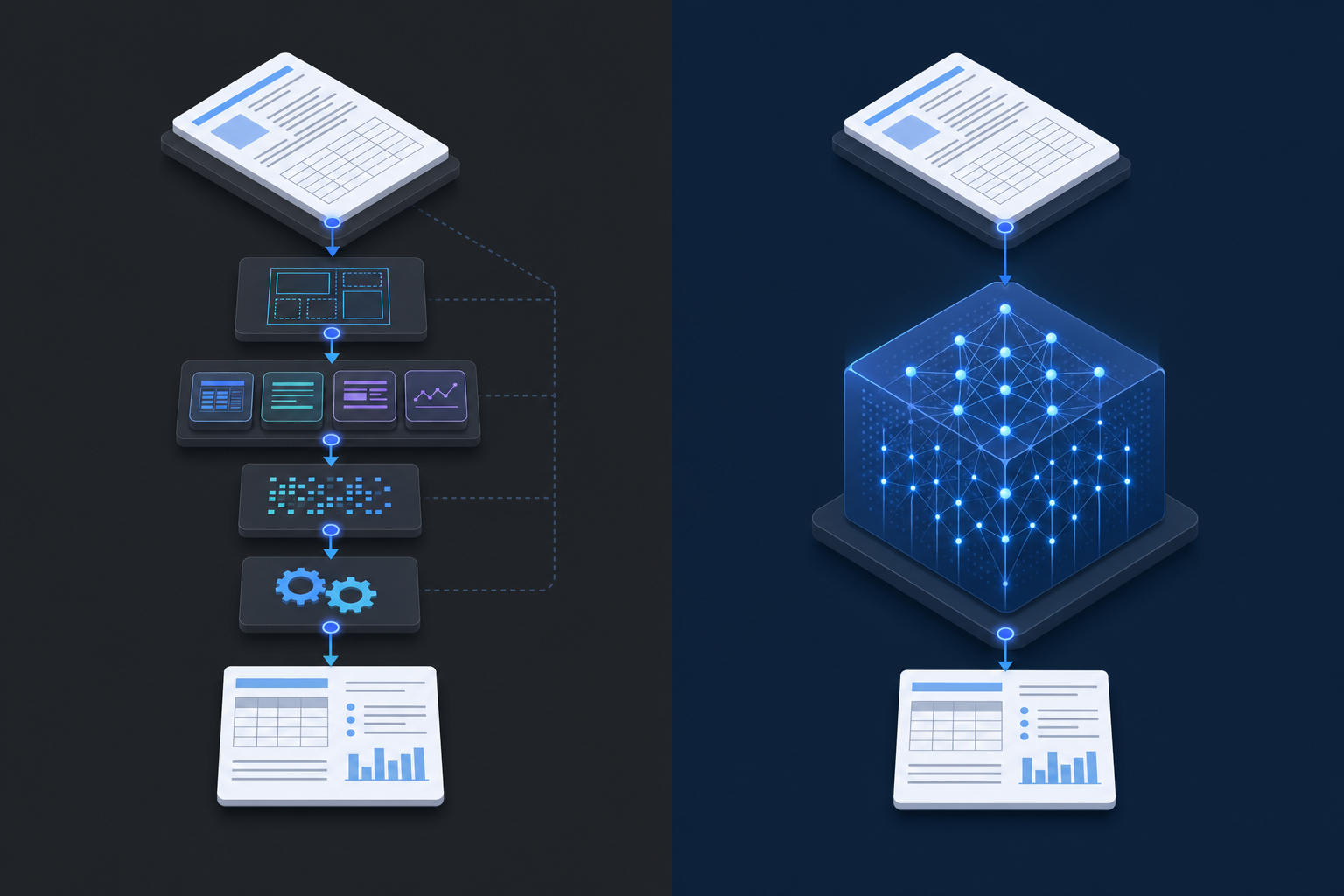
Pipeline-based architectures chain discrete modules: a layout detection model identifies regions, specialized extractors handle tables or formulas, and an OCR engine reads text from each segment. Each module is independently tunable, making debugging straightforward. The downside is error propagation: a misclassified region in the layout stage compounds through every downstream step.
End-to-end architectures pass raw document pixels or bytes directly into a unified model that outputs structured text. These systems reduce inter-module error accumulation but are harder to inspect and fine-tune for domain-specific documents.
Most production RAG pipelines today sit somewhere between these two approaches, mixing a trainable layout model with rule-based post-processing to balance accuracy and interpretability.
Input Format Support and Output Quality
Format support is where parsers diverge fast. Nearly every tool handles clean PDFs, but scanned images, PPTX slides with embedded charts, and multi-sheet Excel files expose real gaps across the ecosystem.
| Parser Type | DOCX/PPTX | Scanned Images | Spreadsheets | Output Formats | |
| Traditional OCR | Yes | Limited | Partial | No | Plain text |
| Open-source (Docling, etc.) | Yes | Yes | Partial | Limited | Markdown, JSON |
| Cloud AI (Google Document AI, Azure) | Yes | Yes | Yes | Yes | JSON, structured |
| AI-native parsers | Yes | Yes | Yes | Yes | Markdown, JSON, HTML |
Output quality matters as much as format coverage. A parser that extracts text but loses table structure or drops headers mid-document creates downstream problems for any RAG pipeline or data workflow. When testing tools, check whether the output preserves reading order, retains table cell boundaries, and handles multi-column layouts correctly. These details determine whether the parsed content is actually usable.
Python Document Parser Libraries and Implementation
Python offers a rich set of libraries for document parsing, each suited to different file types and use cases.
PDF Parsing
PyMuPDF(fitz) is the fastest pure-Python PDF library, offering text extraction, layout analysis, and image handling with minimal setup.pdfplumberwraps pdfminer.six and makes table extraction from PDFs straightforward, returning structured data you can pass directly to pandas.pypdfhandles metadata extraction and page-level text access, making it a lightweight choice for simpler pipelines.
Word and Structured Document Parsing
python-docxreads.docxfiles natively, giving you access to paragraphs, tables, styles, and embedded images.pandascombined withopenpyxlhandles Excel and CSV ingestion, and parse text file python pandas workflows are common for tabular data normalization.
AI-Augmented Python Parsers
Libraries like LlamaIndex and LangChain integrate document parsing directly into retrieval pipelines. LlamaIndex's SimpleDirectoryReader supports multiple file types out of the box, while LangChain document loaders connect to sources ranging from local files to cloud storage, feeding parsed content into LLM workflows.
For production-grade extraction from complex layouts, wrapping any of these libraries behind an API gives you better control over retries, chunking strategies, and output schema validation.
Schema-Based Extraction and Structured Data Output
Schema-based extraction lets you define exactly what fields to pull from a document and receive structured output instead of raw text. Most AI document parsers support some form of this, but the implementation details vary considerably.
Some tools accept JSON schemas and return typed values with confidence scores. Others rely on prompt-based field definitions, which are more flexible but less predictable. For RAG pipelines and downstream data processing, schema-adherence matters: a parser that occasionally returns a string where your pipeline expects a list will cause silent failures at runtime. When assessing APIs for converting PDFs to structured JSON, test whether the parser validates output against your schema before returning it.
Key factors to consider:
- Whether the parser validates output against your schema before returning it
- How it handles missing or ambiguous fields in source documents
- Whether nested objects and arrays are supported, beyond flat key-value pairs
- Output format options such as JSON, XML, or CSV
Document Parsing for RAG: Chunking Strategies and Context Preservation
Chunking strategy directly affects retrieval quality in RAG pipelines. If your chunks are too large, retrieved context overwhelms the LLM. Too small, and you lose the surrounding context that makes an answer coherent. This issue becomes especially problematic with section references in contracts, where chunk boundaries can break cross-reference integrity.
The best document parsers for RAG go beyond splitting on character count. They respect document structure: headers, paragraphs, tables, and lists become natural chunk boundaries. Tools like LlamaIndex and LangChain offer built-in document parser integrations with structure-aware splitters, while Docling preserves layout metadata that can be passed alongside chunk content to improve retrieval ranking.
Context preservation is where many open-source parsers fall short. PDFs with multi-column layouts, merged table cells, or figures with embedded captions require parsers that maintain reading order and associate visual elements with their surrounding text.
For production RAG systems, choose parsers that output structured formats like JSON or Markdown, since these translate directly into cleaner chunk boundaries and better retrieval precision. A well-designed document parsing API for RAG handles these format conversions while preserving the structural metadata your retrieval pipeline needs.
Open Source Document Parsers: Capabilities and Benchmarks
Several open-source document parsers have matured to the point where they can handle production-grade workloads. Understanding their actual capabilities helps you choose the right tool instead of defaulting to the most popular name.
Key Open-Source Options
Here are the parsers worth serious consideration:
- Docling, released by IBM, handles PDF, DOCX, PPTX, HTML, and image formats with layout analysis and table recovery built in, making it well-suited for RAG pipelines.
- LlamaParse integrates natively with LlamaIndex and targets complex document structures where standard extractors fail.
- Unstructured supports over 30 file types and provides chunking strategies that align well with vector database ingestion.
- PyMuPDF is a fast, low-level PDF parser favored for its speed and fine-grained text block access in Python workflows.
- pdfplumber excels at structured data extraction, particularly for tables embedded in PDFs.
What Benchmarks Actually Reveal
Accuracy on real-world documents varies widely across these tools. Docling and LlamaParse outperform simpler extractors on multi-column layouts and scanned content, but add latency. PyMuPDF remains fastest for text-layer PDFs but has no OCR capability natively. Choosing between them requires testing on your specific document types before committing to an architecture, particularly if you're working with specialized use cases like document intelligence APIs for financial services.
Vision-First Parsing for Production Workflows
Vision-first document parsing treats every page as an image before applying any text extraction, which means layout, spatial relationships, and visual formatting are all preserved from the start. This approach handles scanned PDFs, mixed-content documents, and complex tables far better than text-layer-only methods.
Tools like Upstage Document Parse and Google Document AI use this architecture at their core. Instead of relying on embedded text streams, they run visual models over rasterized page images to reconstruct structure with high fidelity.
For production RAG pipelines, this matters. A parser that flattens a multi-column invoice into a single text blob will produce retrieval chunks that make no semantic sense. Vision-first parsers preserve the reading order and element boundaries that downstream LLM calls depend on to generate accurate responses. Unsiloed AI takes a vision-first approach to maintain structural fidelity across complex document types.
For production RAG pipelines, this matters. A parser that flattens a multi-column invoice into a single text blob will produce retrieval chunks that make no semantic sense. Vision-first parsers preserve the reading order and element boundaries that downstream LLM calls depend on to generate accurate responses, particularly in restricted industries like healthcare document processing APIs where compliance requirements add extra constraints.
Final Thoughts on Document Parsing Strategies
Your parser choice shapes everything that happens in your RAG pipeline after extraction. A strong document parser for RAG preserves layout structure and reading order, which directly affects chunk boundaries and retrieval precision. Vision-first tools handle messy documents better but add latency, while OCR-based extractors stay fast on clean PDFs. Test parsers on your actual document types before deciding, because output quality matters more than feature lists.
Book a demo to see how different parsers handle your files.
FAQ
What's the best document parser Python library for production RAG?
For production RAG, PyMuPDF delivers the fastest text extraction for clean PDFs, while pdfplumber excels at table-heavy documents you need to pass to pandas. If you're handling complex layouts with embedded charts and multi-column text, vision-first parsers like Docling or LlamaParse preserve structure better than traditional OCR libraries.
Can I build a document parser without using cloud APIs?
Yes, you can build fully local parsers using open-source libraries like PyMuPDF, pdfplumber, or Docling. These run entirely in your Python environment without external API calls, giving you complete control over data privacy and processing costs at the expense of handling OCR and layout detection yourself.
OCR vs vision-based document parsing for scanned PDFs?
Vision-based parsers handle scanned PDFs better because they interpret layout, typography, and spatial relationships together instead of only extracting character patterns. OCR-first pipelines lose structural context like table boundaries and reading order, which degrades retrieval quality in RAG systems.
How do schema-based extractors prevent output errors in production?
Schema-based extractors validate output against your JSON schema before returning results, catching type mismatches and missing fields at parse time instead of runtime. The best implementations include confidence scores per field and handle nested objects cleanly, preventing silent failures when your pipeline expects a list but receives a string.
When should I choose pipeline-based over end-to-end document parser architecture?
Choose pipeline-based architectures when you need independent control over layout detection, table extraction, and OCR stages for easier debugging and domain-specific tuning. End-to-end architectures reduce error propagation between modules but become harder to inspect and adjust when accuracy drops on specific document types in your workflow.