
Document Parsing Software: Technical Review and Comparison Guide for May 2026
You need document parsing software that converts messy PDFs and scanned forms into structured data your code can actually use. The challenge isn't finding a tool that extracts text from a clean document, it's finding one that preserves layout hierarchy when a table spans multiple pages, maintains re


You need document parsing software that converts messy PDFs and scanned forms into structured data your code can actually use. The challenge isn't finding a tool that extracts text from a clean document, it's finding one that preserves layout hierarchy when a table spans multiple pages, maintains reading order across irregular columns, and returns field-level confidence scores so you know which extractions need human review. Most parsers break on the inputs that matter in production, and by the time you notice, your RAG retrieval is returning garbage or your automation workflow is silently corrupting data. We're walking through the technical criteria that separate tools built for demos from ones that hold up under real document complexity.
TLDR:
- Document parsing converts PDFs, scans, and presentations into structured JSON or Markdown for LLMs and automation
- Production systems need layout-aware parsing, async processing, and field-level confidence scores
- Vision-first models preserve table structure and reading order across multi-column layouts better than OCR
- Schema-driven extraction validates data types and formats before errors reach downstream applications
- Unsiloed AI provides deterministic parsing with word-level bounding boxes and 97.4% table accuracy for finance and legal teams
What Document Parsing Software Does and Why It Matters
Document parsing software converts unstructured files into structured, machine-readable data. PDFs, scanned forms, presentations, and images don't conform to tidy row-and-column formats. Before any LLM or AI agent can reason over that content, it needs to become something deterministic: clean JSON, Markdown, or typed fields that downstream code can actually work with.
A scanned invoice with a rotated table, a multi-column legal filing, a slide deck with embedded charts: generic OCR tools and text-extraction libraries routinely fail on these. The parsing layer sits between your raw documents and everything built on top of them. RAG pipelines, structured extraction workflows, and document-driven automation all depend on getting that input layer right. If parsing breaks, everything downstream breaks with it.
Technical Architecture Behind Document Parsing Systems
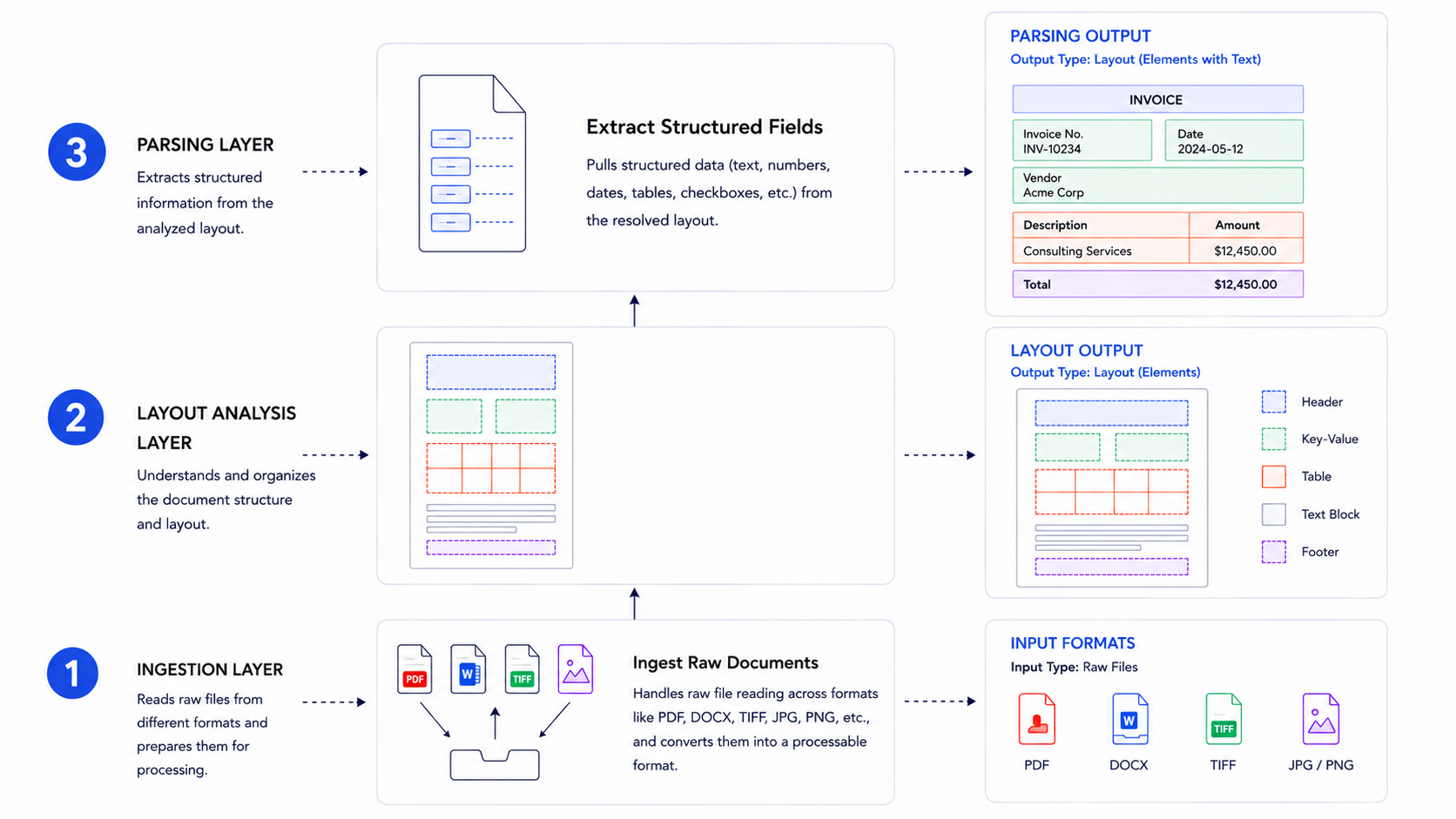
Document parsing systems are built on layered architectures that each solve a distinct part of the extraction problem.
At the lowest layer, ingestion handles raw file reading across formats like PDF, DOCX, and TIFF. Above that, layout analysis resolves spatial structure using either rule-based geometry or trained models. The extraction layer then pulls structured fields from that resolved layout.
Where AI Fits In
Modern systems increasingly use transformer-based vision models for layout detection, replacing older heuristic pipelines. This shift matters because rule-based systems break on edge cases like rotated tables or multi-column invoices, while trained models generalize across document variation.
API-Based Document Parsing vs. Traditional OCR
API-based document parsing and traditional OCR take fundamentally different approaches to extracting structured data from documents. The distinction matters most when your inputs include scanned batches, multi-column layouts, or documents with embedded tables and charts.
Traditional OCR operates at the pixel level. It converts raster images into character strings by matching pixel patterns to glyph templates, then outputs a flat text stream with no awareness of spatial relationships between elements. A two-column invoice becomes a jumbled sequence of characters. A table spanning two pages loses its row and column structure entirely. You're left writing post-processing logic to reconstruct meaning that the OCR layer discarded. Vision AI approaches deliver higher accuracy by understanding document context and layout instead of just text.
API-based parsers combine OCR with vision models that understand spatial layout. Instead of outputting a flat text stream, they classify each region of a page — paragraph, table, header, chart, formula — and apply specialized extractors per element type. Tables come back as typed row-column structures. Headings carry their hierarchy. Images and charts are surfaced as distinct typed elements rather than ignored or flattened. The output is structured JSON or Markdown delivered directly to your application, with no custom post-processing code required on your end.
The practical gap shows up in error rates. Traditional OCR accuracy on clean, high-resolution print is reasonable, but degrades sharply on low-resolution scans, handwriting, rotated pages, or non-standard fonts. Vision-based APIs are trained across document variation and generalize better to the edge cases that break rule-based pipelines in production.
Key distinctions worth knowing:
- API parsers handle complex layouts including multi-column text, nested tables, and mixed content types that rule-based OCR typically mangles
- Traditional OCR accuracy degrades sharply on handwritten text, low-resolution scans, or non-standard fonts, while AI-based APIs adapt across document variations
- With an API approach, you get versioned endpoints, authentication, and usage quotas instead of locally installed binaries to maintain
Core Capabilities Required for Production Document Parsing
Proof-of-concept parsers handle clean PDFs. Production systems face harder inputs: scanned batches, multi-column filings, embedded charts, documents spread across dozens of pages. The table below maps each capability to what it actually does in practice.
| Capability | What it does |
| Layout-aware parsing | Preserves reading order, column structure, and visual hierarchy without treating pages as flat text |
| Multimodal element detection | Classifies tables, images, charts, and formulas as distinct typed elements with specialized extractors per type |
| Schema-based extraction | Returns field-level confidence scores and source citations traceable back to the original document |
| Async processing | Submits large documents as background jobs and returns a job ID to poll, avoiding blocking on a synchronous call |
| Multi-format support | Handles PDFs, DOCX, PPTX, Excel, and images without requiring format-specific preprocessing code |
The gap between a demo and a production system usually surfaces at edge cases: a table that spans two pages, a formula in a footnote, or a 300-page scanned batch hitting your API at once.
Evaluation Criteria for Document Parsing Software
Parsers that work on clean PDFs often break on production inputs. When comparing solutions, focus on these measurable criteria over marketing claims.
| Criterion | What to Check |
| Layout accuracy | Does reading order hold across multi-column text, irregular layouts, and nested structures? |
| Table extraction fidelity | Are merged cells, spanning headers, and multi-page tables reconstructed correctly as typed data? |
| Edge case handling | Does quality degrade on rotated pages, low-resolution scans, or non-standard fonts? |
| Processing model | Is async job submission available, or does every call block on a synchronous response? |
| Output formats | Are Markdown, JSON, and HTML returned natively without conversion middleware? |
| Confidence scoring | Are scores returned at the field level, or only as a single document-level signal? |
| Bounding box precision | Are extracted values cited with word-level coordinates mapped back to the source page? |
The last two criteria deserve particular attention. Field-level confidence lets you build conditional review logic, flagging any extraction below a threshold instead of re-reviewing entire documents. Word-level bounding boxes make extractions auditable, which is a hard requirement in finance, legal, and healthcare workflows where traceability is non-negotiable.
Schema-Driven Extraction and Validation
Schema-driven extraction lets you define exactly what fields to pull from a document, then validate the output against expected types, formats, and constraints before it reaches your application.
Most document parsing tools support some form of field mapping, but the quality of validation varies widely. Look for tools that let you specify data types (string, date, currency, integer), required fields, and conditional logic so bad extractions fail loudly instead of silently corrupting downstream data.
Well-designed schema validation catches OCR errors, missing fields, and formatting inconsistencies at the extraction layer, before they propagate further.
Document Classification and Intelligent Routing
Classification assigns document types using both visual layout signals and semantic content, scoring each page independently before aggregating to a document-level label. Multi-page documents benefit from this page-by-page approach because a single file often contains mixed content types: a contract packet, for example, might include a cover letter, line-item tables, and signature pages that each carry distinct layout fingerprints.
Categories are defined as a JSON array of objects, each with a required name and an optional description. Supplying a description materially improves accuracy on ambiguous document types: {"name": "Invoice", "description": "Financial invoices with itemized charges"} gives the model more signal than a bare label. The classification response returns a confidence score between 0 and 1 alongside per-page results, so you can inspect exactly which pages drove the document-level label.
Confidence thresholds control what happens next. Documents scoring above the threshold route automatically to the appropriate parsing or extraction pipeline, while those below get flagged for human review instead of being silently passed through with unreliable classifications. In practice, scores above 0.9 are reliable enough for straight-through automation; scores in the 0.7–0.9 range warrant a second check in compliance-heavy workflows.
For mixed batches, splitting runs before classification, separating merged pages into typed files so each downstream pipeline receives only the document type it expects. This sequencing matters: classifying an unsplit batch produces a single label for what might be five distinct document types, discarding the per-page detail you need for accurate routing.
Classification assigns document types using both visual layout signals and semantic content, scoring each page independently before aggregating to a document-level label. Multi-page documents benefit from this page-by-page approach since a single file often contains mixed content types.
Confidence thresholds control what happens next. Documents scoring above the threshold route automatically to the appropriate pipeline, while those below get flagged for human review instead of being silently passed through with unreliable classifications.
For mixed batches, splitting runs before classification, separating merged pages into typed files so each downstream pipeline receives only the document type it expects.
Integration Patterns and Developer Experience
Most document parsing tools offer REST APIs with JSON responses, but the depth of developer support varies widely. Look for SDKs in Python, JavaScript, and other common languages, along with webhook support for event-driven workflows. Webhook reliability, rate limits, and error handling documentation matter as much as the API itself. For teams working in Python, libraries like pdfplumber, pdfminer, and pypdf provide programmatic PDF access, while AI-native APIs return structured JSON directly without writing extraction logic from scratch. Modern PDF extraction approaches balance accuracy with processing speed and integration complexity.
Vision-First Parsing for Multimodal RAG Pipelines
RAG accuracy depends on chunk quality. A heading stripped from its body, or a table row without column headers, breaks retrieval before it even begins. The parsing layer determines whether your retriever gets coherent context or fragmented noise.
Vision-first parsers generate hierarchical chunks with parent-child mapping so related content travels together. Tables and images appear as typed segments within their parent chunk instead of as orphaned strings. Each chunk exposes an embed field, a combined Markdown string covering all segments inside it, ready to pass directly to your embedding model without additional preprocessing. That structural fidelity separates parsing built for RAG from generic text extraction.
Production Deployment Considerations
When moving document parsing into production, reliability and scale matter far more than benchmark scores. Consider how your chosen tool handles failure recovery, rate limiting, and async job queues under real load. Check whether the API offers webhook callbacks or polling endpoints for long-running jobs. Verify how parsed output integrates with your downstream systems, whether that means JSON into a database or structured fields into a workflow. Security requirements like SOC 2, data residency, and PII should be confirmed before signing any contract, not after.
How Unsiloed AI Approaches Document Parsing Infrastructure
Unsiloed AI's parser runs a dual-stream Vision Language Model that processes semantic content and structural layout simultaneously. Most parsers pick one or the other. Running both in parallel is what lets the system correctly reconstruct a nested table inside a scanned legal filing without collapsing its structure into flat text.
Domain-aware decoders for finance, healthcare, and legal handle the extraction layer, preserving context and hierarchy that generic models lose. Every extracted value returns with word-level bounding boxes and a confidence score, so each field traces back to its exact position in the source document. On internal benchmarks, Unsiloed shows high table extraction accuracy across finance and legal document types, which reflects the kind of reliability that matters when errors carry real consequences.
Final Thoughts on Production Document Parsing
The gap between proof-of-concept and production document parsing shows up in edge cases, not benchmarks. Document parsing software needs to handle scanned batches, preserve reading order across multi-column text, and return field-level confidence scores that make extractions auditable. Clean demos don't prepare you for the 300-page filing or the rotated table that breaks your workflow at 2am. Book a demo if you want to see how dual-stream vision models handle documents that make traditional parsers fail.
FAQ
What's the best document parsing software for production RAG pipelines?
Unsiloed AI is purpose-built for RAG, generating hierarchical chunks with parent-child mapping and preserving layout context that generic text extractors lose. Most OCR tools output flat text that breaks retrieval accuracy, while vision-first parsers maintain the structural relationships LLMs need to reason correctly over document content.
Can I extract data from PDFs using Python without building custom extraction logic?
Yes, AI-native APIs let you send raw PDFs and receive structured JSON without writing extraction code. For programmatic control, libraries like pdfplumber and pypdf work well, but you'll need to handle layout analysis, table detection, and field validation yourself.
How do I know if a document parsing tool will handle my edge cases?
Test on rotated pages, multi-column layouts, tables that span multiple pages, and low-resolution scans. Production-ready parsers return field-level confidence scores and word-level bounding boxes, letting you flag uncertain extractions instead of silently accepting unreliable output.
Document parsing software free vs paid: when should I upgrade?
Free tools like open-source Python libraries work for clean PDFs and prototyping, but production workflows with complex layouts, mixed content types, or compliance requirements need paid solutions with confidence scoring, async processing, and deterministic schema-based extraction.
What is schema-driven extraction and why does it matter?
Schema-driven extraction defines expected field types, formats, and validation rules upfront, so bad extractions fail loudly at the parsing layer instead of corrupting downstream data. This catches OCR errors and missing fields before they propagate into your database or workflow automation.