Financial PDF Table Extraction Guide (June 2026)
You extract a financial table from a scanned PDF, and the parser hands back clean-looking rows and columns. But the numbers are wrong: the OCR collapsed three subtotal lines into one value. Nothing errors out, so you only catch it when something downstream breaks. This is the failure mode behind mos


You extract a financial table from a scanned PDF, and the parser hands back clean-looking rows and columns. But the numbers are wrong: the OCR collapsed three subtotal lines into one value. Nothing errors out, so you only catch it when something downstream breaks.
This is the failure mode behind most broken PDF-to-CSV conversions, and it isn't an edge case. Coordinate-based extraction works until it hits a merged cell, a rotated header, or any layout that deviates from a rigid grid.
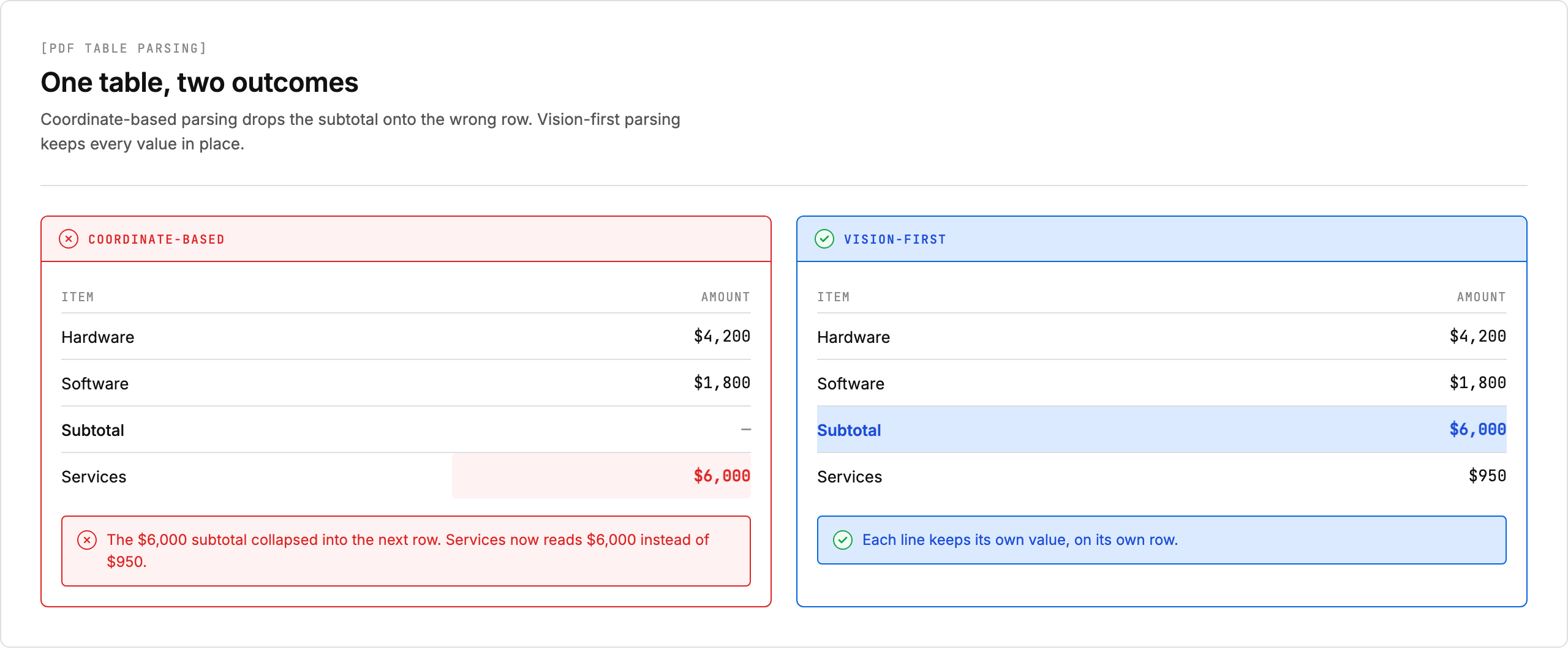
Vision-first parsing takes a different starting point. Instead of reconstructing a table from text coordinates, it treats each page as an image and infers structure from the visual layout, the way a person reading the document would. This guide covers where coordinate-based extraction breaks down, how the main extraction approaches compare, the Python libraries worth reaching for, and how to build a table-extraction pipeline you can trust in production.
TL;DR:
- PDF tables lose structure because most parsers group text by x/y coordinates, not semantics, causing misaligned columns and merged cells.
- Vision model extraction preserves layout from page images, handling merged cells and scanned documents that break rule-based parsers.
- pdfplumber, camelot-py, and tabula-py cover most programmatic extraction but fail on scanned PDFs and complex multi-page tables.
- Production pipelines need per-field confidence scores (above 0.9 for automation, 0.7 to 0.9 for review) and schema validation before data reaches downstream models.
- Unsiloed returns each extracted cell with a confidence score, bounding box, and word-level citation for audit-trail compliance in financial workflows.
Where PDF Table Structure Breaks Down
Spreadsheets, financial models, and BI tools all need tables as queryable rows and columns. A PDF stores them as something else, and the automated extraction that bridges the gap fails in predictable ways. Copying tables by hand avoids the parser but introduces transcription errors that propagate through every downstream model, so for anything beyond a one-off you need extraction that holds up. Knowing where it breaks lets you design around the problem before it reaches production.
Most PDFs store content as positioned text objects with no semantic layer describing rows, columns, or cell boundaries. Document parser tools that rely on heuristics (grouping text by x/y coordinates) routinely misalign columns when cell spacing is inconsistent, merge rows when vertical gaps are narrow, and drop spanning headers entirely.
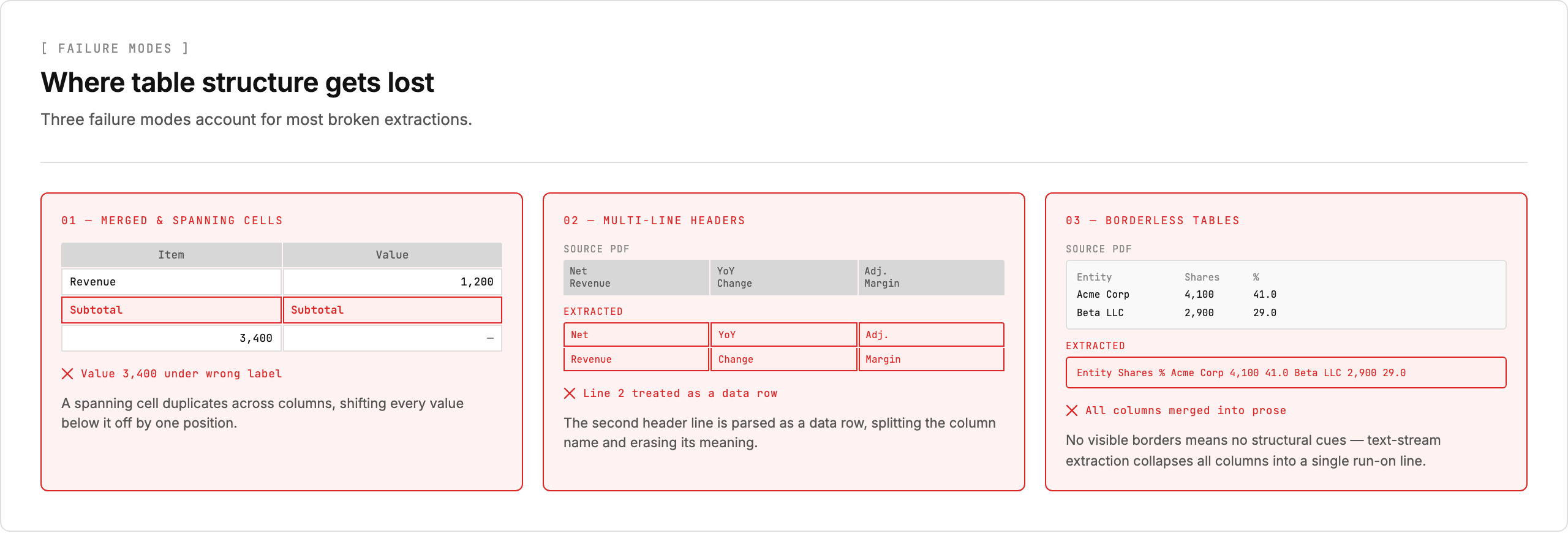
Scanned PDFs compound this: OCR introduces character errors on top of an already-lossy text layer. In every case the result looks plausible in isolation but breaks joins, aggregations, and schema validation once it's loaded into a pipeline.
The Four Extraction Approaches and When Each One Works
Four approaches dominate PDF table extraction, and they trade off accuracy, cost, and traceability against each other in different ways. Most production pipelines end up combining two or more rather than betting everything on one.
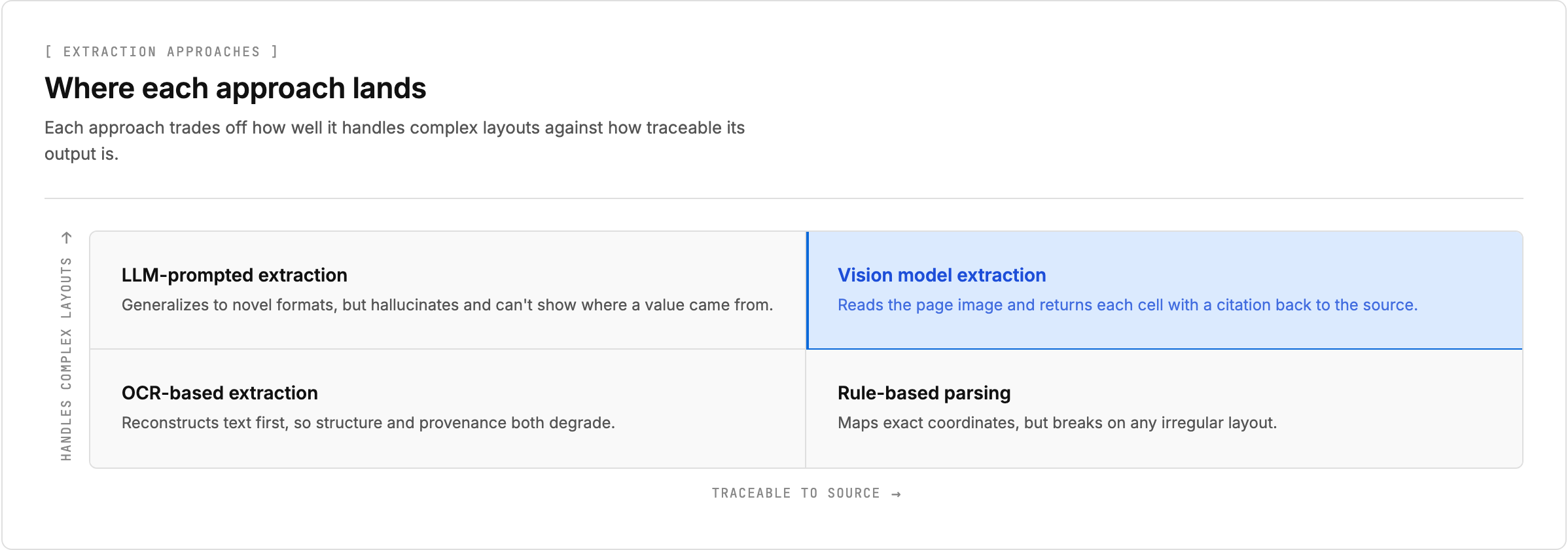
The table below summarizes how each approach works, where it fits, and where it falls down:
| Approach | How It Works | Best For | Fails On |
| Rule-based parsing | Reads PDF text layer directly and maps coordinates to table cells | Text-layer PDFs with consistent spacing and simple grid layouts | Merged cells, rotated headers, multi-page tables, any irregular layout |
| OCR-based extraction | Photographs each page, runs character recognition, then applies layout heuristics | Scanned documents with clean, regular table structures | Dense financial tables, complex layouts (compounds errors across two stages) |
| Vision model extraction | Passes full page image to multimodal model that infers structure from visual layout | Irregular layouts, merged cells, scanned documents, complex multi-page tables | High-volume processing with strict latency constraints (adds cost and latency per page) |
| LLM-prompted extraction | Feeds raw text into LLM with schema prompt to return structured JSON | Novel formats that need generalization without explicit layout rules | Ambiguous tables (hallucinates values), any workflow requiring traceability to source |
Python Libraries for Programmatic Table Extraction
Three libraries cover most text-layer extraction in Python: pdfplumber, camelot-py, and tabula-py. Each suits a different table style, and all three share the same blind spot, which the next section picks up.
pdfplumber
Built on pdfminer.six, pdfplumber gives you precise control over table detection through configurable snap tolerances, edge strategies, and explicit table bounding boxes. It works well on text-layer PDFs with consistent column spacing, and its extract_table() method returns nested lists you can pass directly to pandas for CSV or Excel export.
camelot-py
camelot-py offers two parsing modes: Lattice (for tables with visible grid lines) and Stream (for whitespace-delimited tables). It also returns a confidence score per table, which helps flag extractions that need manual review before they enter a pipeline. The Camelot comparison wiki benchmarks accuracy across these modes against other extraction tools.
tabula-py
tabula-py wraps the Java-based Tabula library and handles a wide range of bordered and borderless tables. Its read_pdf() function returns a list of DataFrames, making conversion to CSV or Excel straightforward with standard pandas methods.
All three libraries fall short on scanned PDFs with no text layer, complex merged cells, or multi-page tables that span irregular layouts. In those cases, you either need an OCR preprocessing step or a vision-based extraction approach that reads the document as an image and reasons about structure instead of parsing raw text streams.
How Vision-First Parsing Reads a Table
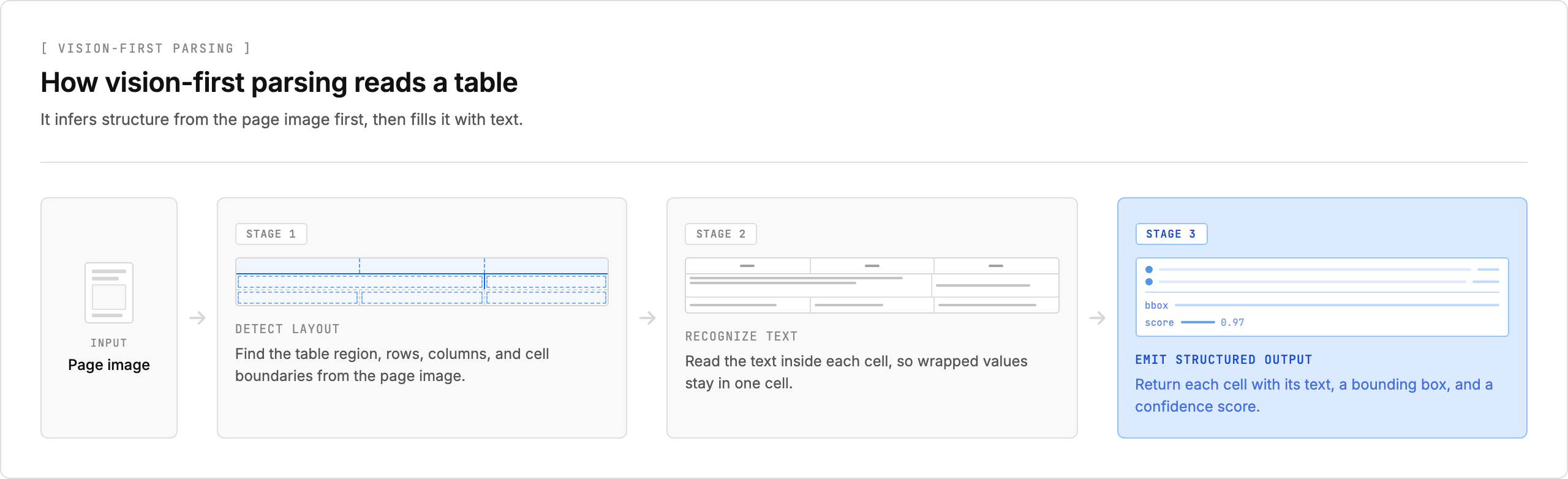
Text-layer parsers start from characters and reason backward to structure: given these glyphs at these coordinates, where are the rows and columns? Vision-first parsing inverts that. It starts from the page image, works out the structure first, and only then fills it with text, which is much closer to how a person reads a table.
The pipeline runs in three stages:
- Detect layout. The model processes the full-page image and locates the table region, then its rows, columns, and cell boundaries, including merged and spanning cells that have no delimiter in the underlying text. It also recovers reading order, so a two-column page is not stitched into one scrambled stream.
- Recognize text. Within each detected cell, the model reads the characters. Because it already knows the cell boundaries, a value that wraps across two visual lines stays in one cell instead of splitting into two rows.
- Emit structured output. Each cell comes back with its text, a bounding box marking where it sat on the page, and a confidence score. Downstream code gets a grid it can map straight to a schema, plus the coordinates to verify any value against the source.
The payoff is that digitally generated and scanned PDFs go through the same path. A scanned page has no text layer for a coordinate-based parser to read, but a vision model never needed one, because it was working from the image regardless. That removes the brittle OCR-then-heuristics two-step, where character recognition runs line by line, collapses multi-column layouts, and merges cells that should stay separate.
Getting Reliable Results from Scanned Pages
Scans still need care, because the image quality the model sees sets the ceiling on accuracy. Three things to check:
- Confirm the parser tells you which path it used. A
parse_mode: "vision"field in the response signals the page had no selectable text layer, so every value came from the image rather than an embedded text stream. - Watch confidence scores more closely on scans. Low-resolution captures produce more recognition errors, so field-level scores are what let you route uncertain rows to review before they reach a model.
- Normalize the input first. Table boundary detection degrades on skewed or low-DPI scans, so deskewing and resampling to 300 DPI or higher cuts extraction errors before the parser runs.
Validating Extracted Tables Before Production
Losing structure during extraction creates a silent failure mode: values land in the wrong columns, multi-line headers collapse into a single row, and merged cells disappear entirely. The output still parses, so nothing errors out, which is exactly why a single pass/fail on the document is not enough. Validation has to happen field by field, including when you convert PDF tables to Markdown.
Start with confidence. A well-designed extraction layer returns a confidence score from 0 to 1 per field, not just per document. Fields above 0.9 are reliable enough for straight-through automation, scores between 0.7 and 0.9 warrant a secondary check, and anything below 0.7 should go to a human review queue.
Confidence tells you how sure the model is; a schema tells you whether the value even makes sense. Binding extraction to a typed schema maps each detected cell to a named field with an expected type, so revenue comes back as a float, a reporting period as a date, and a ticker as a string. Define that schema before extraction runs: column headers as field keys with types, row identifiers that anchor each value to the right entity, and the relationships between tables when a document carries several statements. With it in place, the engine can reject a value whose type conflicts with the schema before the bad data moves downstream.
Validation Checks Worth Running
Schema typing catches the obvious mismatches. These checks catch the structural errors that still type-check cleanly:
- Row and column count checks catch truncated tables where the parser silently dropped a row during layout reconstruction.
- Cross-field consistency checks flag a subtotal that does not match its components, which is common in financial statements.
- Bounding-box checks compare the coordinates of adjacent cells to confirm they were not accidentally merged during extraction.
Great Expectations is a solid framework for defining and enforcing these checks in a Python pipeline. Whatever gets flagged, send the original page to the reviewer alongside the extracted values, because a value in isolation gives no way to verify its structure.
Once a table clears validation, the output maps cleanly to delivery: each schema field becomes a column and each row a record, loading straight into pandas, a SQL table, or Excel without manual reformatting.
How Unsiloed AI Handles Complex Table Extraction
Unsiloed AI puts this vision-first approach to work on complex financial documents, identifying table boundaries from layout signals rather than keyword anchors. That keeps merged headers, nested rows, and footnotes intact on a multi-page income statement or balance sheet, where template-based and pure-OCR tools collapse them.
What sets the output apart is that every value is verifiable. Each extracted cell carries a bounding box, a word-level citation to the source document, and a confidence score, so a pipeline pulling revenue from a 10-K or covenant metrics from a loan agreement gets an audit trail for every figure. Low-confidence cells can be flagged for human review before they reach your models, and a parse_mode field records whether each page went through direct text extraction or vision inference.
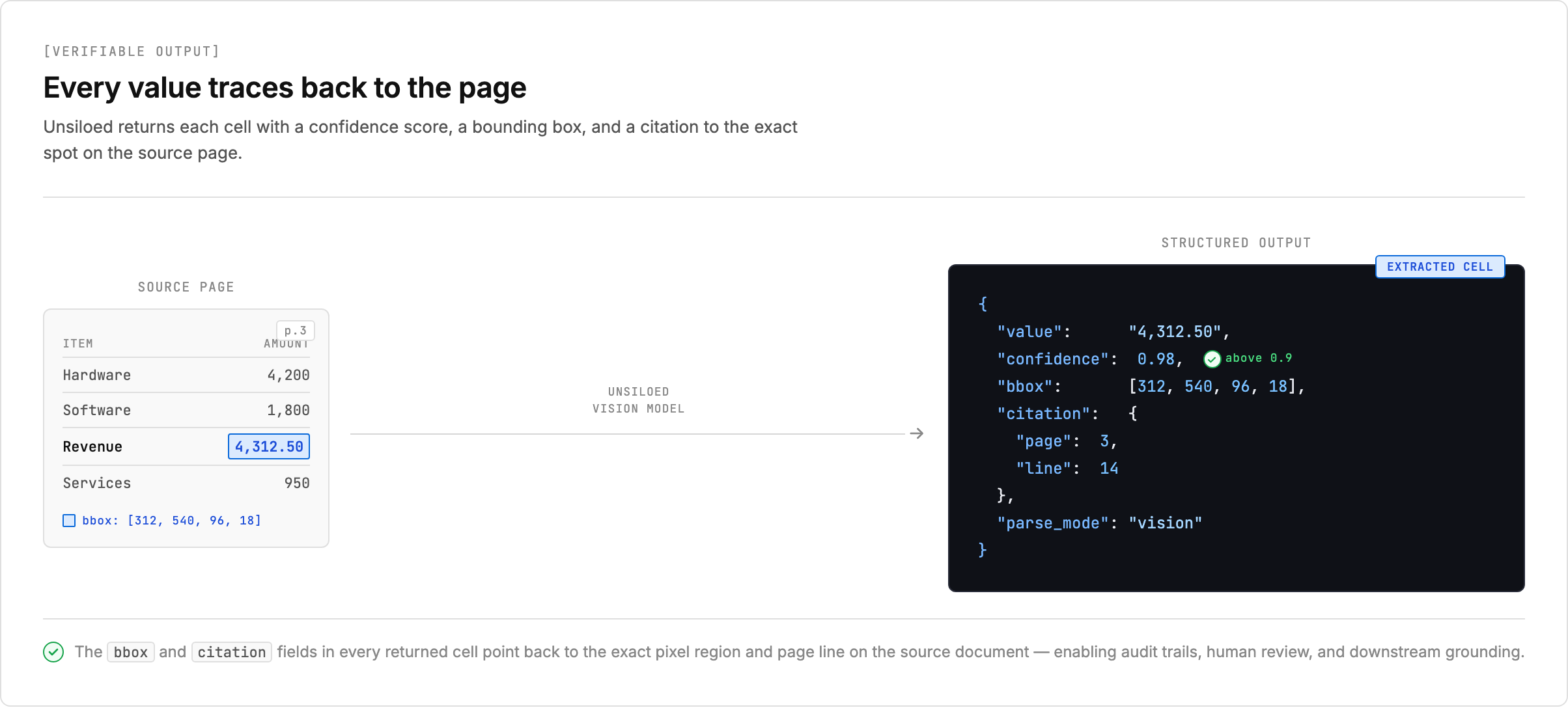
For regulated finance, legal, and audit work, that traceability is what separates a production pipeline from a prototype. "The model said so" is not an acceptable source, and every value here points back to where it came from.
Final Thoughts on PDF Table Extraction for Production Pipelines
The right extraction approach depends on what breaks your pipeline when it fails. If you need every extracted value traceable to a source page with a confidence score attached, vision-first parsing is the only architecture that delivers that without post-processing guesswork. Book a demo if your documents include scanned pages, complex layouts, or regulatory filings where audit trails are non-negotiable.
FAQ
Can I convert PDF to CSV without losing table structure in merged cells?
Yes, but only with a vision-based extraction approach. Rule-based parsers and coordinate-heuristic OCR routinely flatten merged cells into adjacent rows, breaking label-to-value relationships. Vision models read the full page layout and preserve merged headers and spanning cells as distinct structural elements in the output schema.
How do I convert PDF to CSV programmatically in Python?
Use pdfplumber for text-layer PDFs with consistent spacing, camelot-py when you need confidence scores per table, or tabula-py for a wide range of bordered and borderless layouts. All three return DataFrames that export directly to CSV via pandas, but they fail on scanned PDFs and complex merged cells without a preprocessing OCR or vision layer.
What's the difference between OCR-based and vision model extraction for financial tables?
OCR-based extraction runs character recognition first, then applies layout heuristics on top of the reconstructed text, compounding errors across both stages. Vision model extraction treats the page as an image from the start and infers structure from visual layout instead of text coordinates, which handles irregular layouts, merged cells, and multi-page tables that OCR pipelines collapse.
What's the best way to copy a table from PDF to Excel with an audit trail?
Schema-driven extraction with field-level confidence scores and word-level citations. Define your target schema with typed fields (string, float, date), extract to structured JSON, then export to Excel with each value carrying a confidence score and bounding box coordinates back to the source page. This gives you queryable data and a traceable audit path for every cell.
When should I use confidence scores to validate extracted PDF tables?
Use confidence scores to gate automation before data reaches your pipeline. Fields scoring above 0.9 are reliable for straight-through processing, scores between 0.7 and 0.9 warrant secondary validation, and anything below 0.7 should trigger human review with the original document page alongside the extracted output for structural verification.