Routing Accuracy for Ambiguous File Types via Classification (August 2026)
Ambiguous files can produce plausible classification scores and still take the wrong route. Learn how to inspect per-page confidence, handle incomplete results, and calibrate review thresholds.


Clean, distinct files move through a document routing pipeline without trouble. Failures emerge at category boundaries, where a loan estimate resembles a closing disclosure or an invoice arrives with a cover letter. A label alone treats a borderline call like a certain one. Confidence scores expose the difference, but only if the router checks page-level results instead of the top-level score alone.
TL;DR:
- Start with three routing bands, then calibrate them on labeled documents from your own intake stream.
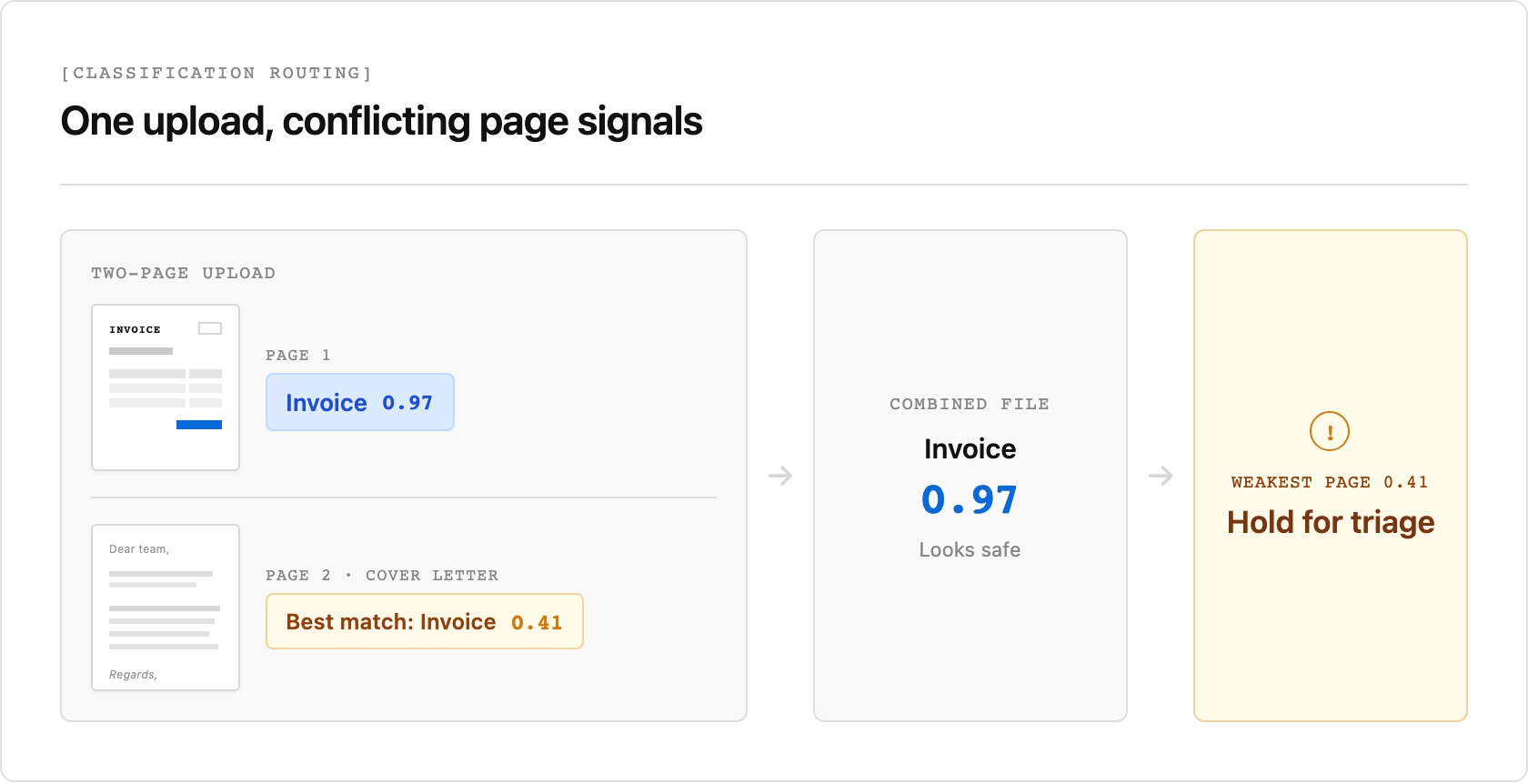
- For multi-page files, check the returned per-page scores and confirm that every page was processed before routing. One uncertain page can disappear inside a plausible top-level score.
- Put the distinguishing detail in each category name. Unsiloed accepts descriptions for compatibility, but its documentation says classification ignores them.
A document-level score can look safe even when one page should stop automatic routing:
Why Ambiguous Document Types Break Routing
A document classification API assigns a file type before the router chooses an extraction schema or downstream system. An upload becomes ambiguous when it resembles several categories. A purchase order and invoice share tables and totals, while a cover letter can make an invoice bundle look like correspondence.
Three cases deserve explicit handling:
- Mixed files: One upload contains several document types that may need to be split into separate files before each receives a document-level label.
- Adjacent categories: Two types share layout and vocabulary but require different extraction schemas.
- Out-of-taxonomy files: None of the configured categories is correct, so the classifier still chooses the closest one.
The third case is the most dangerous because a taxonomy gap can produce a wrong label with a plausible score instead of an API failure.
How to Read Document Classification Confidence Scores Per Page
The Unsiloed AI /classify endpoint accepts an uploaded PDF or image, or a document URL, and a JSON array of candidate categories. It returns a job ID to poll and accepts files up to 500 MB. This example uploads a PDF:
curl -X POST https://prod.visionapi.unsiloed.ai/classify \
  -H "api-key: $UNSILOED_API_KEY" \
  -F "pdf_file=@holdings.pdf" \
  -F 'categories=[{"name":"Invoice"},{"name":"Employment Contract"}]'
The response includes top-level and page-level classification data:
{
  "classification": "Employment Contract",
  "confidence": 0.8697704270159493,
  "total_pages": 39,
  "processed_pages": 39,
  "categories": [
    {"category": "Employment Contract", "page_count": 29, "confidence": 0.8697704270159493,
     "pages": [2, 3, 4, 6, 9, 10, 11, 13, "…"]},
    {"category": "Invoice", "page_count": 3, "confidence": 0.9261, "pages": [8, 12, 25]}
  ],
  "page_results": [
    {"page": 1, "classification": "Invoice", "confidence": 0.407333},
    {"page": 2, "classification": "Employment Contract", "confidence": 0.919643}
  ]
}
This saved live response came from a 39-page mutual fund holdings sheet submitted with only Invoice and Employment Contract as categories, and both were wrong for the document.
The API returned Employment Contract at 0.8697 even though seven pages scored below 0.5. In this response, that top-level score equals the mean for the 29 pages listed under the winning category, while the category summaries omit all seven low-scoring pages. The losing Invoice category scored 0.9261 across three pages. This score reflects agreement among included pages rather than the probability that the document label is correct.
The API reference says the classifier uses only the first four pages of documents longer than four pages. Our saved response instead reports 39 total pages, 39 processed pages, and 39 page results. Until the documentation matches the observed response, compare processed_pages with total_pages and review incomplete results.
Each category requires a name. The API accepts description for compatibility but says only names guide classification. Our claim-form test produced the same pattern. Swapping descriptions kept Category A as the result (0.9897 versus 0.9959), while descriptive names without descriptions returned the correct label at nearly 1.0.
Set Confidence Thresholds for Document Routing
Use confidence as a routing input while treating the label as a prediction. A practical starting policy has three bands:
- Above 0.9, route automatically.
- From 0.7 to 0.9, run a second model pass or queue a reviewer.
- Below 0.7, hold the file for manual triage.
These bands provide starting points that require calibration. Measure the error rate in each band on labeled production documents, then set thresholds per document type and consequence. A wrong mortgage classification deserves a stricter policy than a misrouted internal memo.
Route Documents on the Weakest Page Score
After polling the classification result for a multi-page file, verify that every page was processed. Then apply this check so the router branches on the weakest returned page rather than the document average:
pages = result["page_results"]
worst = min(p["confidence"] for p in pages)

if result["processed_pages"] != result["total_pages"]:
    queue_for_review(result)                 # incomplete page coverage
elif worst > 0.9:
    route(result["classification"])          # straight through
elif worst >= 0.7:
    queue_for_review(result)                 # secondary check
else:
    hold_for_triage(result)                  # no confident match
This conservative policy catches mixed bundles, although you should exclude known blank pages before applying it.
Calibrate Document Routing Against Production Errors
Get the taxonomy right, inspect per-page confidence, and calibrate routing bands on your own errors. If ambiguous files are stalling your pipeline, book a demo with Unsiloed AI.
How does the Unsiloed AI classification API handle ambiguous document types such as purchase orders and vendor invoices?
Pass distinct category names, then inspect page_results and categories[] rather than trusting the top-level score alone. Unsiloed documentation says classification ignores descriptions, matching our swapped-description test.
What confidence score thresholds should I use in a document classification workflow?
Start with three bands. Automate above 0.9, review from 0.7 to 0.9, and hold below 0.7. Calibrate those boundaries per document type using labeled files, and inspect per-page scores for multi-page documents.
How do I name categories so the classifier can separate them?
Use names that state the distinguishing attribute, such as Vendor Invoice (Supplier Requesting Payment) and Purchase Order (Buyer Authorizing Spend). Include a catch-all category so out-of-taxonomy files do not have to masquerade as the closest valid type.