
How to Automate Income Verification From Pay Stubs, W-2s, and Bank Statements
Pay stubs, a W-2 and bank statements each show a different slice of the same income. Extract the few figures each check needs with Unsiloed, then use Python to cross-check them, with every flag pointing back to the page that raised it.


A lender or landlord who wants to know what someone earns usually gets three kinds of paperwork. A pay stub covers one pay period. A W-2 covers last year. A bank statement shows what actually arrived in the account. Each one tells part of the story, and the useful question is whether the parts agree. Answering that by hand means reading figures off five or six pages and doing arithmetic across them, which is slow and easy to get wrong.
We use the Unsiloed extraction API to pull the handful of figures each check needs, each with a confidence score and the exact spot on the page it came from. Then we use Python to compare the documents and hand a person only the parts that don't agree. The guide below takes that approach through one applicant's file, five documents that pass a page-by-page read and fail a cross-check.
What Is Automated Income Verification
Income verification is checking evidence of what someone earns. Automating it means software reads that evidence, compares the figures, and leaves a person only the exceptions. Some services skip the paperwork and connect to payroll or bank accounts directly. This guide covers the other route, where the applicant uploads documents and each one answers a different question.
| Document | What It Shows | What It Can't Tell You |
|---|---|---|
| Pay stub | Earnings and deductions for one pay period. | Whether the money reached the bank account. |
| W-2 | Total wages and tax withheld for one year from one US employer. | What the employee earns now. |
| Bank statement | Deposits and other transactions for the statement period. | Whether a deposit is pay from a job. |
How Automated Income Verification Works
The work happens in four steps.
- Extract the few fields each check needs from each document.
- Normalize them, so "ELIAN VOSS" and "Elian Voss" count as the same name.
- Cross-check names, yearly earnings and deposits across documents.
- Flag anything that doesn't agree, with the page it came from.
If the documents arrive in one mixed PDF, classify and separate its pages first. The rest of this guide takes one applicant's file through the four steps.
Five Documents That Look Consistent
Elian Voss works for Ternvale Fabrication LLC and banks with Larkmere Bank. The file has two monthly pay stubs, last year's W-2 and two months of bank statements.
| Document | Extracted JSON | |
|---|---|---|
| August pay stub | stub-08.pdf | stub-08.json |
| September pay stub | stub-09.pdf | stub-09.json |
| 2025 W-2 | w2-2025.pdf | w2-2025.json |
| August bank statement | bank-08.pdf | bank-08.json |
| September bank statement | bank-09.pdf | bank-09.json |
Read one page at a time, nothing stands out. The name matches everywhere. Each stub shows $6,000 of gross pay, the figure before deductions, and $4,500 of net pay, the figure that goes to the bank, paid by direct deposit to the account ending 4826. The bank statements are for that same account, and last year's W-2 reports $66,000.
Two things are hiding in these documents. One looks like a problem and isn't. The other looks fine and is a problem. Both only show up when the documents are compared.
Extract Only the Fields Each Check Needs
A schema tells the API which fields to return and what type each one is. We ask for very little, because every extra field is one more value someone might need to review. The pay stub guide, W-2 form guide and bank statement guide cover extracting each document in full.
def field(kind, description):
    return {"type": [kind, "null"], "description": description}

def obj(**fields):
    return {"type": "object", "properties": fields, "required": list(fields)}

stub_schema = obj(
    name=field("string", "Employee full name"),
    employer=field("string", "Employer name"),
    pay_date=field("string", "Pay date as YYYY-MM-DD"),
    periods_paid=field("integer", "Payments this calendar year"),
    gross_pay=field("number", "Current gross pay"),
    net_pay=field("number", "Current net pay"),
    taxable_pay=field("number", "Current federal taxable wages"),
    ytd_taxable=field("number", "Year-to-date federal taxable wages"),
)

w2_schema = obj(
    name=field("string", "Box e employee name"),
    employer=field("string", "Box c employer name"),
    tax_year=field("integer", "Tax year"),
    box_1=field("number", "Box 1 wages, tips, other compensation"),
)

deposit = obj(
    date=field("string", "Deposit date as YYYY-MM-DD"),
    description=field("string", "Description, verbatim"),
    amount=field("number", "Deposit amount"),
)
bank_schema = obj(
    name=field("string", "Account holder name"),
    deposits={"type": "array", "items": deposit,
              "description": "Every deposit row. Empty list if none."},
)
The pay stub fields include federal taxable wages, the earnings federal income tax is calculated on. That field turns out to matter more than gross pay.
We send each PDF to the extraction endpoint with its schema and poll until the job finishes. model is set to gamma, which reads these forms reliably, and enable_citations asks for the location of every value.
import json, os, time, requests

BASE = "https://prod.visionapi.unsiloed.ai"
HEADERS = {"api-key": os.environ["UNSILOED_API_KEY"]}

def extract(pdf, schema):
    with open(pdf, "rb") as f:
        job = requests.post(f"{BASE}/v2/extract", headers=HEADERS,
            files={"pdf_file": (pdf, f, "application/pdf")},
            data={"schema_data": json.dumps(schema), "model": "gamma",
                  "enable_citations": "true"}).json()
    while True:
        result = requests.get(f"{BASE}/extract/{job['job_id']}", headers=HEADERS).json()
        if result["status"] == "completed":
            return result["result"]
        time.sleep(3)

docs = {name: extract(f"{name}.pdf", schema) for name, schema in [
    ("stub-08", stub_schema), ("stub-09", stub_schema), ("w2-2025", w2_schema),
    ("bank-08", bank_schema), ("bank-09", bank_schema)]}
Every value comes back with two scores and a citation. Here is Box 1 from the W-2.
{
  "value": 66000.0,
  "score": {"grounding_score": 0.98, "extraction_score": 0.998},
  "citation": {"page": 1, "bbox": [48, 282, 130, 301],
               "page_width": 612.0, "page_height": 792.0}
}
The extraction_score is the API's confidence in the value itself. The grounding_score is its confidence that it found the value at the cited spot. Both run from zero to one. The citation gives the page and a bounding box, the rectangle on the page where the value sits. That rectangle is what lets every check below point a reviewer to the exact figure behind it.
Cross-Check the Documents With Python
None of the documents can be verified alone, so each check takes a few fields from two or three of them and compares them.

Each check below is a sketch written against the docs dictionary from the previous step. A production system would add its own handling for low scores and missing values, which we come back to at the end.
from datetime import date, timedelta
import re

v = lambda f: f["value"]
stubs = {name: docs[name] for name in ("stub-08", "stub-09")}
w2 = docs["w2-2025"]
banks = [docs["bank-08"], docs["bank-09"]]
Do the Names Agree?
Every document should name the same person and the same employer. We lowercase the names and strip punctuation before comparing, which handles "ELIAN VOSS" on the bank statement.
The employer is harder. On the bank statement, the paycheck shows up as TERNVALE FAB PAYROLL PPD, the bank's shorthand for a payroll deposit from Ternvale Fabrication. No string cleanup turns that into "Ternvale Fabrication LLC". Fuzzy matching might, but it might also match a deposit that isn't pay. A small table of descriptions a person has already confirmed is safer, and it grows as reviewers approve new ones.
def normal(text):
    return " ".join(re.sub(r"[^\w\s]", " ", text.casefold()).split())

ALIASES = {"ternvale fab payroll ppd": "ternvale fabrication llc"}

payroll = [row for bank in banks for row in v(bank["deposits"])
           if normal(v(row["description"])) in ALIASES]

people = {normal(v(d["name"])) for d in docs.values()}
employers = {normal(v(d["employer"])) for d in [*stubs.values(), w2]}
employers |= {ALIASES[normal(v(row["description"]))] for row in payroll}

print("person:", "PASS" if len(people) == 1 else "REVIEW", people)
print("employer:", "PASS" if len(employers) == 1 else "REVIEW", employers)
Why the W-2 Looks $6,000 Short
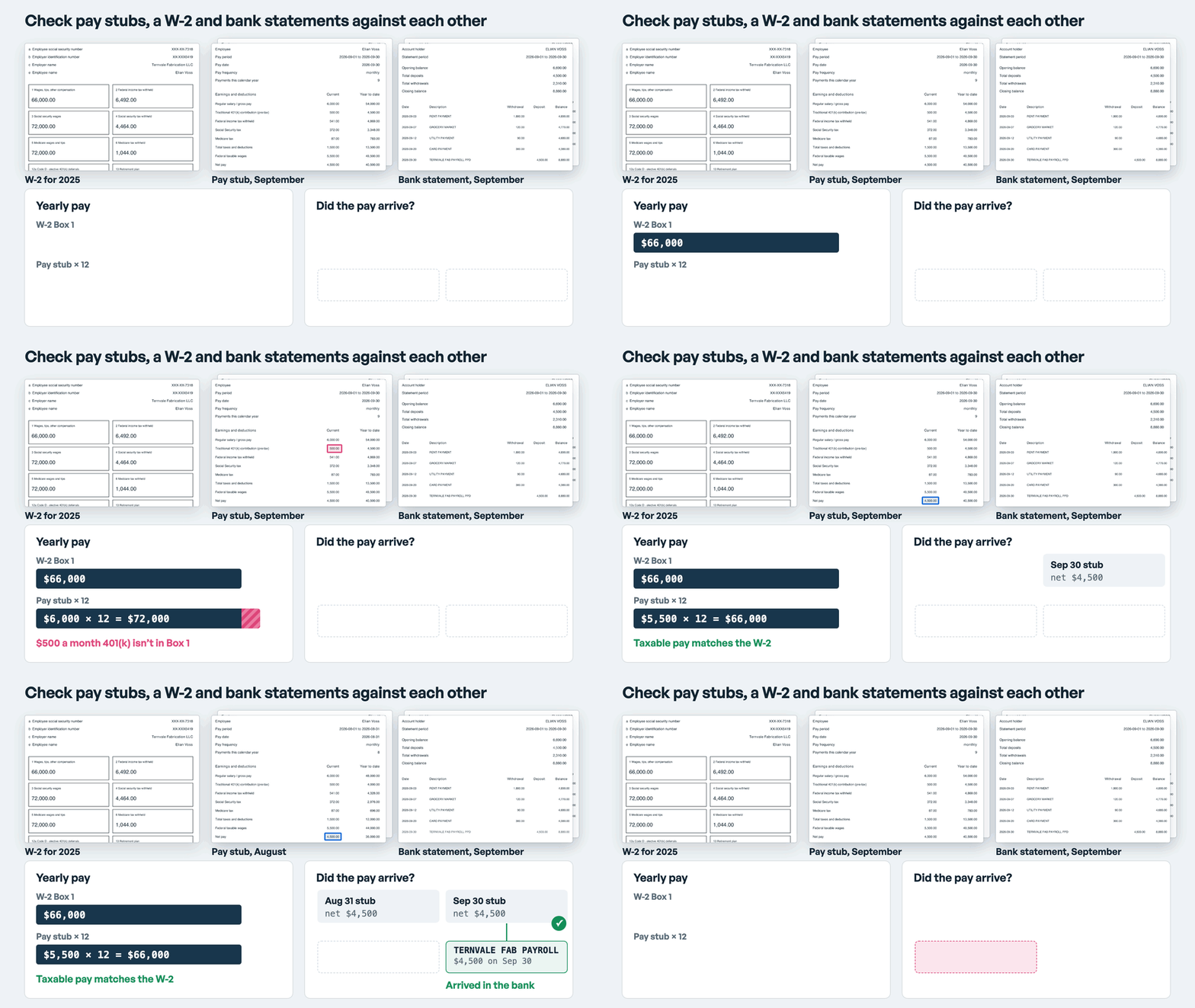
The September stub shows $6,000 gross pay a month. Multiply by twelve, the usual way to annualize a stub, and the applicant earns $72,000 a year. The W-2 for last year says $66,000 in Box 1. A naive check would flag a $6,000 gap and conclude the stubs overstate the income.
The answer is on the stub itself. Each month, $500 goes into a traditional 401(k), a workplace retirement plan paid into before income tax. The IRS instructions for Box 1 leave those contributions out. So the stub figure to hold against Box 1 is federal taxable wages. $5,500 of taxable pay a month is $66,000 a year, which matches the W-2 exactly.
The year-to-date figure, the running total since January 1, gives a second view of the same year. September's stub shows $49,500 of taxable pay over nine payments, which also projects to $66,000.
latest = stubs["stub-09"]
gross = v(latest["gross_pay"]) * 12
taxable = v(latest["taxable_pay"]) * 12
projected = v(latest["ytd_taxable"]) / v(latest["periods_paid"]) * 12

print(f"gross x 12:     {gross:,.0f}")
print(f"taxable x 12:   {taxable:,.0f}")
print(f"YTD projected:  {projected:,.0f}")
print(f"W-2 Box 1:      {v(w2['box_1']):,.0f}")
These figures match to the dollar because the salary and contribution didn't change between years. With raises, bonuses, hourly pay or a midyear start, compare within a tolerance and send larger gaps to a person with both cited figures.
Did the Money Arrive?
Each stub says $4,500 went by direct deposit to the account ending 4826. For each stub, we look for a payroll deposit of the same amount within three days of the pay date.
for name, stub in stubs.items():
    paid = date.fromisoformat(v(stub["pay_date"]))
    hits = [row for row in payroll
            if v(row["amount"]) == v(stub["net_pay"])
            and abs(date.fromisoformat(v(row["date"])) - paid) <= timedelta(days=3)]
    page = stub["net_pay"]["citation"]["page"]
    status = "PASS" if hits else "REVIEW, no matching deposit"
    print(f"{paid} net {v(stub['net_pay']):,.0f}: {status} ({name}.pdf p.{page})")
What the Checks Print
Run against the five documents, the checks print this.
person: PASS {'elian voss'}
employer: PASS {'ternvale fabrication llc'}
gross x 12:     72,000
taxable x 12:   66,000
YTD projected:  66,000
W-2 Box 1:      66,000
2026-08-31 net 4,500: REVIEW, no matching deposit (stub-08.pdf p.1)
2026-09-30 net 4,500: PASS (stub-09.pdf p.1)
The names agree, and once taxable wages are compared like for like, so does the income. The gap that looked like a problem was a 401(k) contribution. The month that looked fine is the one to worry about. September's paycheck arrived on September 30. The August statement for account 4826 shows rent, groceries, a utility bill and a card payment, and no deposits at all.
Flag What Needs a Person
The August paycheck is the one exception, and the output says where to look, so a reviewer opens the August stub and the August statement instead of rereading all five documents. There are ordinary explanations, such as a changed account, a delayed payroll run or a stub that doesn't match what was paid. Deciding which applies is a job for a person.
Values with scores below your cutoff, and fields that come back null, are exceptions too, and they go to a person before any comparison runs. The confidence score thresholds guide covers choosing a cutoff for each field.
The same pattern covers whatever else your team checks, such as a second employer or an employment letter. Extract the few fields the check needs, compare them across documents, and keep the citations so every flag points back to the page that raised it. What the loan officer or leasing agent gets is a short list of places where the paperwork disagrees, with the decision still theirs.


