Document Classification With Python and LLMs
Classify each page of a mixed PDF with Python, extract the right fields from each document type, and check that the documents agree with each other before they move on.


Document classification tells you what kind of document you're looking at, so you know which fields to pull out of it. This guide uses Python and Unsiloed to classify each page of a mixed PDF, extract the right fields from each document, and check that the documents agree with each other.
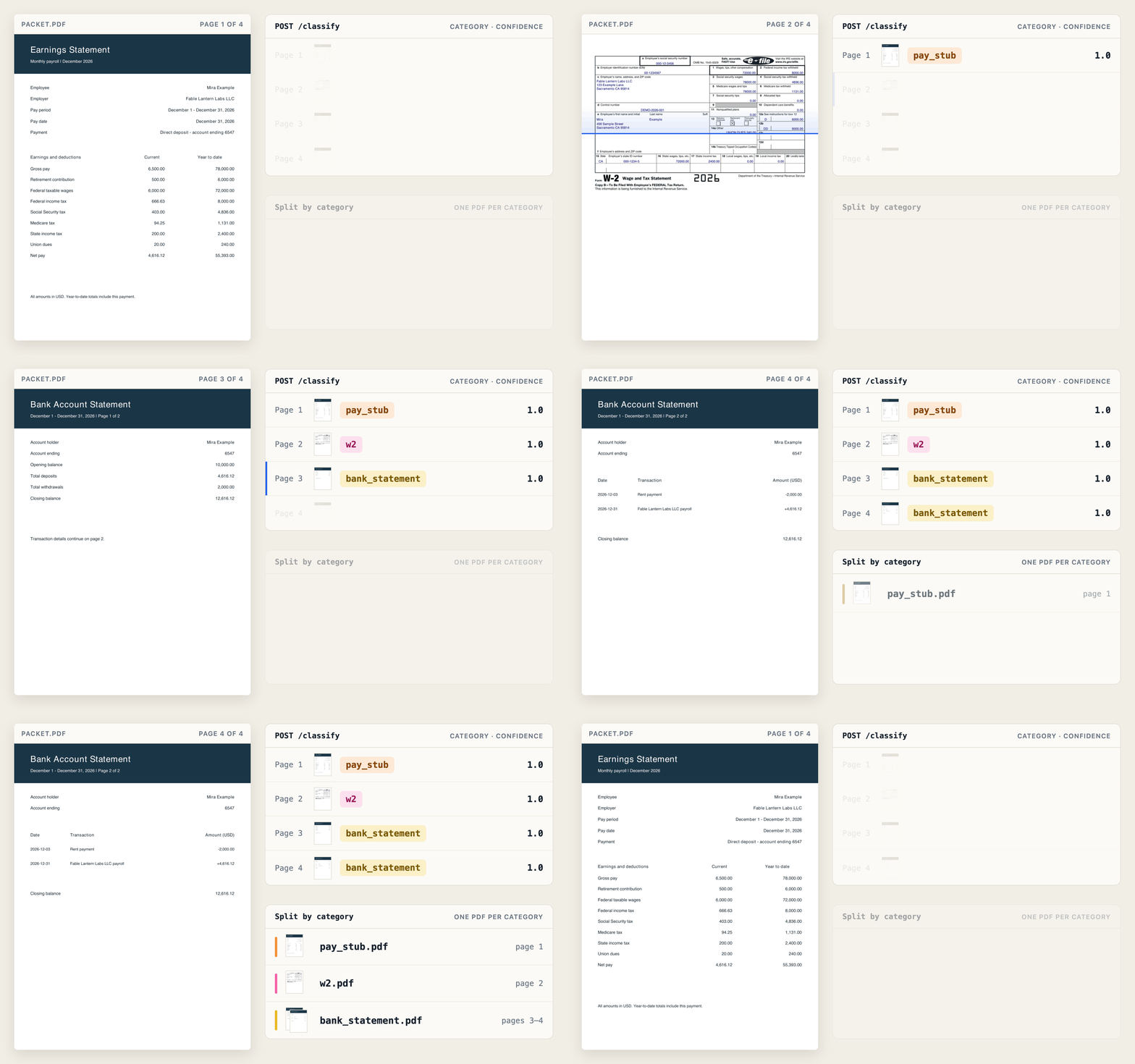
The example is a mortgage loan packet. It brings together the income records a lender uses when assessing a home loan application. This packet has four pages:
- A pay stub, which records one month's earnings and deductions.
- A W-2, the yearly wage and tax statement a US employer gives each employee.
- A bank statement, which runs over two pages.
What Document Classification Means
Document classification gives each document a category based on what it contains. The category decides what happens next. For example, a page labeled pay_stub gets the pay stub fields extracted from it.
A mixed PDF needs a label for each page, not one label for the whole file. In this packet, page 1 is a pay stub, page 2 is a W-2, and pages 3 and 4 are a bank statement. Calling the whole file a bank statement would hide the other two documents.
Compare Document Classification Models and Rules
There are four common ways to classify documents. They differ in how much labeled training data they need, meaning example documents that a person has already sorted into categories.
| Approach | What You Supply | Trade-offs |
|---|---|---|
| Rules and keywords | Conditions, such as a title containing "Wage and Tax Statement" | No training. Each new category needs new rules, and shared wording can match the wrong rule. |
| TF-IDF with Naive Bayes | Labeled example documents | Cheap to train. Each new category needs more labeled examples and retraining. |
| Fine-tuned BERT | Labeled example documents and a pretrained model | Learns from context, not only word counts. You manage training and hosting the model. |
| A prompted LLM or an API such as Unsiloed | A prompt with categories, or category names for the API | No task-specific training. Categories can change per request, with inference costs. |
Term frequency–inverse document frequency (TF-IDF) weights words by their frequency in a document, downweighting words that appear in many documents. Scikit-learn supports TF-IDF together with Naive Bayes for text classification. BERT is a pretrained language model that you train further on labeled examples. Both work on text, so a scanned page needs optical character recognition (OCR) first to turn its image into text.
With a large language model (LLM), you describe the categories in a prompt and ask the model to pick one. A classification API such as Unsiloed takes the document and a list of category names, with no prompt to write. Whichever approach you choose, test it on the documents your pipeline actually receives.
Document Classification in Python With Unsiloed
To classify PDF pages from Python, we need an HTTP client and a PDF library. Install them in your Python environment and set your Unsiloed API key:
python3 -m pip install requests pypdf
export UNSILOED_API_KEY="your-api-key"
Download the matching packet as packet.pdf. Create packet.py in the same folder and append each Python snippet below in order.
Unsiloed runs each request as a job. We send the file, get back a job ID, and poll until the job finishes. This helper does both:
import json, os, time
import requests

BASE = "https://prod.visionapi.unsiloed.ai"
HEADERS = {"api-key": os.environ["UNSILOED_API_KEY"]}

def run(endpoint, path, data, poll_path=None):
    with open(path, "rb") as f:
        job = requests.post(f"{BASE}/{endpoint}", headers=HEADERS,
                            files={"pdf_file": (path, f, "application/pdf")}, data=data)
        job.raise_for_status()
        job = job.json()
    while True:
        result = requests.get(f"{BASE}/{poll_path or endpoint}/{job['job_id']}", headers=HEADERS)
        result.raise_for_status()
        result = result.json()
        if result["status"] == "failed":
            raise SystemExit(f"Job failed: {result.get('error')}")
        if result["status"] == "completed":
            return result
        time.sleep(3)
Classify Each Page of the PDF
Classification needs clear, distinct categories. We send the whole packet to /classify once, with a list of category names, and get a result for each page.
categories = [{"name": name} for name in ("pay_stub", "w2", "bank_statement")]
job = run("classify", "packet.pdf", {"categories": json.dumps(categories)})
if any(page["confidence"] < 0.95 for page in job["result"]["page_results"]):
    raise SystemExit("Send the packet to a person for review")
for page in job["result"]["page_results"]:
    print(page["page"], page["classification"], round(page["confidence"], 3))
1 pay_stub 1.0
2 w2 1.0
3 bank_statement 1.0
4 bank_statement 1.0
Each page gets a category and a confidence score between 0 and 1. The 0.95 cutoff is a starting point for this guide, not a guarantee of accuracy. Tune it against labeled documents before using it to decide which packets need review. The guide to classification confidence scores covers how to set that threshold.
Split the Packet Into Documents
Pages of the same type can be grouped for extraction. The response lists these groups under categories, and we write each group to its own PDF.
from pypdf import PdfReader, PdfWriter

reader = PdfReader("packet.pdf")
documents = {}
for group in job["result"]["categories"]:
    writer = PdfWriter()
    for page in group["pages"]:
        writer.add_page(reader.pages[page - 1])
    documents[group["category"]] = f"{group['category']}.pdf"
    writer.write(documents[group["category"]])
Grouping by category works when each document type appears once. A packet with two bank statements, from two different accounts, would end up in one PDF. To keep them apart, split on other signs too, such as a change of account number or printed page numbers that restart at 1. The guide to splitting PDFs in Python covers this in more detail.
Connect Document Classification and Extraction With Schemas
Once we know a document's type, we can ask for the fields that type contains. A schema lists those fields and their types. Each document type gets its own schema.
For income records, year-to-date means the total since the start of the calendar year. Net pay is take-home pay after deductions, and Box 1 on a W-2 reports annual wages subject to federal income tax:
def field(kind, description):
    return {"type": kind, "description": description}

def obj(properties):
    return {"type": "object", "properties": properties, "required": list(properties)}

schemas = {
    "pay_stub": obj({"name": field("string", "Employee full name"),
                     "employer": field("string", "Employer name"),
                     "ytd_taxable": field("number", "Year-to-date federal taxable wages"),
                     "net_pay": field("number", "Net pay for this period")}),
    "w2": obj({"name": field("string", "Employee full name"),
               "employer": field("string", "Employer name"),
               "taxable_wages": field("number", "Box 1 wages, tips, other compensation")}),
    "bank_statement": obj({"name": field("string", "Account holder full name"),
                           "payroll_amount": field("number", "Amount of the payroll deposit")}),
}
We compare Box 1 with year-to-date federal taxable wages, rather than gross pay before deductions. Pretax retirement contributions can make taxable wages lower than gross pay.
Extract the Fields From Each Document
Extraction uses the schema for each document type. We send each document to the extraction endpoint. Keep the .pdf extension on the filename. We turn on citations, which record where on the page each value was found.
extracted = {}
for kind, path in documents.items():
    job = run("v2/extract", path, {"schema_data": json.dumps(schemas[kind]),
                                   "model": "gamma", "enable_citations": "true"}, poll_path="extract")
    json.dump(job, open(f"{kind}.json", "w"))
    extracted[kind] = {name: item["value"] for name, item in job["result"].items()}
With these settings, values come back wrapped with scores and citations. This response excerpt shows net pay from the pay stub. Scores and bounding boxes can vary between requests:
{
  "score": {"grounding_score": 0.995, "extraction_score": 0.995},
  "value": 4616.12,
  "citation": {"bbox": [343, 564, 392, 579], "page": 1, "page_width": 612.0, "page_height": 792.0}
}
The grounding_score is the confidence that the value was found on the page, and the extraction_score is the confidence in the value itself. The citation gives a page within the split document and a box around the value. We save each full response and keep only the values for the cross-check.
Cross-Check Values Across Documents
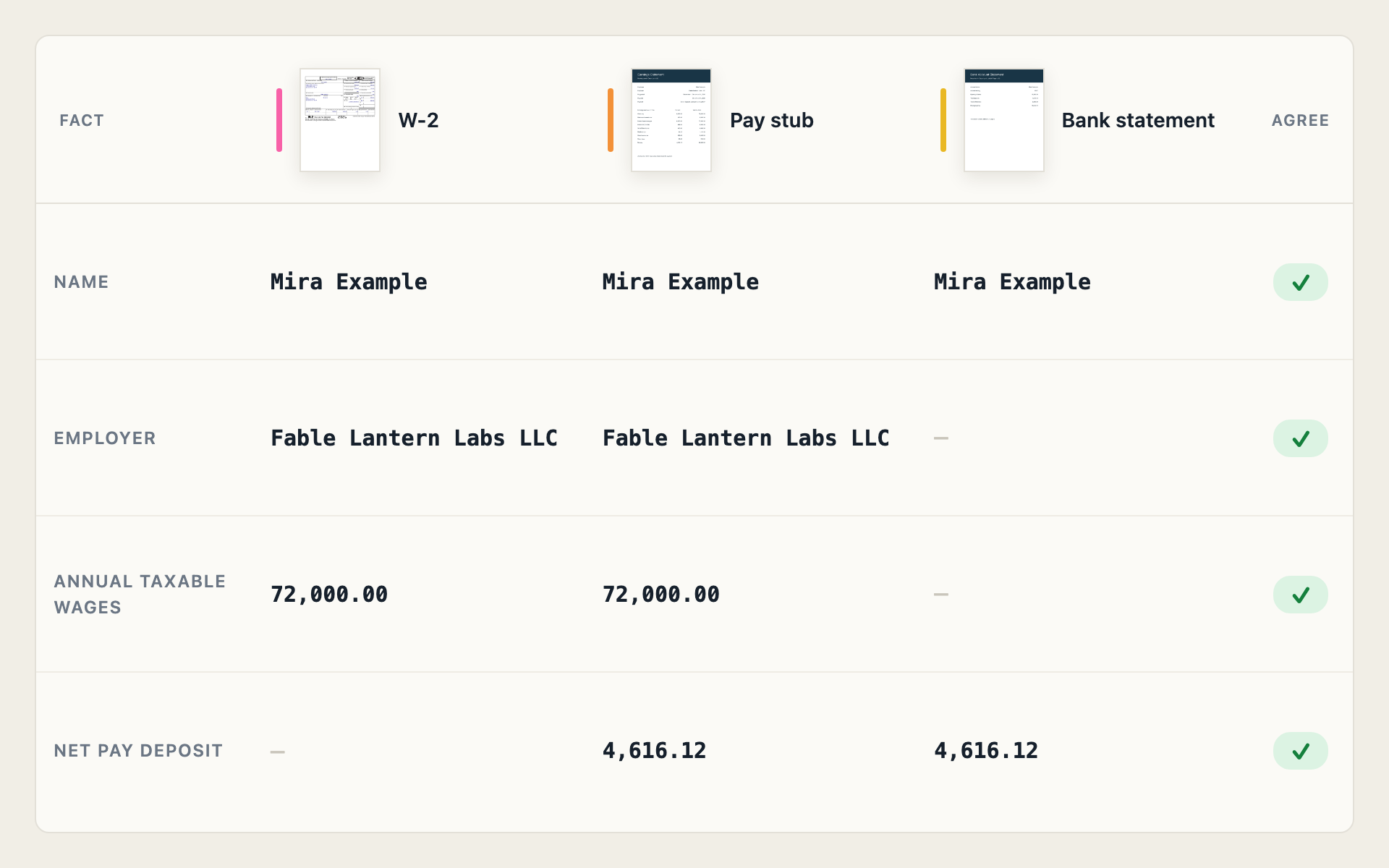
Documents in the same packet describe the same person, so they should agree with each other. A pay stub that names a different employer from the W-2, or a deposit that doesn't match the net pay, is a reason for a person to look closer.
Compare values that cover the same period. This packet has the December pay stub, so its year-to-date wages cover the same tax year as the W-2, and its net pay arrives as one payroll deposit. We compare:
- Name: the same person on the pay stub, the W-2, and the bank statement.
- Employer and wages: the December pay stub's year-to-date taxable wages should equal the W-2's Box 1, and both should name the same employer.
- Deposit: the pay stub's net pay should arrive in the bank account.
We use Python to compare them, ignoring differences in capitalization and spacing:
pay, w2, bank = extracted["pay_stub"], extracted["w2"], extracted["bank_statement"]

def same(a, b):
    return " ".join(str(a).casefold().split()) == " ".join(str(b).casefold().split())

checks = {
    "name": same(pay["name"], w2["name"]) and same(pay["name"], bank["name"]),
    "employer": same(pay["employer"], w2["employer"]),
    "annual wages": round(pay["ytd_taxable"], 2) == round(w2["taxable_wages"], 2),
    "net pay deposit": round(pay["net_pay"], 2) == round(bank["payroll_amount"], 2),
}
problems = [name for name, ok in checks.items() if not ok]
print("REVIEW: " + ", ".join(problems) if problems else "MATCH: the documents agree")
Run the assembled script:
python3 packet.py
After the four classification lines shown earlier, the final line is:
MATCH: the documents agree
Replace packet.pdf with the second packet, where the pay stub names Cedar Harbor Systems LLC as the employer, and rerun the script. The classification lines stay the same, but the final line is:
REVIEW: employer
A match means only that the compared values agree. It doesn't establish that the documents are authentic or that the applicant qualifies for the loan, which is a later step called underwriting. A low extraction score is a separate reason for review, so check the saved responses too. Once a packet passes, route each document to the system that handles its type.