PDF Classification and Routing Guide (July 2026)
When a batch of heterogeneous PDFs (invoices, contracts, and scanned forms) arrives at your pipeline for processing, and you run the same schema extraction on all them, the logic applies uniformly and fails quietly on half the files: * Fields that don't exist in a document type return null; there ar


When a batch of heterogeneous PDFs (invoices, contracts, and scanned forms) arrives at your pipeline for processing, and you run the same schema extraction on all them, the logic applies uniformly and fails quietly on half the files:
- Fields that don't exist in a document type return null; there are now documents with missing values.
- Schema mismatches propagate downstream; a contract that was processed as an invoice will continue causing confusion as the rest of the system tries to handle it.
- Errors are revealed only after embeddings (text to tokens) are generated and retrieval (combining layout and text) returns low-confidence results.
Instead, the correct sequence to process files is to parse, then classify and route, before extracting. Classification schemes tag each document by type and confidence (in the correctness of the type) before any extraction runs. Correct routing will send each extractor the document type it was designed for and prevent extractors from choking on input they were never built to handle.
If a file in a batch contains multiple document types (like a PDF containing an invoice and a scanned receipt), you can classify and split the file into multiple documents, and route each individually.
TLDR:
- Routing before extraction prevents schema mismatches.
- Confidence-gated routing controls automation. Scores above 0.9 route straight through, 0.7 — 0.9 need review, and below 0.7 need full human review before parsing.
- Hybrid routing maximizes speed and correctness. Rule-based checks (filename patterns, page count, metadata) run first, falling back to AI inference only when rules return low confidence.
- Vision-first parsing preserves classification signals. For documents that need AI inference, layout structure and reading order help classifiers understand a document. Whereas OCR-only approaches flatten documents and discard spatial layout that differentiates document types.
Why classify before extracting?
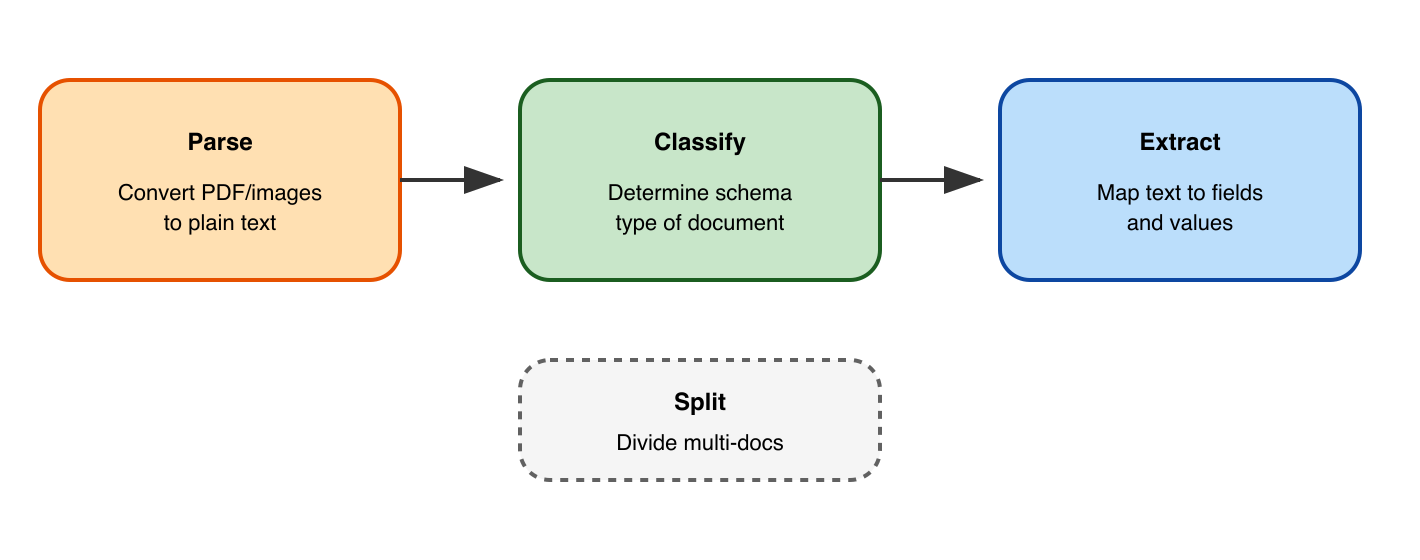
Turning a PDF document (or a Word file or an image) into JSON or Markdown that a program can understand generally follows three steps:
- Parse: Convert the PDF text into plain text, and use possibly vision analysis or OCR to convert images to text too.
- Classify: Decide what type of schema best suits the document. Is the document type an invoice, medical record, advertisement, or handwritten contract?
- Split: If a file contains multiple document types, first split the file into multiple files, with each document classified individually.
- Extract: Send each document to an appropriate extractor. Extraction takes the text given by parsing and separates it into field names and values that match a given schema (like a list of model numbers and prices).
If you omit step two, classification, the schema in the extraction step won't match the document type and hidden errors will occur. An extractor applied uniformly across invoices, contracts, and lab reports will extract fields that don't exist in half the documents, silently return nulls, and push malformed records downstream before any error surfaces.
Classification schemes solve this by sorting documents into typed categories before any splitting logic runs. Object classification assigns each file a document type, a confidence score, and a routing label. From there, split PDF documents into multiple files based on type, not arbitrary page counts, so each downstream parser receives only the input it was built for. Getting this order right matters more in batch pipelines where file heterogeneity is high and manual review is not feasible at scale.
Before classification logic ever runs, the parser underneath it sets the ceiling on what's possible. A classifier can work only with the text and structure it receives. If the parser collapses a multi-column invoice into a single disordered text stream, no classification scheme recovers the original layout signal. Parsing quality matters most at the boundaries between document types. A contract's header block and a loan summary's cover page may look structurally similar in a degraded parse, causing misroutes that send documents down the wrong processing branch entirely.
Vision-first parsers that preserve reading order and table structure give classifiers more reliable signal than OCR-only approaches, which flatten layout into raw text and discard spatial relationships that distinguish document types.
Choosing classification schemes
There are two ways to classify a document (and a third way that uses both):
| Scheme | How it works | Strength | Weakness |
| Rule-based routing | Uses filename patterns, metadata fields, keywords, or header text to sort documents before any model inference runs | Fast and deterministic | Breaks on documents that lack consistent formatting |
| ML-based classification | Trains a model on labeled examples to assign document types by visual layout or text content | Handles variation that rules cannot | Adds latency and cost per document |
| Hybrid scheme | Run rule-based checks first and fall back to model inference only when confidence is low | Balances speed against coverage | Requires tuning confidence thresholds for each document type |
The right classification scheme depends on how much structural variation exists in your batch and how often new document types appear. Choosing between rule-based and AI methods becomes a practical decision about latency budgets versus handling variation at scale.
Reviewing documents based on confidence scoring
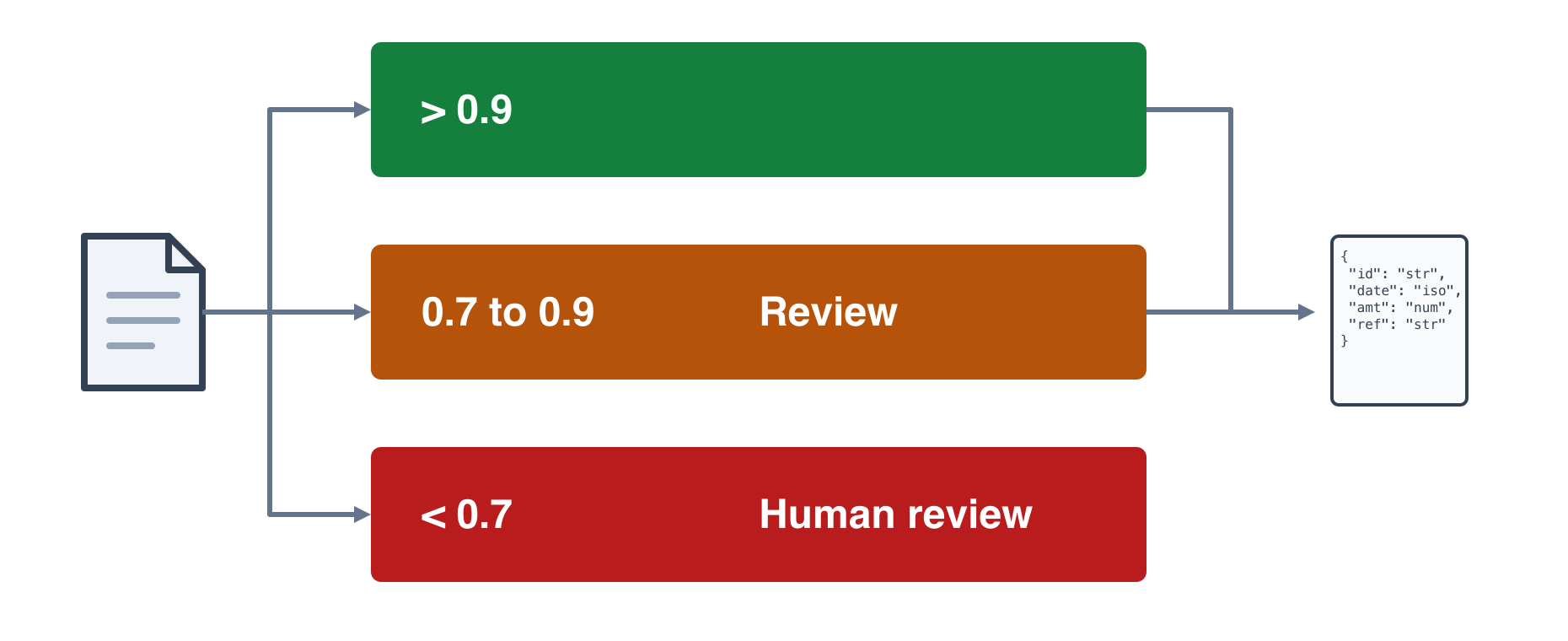
Every classifier output should carry a confidence score between 0 and 1.
- Scores above 0.9 are reliable enough for straight-through routing.
- Scores between 0.7 and 0.9 warrant a second check, either by a second model pass or a human review queue.
- Scores below 0.7 should flag the document for human review before any splitting or parsing runs.
This threshold structure keeps automation high while containing the failure rate on edge cases. A batch of 1,000 mixed PDFs will realistically include scanned documents with degraded quality, ambiguous layouts, and files that span multiple document types within a single upload. Confidence-gated routing handles each scenario without requiring a blanket manual review policy that kills throughput.
Logging the confidence score alongside the document type label on every record gives you an audit trail that feeds back into classifier retraining over time.
How document splitting works
While document classification is done once per document, document splitting does classification multiple times per document. Splitting uses the same classification schemes as document classification: rules-based, AI, or hybrid.
Rule-based splitting divides documents by fixed criteria like page ranges or PDF bookmarks, as well as blank pages or barcodes. It runs fast and predictably, but breaks down when document boundaries are irregular or content-based.
AI-driven classification reads the content itself to identify document type and split points. A classifier assigns each page a label and a confidence score, and the pipeline routes accordingly.
The choice between them depends on your batch composition. Uniform, well-structured batches work fine with rule-based logic. Mixed batches with varied layouts require AI.
Using Unsiloed AI for document processing
Unsiloed AI's document pipeline separates classification from parsing by design. Before any extraction logic runs, each document in a batch receives a document type label and a confidence score between 0 and 1. Scores above 0.9 route automatically; scores between 0.7 and 0.9 flag for human review. That threshold logic is configurable per workflow.
When a batch contains mixed document types, the classifier splits PDF documents into separate files by type. Each routed file is then processed with schema-driven extraction tuned to its document class, so a W-2 never runs through invoice extraction logic and a lease agreement never hits a medical record schema.
Every classification decision returns a structured response with the assigned label, confidence score, and the page range used to make the call, giving downstream systems a traceable record of how each split was made.
Summary: Building a document parsing pipeline that works
If you build a batch processor to extract fields from documents, ensure you do all the following:
- Split a file containing multiple documents into separate files at the appropriate places.
- Combine rule-based classification and AI classification to split documents and classify individual documents appropriately, given the document complexity. Use a dedicated document parsing tool, like Unsiloed AI or one of its competitors, rather than a general purpose LLM for increased accuracy and lower costs.
- Route each file to the appropriate extractor that has a schema that matches the document type.
- If the machine's confidence in a document type is below 0.7, don't extract values. Rather leave it in a separate queue for human review. If the classifier finds a document type that doesn't match any you have a schema for, also send it to a human to create a new schema or discard the file.
FAQ
Can I classify documents without parsing them first?
No. Classification requires readable text and layout structure to assign document types accurately, so parsing must run first to extract that signal. A vision-first parser preserves reading order and table structure that classification models rely on to distinguish between visually similar documents like contracts and loan summaries.
Batch splitting by page count vs. document classification?
Rule-based splitting by page count runs fast and predictably for uniform batches, but breaks on heterogeneous files where invoices, contracts, and forms arrive mixed with irregular page boundaries. Document classification reads content and layout to identify type transitions and split points, handling variation that fixed rules cannot detect.
How to split PDF documents into multiple files from a mixed batch?
Classify each file first to assign a document type and confidence score, then route files above 0.9 confidence directly to type-specific parsers and queue mid-range scores (0.7-0.9) for review. Split PDF into separate files based on classification output, not arbitrary page counts, so each downstream extraction schema receives only the document type it was built for.
What is object classification in document routing?
Object classification assigns each page or file a document type label based on visual layout, text content, or structural signals, returning a category and a confidence score between 0 and 1. Production pipelines use this label to route documents to the correct parser and extraction schema before any field-level processing runs.