From Invoice PDFs to Payment Reconciliation in Databricks
See how we connected Unsiloed to Databricks to turn invoice PDFs into confidence-scored Delta rows and reconcile them against payment data.

We connected Unsiloed to Databricks with an ETL pipeline that reads invoice PDFs from a Unity Catalog volume and sends them to our extraction API. Our API returned invoice fields with confidence scores and page citations. The pipeline stored those results in Delta tables, joined them to representative payment records, and produced a reconciliation table showing what matched and what needed human review.
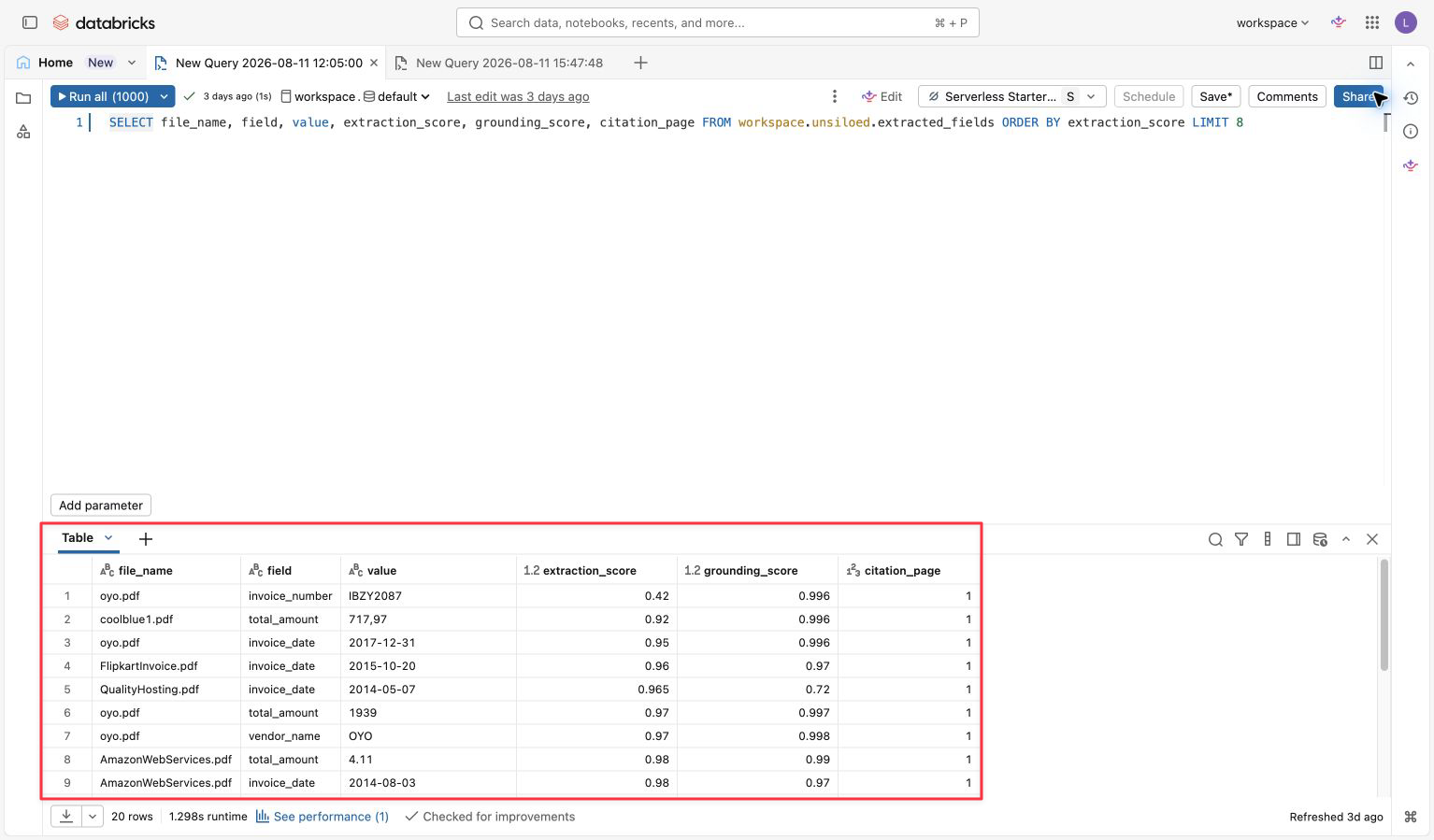
The run turned five invoice PDFs into 20 field rows. Each value carries both confidence scores and its source page.
From a Folder of PDFs to a Review Queue
Databricks already knows what a business ordered, which vendors it uses, and what it paid. The source documents behind those facts often remain in a folder of PDFs.
This integration makes those documents part of the lakehouse workflow:
- Invoice PDFs land in a Unity Catalog volume.
- A Databricks ETL pipeline sends each document to our extraction API.
- The API returns the invoice fields, confidence scores, and page citations.
- Databricks writes the results to Delta tables and joins them to payment records.
The final output is not another document-processing screen. It is a Databricks table that teams can query, govern, and add to an AI/BI dashboard.
We used real invoices from Amazon Web Services, Coolblue, Flipkart, OYO, QualityHosting, and Netpresse. The payment rows are representative data created for the demo.
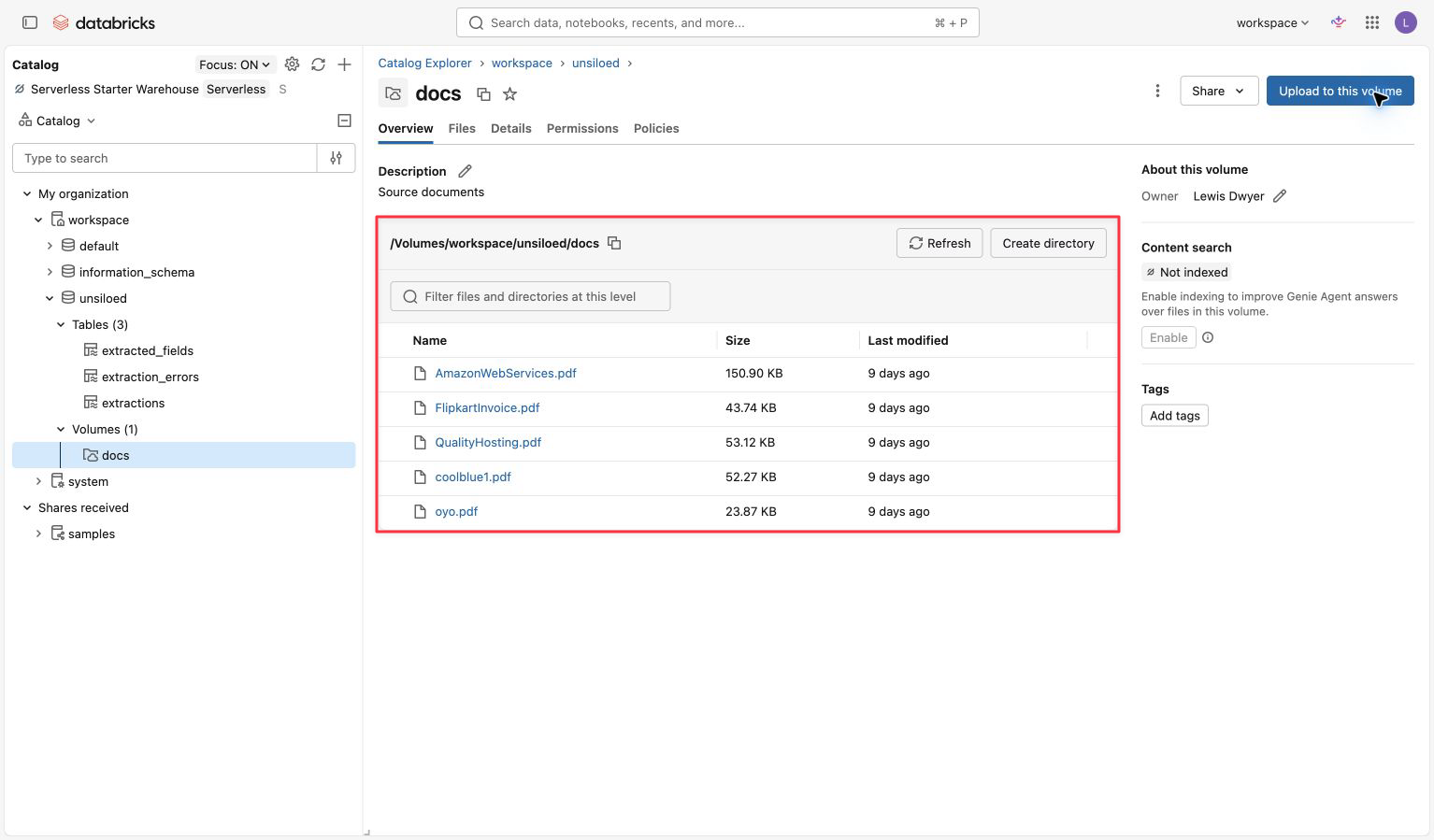
The PDFs remain in a governed Unity Catalog volume while their extracted fields become queryable Delta rows.
Confidence Makes the Join Useful
Extracting an invoice total is useful. Knowing whether that total should pass automatically or wait for a reviewer is more useful.
Our extraction API returns two signals for every field:
- An extraction score for confidence in the value
- A grounding score for confidence that the cited page region supports it
Databricks stores the complete extraction response in a VARIANT column, then expands it into one row per field. Each row keeps the value, both scores, the source path, and the citation geometry.
The citation includes the page and bounding box, so a reviewer can move from a table cell back to the evidence on the invoice. The data stays useful for SQL while retaining its connection to the source document.
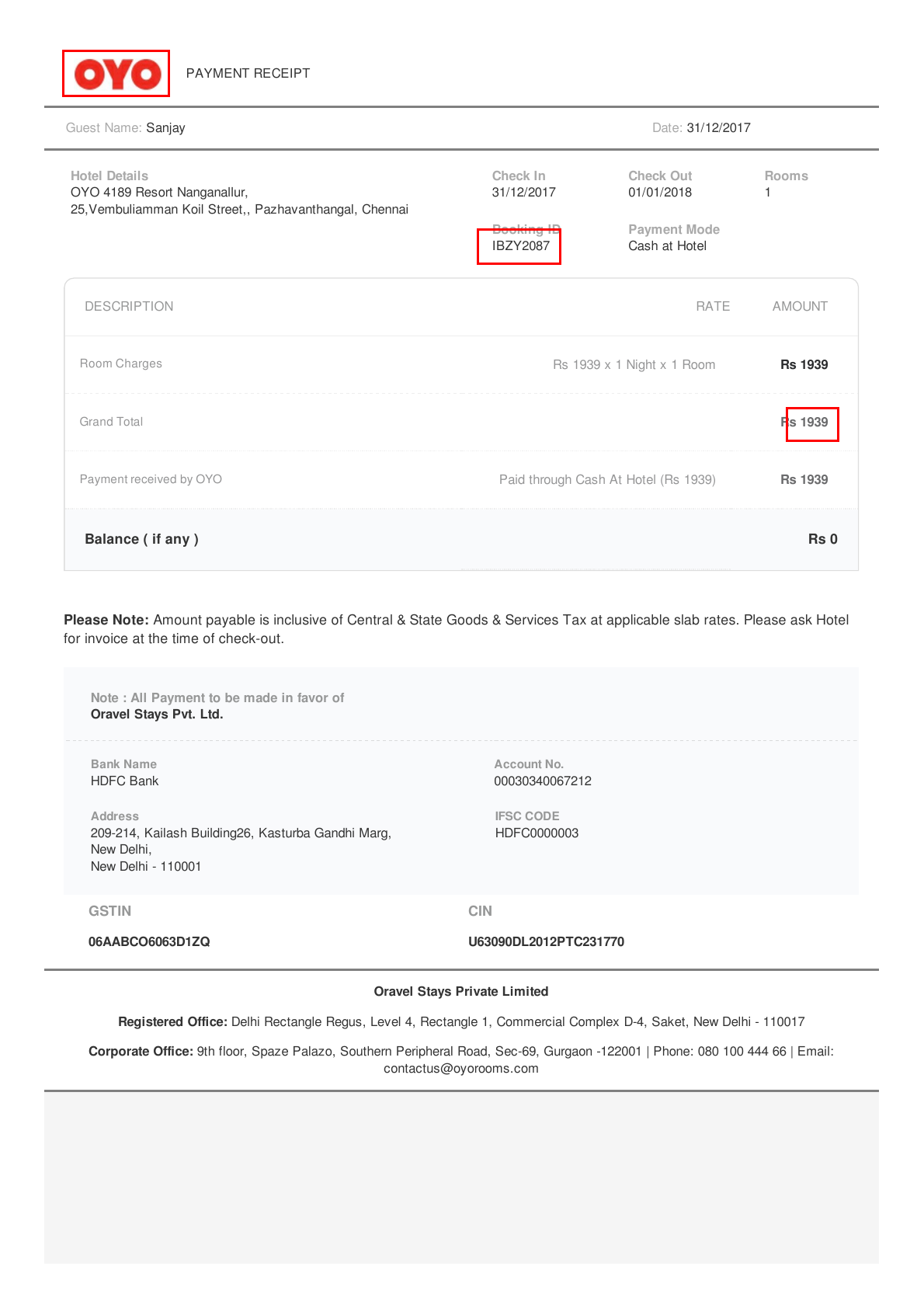
Unsiloed returned the page coordinates used to draw these boxes around the extracted vendor, invoice number, and total.
For this demo, we use the lower of the two scores as the review confidence. The threshold is 0.80.
The OYO invoice illustrates why this matters. The extraction found the invoice number and its location on the page, but the field produced a review confidence of 0.74. Instead of flowing through as a trusted record, Databricks labeled the invoice LOW_CONFIDENCE and placed it at the top of the queue.
Confidence does not replace payment controls or human approval. It gives those controls a better input.
The Reconciliation Results
The pipeline joins each extracted invoice to representative payment data using the invoice number and a normalized vendor name. It then checks the confidence, payment presence, and amount.
Our completed run produced six rows:
| Invoice | Result | What happened |
|---|---|---|
| Amazon Web Services | MATCHED |
Invoice and payment both contain 4.11 USD |
| Flipkart | MATCHED |
Invoice and payment both contain 319.00 INR |
| QualityHosting | MATCHED |
Databricks normalized 34,73 to 34.73 EUR |
| Coolblue | AMOUNT_MISMATCH |
The invoice says 717.97 EUR, but the payment says 707.97 EUR |
| OYO | LOW_CONFIDENCE |
A required field scored below the review threshold |
| Netpresse | MISSING_PAYMENT |
No payment row matched the invoice |
The core routing logic lives in the gold table definition:
CASE
  WHEN review_confidence < 0.80 THEN 'LOW_CONFIDENCE'
  WHEN payment_id IS NULL THEN 'MISSING_PAYMENT'
  WHEN ABS(invoice_amount - paid_amount) > 0.01 THEN 'AMOUNT_MISMATCH'
  ELSE 'MATCHED'
END AS reconciliation_status
The order is deliberate. Low-confidence fields go to review before the pipeline decides that an amount is wrong. This avoids presenting an uncertain extraction as a confirmed accounting problem. The threshold and amount tolerance are demo policies, not universal accounting rules.
Why Unsiloed and Databricks Fit Together
The useful boundary between the products is clear. We turn the document into structured values, confidence scores, and source evidence. Databricks turns that output into governed data that can join the rest of the business.
In this example, our API handles:
- Reading the invoice PDF
- Extracting the vendor, invoice number, date, and total
- Scoring each field
- Returning the page citation and bounding box
Databricks handles:
- Governing the source files with Unity Catalog
- Running the extraction and transformation pipeline
- Storing the output in Delta tables
- Joining invoices to payment records
- Presenting the exceptions through SQL and AI/BI
The result stays inside the Databricks model rather than becoming a parallel document workflow. The pipeline treats each stage as a table and works out the dependency order.
The source feeds three recognizable lakehouse layers:
- Source: invoice files in the Unity Catalog volume
- Bronze: one raw extraction result per document in
extractions - Silver: field rows and normalized invoices in
extracted_fieldsandinvoice_records - Gold: joined payment outcomes in
invoice_reconciliation
A separate extraction_errors table catches document-level failures without stopping the batch. The representative payments table joins into the gold layer alongside the normalized invoice records.
We use the Unsiloed extraction API here because its per-field confidence and citation geometry give us the metadata needed to build a review policy.
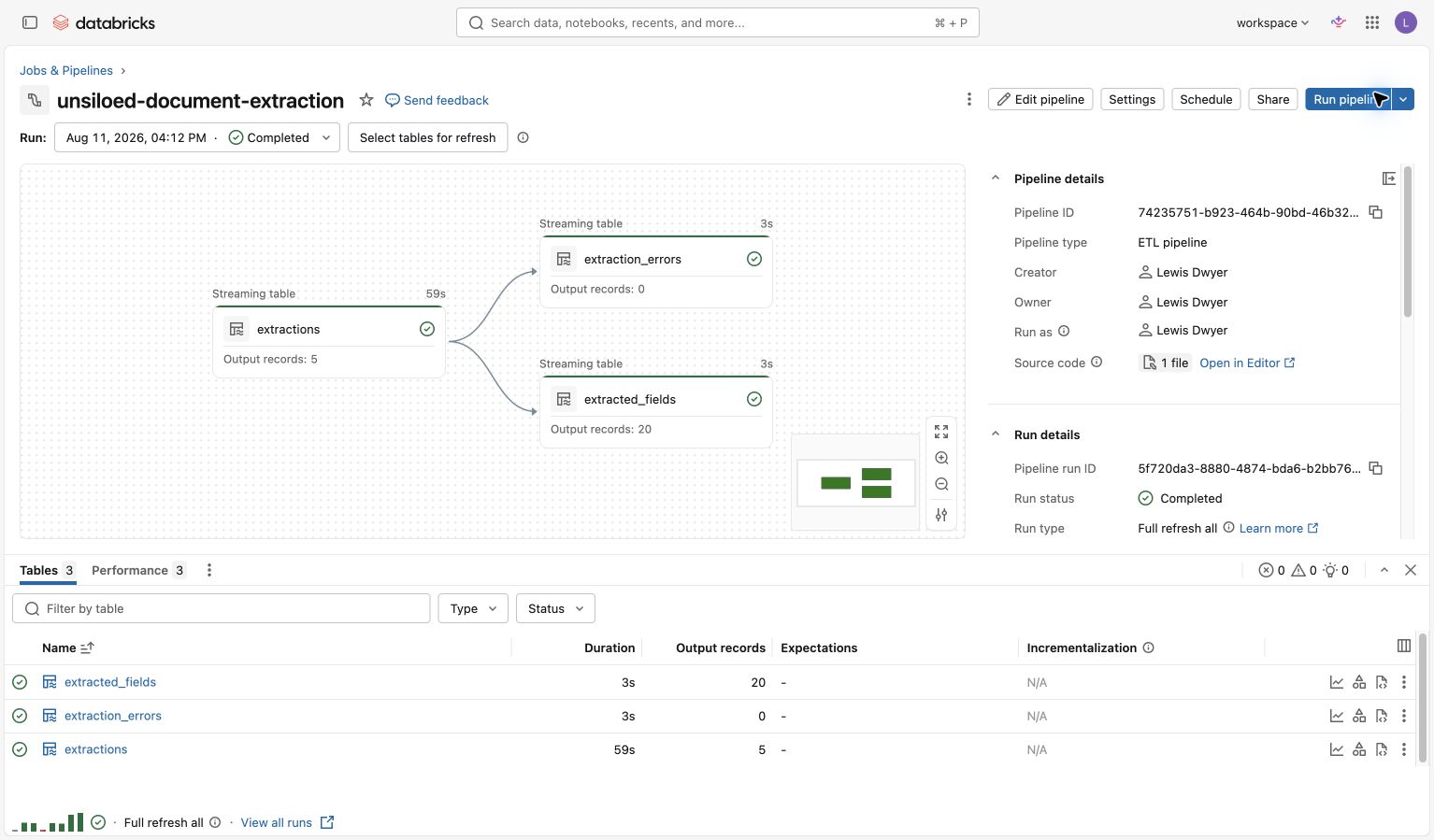
The extraction stage completed with five document rows, 20 field rows, and no errors. The downstream reconciliation tables extend this graph with normalized invoices and representative payments.
Use Extracted Fields in Existing Databricks Workflows
Extraction becomes useful here when Databricks can act on the returned fields. The invoice number, total, confidence, and citation become columns in a Delta table that Databricks can compare with payment records.
Our API supplies the document values and their source evidence. Databricks applies the payment data and controls already in the lakehouse. Together, they turn invoice PDFs into a review queue that shows what matched, what did not, and what needs a person to check.
Follow the complete Databricks integration guide for the implementation, or try the Unsiloed extraction playground with your own documents.