AP Invoice and Purchase Order Automation Guide (August 2026)
Learn how AP teams automate invoice capture, extraction, validation, and three-way matching. See how tolerance checks and targeted exception review help invoices move reliably toward payment.


When a field is misread and the three-way match fails, a reviewer must trace the error through the invoice, purchase order, and goods receipt. This guide explains how accounts payable (AP) teams automate that workflow and how extraction quality determines which invoices enter the exception queue.
TLDR:
- Three-way matching compares the invoice, purchase order, and goods receipt before payment, helping surface quantity and price discrepancies.
- Extraction quality affects how much work reaches manual exception queues.
- A parser that relies only on a PDF text layer cannot extract fields from an image-only PDF, while layout-aware extraction can retain positional context for review.
- Unsiloed's extraction documentation describes 0-to-1 scores and optional source citations, with on-premise and air-gapped deployment options for compliance-sensitive environments.
What Is Automated Invoice Processing
Automated invoice processing handles the vendor-invoice lifecycle without requiring staff to re-key every field. A complete workflow connects document capture, data extraction, validation, matching, approval routing, and payment. Some teams automate only capture and extraction, while others connect the full chain and reserve human review for exceptions.
Manual vs. Automated Invoice Processing
Before adopting accounts payable automation, AP teams should measure their own cycle time, cost per invoice, and exception rate. Those baselines make it possible to test whether a rollout is improving the workflow.
| Workflow Area | Manual Processing | Automated Processing |
|---|---|---|
| Data entry | Staff key in vendor details, line items, and GL codes by hand | Fields extracted directly from the invoice |
| Approval routing | Email chains; every handoff introduces delay | Automated routing; humans review exceptions only |
| Error exposure | Transcription errors at each handoff | Exceptions flagged before payment posts |
| Duplicate detection | Prone to misses under volume | Duplicate-invoice controls can check repeated invoice numbers and amounts |
How Automated Invoice Processing Works
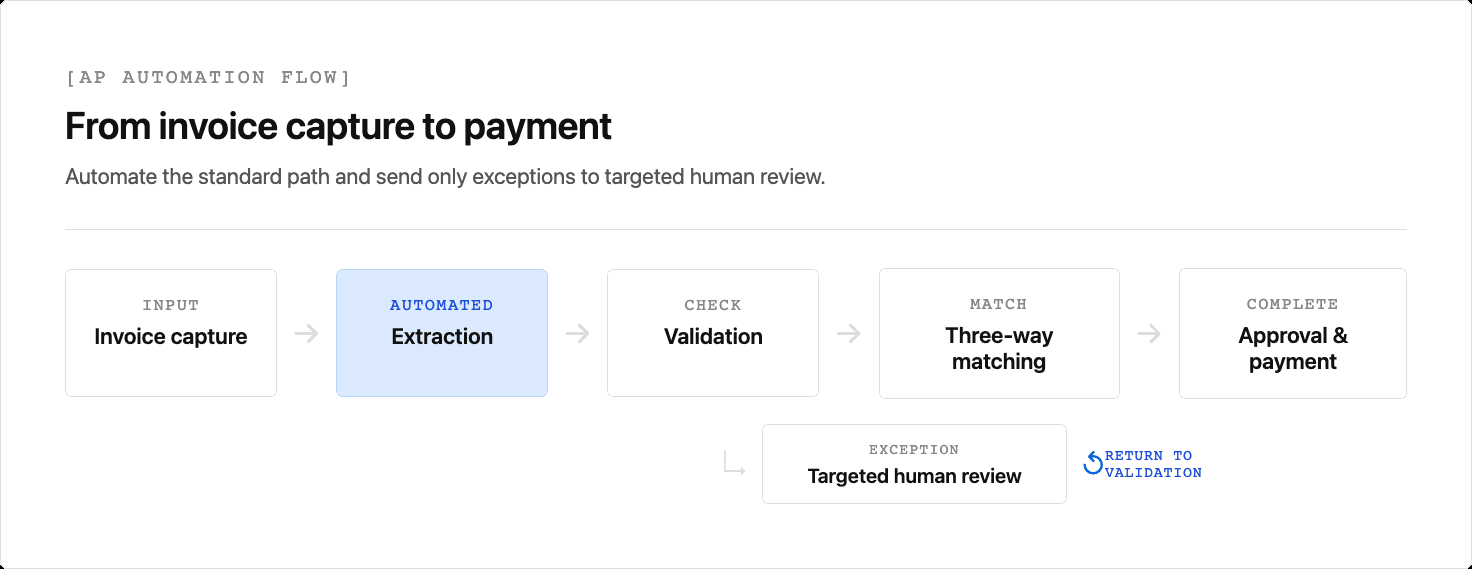
Automated invoice processing moves each invoice through five sequential stages.
- Capture pulls invoices from email inboxes, supplier portals, and paper scans into one queue.
- Extraction reads fields such as vendor name, invoice number, line items, amounts, and due dates, as covered in this document data extraction technical guide.
- Validation checks formats, totals, required fields, and vendor or purchase order references.
- Matching compares the invoice with the purchase order. A three-way match also checks the goods receipt.
- Routing sends invoices within tolerance toward approval and payment, while exceptions go to review.
A misread field, missing purchase order reference, quantity mismatch, or price variance interrupts that standard path. The workflow should surface the affected field so a reviewer can resolve the exception without re-keying the entire invoice.
The flow below shows how the standard path moves toward payment while exceptions return to a focused review step.
Purchase Order Automation and Three-Way Matching
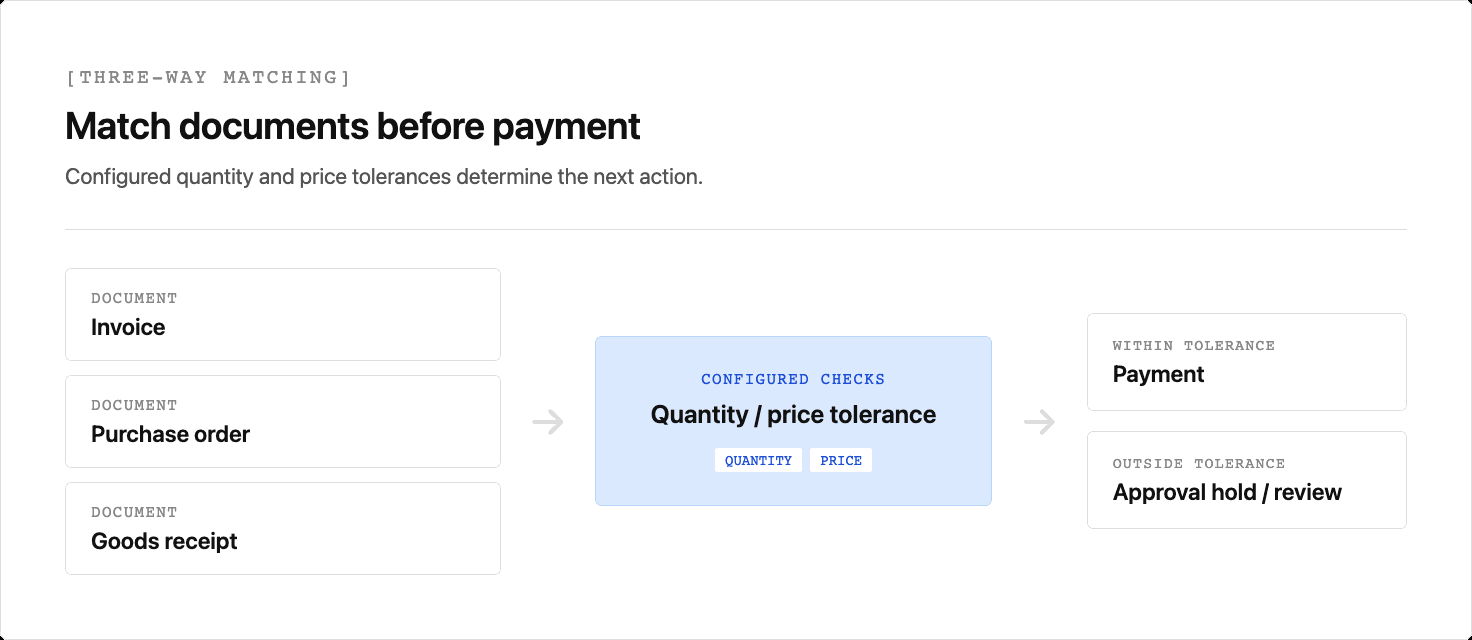
When an invoice arrives, purchase order automation pulls the corresponding purchase order and receipt record, then runs a three-way match across all three documents. The match checks billed quantities and prices against the purchase order, then reconciles billed quantities with the receipt. In systems configured with approval holds, a discrepancy outside tolerance sends the invoice to review before payment.
This decision path makes the tolerance boundary explicit before an invoice can proceed to payment.
How Document Extraction Quality Affects Invoice Automation
Extraction quality determines how much invoice work reaches a manual exception queue.
A scanned invoice can arrive as an image-only PDF. A PDF parser that relies only on a native text layer has no text to supply for matching until an optical character recognition (OCR) or vision-based step extracts the relevant fields.
OCR can return words and their coordinates, but the pipeline's layout model determines whether it preserves the relationships between them. Interpreting a total below a subtotal row and to the right of a tax line depends on that context.
Benchmark representative invoices before setting confidence thresholds. A lower-scoring field can route to a targeted check rather than forcing a reviewer to re-key the whole document. See this guide to confidence score reliability.
At scale, teams cannot manually review every low-confidence document. LLMs for document extraction must meet a high accuracy bar, and field-level confidence lets reviewers focus on the values that need attention.
Common Automated Invoice Processing Challenges
Automation changes where AP teams spend their time, but it does not eliminate exceptions. Four problems account for much of the remaining review work.
- Invoices arrive as PDFs, scans, emails, and EDI files, so document parsing logic that works on one vendor layout can fail on another.
- Quantity, price, or unit-of-measure mismatches between invoices and purchase orders trigger exception queues.
- Slight variations in invoice numbers or vendor names can let duplicates slip through rule-based checks.
- Poor queue visibility delays approvals and makes payment terms harder to meet.
Key Features to Look for in Invoice Automation Software
Three capabilities help AP teams determine whether invoice automation software can handle their production workflow.
Straight-Through Processing with Confidence Thresholds
The software should route high-confidence invoices automatically and flag ambiguous fields for targeted review rather than full manual handling.
PO Matching Logic
Look for two- and three-way matching plus configurable tolerance rules for common variances such as shipping fees.
ERP and Accounting System Connectivity
The tool needs connectors or a documented API for converting PDFs to structured JSON to push validated data into your ERP or accounting system. Otherwise, teams re-key data.
How to Implement Invoice Processing Automation
Implement in phases so extraction errors and routing mistakes surface before they affect every vendor.
- Measure the current workflow. Record invoice volumes, document formats, cycle time, cost per invoice, and exception rate.
- Define acceptance criteria. Set targets for extraction accuracy, straight-through processing, and the errors that must always trigger review.
- Run a narrow pilot. Start with a high-volume, low-complexity invoice type and compare extracted fields and match results with verified source values. This PDF extraction accuracy guide explains what to test.
- Calibrate routing. Set confidence and matching tolerances from the pilot results instead of copying a universal threshold.
- Train reviewers and expand. Teach AP staff how to resolve field-level exceptions, then add harder formats such as handwritten purchase orders and multi-currency invoices.
Unsiloed AI: Document Extraction Infrastructure for AP Automation
Unsiloed AI provides document extraction APIs that pass invoice data from raw documents to downstream systems.
The extraction API documentation describes confidence scores on a 0-to-1 scale. Bounding-box citations are available when enable_citations is enabled. Teams should validate any review threshold against their own documents and error tolerance.
For compliance-sensitive environments where auditable financial data extraction is required, Unsiloed offers on-premise and air-gapped deployment options.
Why Extraction Quality Determines AP Automation Results
Extraction quality determines whether an invoice can move through matching or requires manual exception review. Test accuracy and review routing across the invoice formats your vendors send. Book a demo with Unsiloed to test it on your document mix.
FAQs
What's the difference between OCR-first and vision-first extraction for automated invoice processing?
OCR can return text with positional information, but a pipeline may still lose the relationships between words, rows, and columns if its layout model does not preserve them. Vision-based extraction can use page-level visual context, so a total below a subtotal row can remain associated with its position in the document.
How do I set confidence thresholds for straight-through invoice processing?
Set confidence thresholds from a benchmark of representative invoices and the error rate your workflow can accept. Route uncertain fields to a targeted human check where possible, instead of requiring a reviewer to reprocess the entire invoice.
Can automated invoice processing handle scanned image PDFs without a text layer?
Yes. Image-only PDFs need OCR or a vision-based extraction step because they do not contain a native text layer. A parser that relies exclusively on native PDF text cannot supply a PO number, vendor name, or line-item total for downstream matching until another extraction step processes the image.
What does three-way matching check in purchase order automation software, and what triggers a hold?
Three-way matching compares the invoice with the purchase order and goods receipt. It commonly checks billed quantities and prices against the purchase order, then verifies that billed quantities do not exceed quantities received. In a workflow configured with approval holds, a discrepancy outside the defined tolerance can hold the invoice for review before payment.