
Give an AI Agent PDF Tables and Charts With Source Citations
Stop AI agents from guessing PDF numbers. Add schema validation and source citations for tables and charts, October 2026.

An agent's answer needs more than the right number. It needs the period, unit, and a source region that a reader can inspect. A table value and a chart label can disagree, so returning whichever value arrives first also hides a decision the application should make explicitly.
We'll give an agent one approved revenue-report tool, decode Unsiloed's scored extraction fields, and withhold the numbers when validation needs review. The application formats the final numeric answer from validated evidence, keeping its references stable.
We recommend the Unsiloed Extract API for this workflow because it accepts a JSON schema and returns field scores and optional source citations. The example needs Python 3.11 or newer. Its saved-response walkthrough runs without credentials; live extraction needs an Unsiloed key, and the optional agent run also needs an OpenAI API key and a model supporting Responses function calling. Dependencies were checked with Python 3.14.
TLDR:
- Extract table values and printed chart labels into separate arrays.
- Unwrap each field's
value, score, and citation independently. - Check types, units, duplicates, source boxes, and table/chart agreement.
- Give each observation a deterministic reference ID.
- Return a review message when checks fail, with no numeric observations for the agent to reuse.
Start With a Report and a Saved Extraction
Download the complete example and unpack it into a project folder. It includes the PDF generator, extraction adapter, validator, agent, tests, and a saved response for the sample report.
Install the pinned dependencies and generate the PDF:
python -m venv .venv
source .venv/bin/activate
python -m pip install -r requirements-dev.txt
python make_fixture.py
The fixture contains a revenue table and a bar chart, both labeled USD millions. Q1 is 10 and Q2 is 12, with the numbers printed above the bars. Reading those labels is extraction; estimating an unlabeled bar's height would be inference and is outside this example.
Run the decoder and answer formatter against the saved response:
python agent.py --result fixtures/extraction_result.json
The output is:
Q2 revenue is USD 12 million [ref-1]. Q1 revenue is USD 10 million [ref-2]. The change is 20.0% (calculated). The chart labels match the table [ref-3, ref-4].
This command makes no network calls. It also writes evidence.json, which maps each reference to an observation, its field scores, and its source citations. The percentage change is calculated by the application from the two extracted table values.
Keep Each Value Attached to Its Source
Each answer value should remain linked to the source region that supports it.
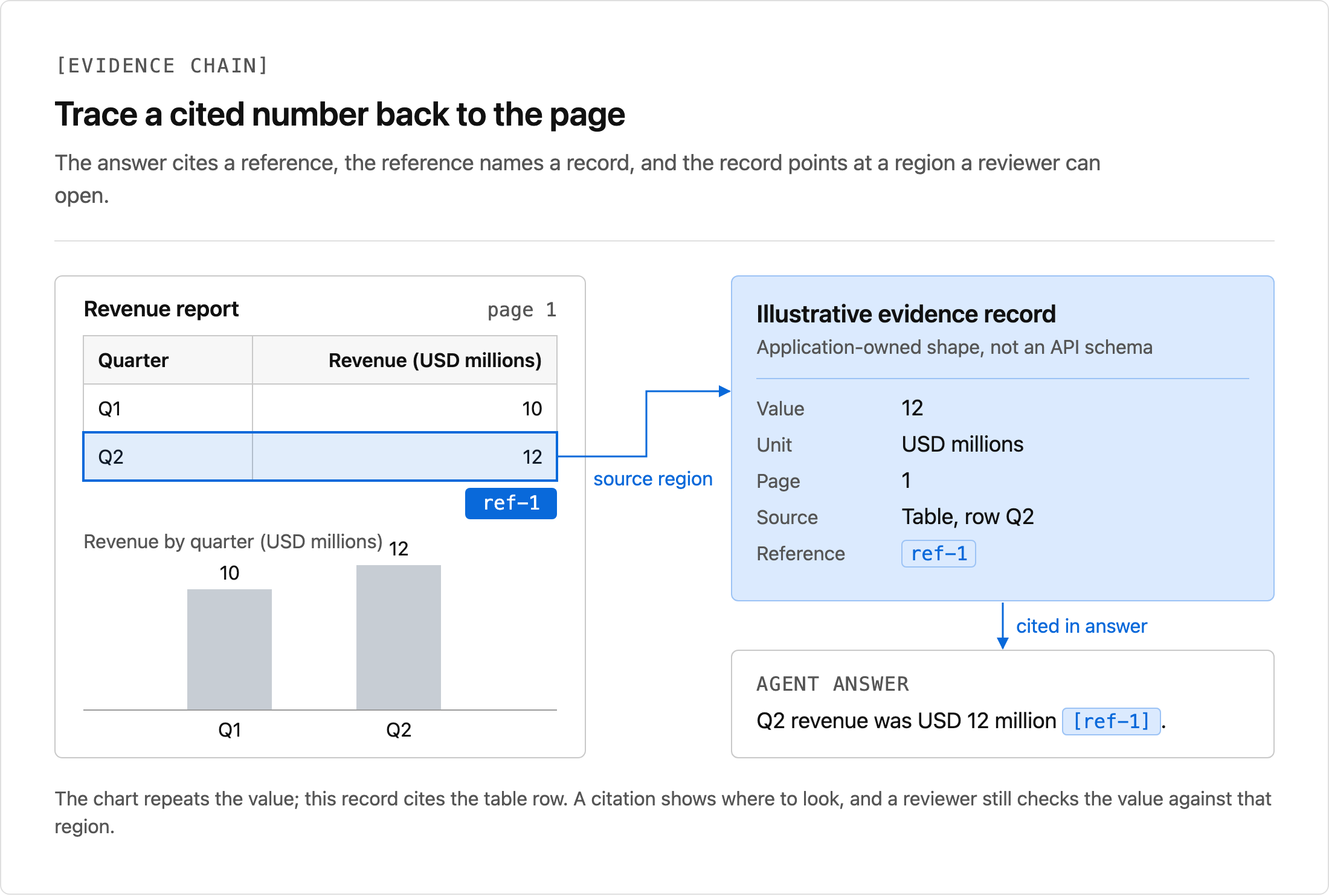
For a financial table, the row label and unit are part of the evidence. The example fixes one schema in extraction.py with two arrays: table_observations and chart_observations. Each item requires a period, series, number, and unit.
The schema instructs the extractor to read printed values and return an empty chart array when no labels are available. The validator treats that empty array as missing evidence, rather than inferring a chart value from the table.
The document allowlist resolves revenue-report to the fixture PDF. The model can select that ID; it cannot provide a file path, URL, or extraction schema.
Enable Citations in the Extraction Request
The extract_document function in extraction.py sends POST /v2/extract. Its multipart request uses these fields:
response = client.post(
    BASE_URL + '/v2/extract',
    headers=headers,
    files={'pdf_file': (path.name, stream, 'application/pdf')},
    data={
        'schema_data': json.dumps(SCHEMA),
        'enable_citations': 'true',
    },
)
This excerpt is the request configuration inside the complete downloaded function. The API key belongs in the api-key header, not in the multipart body.
The adapter polls GET /extract/{job_id} until completed. It handles queued and processing separately from failure and unexpected states. Each request has a timeout, and a monotonic deadline bounds the polling loop. It does not retry the submission automatically.
To extract the fixture yourself, set the key and run from the project folder:
export UNSILOED_API_KEY="your-api-key"
python -c 'from extraction import extract_document; extract_document("revenue-report", output="extraction_result.json")'
python agent.py --result extraction_result.json
Parsing and extraction have different response contracts. Parse jobs finish with Succeeded and return chunks; extraction jobs finish with completed and return result. The extraction result reference documents the latter. A Parse Picture segment locates an image; it is not an extracted numeric observation.
Decode Nested Fields Without Reusing Array Scores
The result array contains objects whose properties are themselves scored leaves. An abbreviated numeric leaf looks like this:
{
  "value": 12,
  "score": {
    "grounding_score": 0.998,
    "extraction_score": 0.998
  },
  "citation": {
    "bbox": [304, 138, 322, 152],
    "page": 1,
    "page_width": 612,
    "page_height": 792
  }
}
This illustrates the response shape. The saved fixture contains the response for the sample PDF, including its returned boxes.
In validation.py, normalize reads item[field]['value'] for each required property. It retains each leaf's score and citation under application-owned field_scores and field_citations. It never copies the array-level score onto individual values.
The current documented score has grounding and extraction components. The compatibility helper also accepts older numeric leaf scores, but still requires a score on every required field. The example's review threshold is 0.9, an application policy rather than a guarantee of correctness.
Validate Values and Citation Bounds Before Answering
Pydantic validates the unwrapped values against the report's expected period, series, unit, and finite numeric type. The validator then checks for duplicate period/series observations and compares table values against chart labels for Q1 and Q2.
A numeric citation needs a page number, a nonempty box, and page dimensions. The downloaded citation_ok function checks those bounds:
def citation_ok(citation):
    if not isinstance(citation, dict):
        return False
    box, page = citation.get('bbox'), citation.get('page')
    width, height = citation.get('page_width'), citation.get('page_height')
    if (not isinstance(box, list) or len(box) != 4
            or not isinstance(page, int) or isinstance(page, bool) or page < 1):
        return False
    numbers = [*box, width, height]
    if not all(isinstance(n, (int, float)) and not isinstance(n, bool)
               and math.isfinite(n) for n in numbers):
        return False
    left, top, right, bottom = box
    return 0 <= left < right <= width and 0 <= top < bottom <= height
Extraction boxes use [left, top, right, bottom] with the dimensions returned in the citation. Parse segment boxes use a different object shape. Do not pass one into the other decoder or combine their coordinate systems without a conversion.
A valid box identifies a region to inspect. It does not prove that the number was read correctly. For multi-page tables, also check that the cited row belongs to the intended period and unit.
Check the schema, confidence, and source evidence before returning a value to the agent.
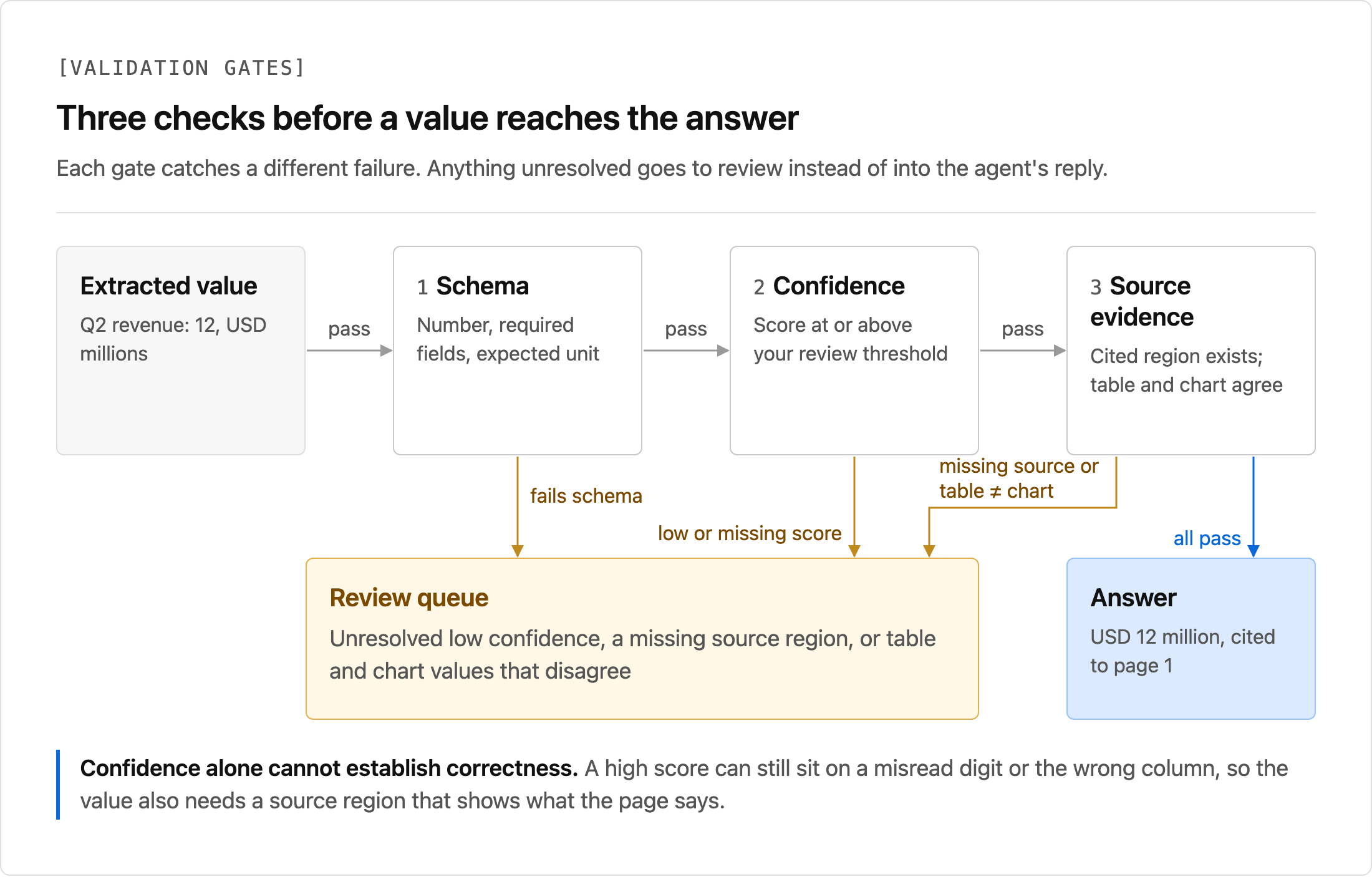
Any error or review flag produces review_required and an empty observations array. That prevents a downstream model from ignoring a warning while repeating the flagged number. The deterministic formatter returns the reasons for review instead of an answer.
Assign Reference IDs Before Calling the Model
The validator sorts observations by source and period: table Q2, table Q1, chart Q2, chart Q1. It then assigns ref-1 through ref-4. This fixed order explains the references in the saved-response answer and keeps them stable if the provider changes array order.
Each reference maps to the observation's field_citations['value']. The other fields retain their own citations as well, so a reviewer can inspect the period, series, and unit separately.
The formatter calculates the percentage change from validated table values. A zero Q1 value produces an undefined-percentage message rather than a division error. It reports chart agreement only after both periods pass the comparison.
Connect the Allowlisted Tool to the Agent
The complete agent.py uses the Responses API function-calling format. It declares one strict function tool whose only argument is the allowlisted document ID.
The dispatcher validates arguments again in application code. Unknown tools, malformed JSON, extra arguments, and unknown IDs return an error before extraction. Provider errors produce a short static error code, without returning exception bodies or credentials.
The first Responses request forces this one extraction tool and disables parallel calls. The application preserves the complete returned output, including reasoning items, then appends a function_call_output with the matching call_id. A second request completes the protocol with further tool calls disabled.
The model's free-form reply does not supply the final numbers. The application uses render_answer to build the numeric response and its references from the validated envelope. This keeps the tutorial focused on one supported revenue question; a general document Q&A agent needs a broader schema and answer policy.
To run the live agent, set a tool-capable model available to your project:
export UNSILOED_API_KEY="your-unsiloed-key"
export OPENAI_API_KEY="your-openai-key"
export OPENAI_MODEL="gpt-4.1-mini"
python agent.py --ask
The model name is configurable. The saved-response command remains available when you want to inspect decoding and validation without either service.
Exercise Failure Cases Before Adding Documents
Run the included tests from the project folder:
python -m pytest -q
The tests mutate the saved extraction to introduce missing citations, out-of-bounds boxes, low field scores, invalid units, non-finite numbers, duplicate observations, missing chart evidence, and table/chart conflicts. Every case withholds numeric observations.
Separate tests cover document allowlisting, extraction polling states and deadlines, and the OpenAI tool protocol. The SDK transport test checks serialization without making an OpenAI request.
For deployment, add document ownership checks and retention controls before expanding the allowlist. Keep the extraction result and its validation decision in an audit trail. A citation makes a value inspectable; the application still owns the decision to answer.
Sign up for Unsiloed to try schema extraction with your reports.