
Prepare Documents for LLMs: Clean Headers, Preserve Tables, and Check Reading Order
A practical October 2026 approach to prepping parsed documents for LLMs, covering header removal, table preservation, and order checks.

Repeating page headers and interleaved columns can survive parsing and reach your vector store. A table can keep its numbers while losing the caption or unit that tells a reader what those numbers mean. Preprocessing needs to preserve that context while changing the Markdown used for retrieval.
We'll clean a Parse response with a Python script that records edits, keeps table text intact, and applies reading-order corrections only from an explicit policy. We recommend Unsiloed parsing output because it keeps Markdown and page regions together, giving the cleanup step source references to retain.
The example needs Python 3.11 or newer. Its fixture-based walkthrough runs without an API key; an optional adapter parses your own document with Unsiloed. The pinned dependencies were checked with Python 3.14.
TLDR:
- Keep the raw Parse response separate from the cleaned output.
- Remove repeated page furniture only when type, repetition, and relative page position agree.
- Keep the first occurrence so the only document title cannot disappear.
- Preserve table Markdown and link its caption, units, and footnotes explicitly.
- Rebuild each output chunk's
embedfrom the cleaned segments.
Download and Run the Preprocessing Example
Download the complete example, unpack it into a project folder, and install its dependencies:
python -m venv .venv
source .venv/bin/activate
python -m pip install -r requirements-dev.txt
The project includes preprocess.py, an optional parse_document.py adapter, tests, and three fixture files. The fixtures provide a Parse-shaped input, a reviewed policy, and an expected cleaned output.
Run the fixture transformation:
python preprocess.py fixtures/parse_result.json \
  --doc-id acme \
  --policy fixtures/policy.json \
  --out cleaned.json

python -m pytest -q
The fixture is hand-written to expose specific failures. It includes a repeated header, a table with a footnote marker, a parenthesized negative amount, and two interleaved text columns. It is separate from captured API output.
Define What the Cleaner May Change
The input follows the Parse response's chunks and segments structure. The cleaner deep-copies each segment and retains its source fields, including segment_id, page_number, bbox, and page dimensions. It adds application-owned provenance:
doc_idsource_chunk_idsource_segment_idheading_pathtable_context, where the reviewed policy supplies links
The output groups retained segments by page. Each new chunk lists its original source_chunk_ids. This is a deliberate change to the source chunk boundaries; it lets a reviewed page order span segments that originally arrived in different chunks.
The script uses segment Markdown as the downstream text. Retained fields such as html, content, and OCR data remain source evidence; they are not regenerated cleanup outputs. Keep the unmodified input JSON alongside the cleaned JSON.
Use Page Dimensions to Identify Repeated Headers
A fixed pixel cutoff fails when two pages have different sizes. The margin_band function in preprocess.py uses each segment's page_height and bounding-box height instead:
def margin_band(segment):
    box, height = segment.get('bbox'), segment.get('page_height')
    if not isinstance(box, dict) or not isinstance(height, (int, float)) or height <= 0:
        return None
    top, size = box.get('top'), box.get('height')
    if not isinstance(top, (int, float)) or not isinstance(size, (int, float)):
        return None
    if segment.get('segment_type') == 'PageHeader' and 0 <= top <= top + size <= height * .08:
        return 'top'
    if segment.get('segment_type') == 'PageFooter' and height * .92 <= top <= top + size <= height:
        return 'bottom'
    return None
The top and bottom 8% are tutorial policies. The function requires a PageHeader or PageFooter type and a box wholly inside the appropriate band. Missing dimensions keep the segment in the output and flag it for review.
The run function then checks whether the same normalized text appears in that same type and band on at least two pages. It retains the first occurrence and removes later matches, recording the removed text, page, segment ID, and box in transform_log.
A repeated table label does not qualify because it is not page furniture. A header inside the page body does not qualify because its geometry disagrees. For unfamiliar document families, review the removals before indexing.
Normalize Prose Without Changing Table Values
The cleaner normalizes line endings and applies NFC only to prose segment types. It skips tables, formulas, footnotes, and segments containing fenced code. It records both versions of every changed string.
NFC composes equivalent character sequences without applying the compatibility folding of NFKC. That distinction matters for a superscript footnote marker such as ¹. Python's Unicode normalization reference describes the available forms.
Avoid global punctuation removal and whitespace collapsing. In the fixture, (310) must remain a parenthesized negative and 12¹ must retain its footnote marker. The tests compare table Markdown character for character.
This is a narrower task than repairing OCR or dehyphenating every line. If content is missing or a table's structure is ambiguous, reparse or review it rather than silently rewriting it. Our PDF-to-Markdown guide covers those conversion tradeoffs.
Keep Captions, Units, and Footnotes Attached to Tables
Keep the table together with the caption, units, and footnote that explain its values.
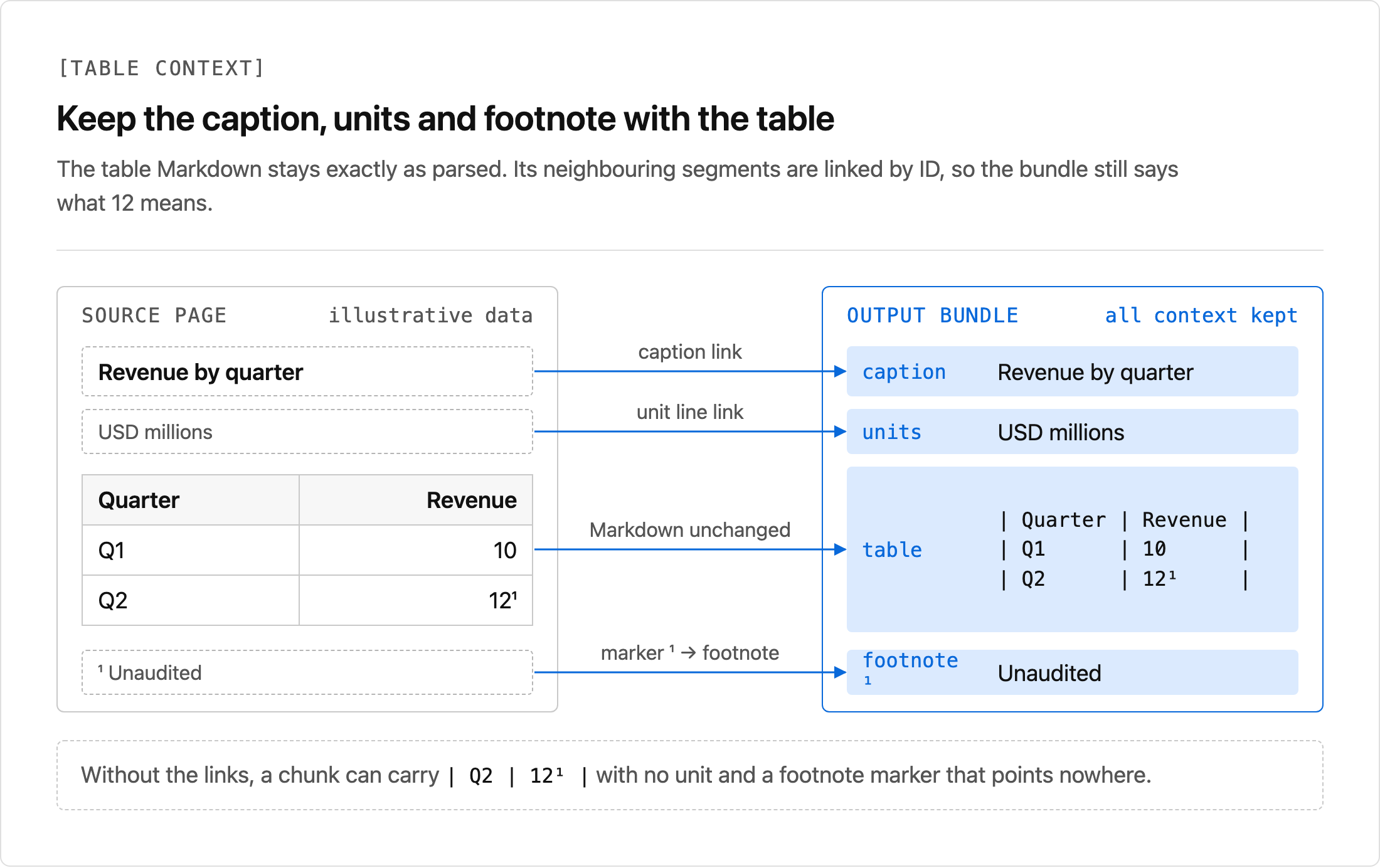
The fixture's policy.json explicitly associates the table with its context segments:
{
  "table_links": {
    "s4": {
      "caption": "s3",
      "units": "s2",
      "footnote_1": "s5"
    }
  }
}
These IDs belong to this fixture. Do not copy them into a policy for another document. The cleaner validates that the table and every linked segment exist in the retained output. A missing or removed target raises an error instead of leaving a dangling reference.
The resulting table_context stores each linked segment's ID, Markdown, page number, and box. It preserves the table Markdown itself. Cross-page continuations and flattened merged cells still need review; see why multi-page tables require more than text concatenation.
Apply a Reviewed Reading Order
For a two-column page, compare the flattened sequence with the order a reader follows down each column.
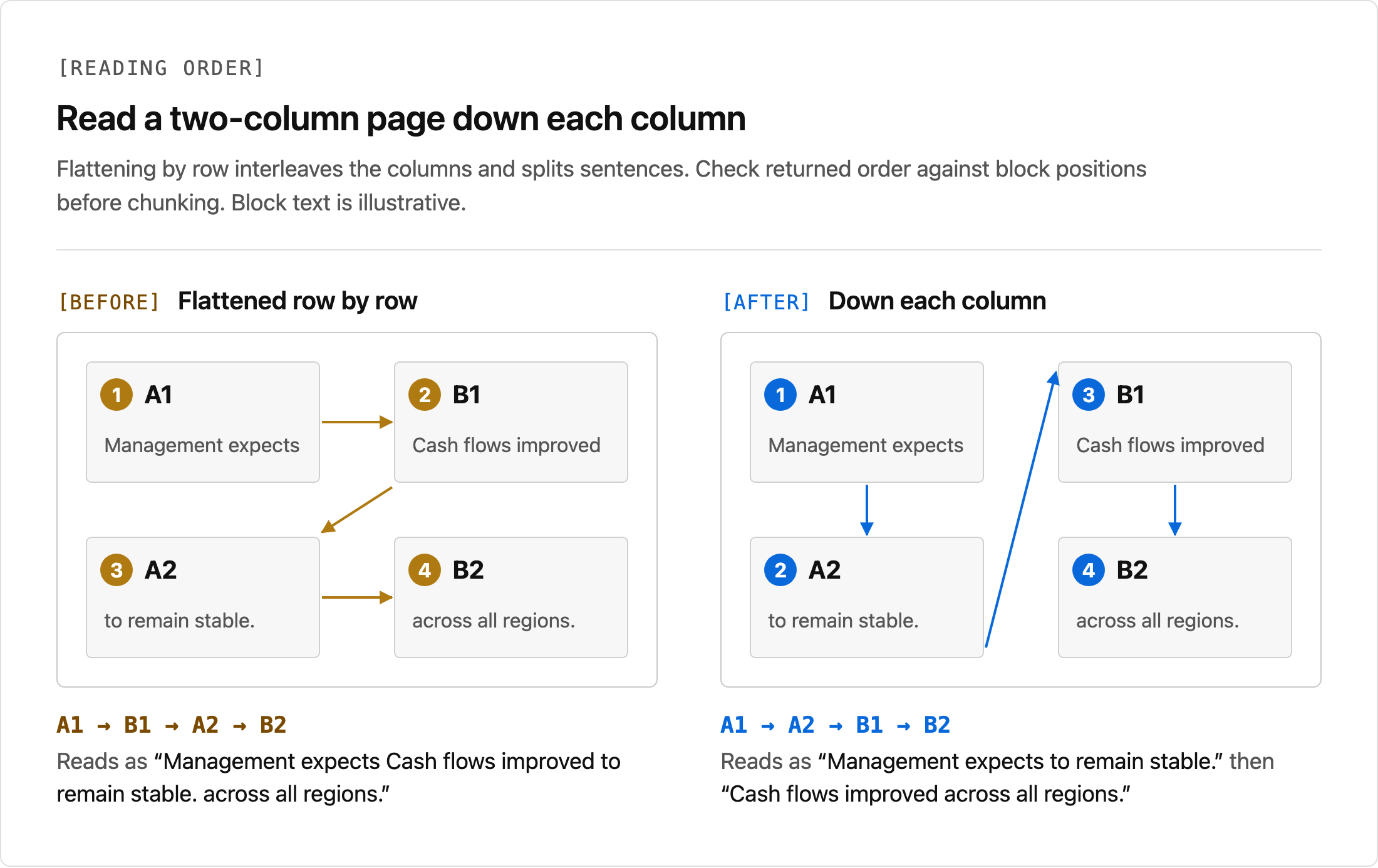
The fixture's second page returns s7, s9, s8, s10: left A, right A, left B, right B. A source-page review confirms that the text should run down the left column before starting the right.
The complete fixture policy includes this mapping:
{
  "reviewed_order": {
    "2": ["s7", "s8", "s9", "s10"]
  }
}
The script checks that the mapping names every retained segment on the page exactly once. It then changes the segment order and logs apply_reviewed_order. An incomplete or duplicate mapping fails rather than dropping text.
Without a mapping, the script keeps parser order. A decrease in the left coordinates of successive text blocks adds a reading_order review flag. That heuristic can catch interleaved columns, but it is not a general reading-order detector. Page-spanning figures, captions, and banners make automatic coordinate sorting unreliable.
Rebuild the Text That Retrieval Uses
Changing segment Markdown is ineffective if the vector store still receives the original embed. The final step in run joins retained segments in their final order:
chunk = {
    'segments': items,
    'embed': '\n\n'.join(s['markdown'] for s in items),
}
This expression is part of the output chunk construction in the downloadable preprocess.py. It runs after normalization, furniture removal, and reviewed ordering.
For the fixture's second page, embed becomes:
Management expects

to remain stable.

Cash flows improved

across all regions.
The chunk also retains the segment records and their source IDs. Downstream chunk sizing can then use this cleaned text and its context; it is a separate choice from the cleanup rules, as discussed in our RAG chunking guide.
heading_path comes only from explicit Markdown heading levels on SectionHeader segments. A header without such a level gets a review flag instead of an invented hierarchy.
Parse Your Own Document Before Cleaning It
The optional parse_document.py adapter submits multipart field file to POST /parse and polls GET /parse/{job_id}. It writes the complete successful response without cleaning it.
From the project folder, run:
export UNSILOED_API_KEY="your-api-key"
python parse_document.py your-document.pdf parse_result.json
python preprocess.py parse_result.json --doc-id your-document --out cleaned.json
The adapter sends no automatic submission retries. Each poll has a request timeout and the overall polling deadline is 600 seconds. Provider failures and unexpected states stop the run.
Start without a policy for a new document. Inspect the source page and the review flags, then create mappings using that document's segment IDs. A fixture policy is not a reusable layout template.
Check Invariants Before Indexing
The included tests check that the raw input remains unchanged, table values and superscripts survive, and reviewed ordering reaches embed. They also cover missing geometry, invalid context links, duplicate order entries, and normalization exclusions.
Compare the output against fixtures/expected_cleaned.json for the fixture run. For your documents, inspect the changed regions against the page image. A syntactically valid response cannot tell you whether an OCR amount is correct.
The cleanup script does not drop uncertain content. Downstream ingestion must decide whether a chunk with needs_review can be indexed or must wait for review. The transform log gives that decision a traceable basis.
Unsiloed supplies the Markdown and layout evidence this workflow uses; your application owns cleanup policies and the review decision. Sign up for Unsiloed to try the pipeline with your files.