
Extract Income Statements From Financial PDFs With Python
Extract income-statement values while preserving reporting periods, signs, currency scale, and source citations.

An income statement can place several reporting periods under shared currency and scale labels. If an extraction loses the column header or a parenthesized negative, a plausible number can still be attached to the wrong period.
We'll extract a sample two-period statement with the Unsiloed Extract API, retain the printed values and source citations, and run arithmetic checks using the fixture's stated sign convention. The example is a document-processing workflow, not financial advice.
Download and Run the Example
Download the Python project and unpack it into a folder. It includes a sample PDF generator, schema, extraction adapter, validator, saved result, and tests. Use Python 3.11 or newer; the pinned dependencies were tested with Python 3.14.
python -m venv .venv
source .venv/bin/activate
python -m pip install -r requirements.txt
python make_fixture.py
python main.py --response fixtures/extract_response.json --output output.json
python -m pytest -q
The offline path uses a saved extraction result from the sample and needs no API key. Each output row carries the original fields, field scores, citations, and review reasons. The validator also returns per-period reconciliation checks.
Retain the Column Context
The fixture uses USD in thousands, with columns for 2025 and 2024 (Restated). Revenue, costs, and income are separate line items; expenses appear in parentheses. The schema requests a separate row for each value with its label, period, amount, currency scale, and footnote marker.
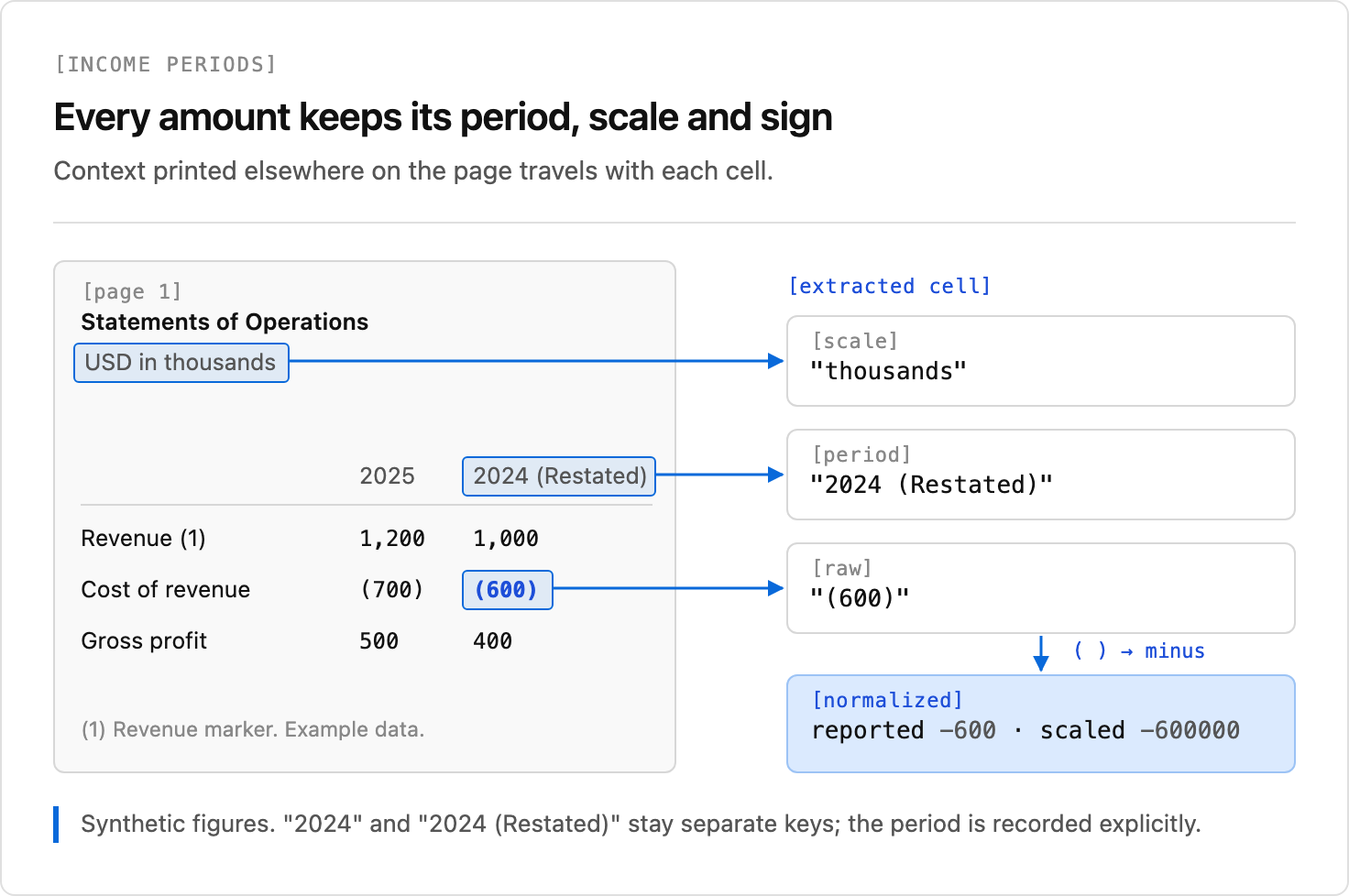
Each item is returned as nested scored fields. The example stores each field's printed value, score object, and citation separately. Missing fields are flagged rather than filled with a guessed value. The optional footnote marker uses NOT_PRINTED as a sentinel, which is converted to null.
The sample accepts USD, USD in thousands, and USD in millions. It preserves the raw amount, then derives a decimal value and scaled amount. Unsupported scales and number formats are sent to review. It accepts US-style comma grouping, a leading minus, and parentheses; it does not infer locale-specific formatting.
Validate the Fixture's Arithmetic
For this fixture, costs and expenses are negative. The code checks:
gross profit = revenue + cost of revenue
operating income = gross profit + operating expenses
The default tolerance is one reported unit. A missing input or a difference outside that tolerance produces a review entry. The checks are specific to the fixture's line items and sign convention; statements with different presentation or intermediate subtotals need their own rules. The code does not edit values to make them balance.
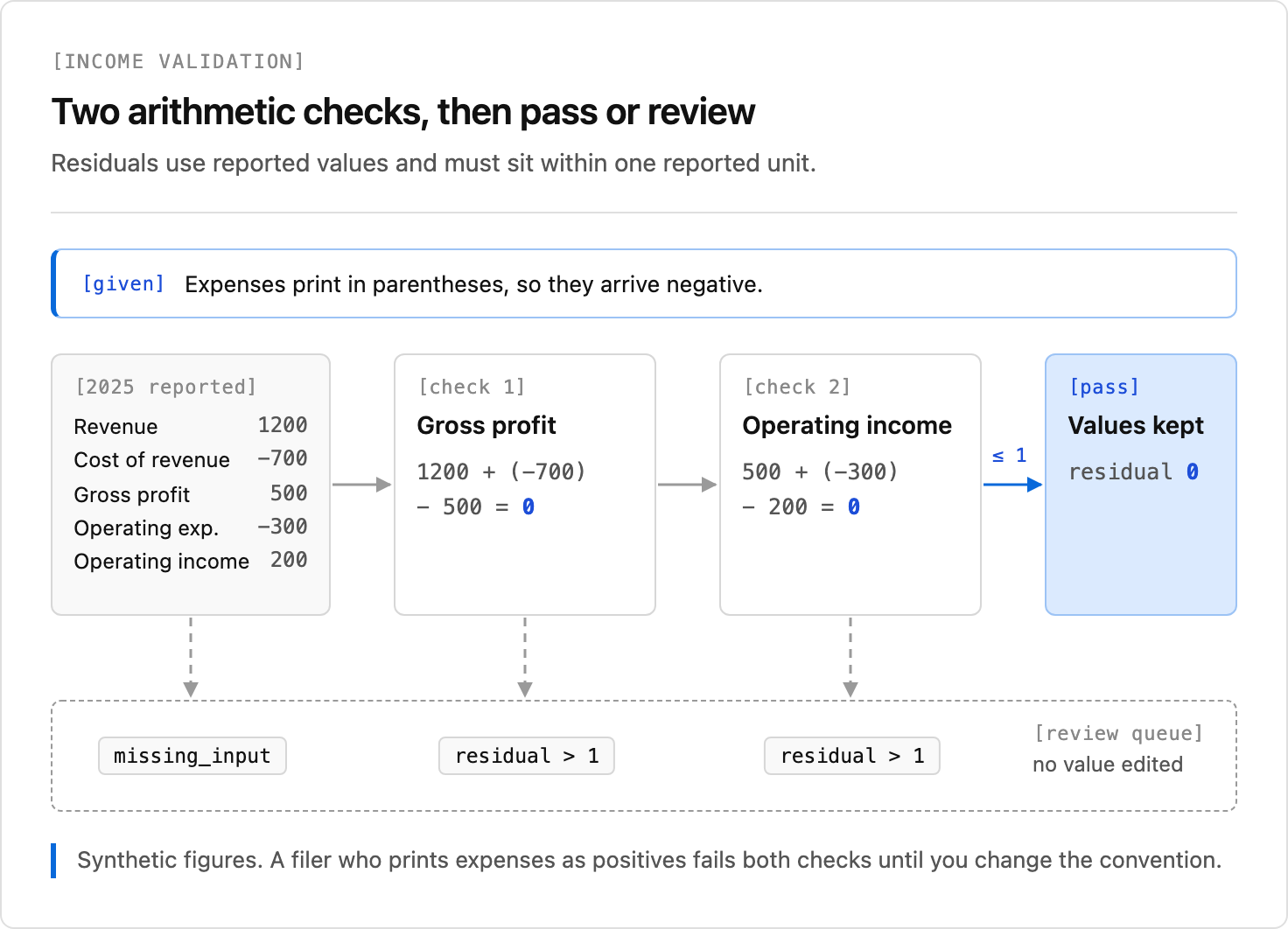
A balanced statement can still contain swapped periods or a consistently wrong scale. Check column headers and source citations against the document. The multi-page table guide covers additional risks when headings and rows span pages.
Extract and Inspect Your Own Result
To run extraction on the generated fixture, set an API key:
export UNSILOED_API_KEY="your-api-key"
python main.py --live --output output.json
The adapter posts pdf_file, serialized schema_data, and enable_citations=true to /v2/extract, then polls /extract/{job_id}. It bounds request time and polling and does not automatically resubmit a lost submission response. The extraction result reference documents the nested value, score, and citation fields.
During the local check, the fixture produced ten values across the two periods, with zero residuals for both checks. Results from another document or run can differ; inspect its values, periods, units, and source regions before using them. The included tests cover number formats, negatives, scale mismatches, missing inputs, duplicates, and reconciliation failures.
Keep Source Evidence With the Output
Keep the printed amount and normalized amount together, along with the period, currency scale, footnote marker, score, and citation. A valid citation box points to an inspectable region; it does not prove extraction correctness. Establish your own review policy for uncertain fields and reports with layouts outside the fixture's assumptions.
Unsiloed's schema-based extraction gives the application named fields and optional source citations to support that review. For wider selection criteria, see the financial document API comparison. Sign up for Unsiloed to test the workflow with your statements.