
How to Extract Nested Tables From PDFs Without Losing Their Structure
Extract nested table rows while preserving parent-child relationships and checking them against the source.
A nested table can contain correct words while attaching them to the wrong parent row. In an order schedule, that can mean assigning one order's items to another. The output needs to preserve those relationships, not just the cell text.
This example uses a PDF with a small items table inside each order row. We'll request one JSON object per order with an array of its items, then compare the result with the source.
Build the Sample and Extract It
Download the Python project, unpack it, and run:
python -m venv .venv
source .venv/bin/activate
pip install -r requirements.txt
python make_fixtures.py
python -m unittest -v
export UNSILOED_API_KEY="your-api-key"
python extract.py table.pdf nested-schema.json nested-result.json
The sample contains order A-101 with SKU-1 and SKU-2, and order B-202 with SKU-3. The schema asks for an orders array, each containing an order_id and an items array with sku and quantity. That shape tells the extractor which relationship the application needs; it does not guarantee that every relationship will be recovered correctly.
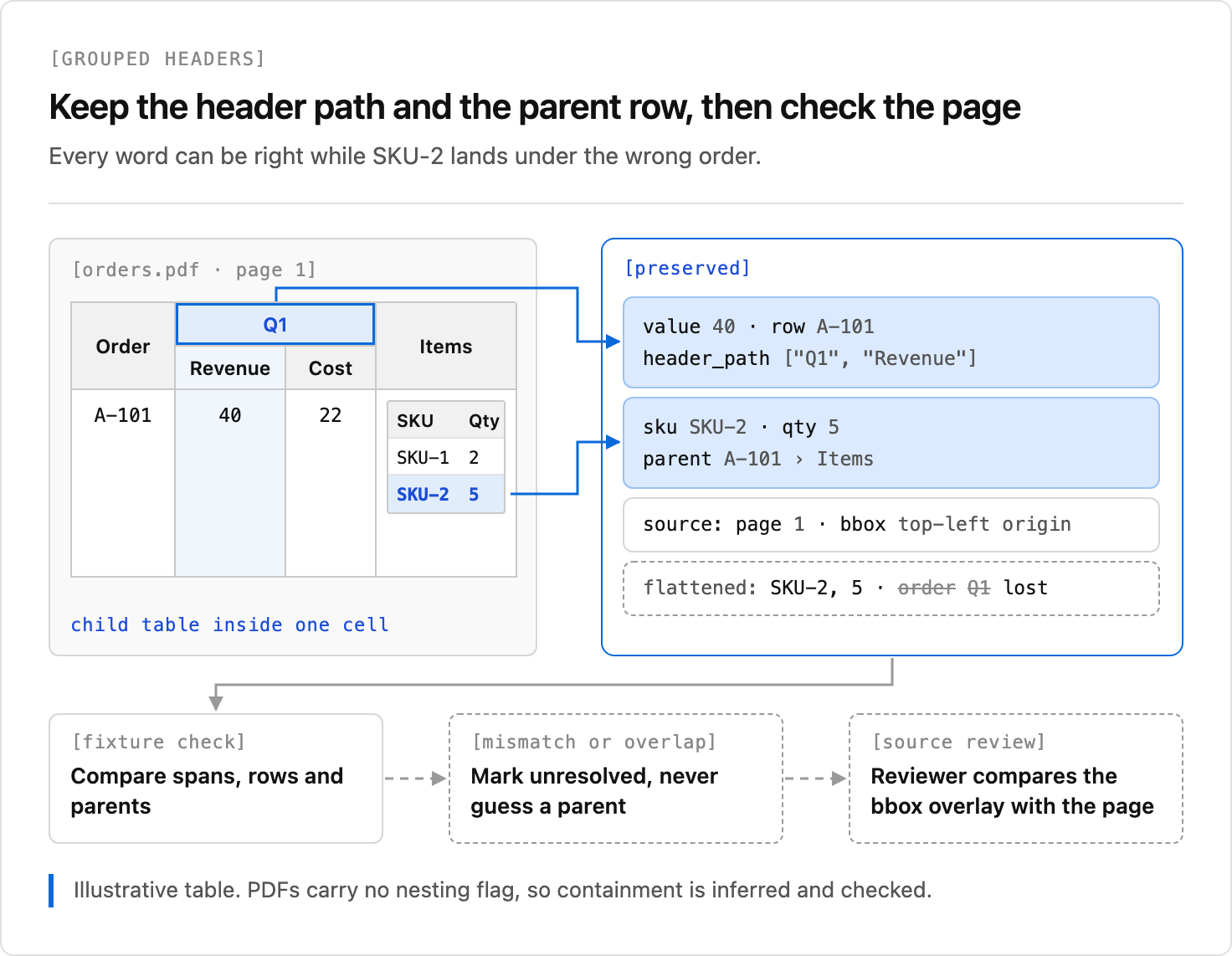
The project includes a saved sample response and an offline test for those parent-child relationships. A later extraction can differ, so check its result against the page. The diagram illustrates a different table with grouped headers as well as nested items.
Check the Parent and Child Together
Open table.pdf beside nested-result.json. Check the order IDs, every SKU and quantity, and which order contains each item. In particular, confirm that SKU-2 belongs to A-101 and SKU-3 belongs to B-202. A field can be accurate in isolation but attached to the wrong parent.
The script uses Unsiloed Extract with citations enabled and saves the complete response. Where citations are returned, use them to locate source fields; a bounding box is evidence to inspect, not proof that a parent-child relationship is correct. Send missing rows, uncertain values and review results to a person.
Handle Other Layouts Deliberately
The sample has visible nested grids and two parent rows. Your documents may have merged headers, wrapped cells, multiple pages, or scans. Add examples of those layouts to a reviewed test set and compare both cell values and relationships. If a row is absent or ambiguous, retain that uncertainty rather than inventing a parent.
For another failure mode, see why multi-page tables break extraction pipelines. For charts and figures alongside tables, see the chart and figure parsing guide.
Sign up for Unsiloed to test nested extraction with your documents.