
Build a Document Ingestion API for PDF, DOCX, and PPTX Files
This October 2026 guide shows how to build a FastAPI ingestion API that validates and parses PDF, DOCX, and PPTX documents.

A document ingestion endpoint needs to do more than forward a file. It has to reject oversized uploads, distinguish a PDF from a renamed ZIP file, and retain a result after an asynchronous parsing job finishes. If a submission times out, it also needs to avoid creating a duplicate job.
We'll build a local FastAPI service for PDF, DOCX, and PPTX uploads. Unsiloed's Parse API handles the document processing behind it and returns Markdown with layout segments. The application owns upload validation, job IDs, polling, and error handling.
You need Python 3.11 or newer and an Unsiloed API key. The downloadable sample includes the application, format validator, fixture generator, and tests. The pinned dependencies were checked with Python 3.14.
TLDR:
- Validate uploads before submitting a provider job.
- Count bytes arriving over HTTP, including requests without a
Content-Lengthheader. - Return an application
document_id, then keep the parsed result for status lookups. - Mark ambiguous submissions
submission_unknownand reconcile them before retrying.
Download and Start the Ingestion Service
Download the complete Python example. It contains these files:
app.py: HTTP routes, body limit, background processing, and status storagevalidation.py: PDF and Office package checkscreate_samples.py: matching PDF, DOCX, and PPTX documentstest_app.py: upload and provider-failure tests
Create a project folder, unpack the archive there, and run:
python -m venv .venv
source .venv/bin/activate
python -m pip install -r requirements-dev.txt
python create_samples.py
export UNSILOED_API_KEY="your-api-key"
uvicorn app:create_app --factory --host 127.0.0.1 --port 8000
The factory checks for the key before starting. Keep this tutorial service bound to localhost: it has no caller authentication or ownership checks, and its in-memory job records disappear on restart.
Keep Uploads and Status Lookups Separate
The upload path and status path stay separate, with the application keeping its own job record.
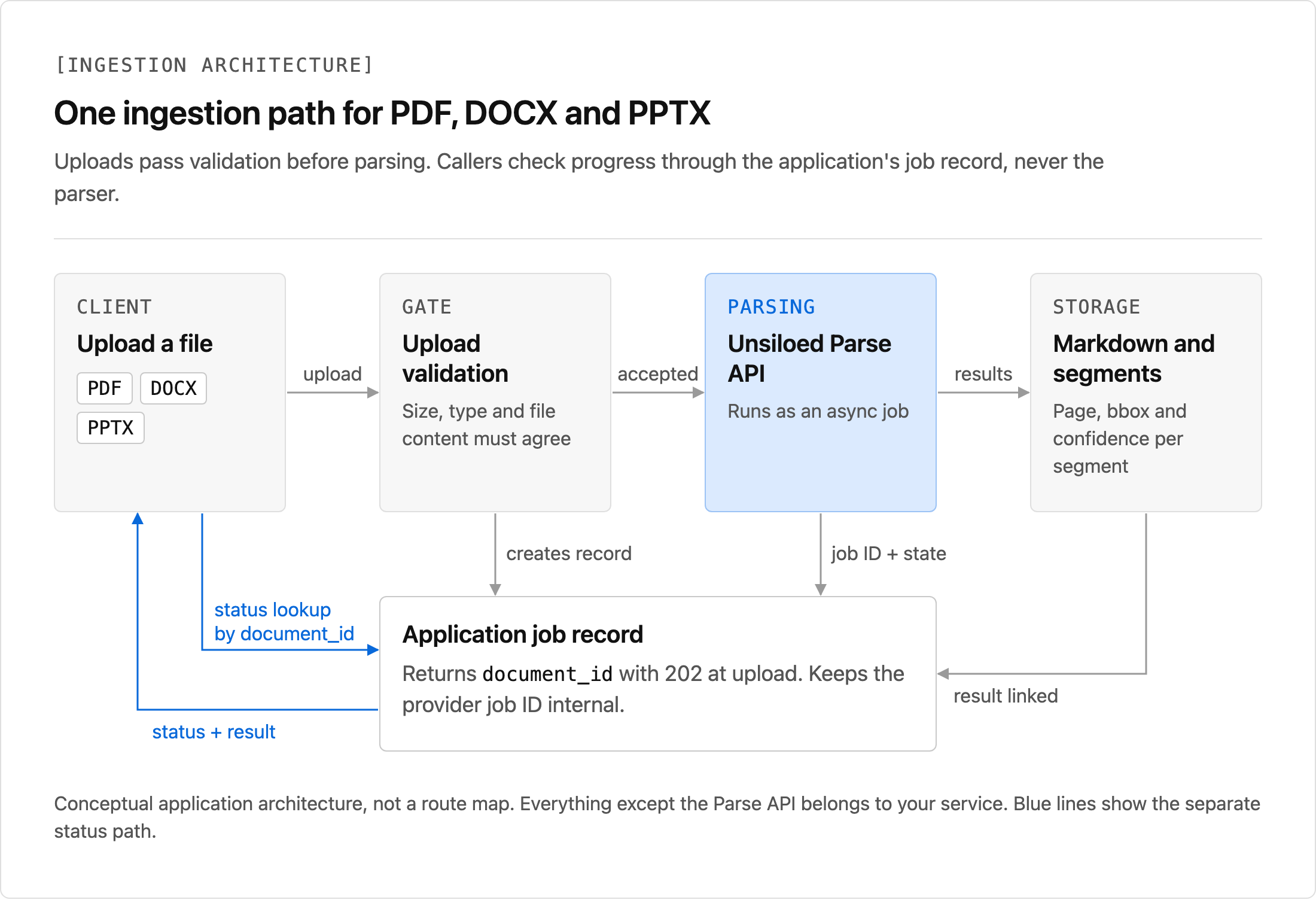
The service exposes two routes:
POST /documentsaccepts one multipart field namedfileand returns202with adocument_id.GET /documents/{document_id}returns the application state, parsed result, or a short error code.
The provider's job ID stays in the server's record. The caller receives this upload response:
{"document_id": "application-generated-id", "status": "queued"}
A background task submits the validated file, polls the provider, and stores the output. The status route continues returning the result after the task finishes. A 202 acknowledges the accepted upload; it doesn't mean parsing has succeeded.
Bound the HTTP Body and the Uploaded File
The ReceiveLimit middleware in app.py wraps the ASGI receive callable. It counts bytes as they arrive, so chunked requests cannot bypass the cap by omitting Content-Length.
The default file limit is 50,000,000 bytes. The body limit adds 1,000,000 bytes for multipart headers and boundaries. Both are application policies, not Unsiloed plan limits.
Inside the upload handler, the sample uses Starlette's multipart parser with one file and no text fields. It then copies the spooled upload into a temporary file in 64 KiB blocks, checking the file limit during the copy. The temporary filename comes from the server; the client's filename supplies only a supported suffix.
When the streamed body limit fires, the middleware raises a multipart exception that makes the parser close its spooled files. The route maps that condition to 413. The tests cover both a file over the file limit and a streamed body over the total limit.
The request-scoped upload closes before processing starts. A finally block deletes the copied temporary file after submission and polling, including failure paths.
Validate PDF and Office Content Before Submission
The complete validate_upload function is in validation.py. Its extension, MIME type, and content checks must agree:
| Format | Expected MIME type | Content check |
|---|---|---|
application/pdf |
PDF signature, readable page tree, no encryption | |
| DOCX | application/vnd.openxmlformats-officedocument.wordprocessingml.document |
ZIP containing [Content_Types].xml and word/document.xml |
| PPTX | application/vnd.openxmlformats-officedocument.presentationml.presentation |
ZIP containing [Content_Types].xml and ppt/presentation.xml |
The PDF validator uses pypdf rather than treating %PDF- alone as proof of a readable document. The Office validator checks ZIP integrity and rejects encrypted entries. It also caps the entry count at 2,000, the declared expanded size at 200 MB, and [Content_Types].xml at 1 MB.
The route maps validation outcomes to HTTP responses:
| Condition | Response |
|---|---|
| Empty upload | 400 |
| Unsupported extension or mismatched MIME type | 415 |
| Unreadable, encrypted, or malformed content | 422 |
| File or body exceeds its size limit | 413 |
These checks catch malformed input; they do not replace malware scanning or document-processing isolation.
Submit Once, Then Poll and Store the Result
In app.py, the background process function opens the copied file and calls POST /parse with the api-key header and multipart field file. It does not retry submissions automatically.
After receiving a job ID, it polls the Parse result endpoint. The documented Starting and Processing states keep the loop running. Succeeded stores page_count, total_chunks, and chunks before marking the application job complete. A failed or unexpected response produces a short application error code.
Each status request has a timeout of at most 15 seconds, bounded by the remaining polling deadline. Three consecutive failed reads stop polling. The overall default deadline is 600 seconds.
The stored response includes a result envelope shaped like this:
{
  "status": "succeeded",
  "result": {
    "page_count": 1,
    "total_chunks": 1,
    "chunks": [{"embed": "Parsed Markdown", "segments": []}]
  },
  "error": null
}
This is an abbreviated illustration. The endpoint also returns the application document ID, timestamps, and source format and byte count.
A chunk's embed field holds Markdown; its segments retain page references, bounding boxes, and confidence metadata. The Parse response reference describes those fields. Region confidence does not establish the accuracy of a table's numeric values.
Treat an Uncertain Submission Differently From a Rejection
An uncertain submission needs reconciliation before a retry can safely create another provider job.
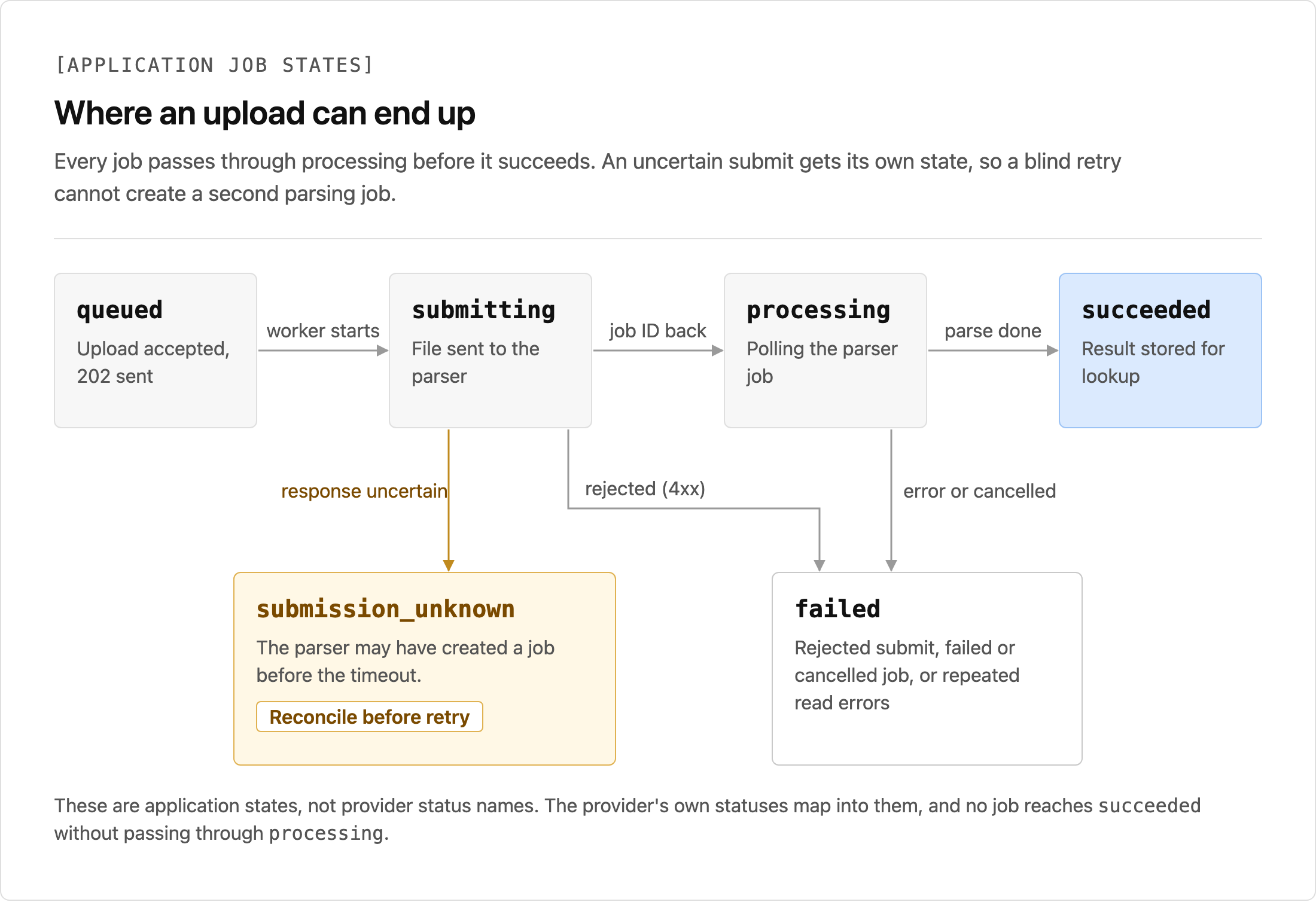
The application uses submission_unknown when a transport error, server error, malformed success response, or missing job ID prevents it from knowing whether submission succeeded. It returns no provider exception text to the caller and makes no second POST /parse call.
A provider 4xx rejection maps to failed. A polling deadline maps to timed_out; that local state does not cancel the provider's job. Neither state implies that resubmitting is safe without checking what happened.
For production, retain enough request and job metadata to reconcile uncertain submissions. The tutorial deliberately stops instead of inventing an idempotency guarantee the provider has not documented.
Upload All Three Formats and Read Their Results
With the service running, submit the generated samples:
curl -F "file=@samples/sample.pdf;type=application/pdf" \
  http://localhost:8000/documents

curl -F "file=@samples/sample.docx;type=application/vnd.openxmlformats-officedocument.wordprocessingml.document" \
  http://localhost:8000/documents

curl -F "file=@samples/sample.pptx;type=application/vnd.openxmlformats-officedocument.presentationml.presentation" \
  http://localhost:8000/documents
Use the returned application ID in the status request:
curl http://localhost:8000/documents/YOUR_DOCUMENT_ID
The fixtures contain a heading, a paragraph, and an East/West revenue table. Inspect both embed and segments before sending the content to a RAG pipeline.
Run the included tests from the sample project folder:
python -m pytest -q
They exercise format validation, size limits, result retention, unknown IDs, rejected submissions, lost submission responses, malformed provider results, and bounded polling. Provider failures are simulated with httpx.MockTransport, so these tests do not consume API credits.
Move Beyond a Single-Process Tutorial
The in-memory dictionary and background task make the state transitions visible in a local walkthrough. A deployed service needs durable job records and a queue that can resume work after a crash. It also needs caller authorization, bounded concurrency, storage isolation, and retention rules.
Keep format-specific validation at the application boundary and document processing behind one adapter. Unsiloed supplies layout-aware Markdown and segment metadata for that adapter, reducing the per-format parsing work described in our PDF extraction guide.
Sign up for Unsiloed to run the samples against your documents.