Unsiloed AI vs Snowflake Document Extraction: Why Accuracy Beats Native Convenience
Snowflake makes it convenient to extract structured data from documents, but convenience does not catch silently missing totals or incorrect digits. We tested Snowflake's document extractor against Unsiloed. Both handled clean files, but Unsiloed stayed complete on complex tables and scored 100% on a degraded scan where Snowflake scored 82%.

Snowflake makes document extraction convenient: point SQL at a staged PDF, provide a schema, and get structured fields back. Its document extraction function handles the processing inside Snowflake. But it's not always the most accurate.
We tested Snowflake's extractor and Unsiloed on the same documents with equivalent schemas. Both tools handled clean, born-digital files. The difference appeared when the documents became complex or degraded: Snowflake omitted sections without warning and scored 82.1% on a financial table scan. Unsiloed returned the complete complex tables and scored 100% on the scan.
If document data feeds reconciliations, financial analysis, or production workflows, use Unsiloed. You can also call it from inside Snowflake, so switching extractors doesn't mean rebuilding your data platform.
The results at a glance:
| Test | Snowflake document extraction | Unsiloed |
|---|---|---|
| Eleven vendor invoices and a modern earnings summary | ✓ All tested values correct | ✓ All tested values correct |
| Complex consolidated balance sheet | ✗ Omitted a subsection and the grand total | ✓ Returned the complete table |
| Grouped long/short fund schedule | ✗ Omitted two sector subtotals | ✓ Returned the complete table |
| Degraded 1917 financial table (84 numeric cells) | ✗ 69 correct (82.1%) | ✓ 84 correct (100%) |
| Measured extraction charge per page | ✗ 1.62¢ before warehouse compute | ✓ 1.2¢ (at least 26% lower) |
Unsiloed also returns per-field confidence and citations and can run from within your Snowflake workflow. The lower bill is a bonus. Across seven matched benchmark calls, Snowflake's AI charge averaged 1.62¢ per page before warehouse compute. Unsiloed's Standard rate is 1.2¢ per page, at least 26% lower. Switching extractors can reduce Snowflake AI credit usage while improving accuracy.
How We Compared the Extractors
We gave both tools the same documents and equivalent schemas. Snowflake expects repeated rows in a columnar schema, while Unsiloed accepts an array of objects, so we adapted the schema shape for each tool without changing the fields.
We also avoided using another model to judge the results. For the hardest table, the printed subtotals establish the ground truth: the rows must add up. That makes a wrong digit provably wrong, not a matter of model preference.
Clean, Born-Digital Documents: No Accuracy Tradeoff
First, we tested eleven real vendor invoices from AWS, Azure, Coolblue, Flipkart, and others. The AWS invoice below is representative of these clean, consistently structured documents.
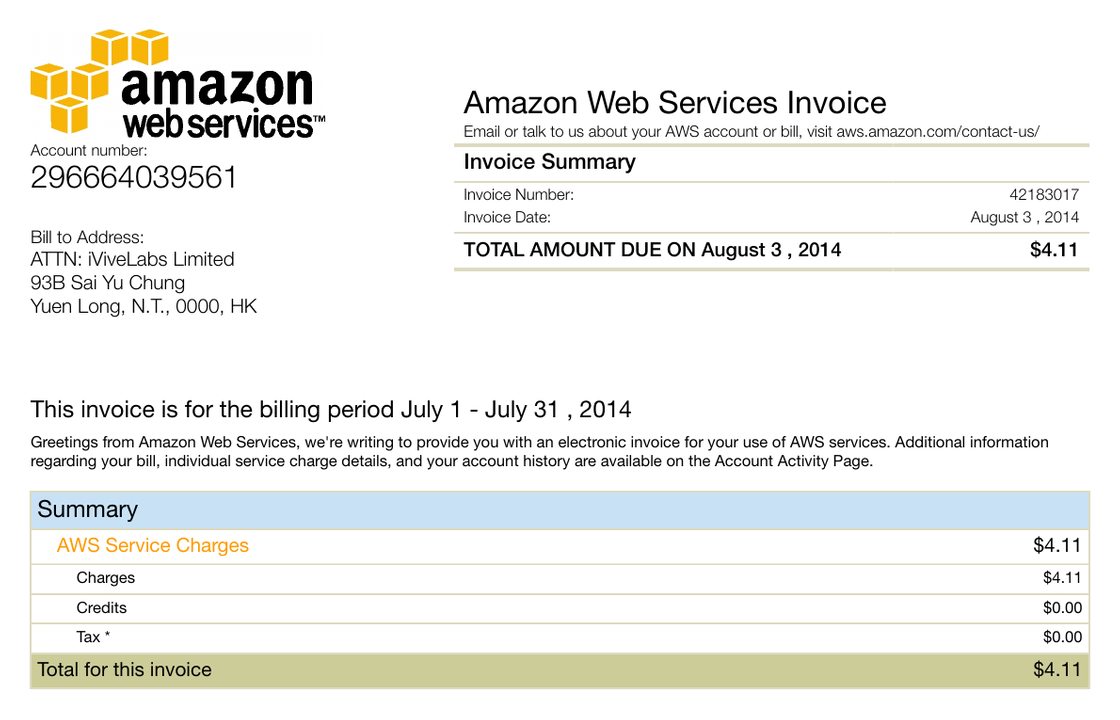
Both extractors returned the correct invoice number and $4.11 total from this AWS invoice.
To test a modern financial table, we also used the "Fiscal 2026 Summary" from an NVIDIA quarterly press release.
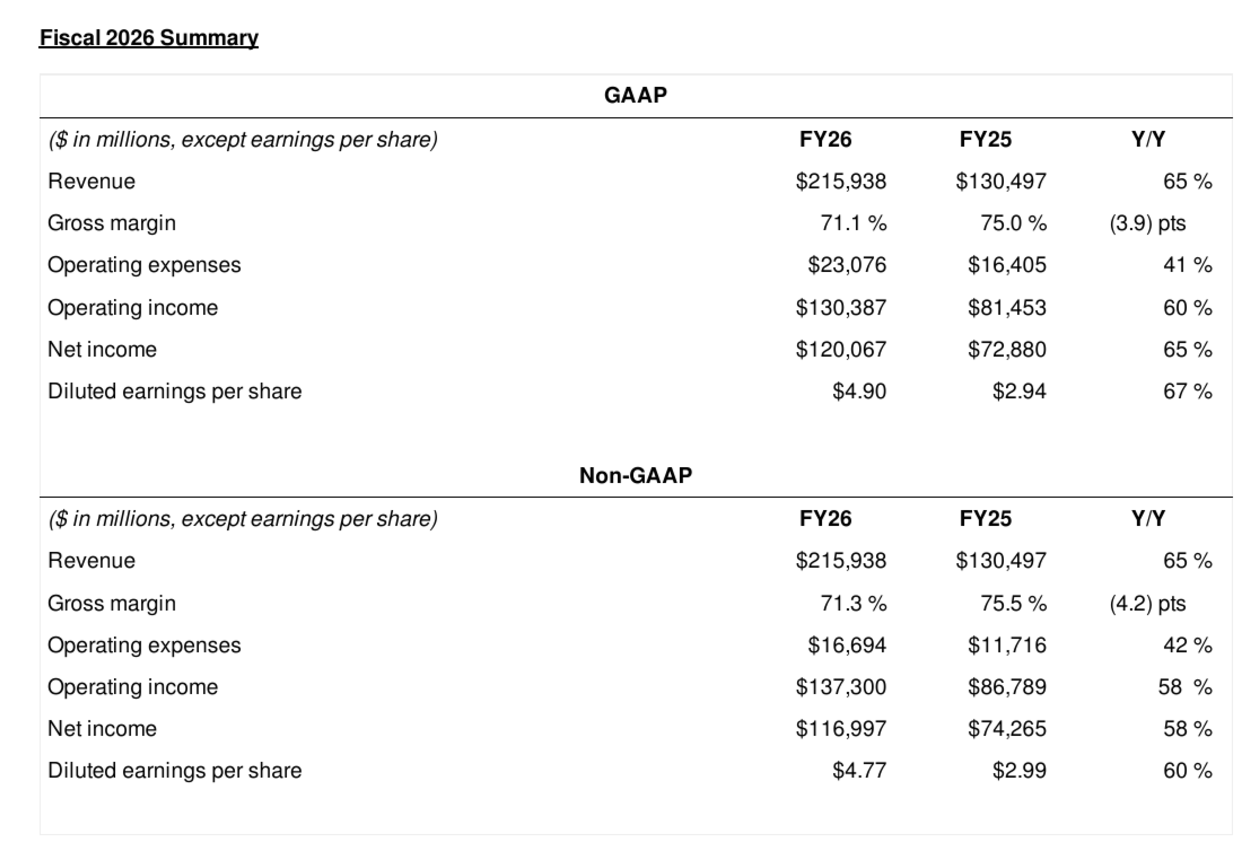
Snowflake and Unsiloed agreed on all seven figures selected from this earnings summary.
Both tools returned identical, correct values on every field. On the NVIDIA
summary, the two extractors agreed on all seven distinctive figures with zero
disagreements. The only differences anywhere were cosmetic: Snowflake returns
amounts with the currency symbol and locale formatting ($4.11, € 717,97),
while Unsiloed returns clean numerics.
There is no accuracy penalty for choosing Unsiloed on clean files. The question is what happens when a less cooperative document enters the same pipeline.
Complex Tables: Snowflake Silently Drops Data
Clean doesn't mean simple. We gave both tools a consolidated balance sheet: born-digital and high-resolution, but dense with nested line items, subtotals, and grouped sections.
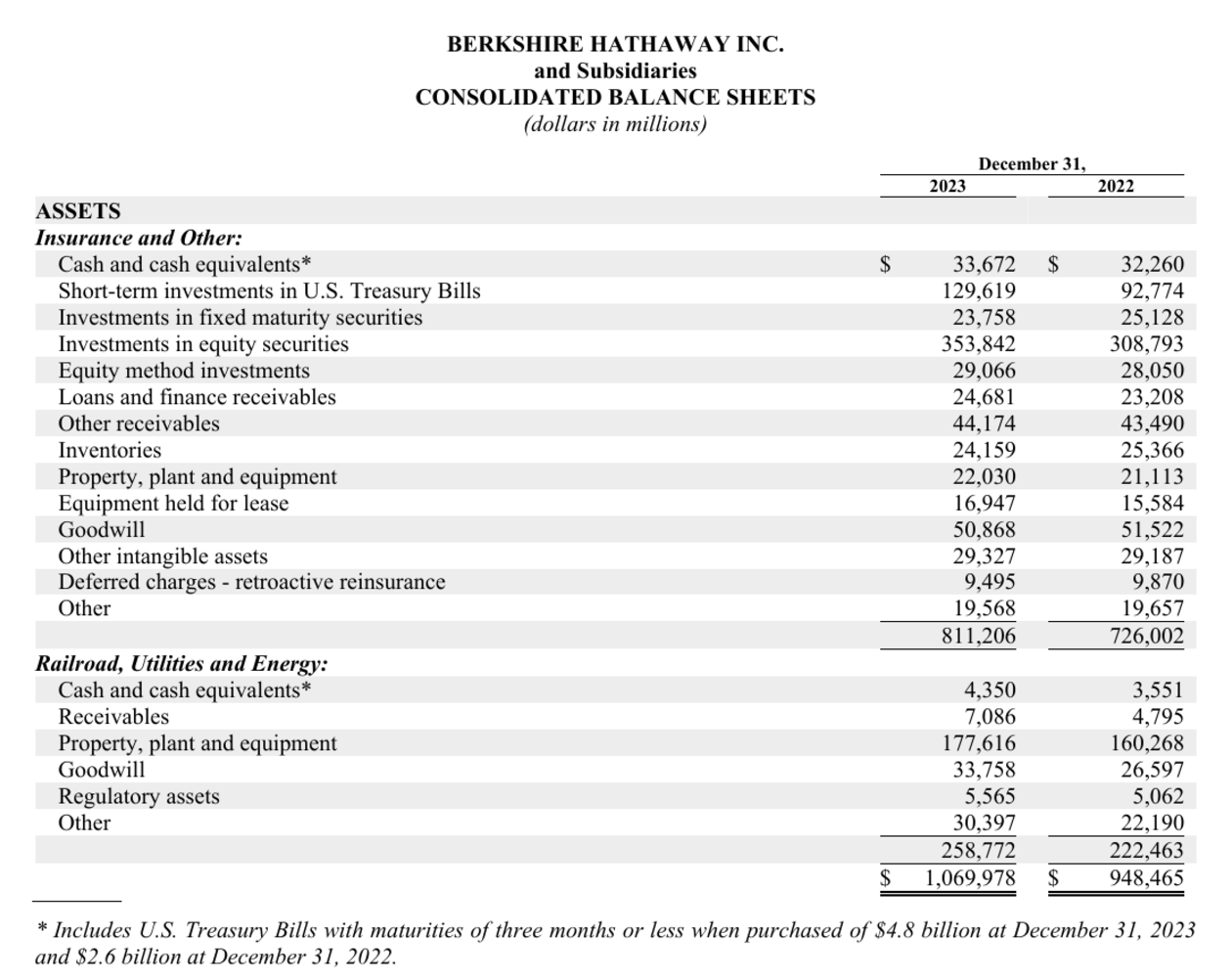
Snowflake omitted the Railroad, Utilities & Energy subsection and the $1,069,978 million grand total; Unsiloed returned both.
Both tools read their returned values correctly, but Snowflake's extractor did not return the whole table. Unsiloed returned every Snowflake result plus the "Railroad, Utilities & Energy" subsection and the grand total that Snowflake omitted. There was no error or low-confidence flag. The result simply looked complete.
We repeated the test with a long/short fund schedule containing grouped positions and sector subtotals.
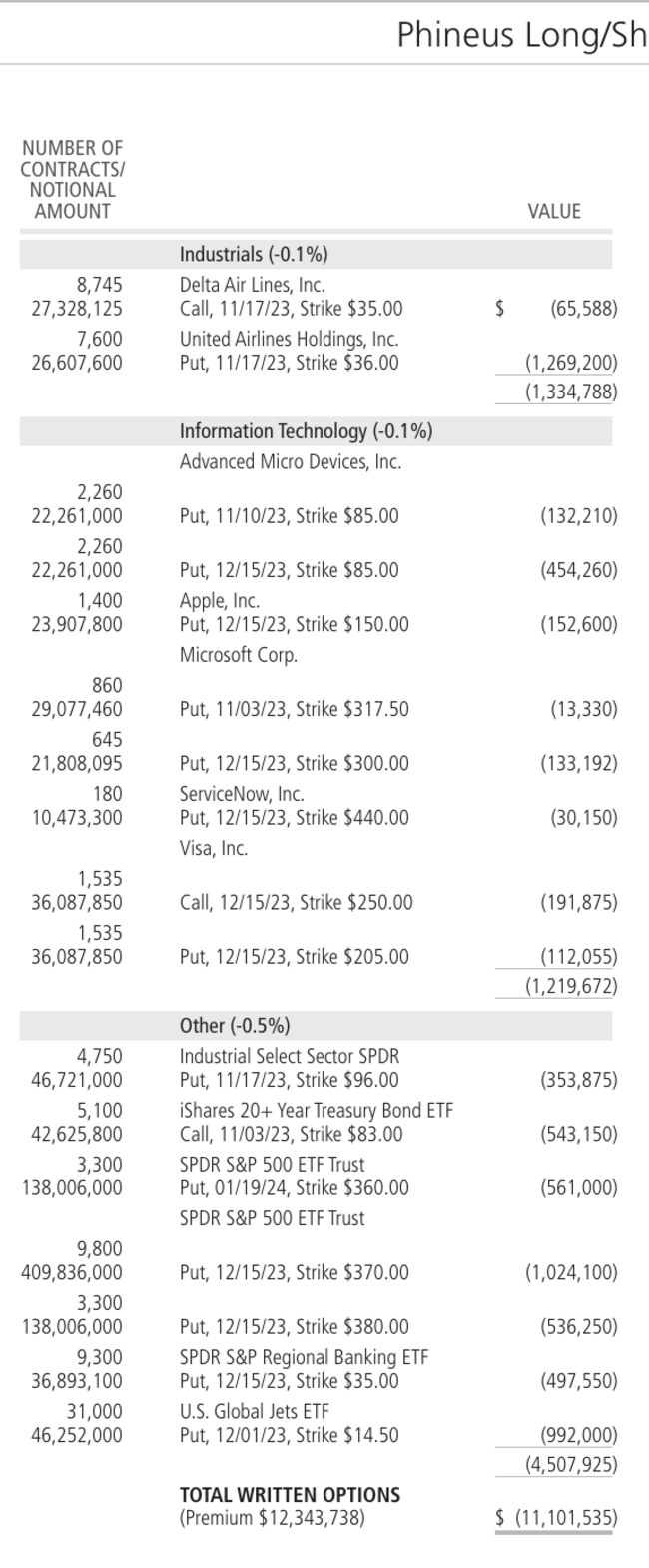
The grouped hierarchy matters here: subtotals turn individual option positions into usable sector-level data.
Snowflake quietly dropped two sector subtotals that Unsiloed kept.
That is a dangerous failure mode for automated workflows. A malformed response can trigger an error handler. A plausible but incomplete table can pass into a query, reconciliation, or report unnoticed.
Degraded Scans: Unsiloed Scores 100%
For the hardest test, we used page 129 of Moody's Analyses of Railroad Investments (1917). The Atchison, Topeka & Santa Fe "Comparative Income Account" contains 84 numeric cells: six years of figures across fourteen line items, printed in small type on yellowed paper.
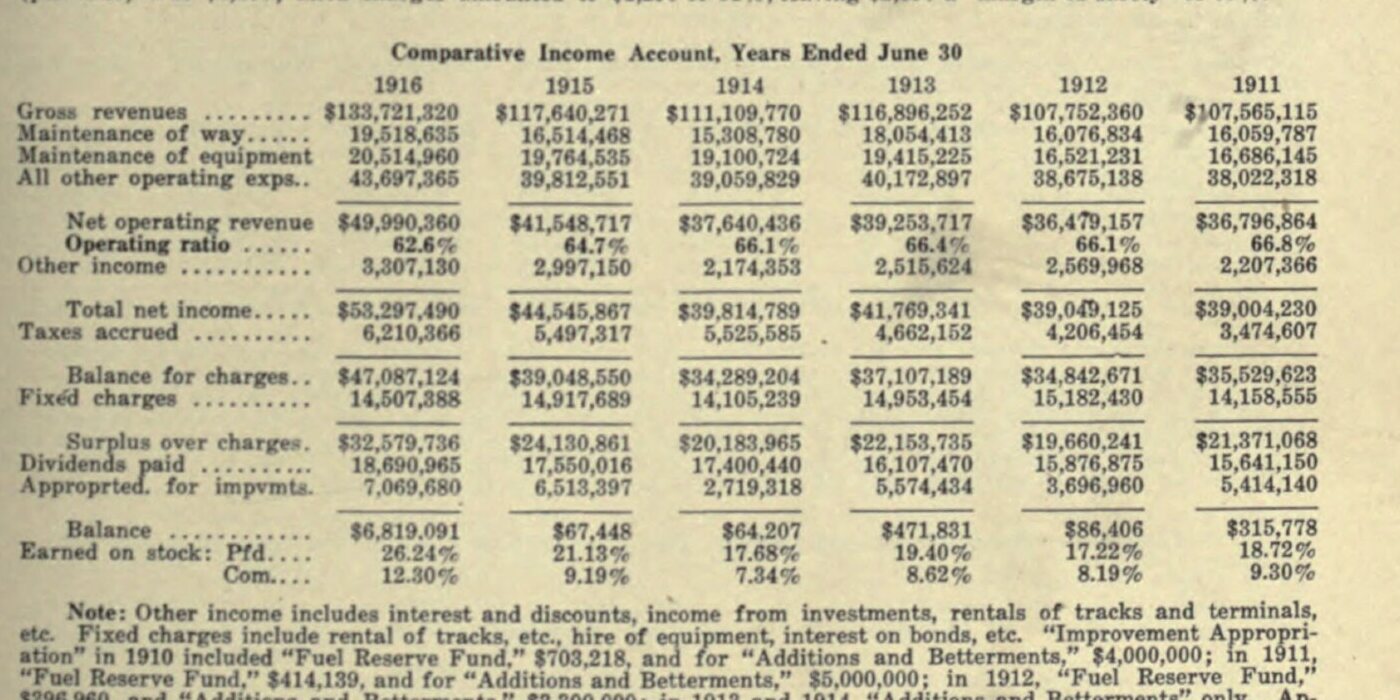
This crop contains the 84 cells used for the digit-exact accuracy test.
The table's arithmetic verifies the values. Net operating revenue equals gross revenue minus the three expense lines, the balance equals surplus minus dividends and appropriations, and the other subtotals follow the same pattern.
| Tool | Digit-exact cells | Accuracy |
|---|---|---|
Unsiloed /v2/extract |
84 / 84 | 100% |
| Snowflake document extraction | 69 / 84 | 82.1% |
Snowflake's extractor made fifteen quiet, plausible errors. Three examples can be checked against the surrounding column:
- Balance, 1913 returned
47,831. The column requires471,831(surplus22,153,735minus dividends16,107,470minus appropriations5,574,434). - Surplus over charges, 1913 returned
22,158,733. Must be22,153,735(balance for charges37,107,189minus fixed charges14,953,454). - Fixed charges, 1912 returned
16,182,490. Must be15,182,430(balance for charges34,842,671minus surplus19,660,241).
Unsiloed got all fifteen of those cells right. It also returns a confidence score and citation for each field, giving reviewers the source location when a value needs inspection. Confidence is useful, but correct extraction leaves less to review in the first place.
Keep Snowflake and Switch the Extractor
Unsiloed fits into the Snowflake architecture you already have. A Python UDF over an External Access Integration extracts staged documents in SQL, returning per-field confidence scores and citations, with the API key held in a Snowflake-managed secret. A Snowflake Cortex Agent can then run that same UDF through Snowflake's Managed MCP server, so you extract staged documents in natural language from Snowflake CoWork while Snowflake keeps governing access. See how to use Unsiloed inside Snowflake.
Use Unsiloed as the Production Default
Snowflake's built-in extractor is reasonable for a prototype with uniformly clean PDFs and low-cost errors. That is a narrow case. Production document collections accumulate scans, faxes, dense tables, and layout variations, and you often don't know which file is difficult until extraction fails.
Routing only the "hard" documents to a specialist also requires you to detect them reliably. The complex balance sheet shows why that is risky: Snowflake returned a plausible result without signaling that sections were missing.
Use Unsiloed as the default extractor for production workflows. It matches Snowflake on clean documents, preserves more data in complex tables, and remains accurate on degraded scans. Native convenience saves one integration; higher accuracy protects every row that follows.