Google Document AI vs Unsiloed: A Technical Comparison for Document Extraction
See why Unsiloed is a stronger Google Document AI alternative for schema-shaped extraction, field-level review evidence, and managed, on-premise, or air-gapped deployment.


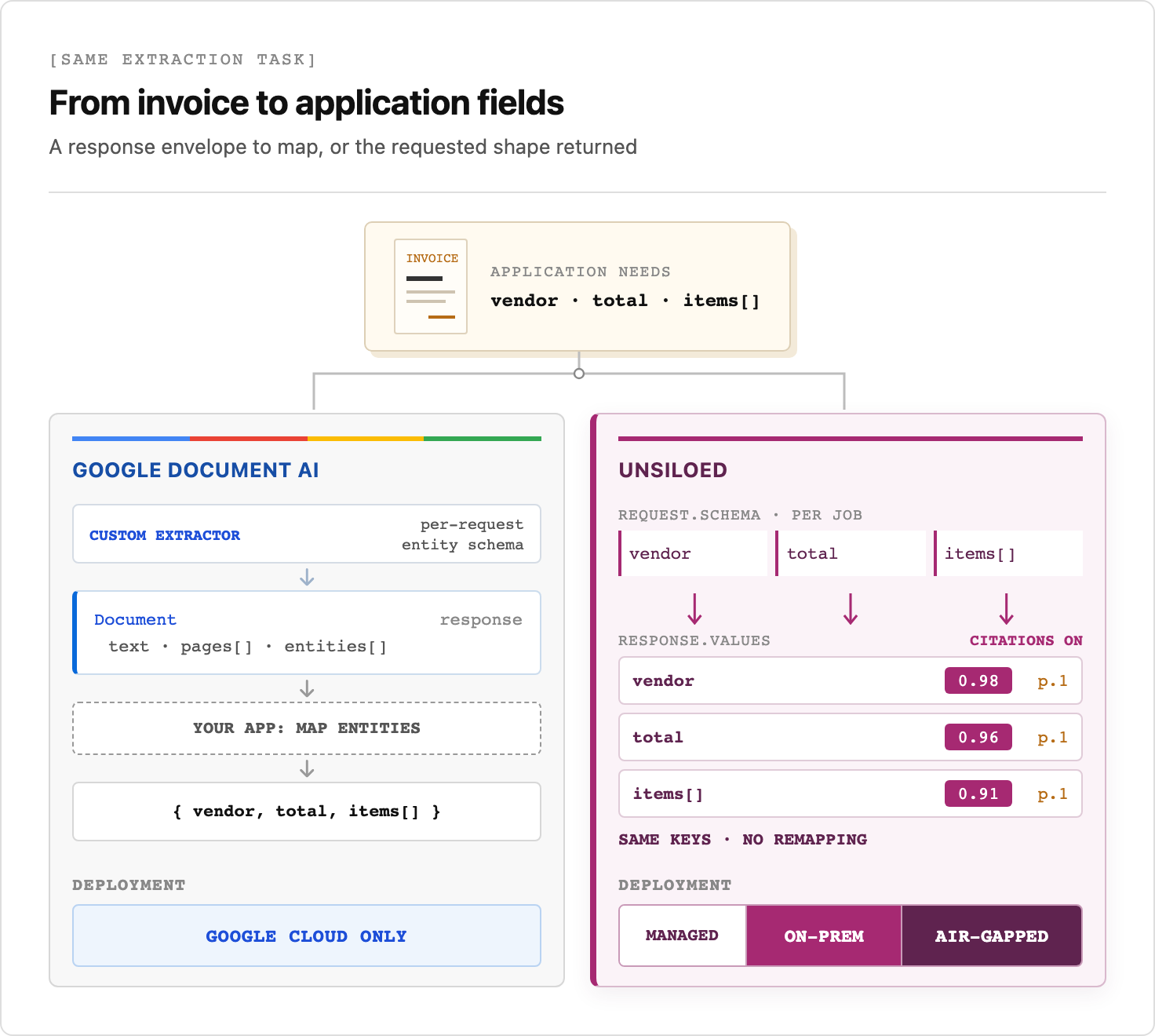
Google Document AI requires a provisioned Google Cloud processor and returns extracted entities inside its canonical Document object, which the application must map into its own data model. Unsiloed accepts a custom JSON Schema with each job and returns the requested keys and types with extraction and grounding scores. Choose Unsiloed when you want to remove that mapping layer or keep documents on-premise or air-gapped.
TL;DR:
- Choose Unsiloed when the application needs schema-shaped values instead of entities nested inside Google's
Documentobject. - Use its extraction and grounding scores with optional citations to build field-level review rules.
- Deploy it as a managed service, on-premise, or air-gapped when documents cannot enter Google Cloud.
- Validate the selected Unsiloed configuration on representative files and calibrate review thresholds by field.
The same invoice shows where each API leaves the integration work:
How Document Extraction Software Combines Recognition, Layout, and Extraction
Document processing systems can combine OCR, layout models, and multimodal foundation models. OCR converts page images into text and location data. Modern OCR services can detect handwriting, rotation, and layout elements, but recognized text alone does not guarantee that the output preserves table cells, columns, or reading order.
A layout-aware or vision-language extraction stage can recover structure and map values to a schema. Unsiloed writes the extracted values under the keys and types in the job's JSON Schema, so the application does not need to map Google-style entity objects into its own fields.
Why Architecture Matters for Extraction Accuracy
Reading order determines whether the application receives a usable table:
- OCR text can contain every character in a table while omitting the relationships between rows, columns, and headers.
- Layout-aware output can include tables, bounding boxes, and reading order, reducing how much structure you must rebuild downstream.
- Handwriting, rotation, and degraded scans test recognition quality separately from layout reconstruction.
Measure latency and processing cost alongside field-level accuracy before setting production acceptance and review thresholds.
Validate Unsiloed Extraction Accuracy on Your Own Files
A single aggregate can hide a model that reads header fields correctly but misses invoice totals, table rows, checkboxes, handwriting, or irregular layouts. A wrong payment total can trigger an incorrect transaction, while a missing optional note may only require a manual correction, so the two fields need different review rules.
Evaluate extraction accuracy with four measures:
- Field-level accuracy: Measure exact matches or task-specific tolerances for each required field.
- Document coverage: Include scans, rotated pages, tables, handwriting, and every layout variant in the intake stream.
- Review rate: Count how many fields or documents fall below the automation threshold.
- Failure cost: Weight a wrong payment total differently from a missing optional note.
Run an Unsiloed evaluation on representative documents before rollout. Calculate error rates and confidence distributions for each field, then set the score at which that field goes to a reviewer.
Google Document AI API: Authentication, Processors, and Page Limits
Google Document AI is a managed Google Cloud service. Its REST API and client libraries use Google Cloud authentication and IAM. The setup guide directs client applications to use Application Default Credentials, not an API key. Each processor has a location, and processing requests use the corresponding location-specific endpoint. Available multi-region and single-region locations vary by processor. Processor location does not guarantee residency for every model version. Google says some preview Custom Extractor versions use a global Vertex AI endpoint, so requests sent through US or EU endpoints can route globally.
The service groups processors into Digitize, Extract, and Classify. Types include Enterprise Document OCR, Form Parser, Layout Parser, Custom Extractor, Invoice Parser, W-2 Parser, Expense Parser, Custom Classifier, and Custom Splitter. You create a processor, then send a document to the projects/{project}/locations/{location}/processors/{processor}:process endpoint. Online REST requests can include base64-encoded document bytes.
A Google Document AI integration must account for three details:
- Page limits depend on the processor. Enterprise Document OCR supports 15 pages online, 30 with
imageless_mode, and 500 in batch. Custom Extractor supports up to 200 pages in batch, but documents with checkboxes are limited to 10 pages online or in batch. Batch jobs write results to Cloud Storage. - A foundation-model Custom Extractor can configure entities per request without model training. Teams can also create a processor version with a stored schema or fine-tune it with labeled documents.
- Output is a structured JSON
Documentobject whose contents depend on the processor. OCR output includes pages, blocks, paragraphs, tokens, layout coordinates, and confidence values. Extraction processors add entities.
Google Document AI pricing varies by processor. OCR and extraction processors generally use page-based pricing, some pretrained parsers charge per document, and custom processors can add hosting charges. Model the processor and service tier you plan to use rather than applying one OCR rate to the entire service.
In production, the application must route each file to the correct processor, enforce processor-specific page limits, retrieve batch results from Cloud Storage, and map returned entities into its own data model. Google can configure Custom Extractor entities per request, but it still returns them inside the canonical Document envelope. Unsiloed returns values in the submitted JSON Schema shape, avoiding an additional entity-to-application-object mapping layer.
Unsiloed Uses JSON Schemas for Predictable Output Contracts
Unsiloed replaces open-ended document parsing with a request for specific fields. Its extraction API accepts a custom JSON Schema with each job. In our live tests against /v2/extract, the response values matched that schema and included per-field extraction and grounding scores. Setting enable_citations=true also returned a source page and bounding box for each non-null value.
Google Custom Extractor places configured entities inside the Document object, so the application must map them into its own fields. Unsiloed returns the requested schema shape directly, although the application must still handle null values and enforce business rules.
A production schema needs clear constraints:
- Separate header fields from repeating data.
- Use arrays for line items or parties.
- Disable unexpected properties where strict output matters.
- Write field descriptions as extraction instructions rather than short labels.
Calibrate each field's review threshold against labeled production files so the threshold reflects observed errors at each score.
Which one should you choose?
Choose Unsiloed for custom extraction. It returns the keys and types your application expects, removes the Google entity-mapping layer, and can keep document processing on-premise or air-gapped.
- Send a standard JSON Schema with each job and receive those fields directly instead of mapping Google
Document.entities[]into an application object. - Route uncertain fields using extraction and grounding scores, then show reviewers the optional source citations.
- Run Unsiloed as a managed service, on-premise, or air-gapped. Google Document AI runs in Google Cloud.
Book a demo to run Unsiloed against your production documents and inspect the returned fields, scores, and citations.
What's the best document extraction software for production workflows?
Unsiloed is the better choice for production workflows that need custom output schemas, per-field extraction and grounding scores, or deployment outside a public cloud. Validate accuracy on representative documents, then set per-field thresholds that accept values above the chosen score and send the rest to a reviewer.
How does the Google Document AI API compare with schema-driven extraction?
Google Document AI requires applications to select a provisioned Google Cloud processor. Compatible foundation-model Custom Extractor versions can configure entities per request, but return those entities with confidence and page anchors inside the Document response. Unsiloed accepts a custom JSON Schema per extraction job and returns schema-shaped values with separately reported extraction and grounding scores plus optional source coordinates.
Can I use document data extraction software without cloud deployment?
Yes. Use Unsiloed on-premise or air-gapped when documents cannot enter a public cloud. Google Document AI runs as a managed Google Cloud service. Before deployment, verify that the Unsiloed installation does not send documents, logs, model requests, temporary files, or telemetry outside the approved network.
How do I improve document extraction accuracy on my own files?
Build a labeled test set from your actual intake stream and run it through Unsiloed. Measure accuracy per field, inspect failures by layout and document type, and use extraction and grounding scores to send uncertain fields to review. Recalibrate those thresholds as the document mix changes.
What is schema-based document data extraction?
Schema-based extraction uses a JSON Schema to define the fields and types the extractor must return. Unsiloed accepts that schema with each extraction job, so application code can validate and consume the returned object without translating a vendor-specific entity list.