Unsiloed AI vs Azure AI Document Intelligence: Which Is Better in July 2026?
Azure AI Document Intelligence gives you a document-processing toolkit of OCR, layout, prebuilt and custom models, and containers. Unsiloed gives you a schema-first document API. We compare how each defines extraction, what the output looks like, how much pipeline logic you own, and where each can run.

Azure AI Document Intelligence gives you a document-processing toolkit: OCR, layout extraction, prebuilt models, add-ons, custom models, and containers. Unsiloed AI gives you a schema-first document API for pipelines that need structured output without assembling several model paths.
Both can extract useful data from complex documents. The difference shows up in the integration work around the extraction. Azure asks your pipeline to choose the right model, enable the right add-ons, train when the document does not fit a prebuilt model, and poll an asynchronous job. Unsiloed is built around request-time schemas, RAG-ready chunks, citations, and a single composable surface for parsing, extraction, classification, and splitting.
This comparison focuses on that trade-off: how you define extraction, what shape the output takes, how much pipeline logic you own, and where the service can run.
TLDR:
Choose Azure AI Document Intelligence if you want Microsoft's managed document stack, your documents fit its prebuilt models, and your team is comfortable assembling output from model-specific JSON.
Choose Unsiloed AI if your pipeline needs extraction-ready output for LLMs, agents, RAG, or automation workflows:
Unsiloed extracts against a custom JSON schema in one call, with typed fields, confidence scores, bounding boxes, and word-level citations. Azure extraction is model-driven: use a prebuilt model, train a custom model on labeled samples, or add query fields to extract a limited set of named fields.
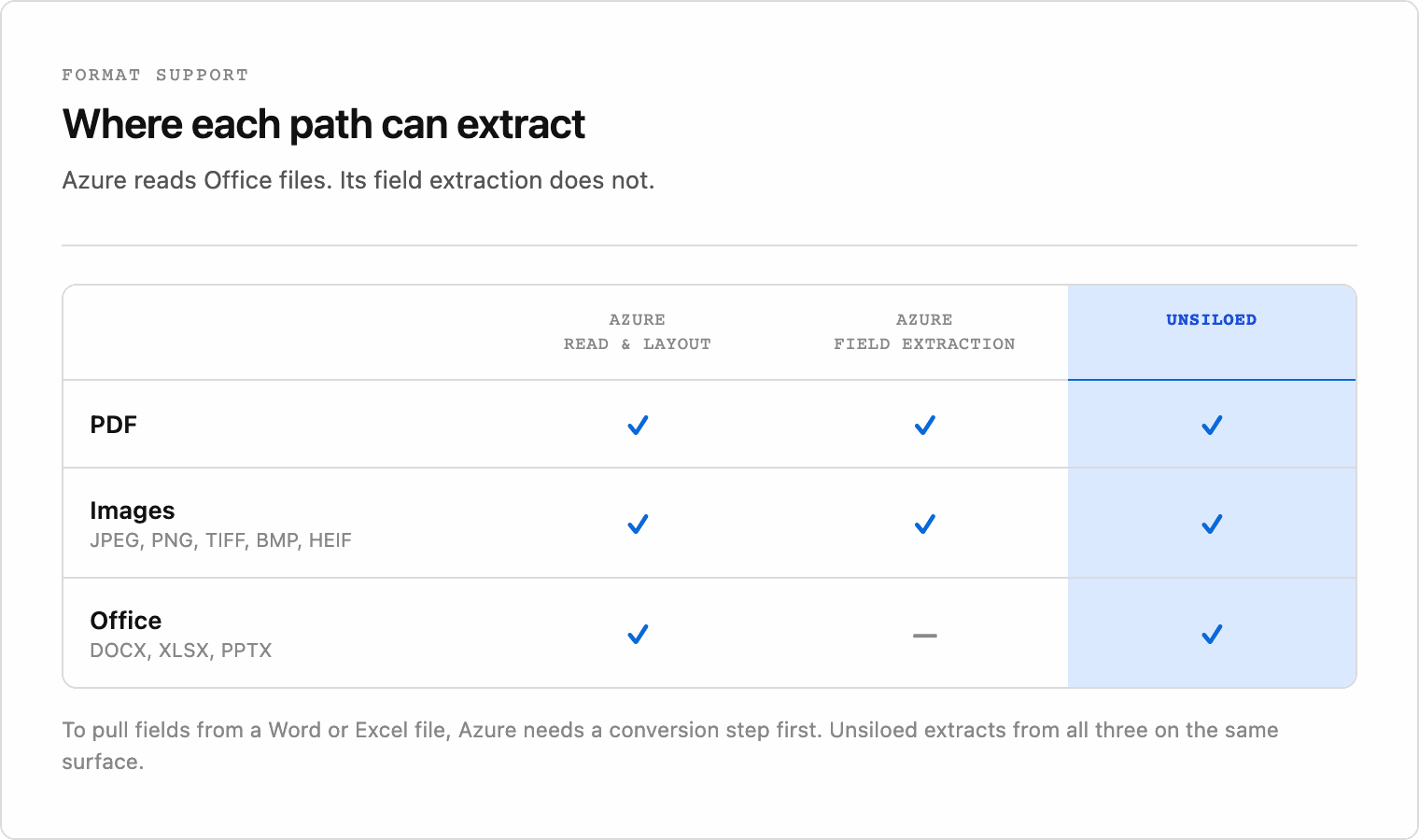
Unsiloed parses and extracts from more than 20 formats, including DOCX, PowerPoint, Excel, PDFs, and scans. Azure Read and Layout support Office and HTML inputs, but prebuilt extraction and custom extraction support PDFs and images.
Unsiloed exposes parsing, extraction, classification, and splitting through one composable API surface. Azure separates those jobs across models, add-ons, custom training, and an asynchronous submit-and-poll flow.
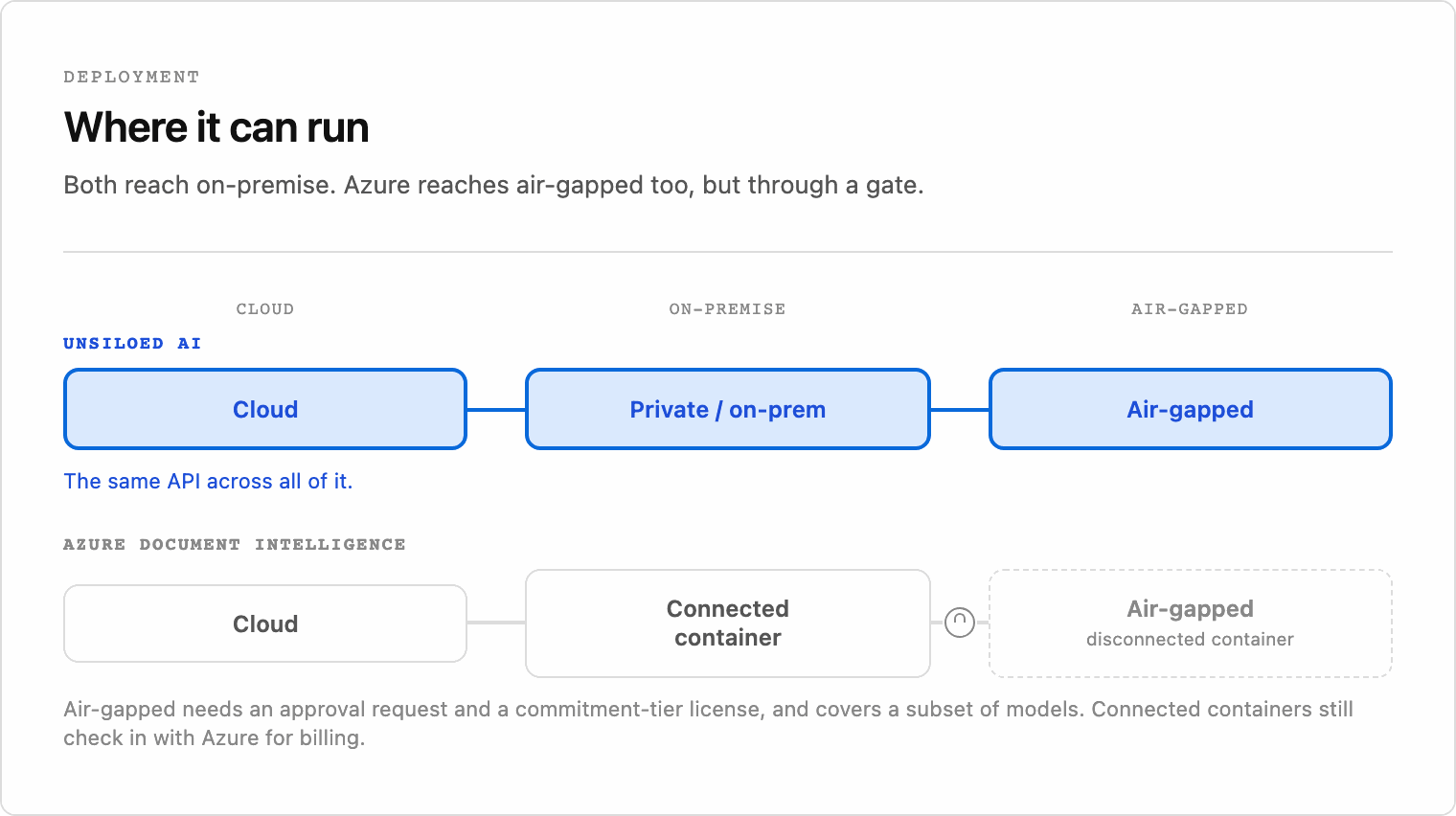
Both keep customer documents private. Azure stores analyze results briefly for retrieval and supports connected or disconnected containers with extra licensing and approval requirements. Unsiloed supports cloud, private, on-premise, and air-gapped deployment of the same API.
Unsiloed prices by plan and page volume across its document operations. Azure prices by model and page volume, so OCR, Layout, query fields, custom extraction, and training can become separate cost lines.
What Is Azure AI Document Intelligence?
Azure AI Document Intelligence, now branded as Document Intelligence in Foundry Tools, is Microsoft's service for extracting text, layout, tables, and fields from documents. It was previously called Azure Form Recognizer. The generally available v4.0 REST API is dated 2024-11-30.
The service is organized around models:
- Read extracts OCR text, words, lines, languages, and handwriting signals.
- Layout extracts text and structure, including tables, selection marks, paragraphs, titles, section headings, and reading order. It can also return Markdown output for retrieval workflows.
- Prebuilt models extract fields from supported document categories such as invoices, receipts, IDs, health insurance cards, contracts, bank statements, and US tax forms.
- Custom extraction models extract fields from your own document types after you label a training set. Microsoft says you can start with five examples of the same form or document type.
Azure also offers add-ons such as high-resolution OCR, formula detection, font detection, and query fields. Query fields let you pass field names on a Layout, prebuilt, or custom-model request without training a new model, but they are a premium add-on, and Microsoft suggests key-value pairs once you need more than about 20 fields.
That breadth is useful. The trade-off is orchestration: turning a raw document into the exact object your application expects often means selecting a model, adding features, training a model, and reshaping the result in application code.
What Is Unsiloed AI?
Unsiloed AI is a document intelligence platform for turning complex documents into structured output that LLMs, agents, RAG systems, and automation workflows can use directly.
Instead of returning OCR text or a layout tree that your code reshapes, Unsiloed returns structured document chunks and schema-shaped extraction results. Parsed output preserves reading order, tables, charts, and hierarchy. Extraction output matches a custom JSON schema and includes confidence scores, bounding boxes, and word-level citations back to the source document.
The platform is organized around four composable APIs:
Parsing converts documents into hierarchical, RAG-ready chunks.
Extraction pulls fields from documents using custom JSON schemas.
Classification routes documents by type using visual and semantic signals.
Splitting breaks mixed or merged files into logical sections.
Unsiloed supports more than 20 file formats, including PDFs, DOCX, PowerPoint, Excel, and scanned images. The same document layer can sit between raw files and the AI or workflow system that needs reliable structured data.
How Unsiloed AI and Azure AI Document Intelligence Compare
The two services diverge most on extraction definition, output shape, supported formats by operation, and deployment model.
| Capability | Unsiloed AI | Azure AI Document Intelligence |
|---|---|---|
| Extraction model | Custom JSON schema at request time | Prebuilt model, trained custom model, or query fields add-on |
| Output shape | Hierarchical chunks and typed JSON | Model-specific JSON that application code assembles |
| RAG readiness | Structure-aware chunks with reading order preserved | Layout Markdown output that teams chunk themselves |
| Input formats | More than 20 formats across parsing and extraction | Read and Layout support PDF, images, Office, and HTML; prebuilt and custom extraction support PDF and images |
| Traceability | Confidence scores, bounding boxes, and word-level citations on extracted fields | Confidence scores and bounding regions in model output, with shape varying by model |
| Operations | Parsing, extraction, classification, and splitting on one surface | Separate models, add-ons, custom training, and asynchronous analysis jobs |
| Deployment | Cloud, private, on-premise, or air-gapped | Cloud, connected containers, or disconnected containers with approval and commitment-tier requirements |
| Customer data use | Not used for training | Not used for training; analyze results retained briefly for retrieval |
| Pricing model | Monthly plans with included pages and per-page overage | Pay-as-you-go per model per page, or commitment tiers |
Document Coverage and Output Shape
Azure format support depends on the model you use. Read and Layout accept PDFs, images, DOCX, XLSX, PPTX, and HTML. Prebuilt extraction and custom extraction accept PDFs and images. Custom classification also supports Office and HTML inputs.
That model split matters when your pipeline receives mixed file types. A DOCX file can go through Read or Layout, but field extraction with a prebuilt or custom extraction model needs a PDF or image input. In practice, that means conversion, separate routing, or a narrower extraction path for Office documents. Unsiloed parses and extracts from more than 20 formats through the same API surface, so Office files, PDFs, scans, and mixed batches can move through the same workflow.
The output models differ too. Azure returns model-specific JSON: Read returns OCR, Layout returns page and structure objects, prebuilt models return fixed schemas, and custom models return trained fields. Each output is useful, but your application still has to assemble the final structure it needs.
Unsiloed returns hierarchical chunks and schema-shaped JSON directly. That output can feed an LLM, vector store, review queue, or document workflow without a separate reassembly layer.
Accuracy and Benchmark Transparency
Accuracy is easier to evaluate when vendors publish rerunnable benchmarks. Unsiloed reports a score of 88.0 on olmOCR-Bench, a public OCR benchmark, and ranks first on it.
Azure documents confidence scores and human-review guidance, but Microsoft does not publish a directly comparable public accuracy benchmark for Document Intelligence. Teams evaluating Azure still need to test it on their own document set, especially if they depend on custom extraction or mixed file formats.
Schema-Driven Extraction vs Models and Query Fields
The deepest difference is how you tell each system what to extract.
With Unsiloed, you define a custom JSON schema and send the document to the extraction API. The response matches that schema and includes a confidence score, bounding box, and word-level citation for each field. One call produces the typed object your application expects, with no model to train first.
Azure's standard Document Intelligence workflow is model-driven. You can use a prebuilt model when your document matches one of Microsoft's supported categories. For your own fields, you can train a custom extraction model by labeling examples and assigning field types before building the model. Query fields are lighter weight, but they work as a list of named fields, not a typed nested schema, and Microsoft suggests key-value pairs once you need more than about 20 fields.
That distinction matters for application contracts. A few extra fields on an invoice may fit query fields. A nested 40-field schema for contracts, claims, research papers, or internal forms is a different problem: the Azure path becomes custom modeling or field-list orchestration, while Unsiloed keeps the extraction definition in the request.
Pricing
Azure prices by model and page volume. Unsiloed prices by plan and page volume across its document operations. Exact Azure costs vary by region and commitment tier, so confirm current rates in the Azure pricing page before budgeting.
| Pricing item | Unsiloed AI | Azure AI Document Intelligence |
|---|---|---|
| Pricing model | Monthly plans with included pages and per-page overage | Per-model page pricing, with optional commitment tiers |
| OCR | Included in plan | Read is billed separately per 1,000 pages |
| Layout and structure | Included in plan | Layout is billed separately per 1,000 pages |
| Field extraction | Custom JSON schema included in plan | Prebuilt, custom extraction, and query fields have separate pricing lines |
| Custom model training | No training step for request-time schema extraction | Custom neural training is free for the first 10 hours each month, then billed hourly |
| Production volume | Standard and Growth plans include page bundles and overage rates | Commitment tiers are available for larger workloads and containers |
Azure's Read model can be inexpensive for high-volume OCR. The cost profile changes when structured extraction requires Layout, query fields, custom extraction, custom training, or commitment tiers. Unsiloed's pricing is simpler for teams that use parsing, extraction, classification, and splitting together because those operations sit under the same plan model.
Integration Complexity
Azure's analyze operations are asynchronous. Your application submits a document, receives an operation URL, polls until the result is ready, and then retrieves the JSON. That flow is normal for managed document services, but it becomes more involved when the pipeline also has to select a model, enable add-ons, train a custom model, or normalize different output shapes.
Unsiloed accepts a document in one call and returns structured output directly. Parsing, extraction, classification, and splitting are separate but composable endpoints, so the same pipeline can parse a file, extract schema-shaped JSON, route it by type, or split a mixed packet without changing services.
The practical difference is ownership. With Azure, the toolkit is flexible, but your team owns the routing logic between models and add-ons. With Unsiloed, the API boundary is closer to the object your downstream system expects.
Deployment, Data Use, and Enterprise Security
Both services can fit enterprise security reviews, and neither uses customer documents to train its models. Microsoft stores Document Intelligence analyze results briefly for retrieval and lets you delete them through the API. Unsiloed also does not train on customer data, and supports zero data retention on its Standard plan and above.
Deployment is where the distinction becomes more operational. Azure supports cloud deployment, connected containers, and disconnected containers for environments with no cloud connectivity. Disconnected containers require approval and commitment-tier licensing, and the container model set is not the same as the full cloud surface.
Unsiloed supports cloud, private, on-premise, and air-gapped deployment of the same API. That is useful for teams that need document processing inside a controlled boundary by default rather than through a separate container approval and licensing path.
When to Choose Unsiloed AI over Azure AI Document Intelligence
Azure AI Document Intelligence is a strong choice when your documents match its prebuilt models, you are already invested in Azure, and your team can assemble the output from model-specific JSON. It fits especially well for invoice, receipt, ID, tax, and high-volume OCR workflows inside the Microsoft ecosystem.
Choose Unsiloed AI when document output has to feed LLMs, agents, RAG systems, or structured workflows without a custom assembly layer. It is the better fit when you need:
Typed JSON from a custom extraction schema, with no model to train first
Hierarchical chunks with reading order preserved
Confidence scores, bounding boxes, and word-level citations on extracted fields
Direct extraction from Office files, PDFs, scans, and mixed batches
One surface for parsing, extraction, classification, and splitting
Cloud, private, on-premise, or air-gapped deployment of the same API
The shorter version: Azure is a broad document toolkit you assemble. Unsiloed is schema-first extraction you call when downstream systems need structured, cited output.
If your pipeline feeds LLMs, agents, or RAG systems, book a demo to see how Unsiloed handles schema extraction and the formats that fall between Azure's models.
FAQ
How should I decide between Unsiloed AI and Azure AI Document Intelligence?
Choose Azure if your documents match its prebuilt models, you want Microsoft's managed stack, and your team can assemble model-specific output. Choose Unsiloed AI if you need request-time schema extraction, RAG-ready chunks, field-level citations, Office-format extraction, and one surface for parsing, extraction, classification, and splitting.
Does Azure AI Document Intelligence support extraction with a custom JSON schema?
Not in the same request-time schema model as Unsiloed. Azure extraction is built around prebuilt models, trained custom models, and query fields. Query fields let you ask for named fields without training, but they are a field list rather than a typed nested JSON schema, and Microsoft suggests key-value pairs once you need more than about 20 fields. Unsiloed's extraction API accepts a custom JSON schema per request and returns typed JSON with confidence scores, bounding boxes, and word-level citations.
Can Azure AI Document Intelligence or Unsiloed AI run air-gapped?
Both can support air-gapped deployments. Azure supports disconnected containers, but they require approval and commitment-tier licensing. Unsiloed supports cloud, private, on-premise, and air-gapped deployment of the same API.
What file formats do Unsiloed AI and Azure AI Document Intelligence support?
Azure Read and Layout support PDFs, images, DOCX, XLSX, PPTX, and HTML. Azure prebuilt extraction and custom extraction support PDFs and images. Unsiloed parses and extracts from more than 20 formats, including Office files, PDFs, and scans, through the same API surface.
Does Azure AI Document Intelligence output data ready for RAG?
Partly. Azure Layout can return Markdown that helps retrieval pipelines, but teams still need to chunk it and connect it to any extracted fields they need. Unsiloed returns structure-aware chunks and schema-shaped JSON with citations from one API surface.
How does pricing differ between Unsiloed AI and Azure AI Document Intelligence?
Azure prices by model, page volume, add-ons, training, and commitment tiers. That can be cost-effective for raw OCR, but structured extraction can involve several billing lines. Unsiloed prices by monthly plan and page volume across parsing, extraction, classification, and splitting.