
Loop Engineering

How to Make AI Agent Loops More Efficient and Cost-Effective
Agent loops are cheap to start and expensive to run. A practical guide to cutting token usage and API costs: preparing data before the first model call, designing loops that stop, keeping context small, and matching models and tools to the task.
Prompt engineering has been the focus of AI development for the past few years. Today, another idea is drawing attention across the developer community. It is called loop engineering.
Loop engineering gives AI agents a goal and lets them work through it on their own. An agent can plan the next step, use tools, review the results, fix errors, and continue until the task is complete. Modern coding agents have shown what this approach can do. Many developers are now exploring it for real-world applications.
The idea sounds promising. The cost can become a problem very quickly. An agent may repeat the same actions, send larger amounts of context back to the model, or keep trying to solve the same issue. Each cycle increases token usage, execution time, and API costs.
In this article, you'll learn why loop engineering has become a popular topic and discover practical ways to build efficient, cost-effective AI agent loops.
What Is Loop Engineering?
Most people interact with AI through prompts. They ask a question, review the response, and send another prompt if more work is needed. This works well for simple tasks. Complex tasks often need many rounds of instructions, reviews, and corrections.
Loop engineering gives the AI agent a clear goal and lets it work through the task on its own. It can decide the next step, use available tools, review the output, fix mistakes, and continue until it reaches the expected result or meets a stopping condition.
A typical loop follows a simple cycle:
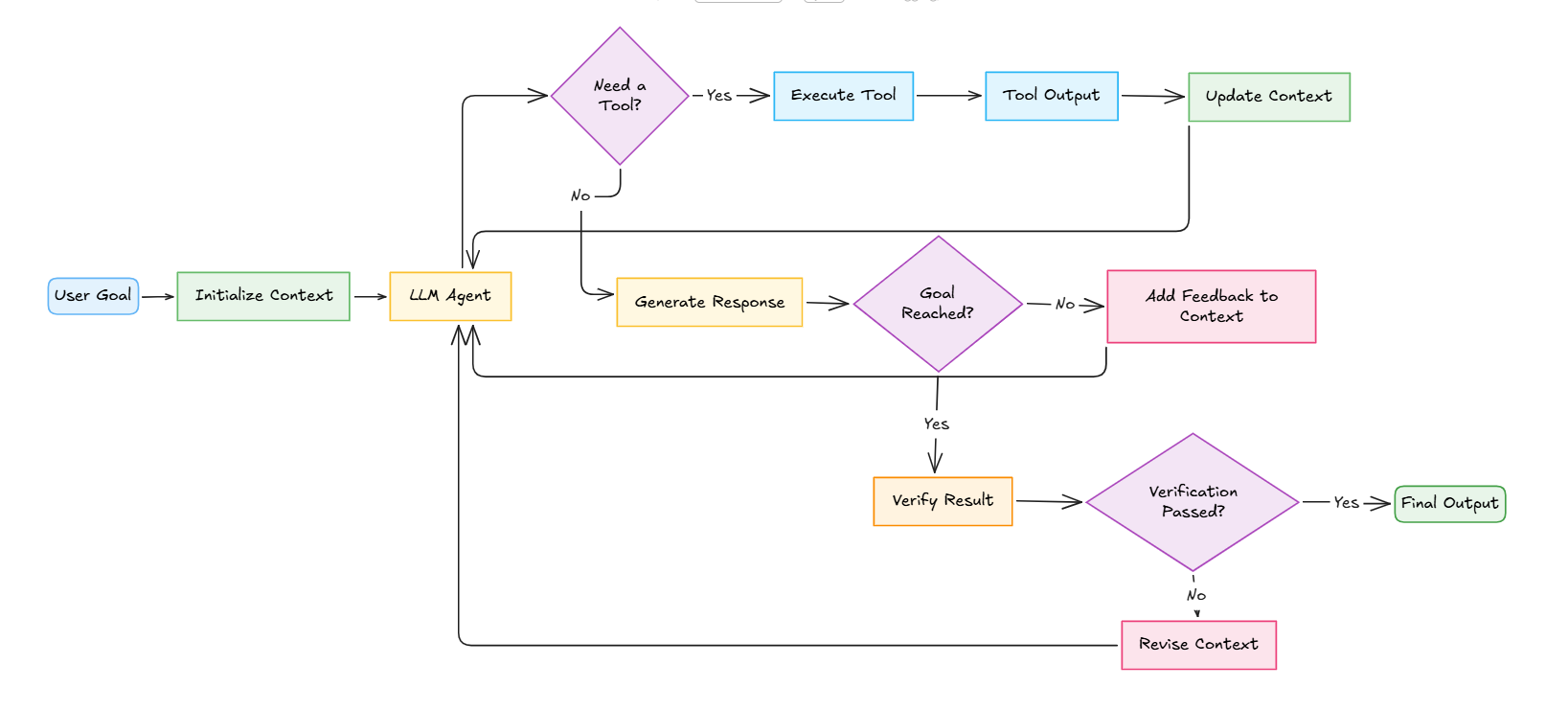
- Receive a goal.
- Plan the next action.
- Use tools when needed.
- Review the results.
- Continue until the goal is achieved.
The loop itself is only a small part of the system. Modern AI frameworks can already manage this cycle.
The real engineering work happens around it. Developers decide what information the agent receives, which tools it can use, how success is measured, and when the process should stop. These decisions have a direct impact on accuracy, execution time, and API costs.
Why Is Loop Engineering Becoming Popular?
Several developments have contributed to the growing interest in loop engineering. Better AI models, capable coding agents, and the need for autonomous workflows have encouraged developers to adopt this approach.
- Better reasoning models: Modern AI models can plan tasks, use tools, and solve complex problems with greater accuracy.
- Rise of AI coding agents: Coding assistants can write code, run tests, fix errors, and continue working with minimal human input.
- Demand for autonomous workflows: Many applications need AI agents that can complete multi-step tasks with little human intervention.
- Growing agent ecosystem: Agent frameworks and development tools have made it easier to build and manage loop-based applications.
- Focus on production systems: Developers now spend more time designing workflows, tools, memory, and verification to build reliable AI agents.
Why Loop Engineering Can Become Expensive
Loop engineering gives AI agents the ability to work through tasks with little human input. Every iteration also consumes tokens, compute resources, and execution time. A simple workflow can become expensive if the loop keeps running longer than expected.
Several factors contribute to these increasing costs:
- Repeated model calls: Every iteration sends a new request to the LLM.
- Growing context: Previous responses, tool outputs, and reasoning continue to accumulate.
- Duplicate tool execution: The agent may call the same tool multiple times for the same task.
- Weak stopping conditions: Poor exit criteria can keep the loop running even after a usable result is available.
- Expensive models for simple tasks: Basic operations often go through premium models even when deterministic tools or smaller models are sufficient.
These issues become more noticeable as the workflow grows. A loop that runs for a few extra iterations can consume thousands of additional tokens and increase execution time. Large-scale deployments can see these costs multiply across hundreds or thousands of agent runs.
The good news is that most of these costs come from the workflow around the loop, not the loop itself. Careful planning and a few optimization techniques can significantly reduce token usage and improve overall efficiency.
For example, consider an AI coding agent that needs to fix a failing unit test. A poorly designed loop may regenerate the entire file, rerun all tests, and repeat the same process several times.
An optimized loop fixes only the failing function, runs the affected tests, and stops once the issue is resolved. This approach reduces token usage, execution time, and API costs.
Tip: The cheapest token is the one you never send. Cleaning data before the first model call often saves more money than optimizing the loop later.
Optimize Before the Loop Starts
Many developers focus on improving the loop itself. The biggest improvements often happen before the first model call. Every unnecessary token, large document, or repeated piece of information sent to the model increases the cost of every iteration that follows. Preparing the workflow in advance helps the agent complete tasks more efficiently.
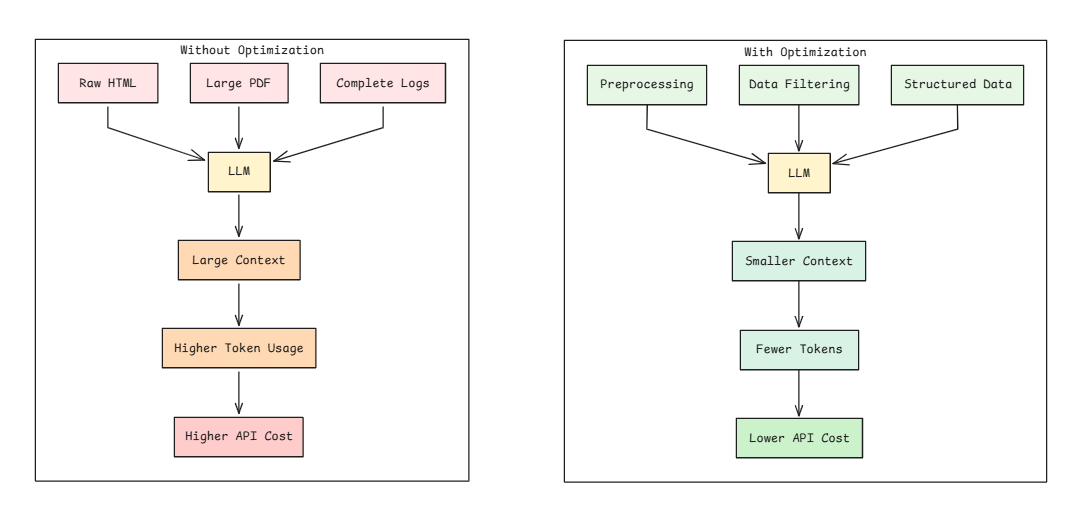
Start by preprocessing the data. Remove irrelevant content and extract only the information required for the task. A model does not need an entire web page or a complete log file if only a small section contains the answer.
The following examples compare raw and optimized inputs.
| Raw Input | Optimized Input |
|---|---|
| Full HTML page | Clean Markdown |
| 10 MB log file | Error summary |
| Complete PDF | Relevant pages |
| Entire database | Matching records |
Preparing the input before the first model call reduces unnecessary processing throughout the entire loop.
Use structured inputs whenever possible. Formats such as JSON, Markdown, or tables are easier to process than raw HTML, PDFs, or unstructured text. Clean and organized data reduces unnecessary reasoning and improves response quality.
Simple operations should stay outside the language model. File parsing, data filtering, sorting, calculations, and format conversion can be completed with traditional code. This approach reduces API calls and reserves the model for tasks that truly require reasoning.
Retrieve only the information needed for the current step. Large documents and lengthy conversation histories increase context size and token usage. Loading only the relevant sections keeps the loop efficient and reduces processing costs.
Caching also plays an important role. Tool outputs and other deterministic results can often be reused across multiple iterations. Reusing existing results prevents repeated work and improves overall execution efficiency.
Design Efficient Loops
An efficient loop completes the task with minimal iterations and resource usage. The following practices can help improve loop performance and reduce unnecessary API costs.
- Define Clear Success Criteria: Start with a measurable goal. The agent should know exactly when the task is complete. For example, a coding agent should stop after all tests pass, not after generating code.
- Set Execution Limits: Define limits for iterations, execution time, and token usage. These limits prevent the agent from running indefinitely when it encounters unexpected situations.
- Detect Repeated Actions: Monitor the workflow for repeated tool calls or identical outputs. Repeated actions often indicate that the agent is stuck and needs a different strategy or human intervention.
- Separate Execution and Verification: Keep the process that generates the solution separate from the process that verifies it. Use tests, validation rules, or a dedicated verifier to confirm the final result.

- Handle Failures Gracefully: Design the workflow to recover from errors. Retry temporary failures, stop after repeated failures, and provide meaningful feedback that helps the agent choose the next action.
- Keep the Loop Focused: Each iteration should move the task closer to completion. Avoid adding unnecessary reasoning steps, tool calls, or context that increase cost without improving the outcome.
Optimize Context and Memory
Every iteration adds more information to the context window, including previous responses, tool outputs, and reasoning. As the context grows, the model processes more tokens, which increases execution time and API costs. Large context windows can also make it harder for the agent to focus on the information that matters most.
A focused context keeps the loop efficient. Summarize long conversations, retrieve only the information needed for the current task, and store large documents or logs outside the context window. This reduces unnecessary token usage and keeps each iteration lightweight.
Memory management is equally important. Separate memory for independent tasks, remove outdated information, and avoid duplicate content. A clean context helps the agent respond faster, produce more accurate results, and complete tasks with fewer resources.
Choose the Right Tools and Models
The choice of tools and models has a direct impact on the cost and efficiency of a loop. A language model should focus on tasks that require reasoning, planning, or decision-making.
Simple operations such as file parsing, database queries, calculations, and web scraping are better handled by dedicated tools. This reduces unnecessary model calls and keeps the workflow efficient.
Model selection is equally important. Lightweight models work well for tasks such as classification, summarization, formatting, and basic data extraction.
Reserve advanced reasoning models for complex problems that truly benefit from their capabilities. This approach helps control API costs without affecting the quality of the final result.
Keep the toolset focused and avoid adding tools that the agent does not need. A smaller collection of tools makes it easier for the agent to select the correct one and reduces unnecessary tool calls.
You should also reuse outputs from deterministic tools whenever possible. Caching these results prevents repeated processing and improves the overall efficiency of the loop.
Best Practices for Efficient Loop Engineering
Building an efficient AI agent requires careful planning at every stage of the workflow. The following practices can help reduce API costs, improve execution speed, and build loops that perform reliably in production.
- Define clear goals: Set measurable success criteria before the first iteration begins.
- Prepare the data: Clean, filter, and structure the input before sending it to the model.
- Limit the context: Keep only the information needed for the current task and remove outdated content.
- Control loop execution: Set limits for iterations, execution time, and token usage.
- Choose the right tools: Use dedicated tools for deterministic tasks and reserve language models for reasoning.
- Select suitable models: Match the model to the complexity of the task instead of using the same model for every operation.
- Reuse previous results: Cache deterministic outputs to avoid repeating the same work.
- Verify the outcome: Validate the final result through tests or predefined rules before completing the task.
- Track performance: Monitor token usage, execution time, and API costs to identify opportunities for improvement.
Common Mistakes to Avoid
Even a well-designed loop can become inefficient if a few common mistakes are overlooked. One of the most common problems is letting the loop run without limits on iterations, execution time, or token usage. This can cause the agent to continue working long after it should have stopped, leading to unnecessary API costs.
Another mistake is sending large documents, complete chat histories, or unnecessary context with every request. Large context windows increase token usage and make it harder for the model to focus on the most relevant information. Using the same large reasoning model for every task can also increase costs, even when a smaller model or a dedicated tool is sufficient.
Tool selection also plays an important role. Giving the agent too many tools with overlapping functions can lead to incorrect or repeated tool calls. Similarly, running the same tool multiple times when previous results can be reused wastes both time and resources.
Finally, avoid letting the agent verify its own output. Independent validation through tests, predefined rules, or a separate verifier provides more reliable results and helps prevent incorrect responses from being accepted as complete.
Conclusion
Loop engineering is changing how AI agents are built and deployed. The loop itself is simple, but building an efficient workflow requires careful planning. Data preparation, context management, tool selection, and clear stopping conditions all play an important role in reducing costs and improving performance.
The goal is not to build a loop that runs longer. The goal is to build one that reaches the desired result with fewer iterations and lower resource usage. A well-designed workflow reduces costs, improves performance, and makes autonomous AI agents practical for real-world applications.