

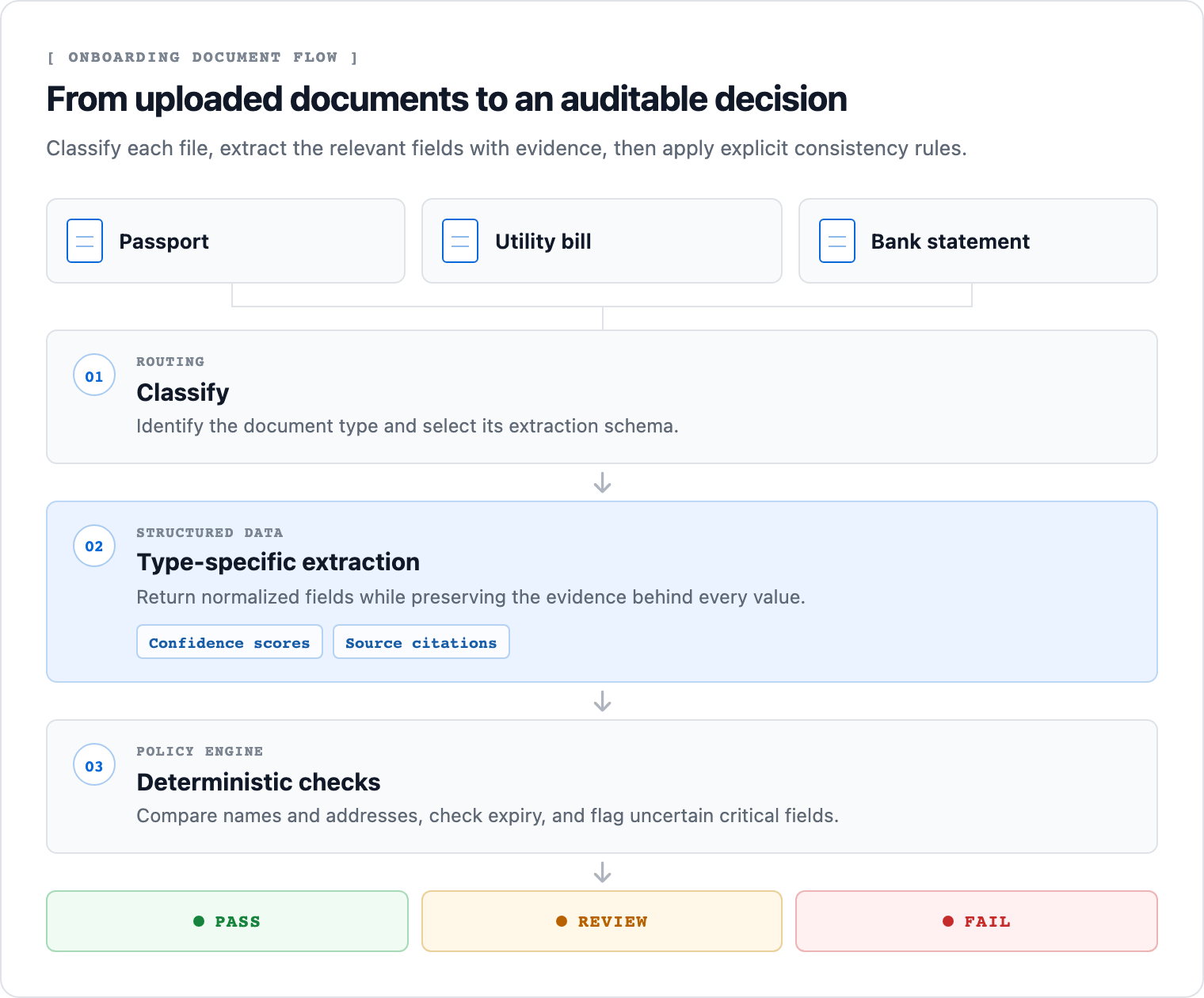
PASS, REVIEW, or FAIL, with confidence scores and source citations preserved for every extracted field.
What We’ll Build
A script that:- Classifies each file as an identity document, utility bill, bank statement, or other document.
- Extracts the fields required for that document type with citations enabled.
- Normalizes names and addresses before comparing them across files.
- Checks the identity document’s expiry date.
- Returns
FAILfor a mismatch or expired document,REVIEWfor uncertain data, andPASSonly when every check clears.
REVIEW: all cross-document values match, but the workflow refuses to approve a field it can’t ground.
Show the Full Script
Show the Full Script
Set
UNSILOED_API_KEY in your environment and save the three sample files in the same directory as the script before running it.- Python
- JavaScript
check_kyc.py
Step 1: Set Up the Sample Documents
Before writing code, we’ll download the tested sample set and configure the runtime.1.1 Get an Unsiloed API Key
Get an API key from the Unsiloed dashboard, then export it as an environment variable:1.2 Download the Fictional Onboarding Set
Create a new directory, then download the three files from the Unsiloed cookbook repository:1.3 Install the Python Dependency
The JavaScript version uses only Node.js built-ins. For Python, installrequests:
Step 2: Classify Each Document Before Extraction
An intake folder doesn’t reliably tell us which file is an ID or proof of address. We classify first, then use the result to select the right extraction schema. Define mutually exclusive categories, including anOther fallback:
0.9999999.
Step 3: Extract Fields With a Schema per Type
Each document answers different questions. A passport has a date of birth and expiry date; a utility bill has a service address; a bank statement has an account holder and statement period. A single catch-all schema would ask documents for fields they can’t contain. The scripts keep one schema per classification result and enable citations on every extraction:16 02 2036; extraction returns 2036-02-16, which Python and JavaScript can compare without a list of locale-specific date formats.
We leave document_number out of the schema’s required array. The sample’s complete passport number isn’t visible, so requiring it could pressure the extraction toward a guess. It remains a critical field in the decision rules, where a null value correctly triggers review.
Step 4: Compare Confidence, Names, Addresses, and Expiry
The decision engine uses only deterministic code. The model reads each document, but it doesn’t decide whether the person passes onboarding.4.1 Gate Critical Fields by Confidence
Each extracted field has a grounding score and an extraction score. The scripts use the lower available value:0.85.
Start with
0.85 for this example, then calibrate the threshold against documents your team has already reviewed. It isn’t a universal compliance threshold.4.2 Normalize Before Comparing
Names and addresses rarely use identical punctuation and spacing. The scripts lowercase the values, remove punctuation and diacritics, split them into tokens, and compare token overlap. For the sample, these two addresses normalize to the same token set:4.3 Check the Expiry Date in Code
The ISO date lets us compare the identity document against today’s date directly. An expired identity document returnsFAIL; a missing or malformed expiry date returns REVIEW.
Step 5: Return a Review Decision With Evidence
Run the completed script for your runtime:- Python
- JavaScript
Save the Python script from the full-script accordion as
check_kyc.py, then run:kyc-raw.jsonpreserves the complete classification and extraction responses, including job IDs and citations.kyc-result.jsoncontains the normalized decision payload for the onboarding system.
Sample Output
The live API classified every sample correctly and extracted all visible critical values. Every name comparison passed, and the utility-bill address matched the bank-statement address. The complete passport number is obscured, so the result stops for review:Where to Take This Next
For a production onboarding service, add your organization’s policy checks around this core pipeline. Useful extensions include:- Checking whether proof-of-address documents are recent enough for your policy.
- Comparing a selfie against the identity-document portrait with an approved identity provider.
- Sending review items to an evidence viewer that draws each citation box on the source document.
- Recording reviewer corrections separately from the raw API response.
- Encrypting documents and deleting stored artifacts according to your retention policy.
Classification
Define document categories and route each file to the right workflow.
Extraction Schemas
Add or refine fields for the identity documents your onboarding policy accepts.
Extraction Response Format
Inspect value, confidence, citation, and job metadata fields.