Unsiloed AI vs Docsumo: Which Is Better in July 2026?
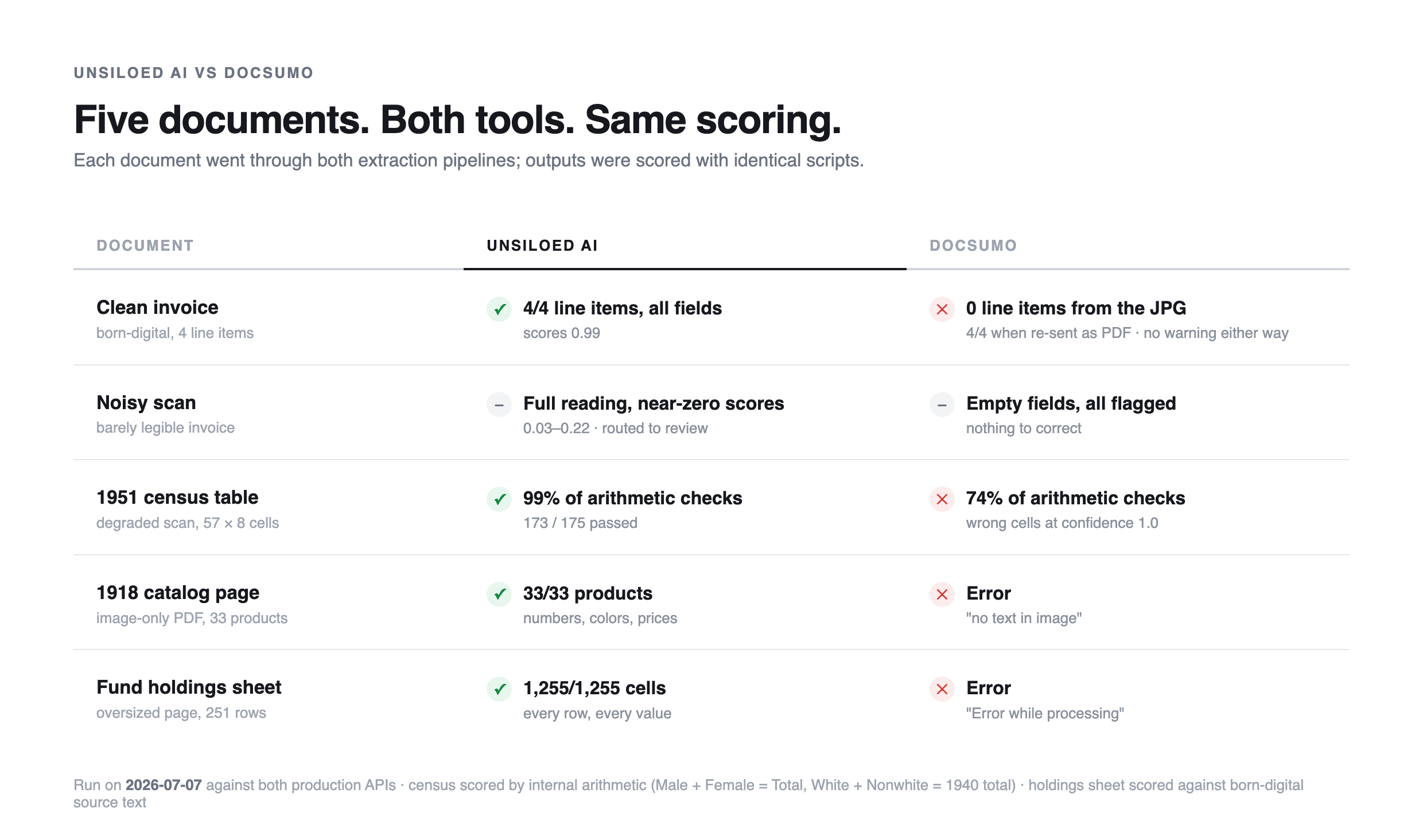
Docsumo and Unsiloed both turn documents into structured data, but we ran the same five documents through both and scored them with the same scripts. Two of five errored on Docsumo, and its confidence scores never flagged the values it got wrong. Here is where each tool holds up.

Unsiloed AI and Docsumo both turn documents into structured data, but they are built for different teams. Docsumo is a document processing platform aimed at operations work; Unsiloed is an extraction API for engineers. We compared what each offers, then ran the same five documents through both and scored the results with the same scripts.
What Each Tool Offers
Docsumo is built around configured document types and a human review queue. You enable a pre-trained model (invoice, bank statement, ACORD forms, tax forms) or create a custom type from sample files in its dashboard, then feed it documents by upload, a dedicated inbound email address, connectors, or API. Extractions land in a review interface where people check flagged values before the data moves on. The review UI is polished, and the automatic field detection for custom types is good: it inferred our census table's eight-column schema from a single sample.
Unsiloed AI is built around four API endpoints: parsing, extraction, classification, and splitting. For extraction, the JSON schema travels with the request, so there is no per-type setup, and every extracted field returns with a confidence score, a bounding box, and a word-level citation back to the source page. Review is something you build on top of the scores and citations rather than a hosted queue.
| Unsiloed AI | Docsumo | |
|---|---|---|
| Built for | Engineering teams embedding extraction in products, agents, and RAG pipelines | Operations teams processing known document types at volume |
| Setup per document type | None; the schema is in the request | Dashboard configuration (no documented API for this step) |
| Schema | Any JSON schema, per request | Pre-trained taxonomy or custom field setup, per type |
| Every field returns | Confidence score, bounding box, word-level citation | Confidence score, review flag, position box |
| Review workflow | Build on the API | Hosted review queue and UI |
| Document intake | API | Dashboard, inbound email, connectors, API |
The table is the brochure version. What separates the two tools is what comes back when the documents get hard, so we tested that directly.
The Performance Examples
Five documents, from easy to hostile: a clean invoice, a barely legible scan, a degraded 1951 census table, an image-only 1918 catalog page, and an oversized 251-row fund holdings sheet. Every document went through Docsumo (its pre-trained invoice model, or a custom document type built in its dashboard) and through Unsiloed's extraction API with an equivalent JSON schema. We saved the raw responses and scored both outputs with the same scripts.
Round 1: A Clean Invoice
A born-digital consulting invoice with a four-row services table, sent to both tools as a JPG (a format both list as supported).
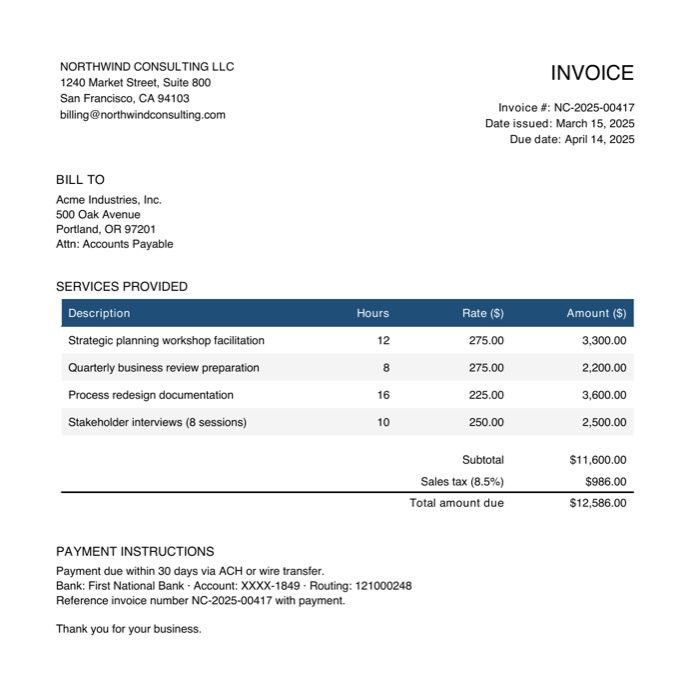 The input: about as easy as document extraction gets.
What Docsumo Returned
The pre-trained invoice model reads the header fields correctly and returns an empty line-items table:
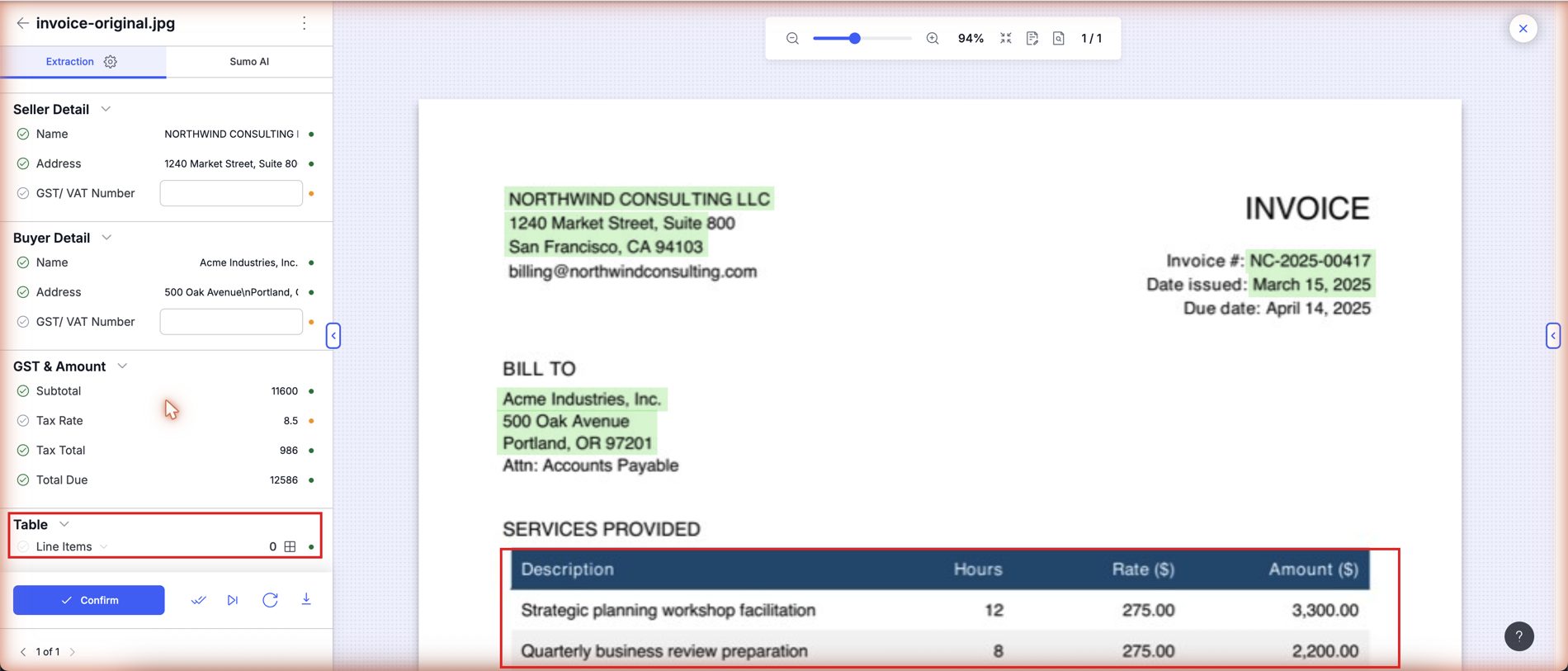 Line Items: 0, with the table in plain sight. Nothing warns you unless a human opens the document.
This is not a table-extraction failure. Re-sent as a PDF of the same image, the invoice comes back with all four line items correct. The problem is that the result depends on the container format, both formats are accepted without complaint, and the JPG's empty table arrives with no error and nothing flagged. A pipeline that happens to feed it images silently loses every table.
What Unsiloed Returned
The same JPG, all four rows, with the scores to back them:
"line_items": {
  "value": [
    {"description": "Strategic planning workshop facilitation", "hours": 12, "rate": 275.0, "amount": 3300.0},
    {"description": "Quarterly business review preparation", "hours": 8, "rate": 275.0, "amount": 2200.0},
    {"description": "Process redesign documentation", "hours": 16, "rate": 225.0, "amount": 3600.0},
    {"description": "Stakeholder interviews (8 sessions)", "hours": 10, "rate": 250.0, "amount": 2500.0}
  ],
  "score": {"grounding_score": 0.99, "extraction_score": 0.99}
}
Abridged: the raw response wraps each field inside every row with its own score object (and a citation when enabled); those per-cell scores and citations are omitted here for brevity.
Round 2: A Barely Legible Scan
An invoice degraded past the point of comfortable reading, with no ground truth to score against, so this round is about behavior rather than accuracy.
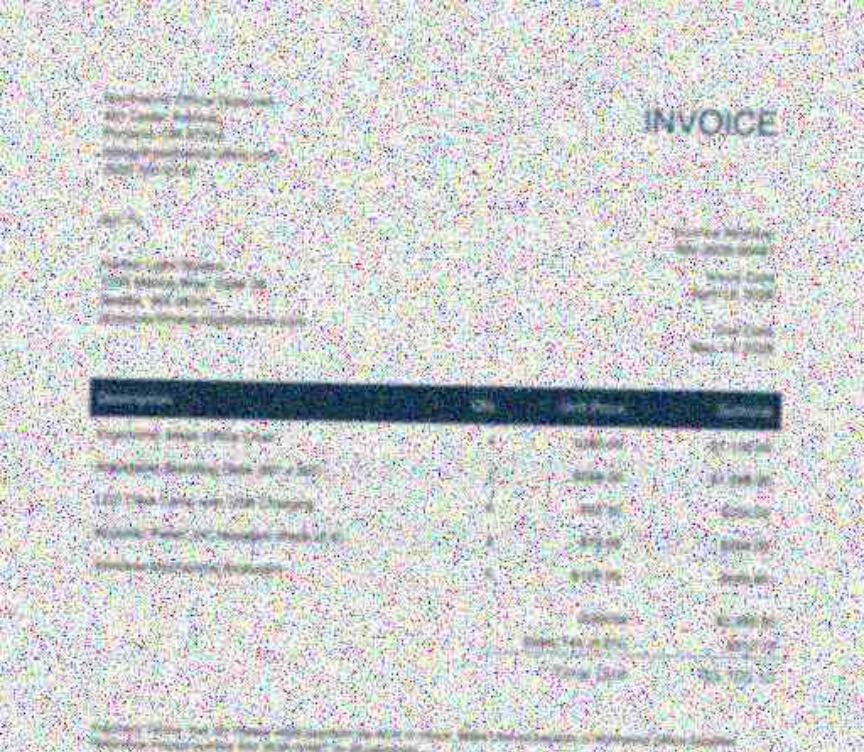 The input document, as sent to both tools.
What Docsumo Returned
Every field came back empty and flagged for review, which is a reasonable response to an unreadable page:
"Invoice Number": {"value": "", "confidence": 0.55, "review_required": true},
"Name":           {"value": "", "confidence": 0.54, "review_required": true},
"Total Due":      {"value": "", "confidence": 0.59, "review_required": true}
What Unsiloed Returned
A complete best-effort reading, with scores that say "do not trust this":
"seller_name": {"value": "Northwest Office Solutions", "score": {"grounding_score": 0.18, "extraction_score": 0.22}},
"invoice_number": {"value": "INV-2024-0042", "score": {"grounding_score": 0.08, "extraction_score": 0.12}},
"subtotal": {"value": 3228.0, "score": {"grounding_score": 0.05, "extraction_score": 0.09}},
"total_due": {"value": 3502.38, "score": {"grounding_score": 0.05, "extraction_score": 0.09}}
Abridged: citation keys omitted for brevity.
Any threshold routes this document straight to a human, so call it a draw with a difference: Docsumo's reviewer starts from blank fields, Unsiloed's reviewer starts from a prefilled guess and a score telling them not to trust it. Compare these scores with the 0.99 on the clean invoice in Round 1: the score tracks how readable the document actually is, which is what makes it usable for routing. Neither tool was confidently wrong here, which is the failure mode that actually costs money.
Round 3: A 1951 Census Table
Page 12 of the 1951 US Statistical Abstract: a degraded typewriter-era scan of a 57-row population table.
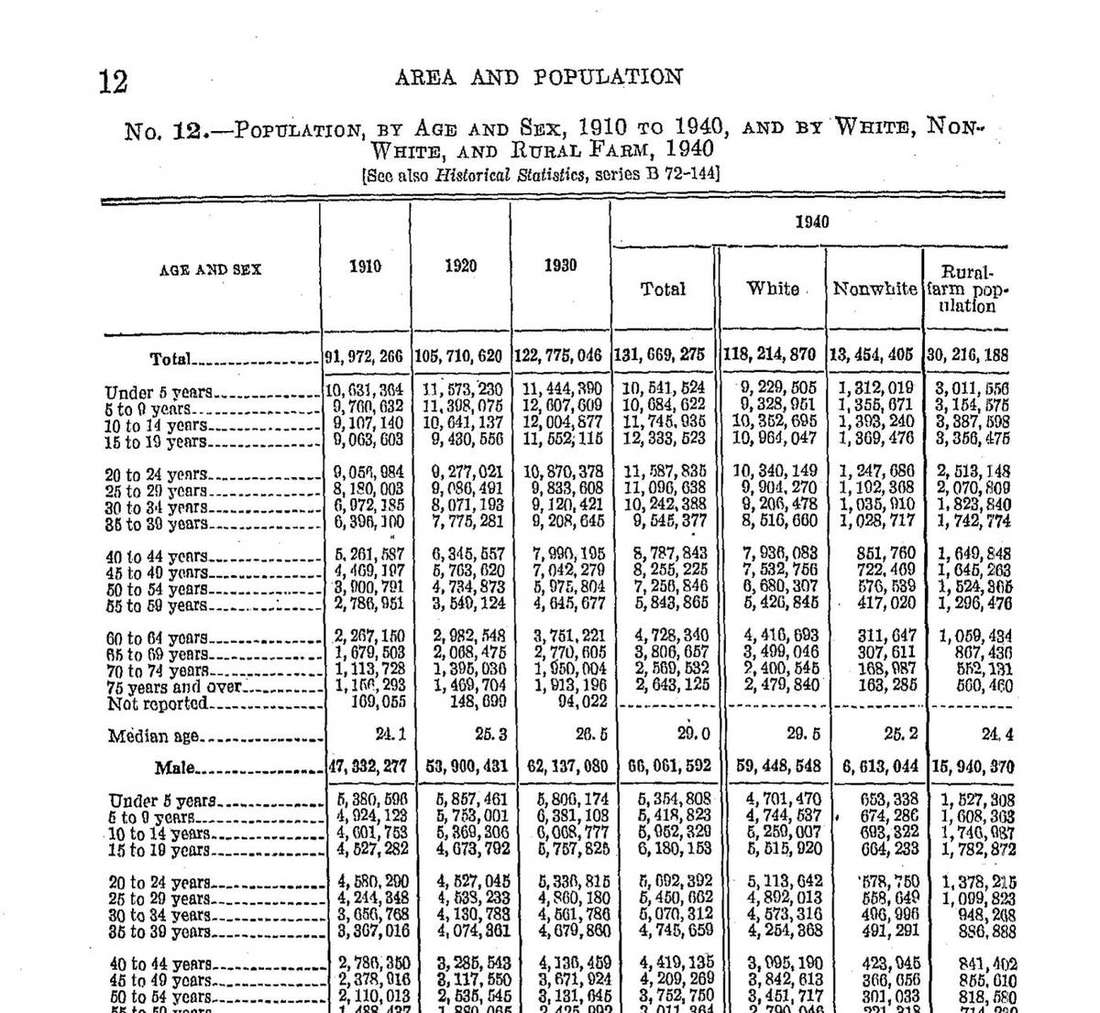 The input: comma-grouped seven-digit numbers in 1950s print, scanned. The printed table is internally consistent, which is what makes it scoreable.
Because the printed numbers reconcile, we scored both tools by arithmetic instead of labels: Male plus Female must equal Total, White plus Nonwhite must equal the 1940 total, age rows must sum to section totals. Here is the same row from each output, the male "10 to 14 years" age group:
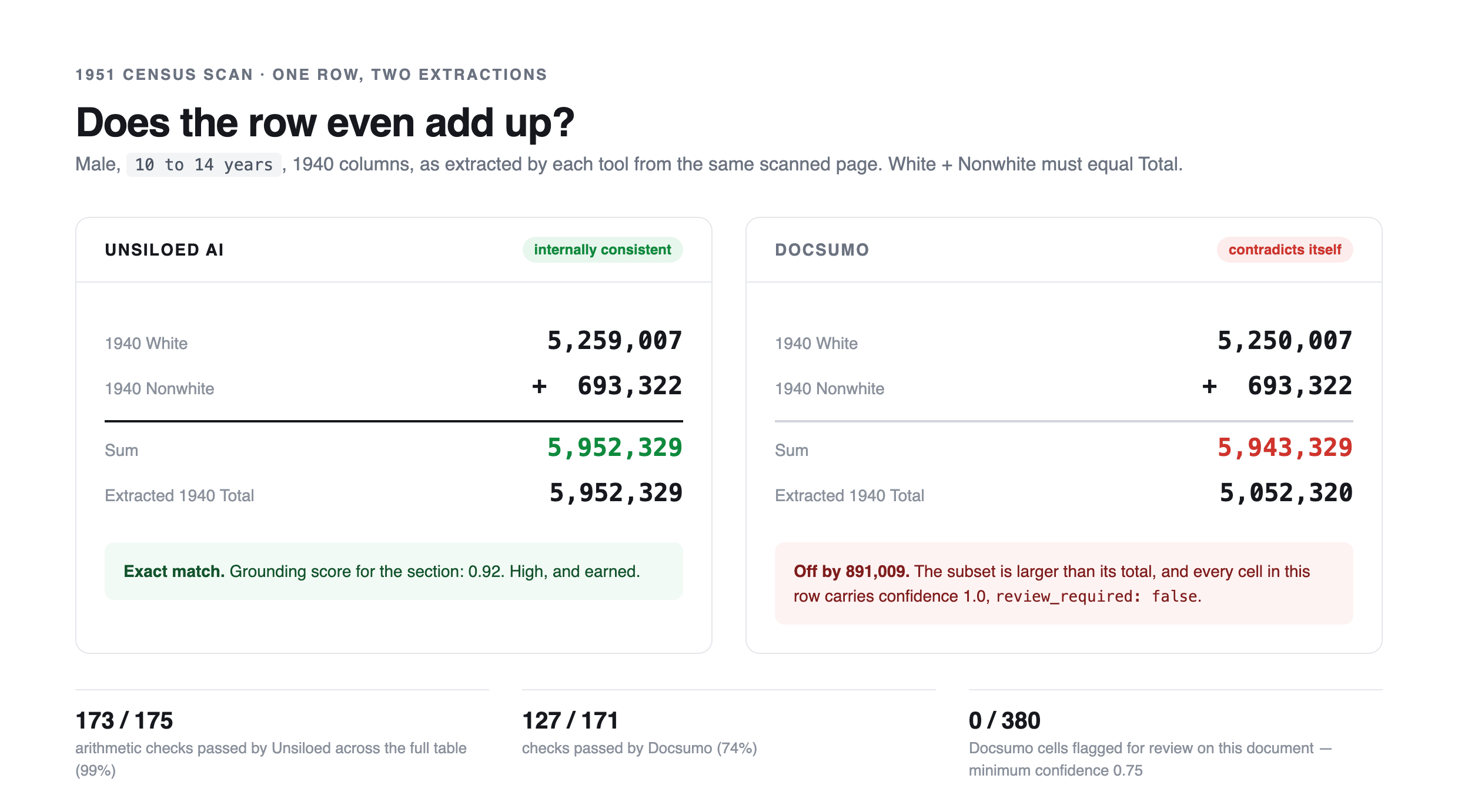
What Docsumo Returned
Docsumo passed 127 of 171 checks (74%). The row above says a subset (White) is larger than its total, and here it is in Docsumo's review queue, both cells at confidence 1.0, no review flag:
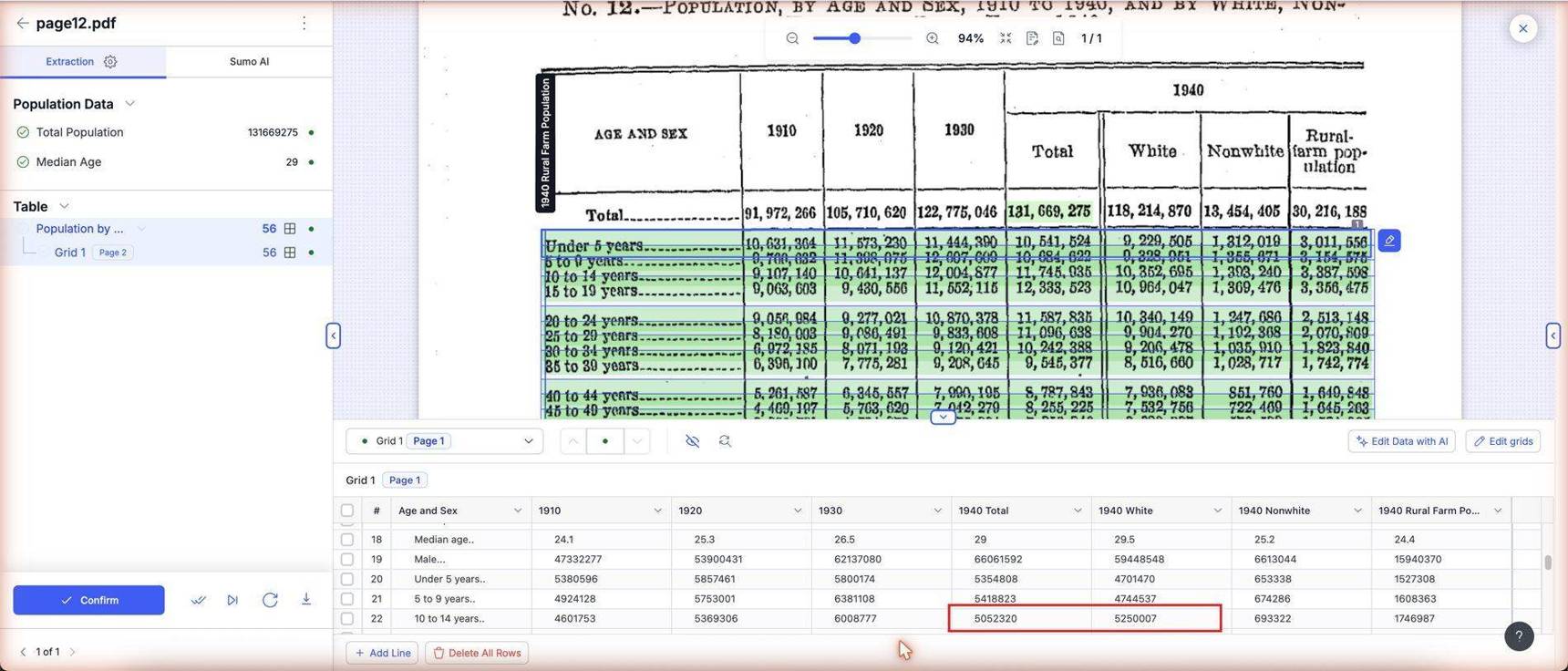 Across all 380 numeric cells Docsumo extracted from this scan, zero were flagged for review, while about a quarter of the arithmetic checks fail.
What Unsiloed Returned
Unsiloed passed 173 of 175 checks (99%), with section scores of 0.90 to 0.95. The bounding-box citations generate the review copy directly, with the lowest-confidence cells boxed for a human:
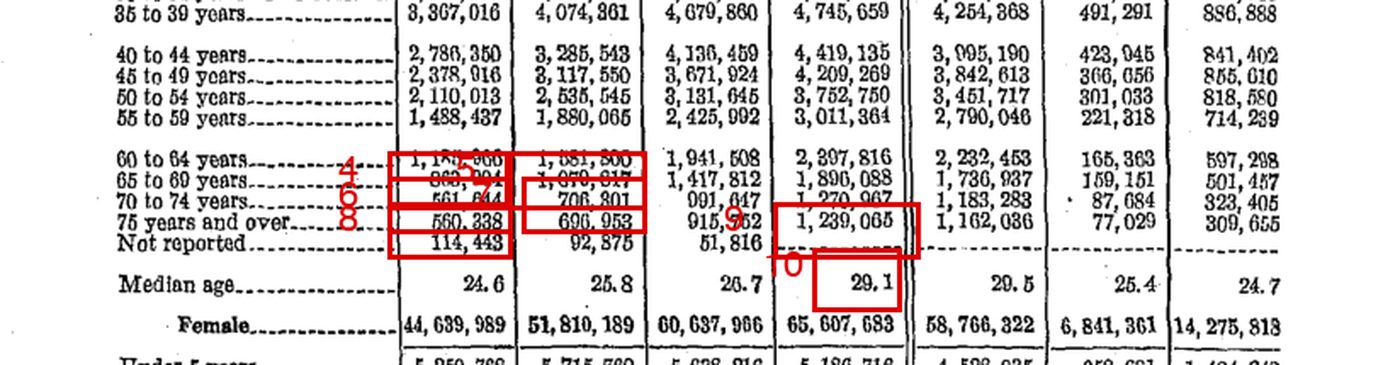 A section of the annotated review copy: the numbered boxes are the lowest-confidence cells, placed by the per-field citations. This is the difference between a confidence score and a confidence measurement.
Round 4: A 1918 Catalog Page
Thirty-three sweater listings wrapped around illustrations, scanned, no text layer, sent to both tools as a PDF.
 The input: ordering details in small print, wrapped around artwork. Every catalog number, color, and price is locked in the image.
What Docsumo Returned
The document errored at ingestion, so no data ever arrived:
{"status": "erred", "err_message": "no text in image"}
To be fair to Docsumo: re-uploaded as a JPG of the same pixels, the catalog page extracted accurately, 33 of 33. Note the direction: this round the PDF fails and the JPG works, while in Round 1 the JPG lost the table and the PDF worked. Which format is safe depends on the document, and nothing in the API tells you in advance.
What Unsiloed Returned
All 33 products from the PDF:
"products": [
  {"catalog_number": "29N6322", "description": "Rose, white trim.", "price": "$2.95"},
  {"catalog_number": "29N6323", "description": "Copenhagen blue, white trim.", "price": "$2.95"},
  ...31 more
]
Abridged the same way as Round 1: each product's fields carry their own per-cell scores and citations in the raw response, omitted here for brevity.
Round 5: A 251-Row Holdings Sheet
One large-format page tiling four Vanguard bond schedule pages, 251 rows of small-print numbers.
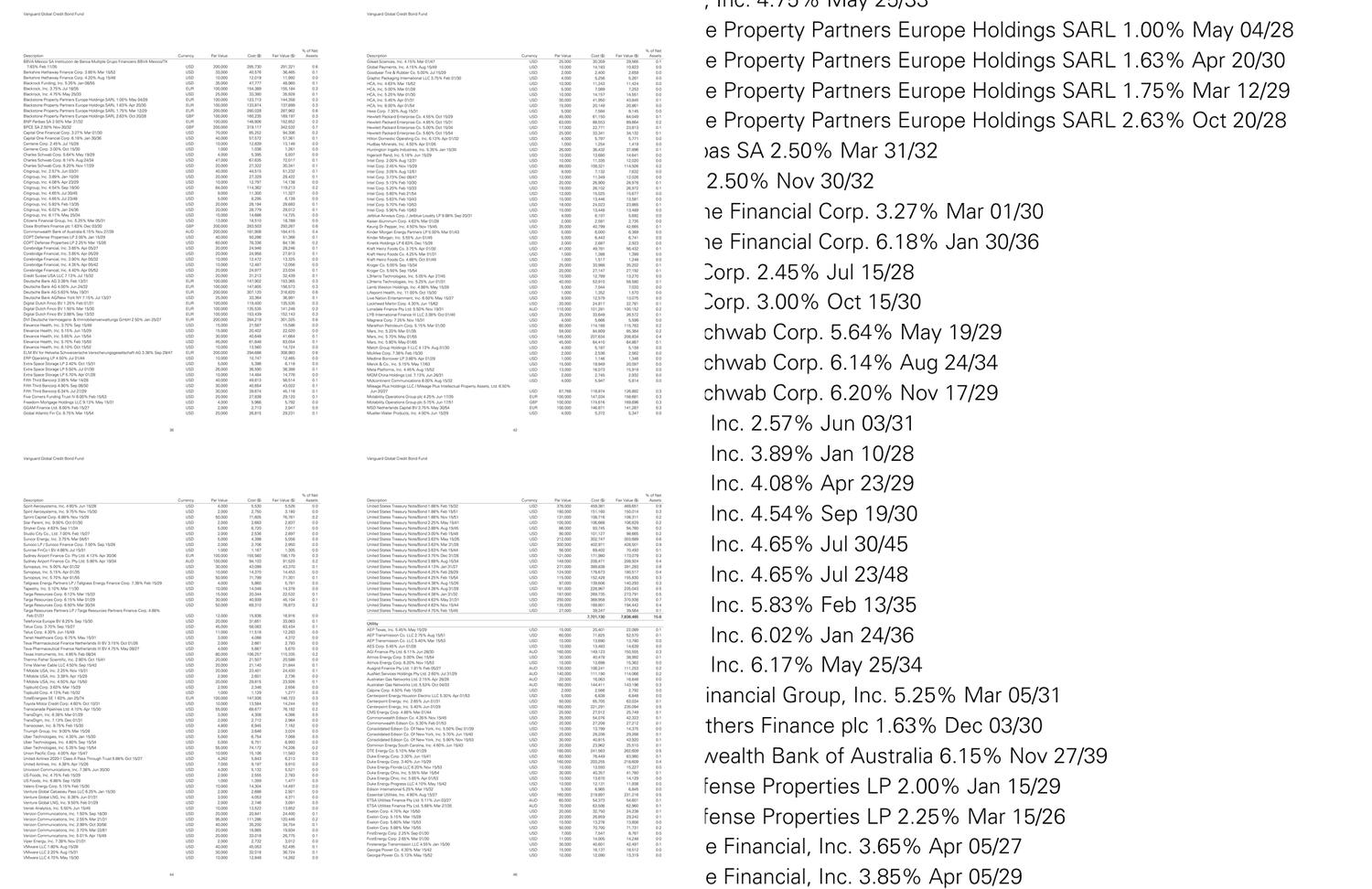 The input, whole sheet on the left, a small patch of it at actual size on the right. Any pipeline that downscales the page to fit a model's image budget destroys those digits.
What Docsumo Returned
Its automatic field detection couldn't model the table (it proposed a single string field), and after we configured the six columns by hand, processing failed:
{"status": "erred", "err_message": "Error while processing"}
What Unsiloed Returned
The parse endpoint with high-resolution OCR returned all 251 rows, and every one of the 1,255 cells matches the born-digital ground truth.
On a normal-size single page of the same table both tools are near perfect, so the wall is page size and density.
Getting to the First Extraction
Docsumo's API rejects every upload until a document type exists in the workspace, and there is no documented API for creating one:
{"status_code": 404, "error": "doc_type not valid", "error_code": "DOCUMENT_NOT_FOUND"}
So for each new document shape, the path runs through the dashboard: open the Models Hub, pick or create a document type, upload a sample, review the auto-detected fields, save, and then call the API.
Unsiloed's setup is the request itself. The schema is the configuration:
curl -X POST "https://prod.visionapi.unsiloed.ai/v2/extract" \
  -H "api-key: $UNSILOED_API_KEY" \
  -F "pdf_file=@invoice.pdf" \
  -F 'schema_data={"type":"object","properties":{"invoice_number":{"type":"string"},"line_items":{"type":"array","items":{"type":"object","properties":{"description":{"type":"string"},"amount":{"type":"number"}}}}}}' \
  -F "enable_citations=true"
What It Costs
Both tools price by pages processed. List prices from each vendor's published plans at the time of writing:
| Unsiloed AI | Docsumo | |
|---|---|---|
| Free tier | 2,000 pages, then $0.015 per page | 1,000 pages, 14-day trial |
| Entry paid plan | $250/month, 20,000 pages included | $499/month, 5,000 pages included |
| Overage rate | $0.012 per page ($0.010 on Growth) | Not published |
| Next tier | Growth: $750/month, 75,000 pages included | Business: custom pricing |
| Enterprise | Custom per-page rate; VPC, on-premises, or air-gapped | Custom pricing |
At the entry paid tiers that works out to roughly $0.013 per page on Unsiloed against roughly $0.10 per page on Docsumo.
The Verdict
Docsumo is a dashboard-first platform for teams processing a stable set of known document types, and its human review queue is polished. But a review queue is only as good as the flags that feed it, and five documents were enough to find its edges:
Docsumo's confidence scores didn't flag its errors. On the census scan it misread about a quarter of the checkable values and flagged zero of 380 cells, most at confidence 1.0. Unsiloed's scores tracked reality on every document: 0.99 on the clean invoice, 0.90 to 0.95 on the census, near zero on the unreadable scan.
Docsumo's results changed with the file format, silently. The same invoice lost its entire table as a JPG but not as a PDF; the same catalog page errored as a PDF but not as a JPG. Unsiloed returned the same correct results from the files as sent.
The hard documents ended the test for Docsumo. Two of five errored outright. Unsiloed processed all five, including 1,255 of 1,255 correct cells on the oversized holdings sheet.
Unsiloed's first extraction is one API call. Every Docsumo document type first has to be configured in its dashboard, and every value Unsiloed returns carries a citation back to the exact spot on the page, so checking it is cheap.
If your pipeline needs to know which extracted values to trust, book a demo and run your own hardest documents first.