Handwriting OCR: How Recognition Technology Converts Handwritten Text to Digital Data (July 2026)
You need to digitize patient intake forms, loan applications, or handwritten audit notes at scale. But the OCR tool you already use for typed documents falls apart the moment it hits handwriting: inconsistent letterforms, overlapping cursive strokes, and faded or skewed scans produce output you can'

You need to digitize patient intake forms, loan applications, or handwritten audit notes at scale. But the OCR tool you already use for typed documents falls apart the moment it hits handwriting: inconsistent letterforms, overlapping cursive strokes, and faded or skewed scans produce output you can't trust.
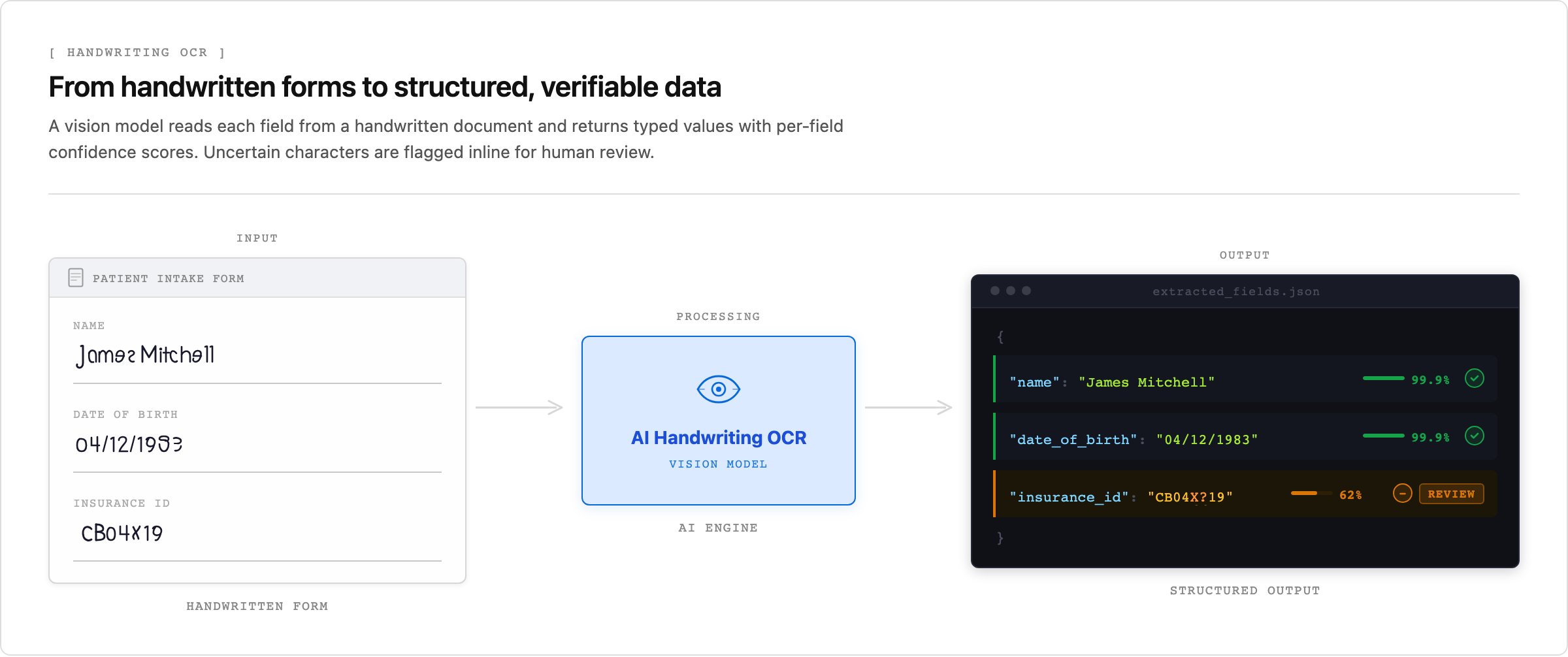
The problem is structural. Traditional OCR matches pixels against fixed font templates, and handwriting has no fixed template. Handwriting OCR closes that gap by running a preprocessing pipeline to clean the image, then applying a vision model trained on handwriting samples instead of typed fonts. Free online converters do a reasonable job of this on clean, single-page notes. But production workflows in regulated industries need more: per-field confidence scores, bounding boxes, and citations back to the source, so you can route uncertain extractions to human review instead of passing low-confidence data downstream.
This guide covers how handwriting OCR actually works, why traditional OCR fails on it, what accuracy you can realistically expect in 2026, and how to choose between free tools, Python libraries, and production-grade APIs. We'll finish with how to handle the hardest real-world case: mixed documents where handwritten fields sit next to printed text and structured tables.
TLDR:
- Handwriting OCR turns handwritten content into machine-readable text by combining image preprocessing, segmentation, and AI-based pattern recognition using CNNs and recurrent models.
- Traditional OCR fails on handwriting because it relies on fixed font models; connected cursive strokes cause segmentation errors and substitution mistakes.
- Accuracy varies widely: clean printed handwriting hits 95% or higher character-level accuracy, while cursive or degraded documents drop below 70% without domain-specific fine-tuning.
- Production pipelines route mixed documents through classification first, then pass high-confidence extractions through automatically while queuing low-confidence results for human review.
- Unsiloed AI processes handwritten forms alongside printed text and tables, returning each field with a confidence score, bounding box, and word-level citation for auditability in regulated industries.
What Is Handwriting OCR and How It Works
Handwriting OCR converts physical handwritten content into machine-readable text. Unlike OCR for printed documents, it can't assume a fixed set of character shapes, so it relies on models trained to recognize patterns across inconsistent letterforms, variable spacing, and the personal style of each writer.
Most handwriting OCR systems run the image through the same five-stage pipeline:
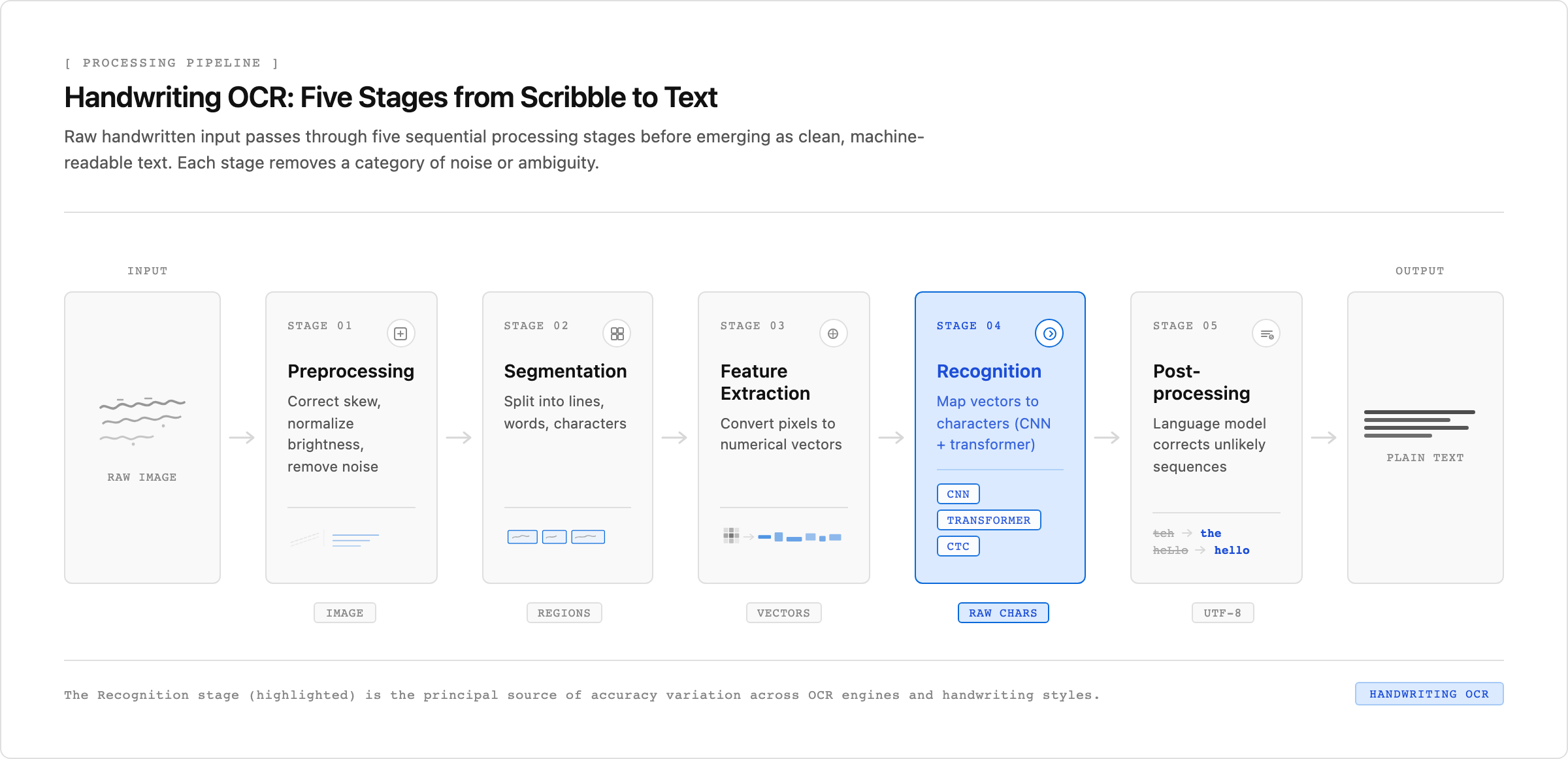
- Preprocessing cleans the input image by correcting skew, normalizing brightness, and removing noise, so the recognition model sees a consistent signal.
- Segmentation breaks the image into lines, words, or individual characters, depending on whether the model operates at the sequence or character level.
- Feature extraction converts pixel regions into numerical representations the model can score.
- Recognition maps those representations to character sequences using a model trained on labeled handwriting samples.
- Post-processing applies a language model or dictionary to correct unlikely sequences and recover plausible words.
The recognition stage is where modern systems pull ahead of older ones. Rule-based engines classified characters one at a time, which fell apart on connected cursive. Current models treat recognition as a sequence-to-sequence problem, pairing convolutional feature extraction with a recurrent or transformer-based decoder. Transformers in particular capture long-range dependencies across a word or line, which reduces errors on ambiguous letterforms like "a," "o," and "u" that look nearly identical in many hands.
Why Traditional OCR Fails on Handwriting
Traditional OCR was built for printed text: clean fonts, uniform spacing, predictable character shapes. It segments a page by looking for consistent gaps and edges, matches each isolated shape against a font template, and reads off the result. Handwriting removes every cue that approach depends on. Letterforms vary by writer, words run together, baselines slope, and ink quality varies across a single page.
That breaks recognition in two specific ways:
- Segmentation failures: connected cursive strokes look like a single blob to a pixel-based detector, so the engine can't tell where one character ends and the next begins.
- Substitution errors: an isolated character whose shape falls outside the trained font set gets mapped to the nearest template, producing garbled output even when a person reads the word easily.
Handwriting OCR replaces template matching with sequence modeling. Instead of classifying each character in isolation, it reads a word or line as a sequence and uses the surrounding context to resolve ambiguous strokes. That's the core reason it succeeds where traditional OCR collapses, and it's also why baseline accuracy is lower and more variable, especially on cursive, degraded paper, or domain-specific vocabulary.
Handwriting OCR Accuracy: What To Expect in 2026
Accuracy in handwriting OCR varies widely by script type, writing style, and image quality. Printed handwriting on clean backgrounds reaches character-level accuracy above 95% with well-trained models, while cursive or degraded historical documents can drop below 70% without domain-specific fine-tuning. Benchmarks comparing OCR engines and vision models show tools that exceed 99% on clean typed text falling well short on cursive samples.
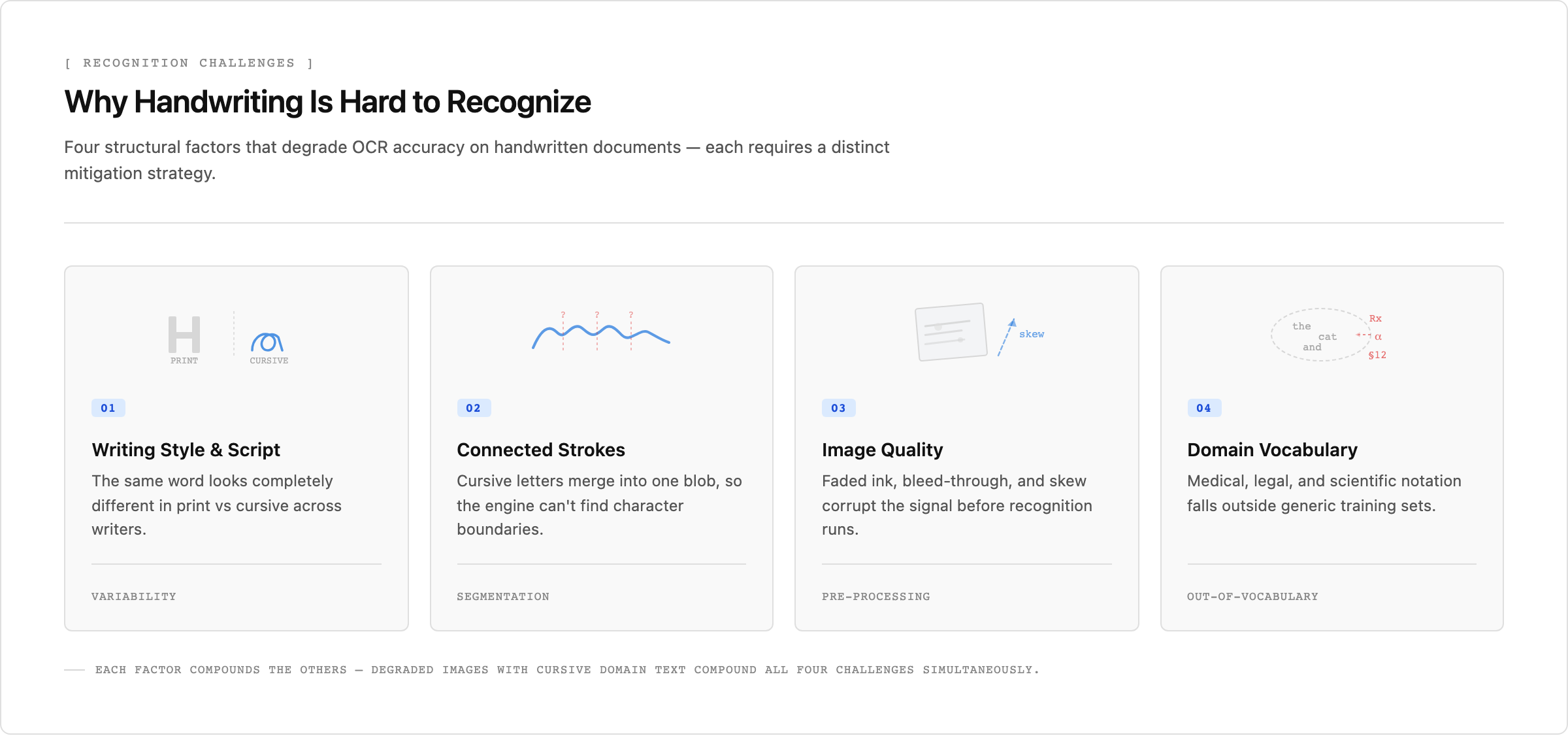
Three factors drive most of the gap between best-case and real-world accuracy:
- Writing style and script type have the largest effect: a model trained on one demographic's print handwriting often underperforms on another's cursive without retraining or augmentation.
- Image quality degrades recognition before the model even runs, since low resolution, skew, and bleed-through corrupt the input signal.
- Domain vocabulary affects accuracy considerably, because generic models lack the specialized lexicons for medical, legal, or scientific notation, and substitution errors land on the exact terms that matter most for document processing platforms.
Even the strongest models plateau on out-of-distribution handwriting without targeted training data, so published benchmark numbers rarely transfer directly to your own documents.
Industries Using Handwriting OCR
Handwriting OCR shows up anywhere paper forms still feed digital systems:
- Healthcare teams digitize physician notes, prescriptions, and patient intake forms to reduce transcription errors in clinical workflows.
- Legal professionals convert handwritten contracts, deposition notes, and case files into searchable records.
- Financial institutions process handwritten loan applications and audit documents.
- Educational institutions digitize student exams and historical archives.
- Government agencies transcribe census records, land deeds, and immigration documents.
- Logistics companies capture handwritten shipping labels and delivery confirmations to feed real-time tracking systems.
Handwriting OCR APIs: Implementation Approaches
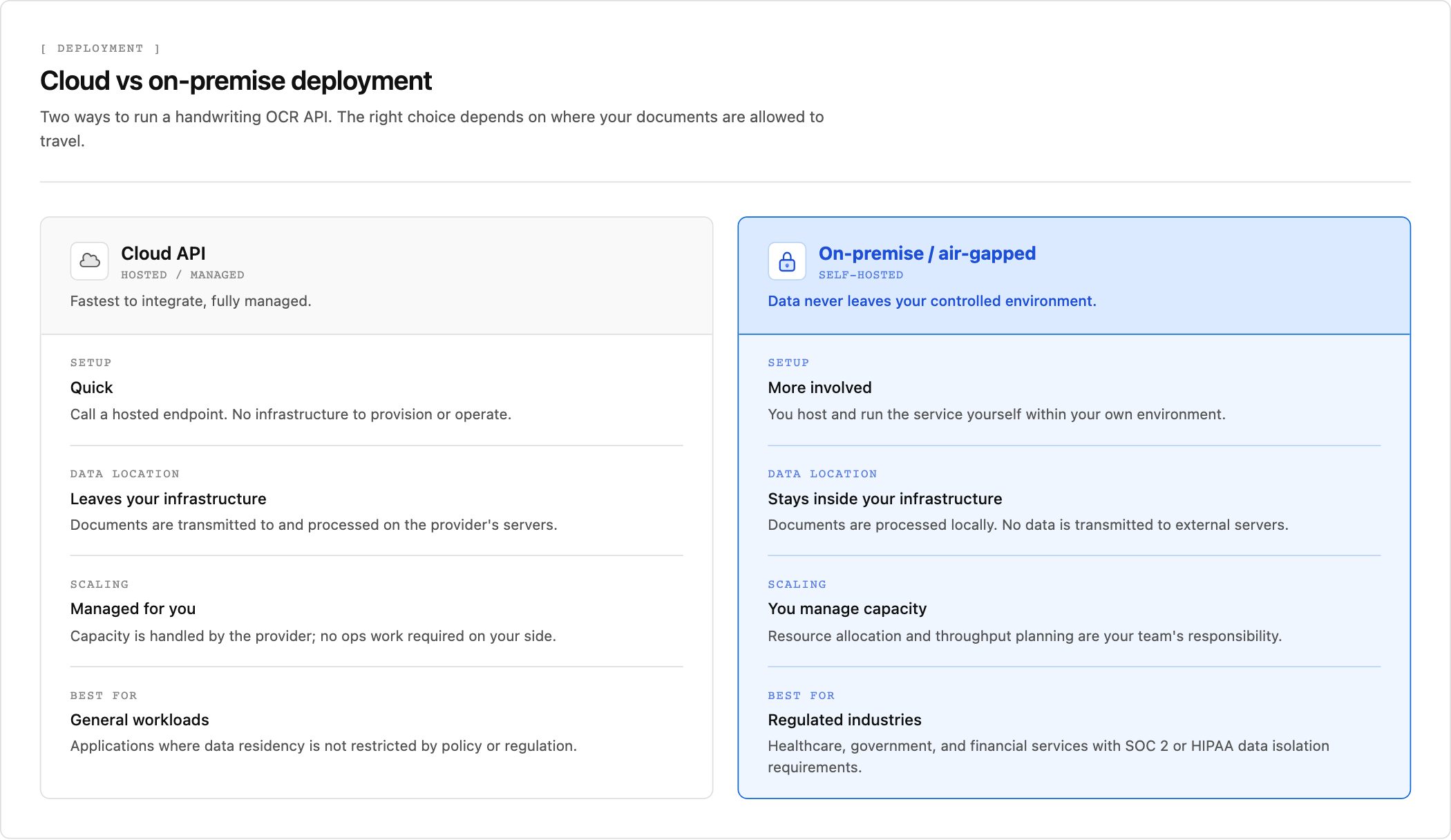
Two deployment choices drive most handwriting OCR integrations: cloud APIs for speed of setup, and on-premise deployment for regulated environments where documents cannot leave a controlled infrastructure. Healthcare, government, and financial services typically fall into the latter category.
For multi-page documents, asynchronous REST API patterns are the standard approach. Submit a job, receive a job ID, then poll a status endpoint for results. Webhook callbacks reduce polling overhead by pushing a notification when processing completes, which matters at scale when batch jobs span hundreds of pages.
API Response Structure
Most handwriting OCR APIs return per-word bounding boxes, confidence scores, and raw text in a structured JSON response. Those confidence scores are the raw material a pipeline needs to route uncertain extractions automatically, which we cover under document processing workflows below.
Choosing the Right Handwriting OCR Solution
The right handwriting OCR solution depends on your use case, volume, and technical requirements. The table below maps the four main options to the workloads they fit and where each one falls short.
| Solution Type | Best For | Accuracy on Cursive | Key Limitation |
| Free web tools and mobile apps like Google Lens, Microsoft OneNote, Adobe Acrobat | Personal use and light workloads with clean handwriting on simple backgrounds | Reliable on clean handwriting but no performance data for cursive or degraded documents | No confidence scores, bounding boxes, or field-level citations for production routing |
| Python libraries like Tesseract and open-source models on Hugging Face | Prototyping and developer experimentation with programmatic control | Below 70% on cursive or degraded documents without domain-specific fine-tuning | Messy or cursive handwriting requires custom training to reach production accuracy |
| Cloud-based handwriting OCR APIs | Fast setup with pre-trained models that handle most handwriting styles | Varies by provider but improved over Python libraries through larger training sets | Documents cannot leave infrastructure in regulated healthcare, legal, and financial environments |
| Unsiloed AI production document pipelines | High-volume regulated industries needing auditability, confidence scores, and on-premise deployment | Handles cursive through dual-stream vision model with field-level routing based on confidence | Built for production scale and mixed documents where handwriting appears next to printed text |
Handwriting OCR for Document Processing Workflows
Handwriting OCR works best as one stage in a larger pipeline. Classification runs first to identify whether a page contains handwriting, printed text, or both, then routes each page to the appropriate recognition path.
Mixed documents are common. A loan application might combine typed fields with handwritten annotations; a clinical form might pair printed structure with handwritten patient responses. Pipelines that treat the entire document as a single recognition job degrade accuracy for both content types.
Confidence scores drive the final routing step. High-confidence extractions pass straight through to downstream databases or business applications. Low-confidence results queue for human review, keeping automation rates high without sacrificing oversight on uncertain fields.
Handwriting OCR With Unsiloed AI
Unsiloed AI processes handwritten documents alongside printed text, tables, and images using a dual-stream vision model that reads semantic content and structural layout simultaneously. The system handles more than 20 file formats, including scanned forms and mixed-content PDFs where handwriting appears next to typed fields or structured tables.
Every extracted field returns a confidence score, a word-level citation, and a bounding box tied to the source page. Schema-driven extraction produces deterministic JSON outputs instead of flat text strings, giving downstream systems structured data with full traceability. On-premise and air-gapped deployment options support compliance-driven industries in healthcare, legal, and financial services, and asynchronous processing handles production-scale volumes without blocking pipelines on large or multi-page document batches.
Final Thoughts on Implementing Handwriting OCR
Handwriting OCR is a harder problem than printed text recognition, and accuracy varies widely based on script style, image quality, and domain vocabulary. Free tools cover light personal use, but production document pipelines need confidence scores, bounding boxes, and routing logic to separate high-confidence extractions from cases requiring human review. Your deployment choice comes down to whether documents can leave your infrastructure or need on-premise processing. Book a demo to see how Unsiloed handles handwritten forms with field-level citations and air-gapped deployment for healthcare, legal, and financial workflows.
FAQ
Can I use handwriting OCR without building a custom model?
Yes. Modern handwriting OCR APIs provide pre-trained models that handle most handwriting styles without requiring custom training, returning structured JSON with confidence scores and bounding boxes so you can route uncertain extractions to human review instead of building recognition logic from scratch.
What's the best free handwriting OCR option for production use?
Free tools like Tesseract and open-source models on Hugging Face work for prototyping, but production pipelines in regulated industries need field-level confidence scores, word-level citations, and deterministic outputs that free OCR engines don't provide. Handwriting accuracy also drops below 70% on cursive or degraded documents without domain-specific fine-tuning.
Should I use online or on-premise handwriting OCR?
Online handwriting OCR services are faster to set up, but healthcare, legal, and financial teams processing sensitive documents require on-premise or air-gapped deployment where data never leaves the controlled environment. Cloud-only tools fail SOC 2 and HIPAA requirements that mandate isolated infrastructure.
How does handwriting OCR handle mixed documents with printed and handwritten text?
Classification runs first to identify whether each page or region contains handwriting, printed text, or both, then routes each section to the appropriate recognition model. Treating an entire mixed document as a single job degrades accuracy on both content types, because printed OCR and handwriting recognition need different processing pipelines.
What accuracy can I expect from handwriting OCR on cursive writing?
Clean printed handwriting reaches above 95% character-level accuracy with well-trained models, while cursive or degraded historical documents often drop below 70% without domain-specific training data. Accuracy depends heavily on writing style consistency, image quality, and whether the model has been fine-tuned on vocabulary from your specific domain, such as medical abbreviations or legal shorthand.