RAG Pipeline Output: Markdown vs JSON (July 2026)
You've extracted the text from your PDFs, scans, and bank statements, and now it goes into a RAG pipeline. Before it does, there's a decision that quietly sets the ceiling on retrieval quality: should your parser output Markdown or structured JSON? The two formats fail in opposite ways. Markdown pre


You've extracted the text from your PDFs, scans, and bank statements, and now it goes into a RAG pipeline. Before it does, there's a decision that quietly sets the ceiling on retrieval quality: should your parser output Markdown or structured JSON?
The two formats fail in opposite ways. Markdown preserves heading hierarchy, so your chunker can split on real section boundaries instead of arbitrary character counts, but it flattens complex tables into pipe-delimited text that loses their structure. JSON with a schema keeps every field discrete and queryable, so downstream code can read total_amount or transaction_date directly, but it discards the narrative flow that semantic retrieval leans on.
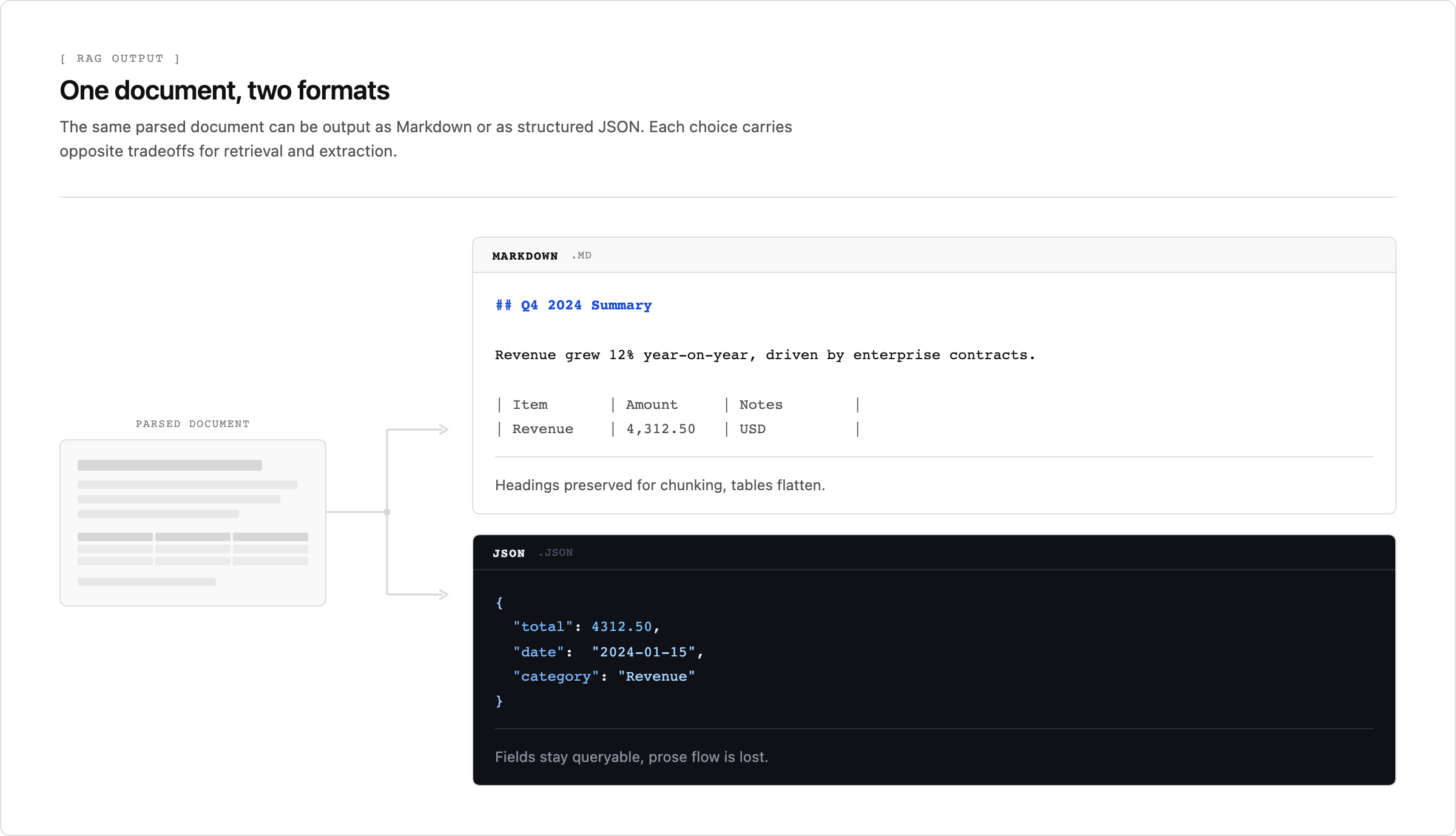
So the right answer depends on what your consuming system does with the output, not on which format looks cleaner in a file browser. This guide covers when Markdown wins, when JSON wins, why the parser underneath has to preserve layout for either to work, and how to match the choice to your own document types.
TLDR
- Your parser's output format, Markdown or JSON, shapes RAG retrieval quality before any chunking or embedding happens.
- Markdown preserves heading hierarchy for clean semantic chunking, but collapses nested tables and merged cells into flat text that loses relational meaning.
- JSON with a schema keeps every field discrete and queryable (filter by amount, date, or type), which is what field-extraction and automation workflows need.
- Either format only works if the parser preserved layout first: vision-first parsing keeps tables and reading order intact where text-layer extraction collapses them.
- Unsiloed AI returns structured JSON or clean Markdown with confidence scores and word-level citations traceable to the source page.
Why Output Format Decides Retrieval Quality
When a person opens a converted document, they read it and skip the noise. When an LLM consumes it, it tokenizes every character: whitespace, stray punctuation, and formatting artifacts included. A bank statement dumped as a flat text block looks fine to a human but hands the model a wall of undifferentiated tokens, with no signal about which numbers are balances, which are dates, and which are transaction descriptions.
That makes the output format a retrieval decision, not a cosmetic one. The format is what carries a document's structure into your pipeline or throws it away: Markdown encodes it as headings and lists, JSON encodes it as typed fields, and flat text encodes none of it. The next two sections cover when each format is the right target.
Markdown for RAG: When Heading Structure Drives Chunking
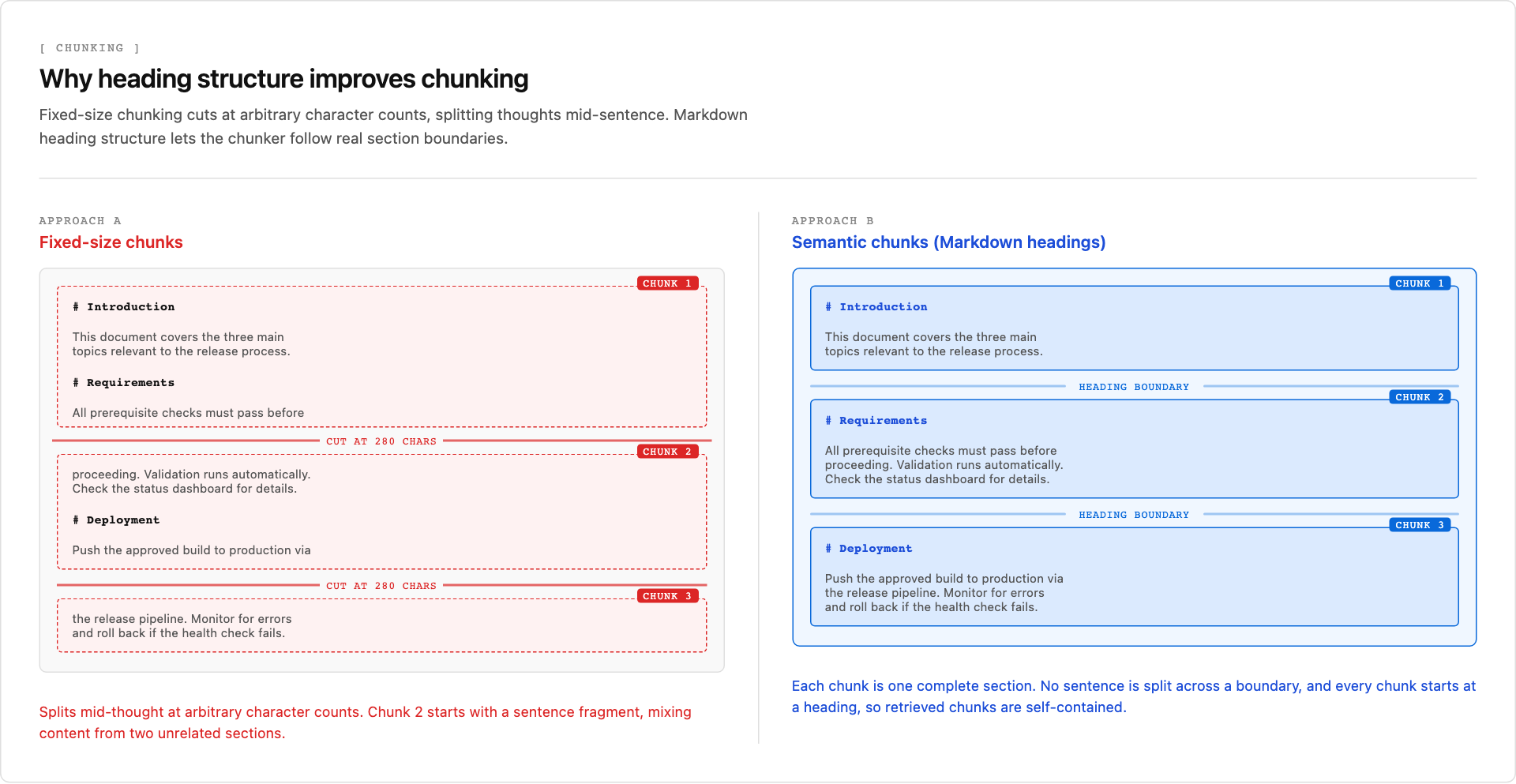
Markdown's heading hierarchy maps directly to how a RAG retriever segments and ranks content. When a parser preserves H1, H2, and H3 structure from a source document, document structure-based chunking can split on semantic boundaries instead of arbitrary character counts. The result is retrieval chunks that contain complete thoughts instead of fragments of sentences that straddle a section break.
The tradeoff is that Markdown is a structural format, not a data format. Tables render cleanly when the source layout is simple, but nested headers, merged cells, and multi-row spans collapse into flat pipe-delimited text that loses relational meaning. For anything with complex tables, like a bank statement or a financial report, that loss is unrecoverable downstream.
JSON for Extraction: When You Need Fields, Not Paragraphs
Structured JSON is the right choice when your pipeline needs to extract specific fields rather than retrieve passages: bank statement parsing, invoice processing, or any workflow where downstream code acts on individual values. JSON preserves field identity, while an IDP ingestion contract defines how downstream code validates those fields before indexing them. Each value maps to a named key, so your code can reference total_amount or transaction_date without parsing free-form text.
Bank statements are the clearest case. The document has a defined structure (dates, descriptions, debits, credits, a running balance), and a parser that returns plain text destroys it, leaving downstream systems to rebuild column relationships from a flat string. Markdown preserves the row boundaries well enough for retrieval but loses the column semantics that make the data queryable. JSON keeps every field discrete, which is what reconciliation logic or an LLM answering questions about specific transactions actually needs.
The schema you choose at extraction time sets the ceiling for what retrieval can answer later. A statement parsed into {"date": "2024-01-15", "description": "ACH PAYMENT", "debit": 240.00, "credit": null, "balance": 4312.50} lets a query filter by amount range, transaction type, or date window without re-parsing prose. Flat text cannot, and neither can a Markdown table once its columns have collapsed.
Choosing an Output Format Your Pipeline Can Actually Use
Map your primary goal to a format, and know where each one breaks:
| Goal | Format | When it breaks |
| Retrieval and Q&A over document collections | Markdown | Source has nested tables, merged cells, or no heading hierarchy |
| Field extraction for automation or database ingestion | JSON with schema validation | Schema is too loose or source layout is inconsistent |
| Spreadsheet output for manual analysis | Excel/XLS conversion | Source is scanned, chart-heavy, or has complex embedded visuals |
In every case the deciding factor is your downstream consumer, not the document itself. A technical comparison of document parser tools helps you weigh the options, and our head-to-head test of PDF parsers for RAG shows how they handle real documents.
Structure Has to Survive Parsing First
No output format can preserve structure the parser already destroyed, and tables and charts are where that destruction happens. A parser that handles clean prose well often returns garbage on a multi-column grid or a chart stored as an image. Tables have relational structure that linear text extraction flattens, and charts encode their data visually, with no text equivalent to read.
OCR and extraction benchmarks show the same failure modes repeatedly:
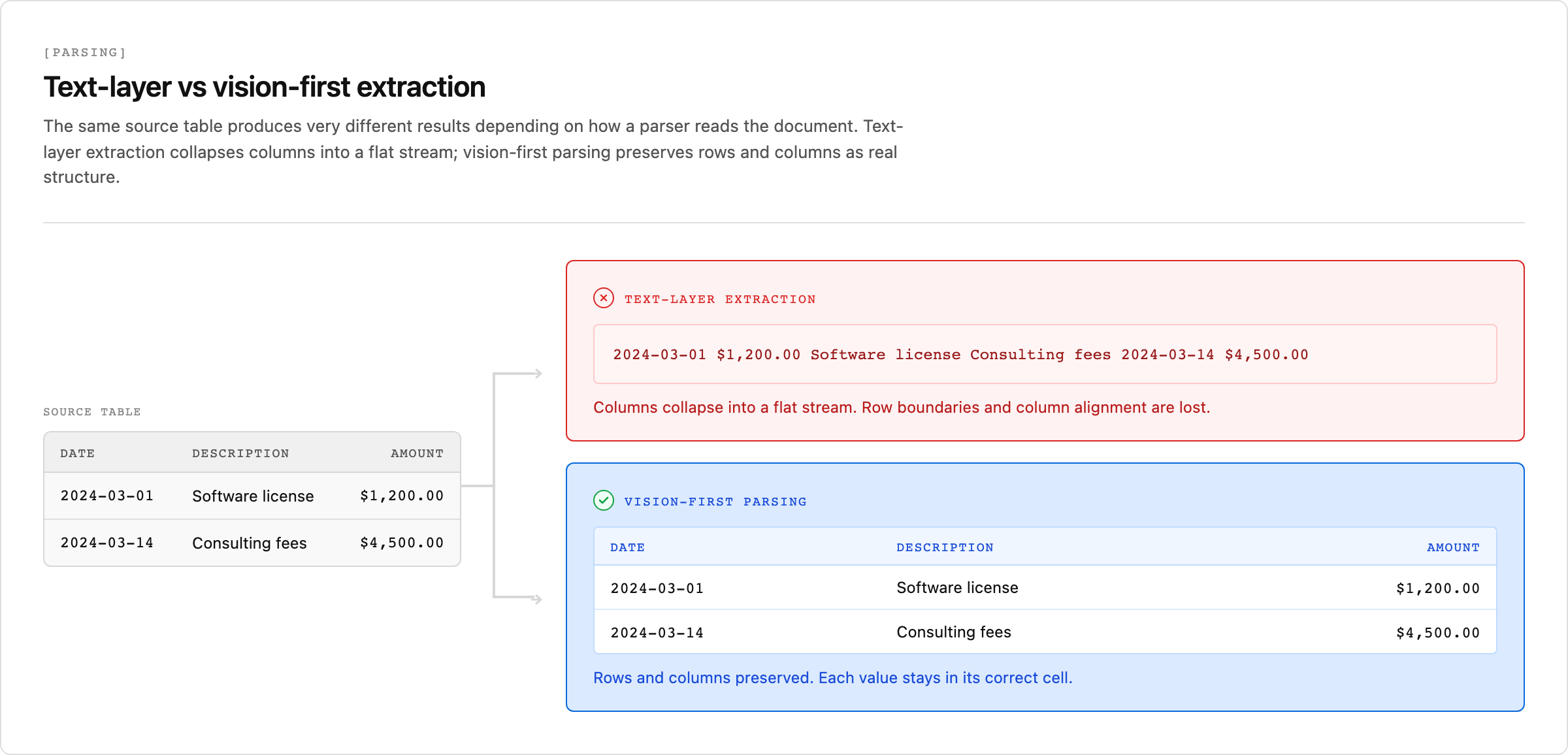
- Text extraction reads left to right across a row, then drops to the next line, collapsing column relationships. A three-column bank statement becomes a flat string with no recoverable structure.
- Image-based charts (bar, line, pie) have no text layer at all. A parser without vision inference returns nothing, or at best a nearby caption.
- Embedded spreadsheet objects inside PDFs are treated as images unless the parser handles the object type explicitly.
Vision-first parsing is the fix. Instead of extracting text layer by layer, the model processes the full page image and infers layout, reading order, and table boundaries before any text is produced. A document parsing API for RAG built this way keeps a row from a bank statement intact as a row, rather than scattering its cells across an embedding window. That is the difference between Markdown or JSON that carries real structure and a format that only looks structured.
From PDFs to Production: How Unsiloed AI Handles the Full Pipeline
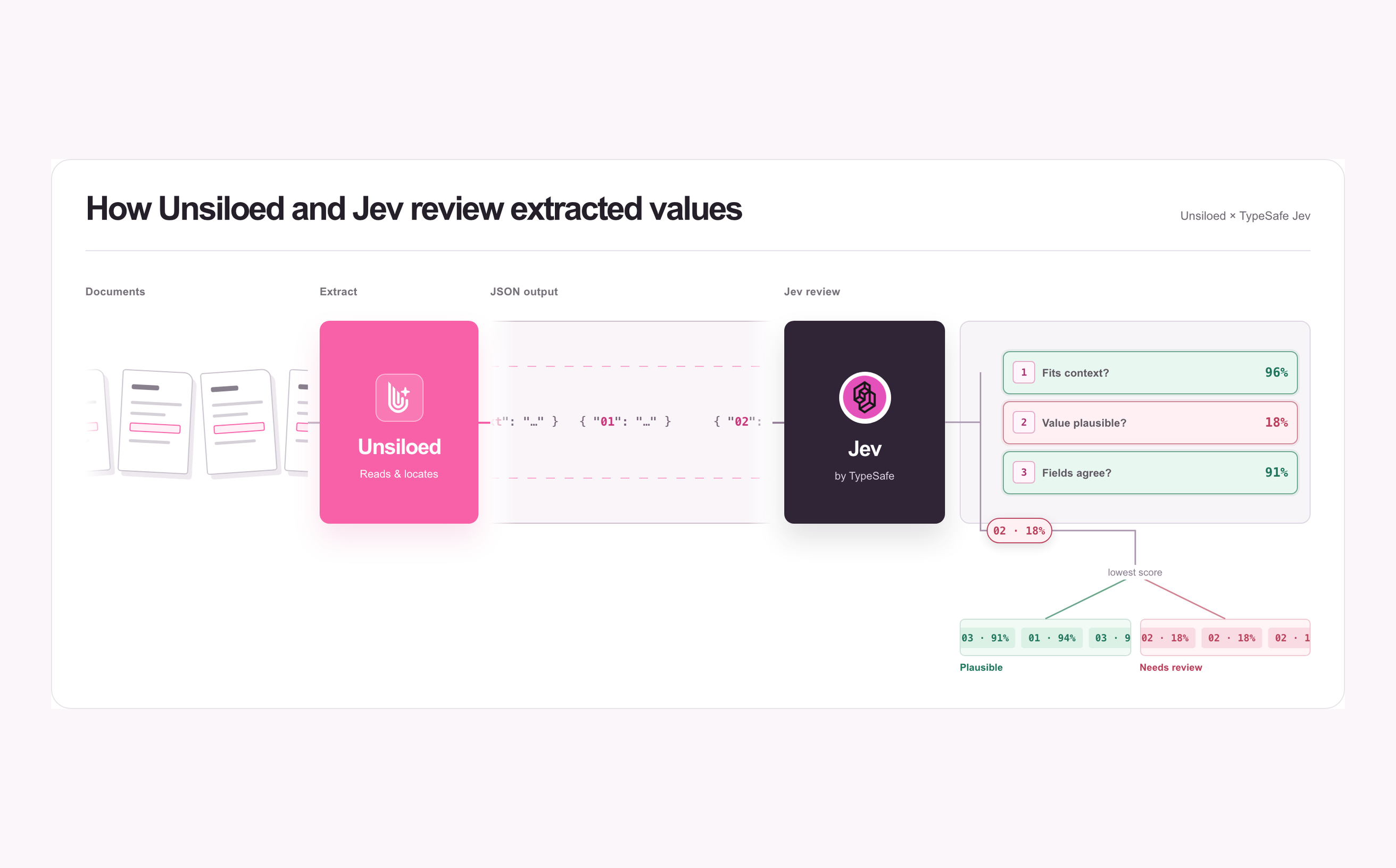
Unsiloed AI processes documents through a vision-first architecture that preserves layout, reading order, and table structure before any LLM sees the content. Every extracted field returns a confidence score, a bounding box, and a word-level citation back to the source page, giving RAG pipelines a verifiable chain from answer to document.
Scores below 0.9 can be flagged for human review before they reach your vector store, and on-premise or air-gapped deployment keeps documents inside your security boundary for finance, legal, and healthcare workflows. Output arrives as structured JSON or clean Markdown, ready for direct ingestion without intermediate cleaning steps.
Final Thoughts on Choosing Your RAG Output Format
The format your parser outputs is a retrieval decision, not a formatting preference. Reach for Markdown when your pipeline retrieves and ranks passages and the source has clean heading structure; reach for JSON with a schema when downstream code needs discrete, queryable fields. Either way, the output is only as good as the parsing underneath it: if extraction flattens a table, no format can put the structure back. When your RAG pipeline depends on that structure surviving, book a demo to see how vision-first, layout-aware parsing handles complex documents end to end.
FAQ
What output format should I use for a RAG pipeline?
Use JSON with schema validation when you need discrete, queryable fields like transaction amounts or dates, and Markdown when you need hierarchical retrieval over paragraphs and sections. Markdown preserves heading structure for semantic chunking, but tables and nested layouts collapse into flat pipe-delimited text that loses relational meaning.
Can I use both Markdown and JSON in the same pipeline?
Yes, and many pipelines do. A common pattern is Markdown for the narrative sections you retrieve and rank semantically, and JSON for the structured fields (tables, totals, dates) you query directly. Parsers that emit both from a single pass let you route each part of a document to the format its consumer needs.
Should I extract tables as Markdown or JSON?
JSON, if anything downstream needs to read individual cell values, filter rows, or run calculations. Markdown is fine only when the table is simple and you just need it readable inside a retrieved chunk. Nested headers, merged cells, and multi-row spans lose their structure in Markdown's pipe-delimited format.
Does Markdown chunking actually beat fixed-size chunking?
When the parser preserves heading hierarchy, yes: you can split on real section boundaries instead of arbitrary character counts, so each chunk holds a complete thought instead of a fragment that straddles a section break. The gain disappears if the parser flattened the headings during extraction.
Can I still get Excel or spreadsheet output from a RAG parser?
Yes, but treat it as a separate export target, not your RAG format. Spreadsheet output works for manual analysis when the source has clean tabular structure; for retrieval you still want JSON or Markdown. A scanned or chart-heavy source needs vision-first parsing to recover the columns before any format is reliable.