> ## Documentation Index
> Fetch the complete documentation index at: https://docs.unsiloed.ai/docs/llms.txt
> Use this file to discover all available pages before exploring further.
# Extract Documents from Databricks with Unsiloed
> Build a Databricks ETL pipeline that reads documents from a Unity Catalog volume, extracts structured fields with Unsiloed, and writes confidence scores and citations to Delta tables.
Databricks reads documents natively with `ai_parse_document` and `ai_extract`.
This guide routes that workload to Unsiloed for a confidence score and a source
citation for every grounded value, so you can triage the values worth checking
instead of trusting them all equally.
Document processing runs inside Databricks. Unity Catalog governs the pipeline,
and you can trigger or schedule it like any other Databricks workload. The only
local tool this guide uses is the Databricks CLI for one-time secret setup.
## Why Call Unsiloed from Databricks
PDFs in a Unity Catalog volume are just bytes. You can list them and count them,
but you can't join them to anything, because none of what matters is in a column
yet.
This guide turns them into a table. Every document becomes a row, and every
extracted field carries a value and two confidence scores. When Unsiloed can ground
a value in the source document, the field also includes a citation pointing to the
region of the page it came from.
That confidence signal is the reason to route the work through Unsiloed. High-
confidence values can flow into downstream analysis, while lower-confidence values
can enter a review queue. Both land in the same table, so you can define a review
policy with a SQL filter.
## How the Pipeline Works
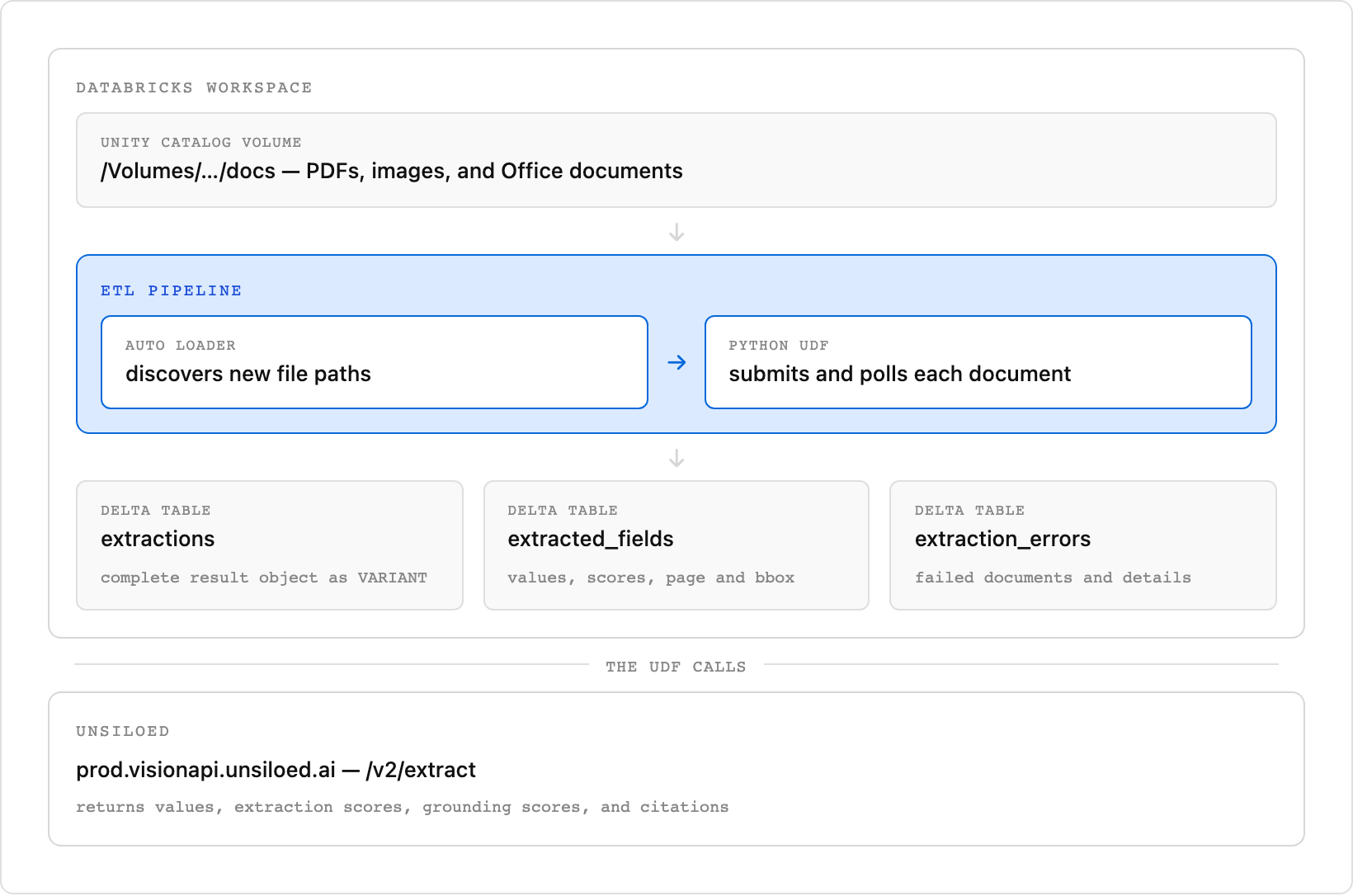
Documents land in a Unity Catalog volume. An ETL pipeline reads them, sends each
one to Unsiloed for extraction, and writes the results back as Delta tables in the
same schema, so the documents and the data pulled out of them stay together.
 ## What We'll Build
An ETL pipeline with three tables:
* **`extractions`:** one row per document, holding the complete Unsiloed result object in a `VARIANT` column
* **`extracted_fields`:** one row per successfully extracted field, including its confidence scores and citation
* **`extraction_errors`:** one row per document that could not be extracted
The pipeline reads the volume with Auto Loader, so a normal run discovers document
paths that haven't already committed. We'll build the code up a piece at a time
below. If you'd rather skip the walkthrough, take the whole file from the dropdown.
This is the complete file. Paste it into the pipeline's starter file in [Step 4](#step-4-create-and-run-the-pipeline), changing `VOLUME` and `FIELDS` to match your own volume and the fields you want.
```python my_transformation.py theme={null}
"""Turn documents in a Unity Catalog volume into a queryable Delta table with Unsiloed.
Create an ETL pipeline in Databricks, point it at this file, and click Run.
New files dropped into the volume are picked up on the next run.
"""
import json
import mimetypes
import time
import requests
from pyspark import pipelines as dp
from pyspark.sql.functions import col, element_at, split, udf
# --- Configure -------------------------------------------------------------
VOLUME = "/Volumes/workspace/unsiloed/docs"
MAX_FILE_BYTES = 50 * 1024 * 1024
MAX_CONCURRENT_EXTRACTIONS = 4
# The fields to pull from each document. Each description is an instruction to
# the model, so be specific.
FIELDS = {
"vendor_name": "Company that issued the invoice",
"invoice_number": "Invoice number or ID",
"invoice_date": "Issue date as YYYY-MM-DD",
"total_amount": "Grand total payable",
}
# ---------------------------------------------------------------------------
API_KEY = dbutils.secrets.get("unsiloed", "api_key")
BASE = "https://prod.visionapi.unsiloed.ai"
SCHEMA = json.dumps({
"type": "object",
"properties": {k: {"type": "string", "description": v} for k, v in FIELDS.items()},
})
@udf("string")
def unsiloed_extract(file_name, content):
"""Send one document to Unsiloed and return its result as JSON text."""
if content is None:
return json.dumps({"_error": "The document has no content"})
if len(content) > MAX_FILE_BYTES:
return json.dumps({"_error": f"File exceeds the {MAX_FILE_BYTES}-byte limit"})
try:
content_type = mimetypes.guess_type(file_name)[0] or "application/octet-stream"
with requests.Session() as session:
submit = session.post(
f"{BASE}/v2/extract",
headers={"api-key": API_KEY},
files={"pdf_file": (file_name, bytes(content), content_type)},
data={"schema_data": SCHEMA, "model": "gamma", "enable_citations": "true"},
timeout=180,
)
if not submit.ok:
detail = submit.text.replace("\n", " ")[:240]
return json.dumps({"_error": f"Submit HTTP {submit.status_code}: {detail}"})
job_id = submit.json()["job_id"]
deadline = time.monotonic() + 240
while time.monotonic() < deadline:
remaining = deadline - time.monotonic()
poll_response = session.get(
f"{BASE}/extract/{job_id}",
headers={"api-key": API_KEY},
timeout=max(1, min(30, remaining)),
)
if poll_response.status_code == 429:
time.sleep(min(8, max(0, deadline - time.monotonic())))
continue
poll_response.raise_for_status()
poll = poll_response.json()
if poll.get("status") in ("completed", "review"):
return json.dumps(poll.get("result") or {})
if poll.get("status") == "failed":
return json.dumps({"_error": f"Job {job_id} failed: {json.dumps(poll)[:240]}"})
time.sleep(min(4, max(0, deadline - time.monotonic())))
return json.dumps({"_error": f"Job {job_id} timed out after 240 seconds"})
except Exception as e: # one bad document must not fail the pipeline
return json.dumps({"_error": f"{type(e).__name__}: {e}"})
unsiloed_extract = unsiloed_extract.asNondeterministic()
@dp.table(
name="extractions",
comment="One row per document, containing the Unsiloed result object",
)
def extractions():
# Auto Loader tracks which files it has already seen, so each run only
# extracts documents that are new since last time.
return (
spark.readStream.format("cloudFiles")
.option("cloudFiles.format", "binaryFile")
.load(VOLUME)
.repartition(MAX_CONCURRENT_EXTRACTIONS)
.withColumn("file_name", element_at(split(col("path"), "/"), -1))
.withColumn("result_json", unsiloed_extract(col("file_name"), col("content")))
.selectExpr(
"replace(path, 'dbfs:', '') AS path",
"file_name",
"length AS size_bytes",
"try_parse_json(result_json) AS result",
"current_timestamp() AS extracted_at")
)
@dp.table(
name="extracted_fields",
comment="One row per extracted field, so you can triage on confidence",
)
def extracted_fields():
return spark.sql("""
SELECT path, file_name, key AS field,
value:value::string AS value,
value:score.extraction_score::double AS extraction_score,
value:score.grounding_score::double AS grounding_score,
value:citation.page::int AS citation_page,
to_json(value:citation.bbox) AS citation_bbox,
value:citation.page_width::double AS citation_page_width,
value:citation.page_height::double AS citation_page_height
FROM STREAM(extractions), LATERAL variant_explode(result)
WHERE result:_error IS NULL
""")
@dp.table(
name="extraction_errors",
comment="One row per document that Unsiloed could not extract",
)
def extraction_errors():
return spark.sql("""
SELECT path, file_name, result:_error::string AS error, extracted_at
FROM STREAM(extractions)
WHERE result:_error IS NOT NULL
""")
```
## Prerequisites for the Databricks Pipeline
You need four things before starting:
* A Databricks workspace with Unity Catalog and access to a SQL warehouse
* Permission to use your target catalog and create a schema, volume, pipeline,
streaming tables, and materialized views
* An Unsiloed API key from the [Unsiloed dashboard](https://app.unsiloed.ai/playground/Extractor)
* The [Databricks CLI](https://docs.databricks.com/aws/en/dev-tools/cli/),
authenticated with `databricks auth login`
You also need at least one supported document to test. The extractor accepts PDFs,
images, and Office documents. Invoice-like documents work with the example fields
in this guide; change `FIELDS` if you use another document type.
You only need the CLI once, in Step 1, to store your API key. Everything after
that happens in the Databricks UI.
## Step 1: Store Your API Key as a Secret
The pipeline reads your key from a Databricks secret scope, so it never appears
in the code.
Databricks has no menu entry for this page, so open it directly, replacing
`` with your own workspace URL:
```
https:///#secrets/createScope
```
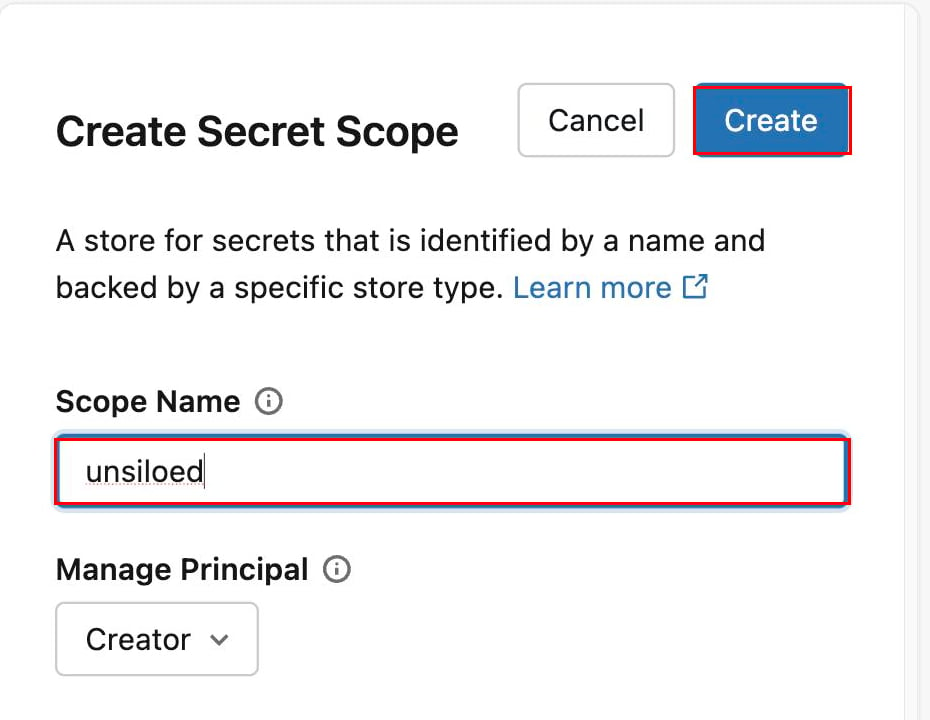
Enter `unsiloed` as the scope name, leave **Manage Principal** set to
**Creator**, and click **Create**. Limiting management to the creator prevents
other workspace users from changing the API key or the scope permissions.
## What We'll Build
An ETL pipeline with three tables:
* **`extractions`:** one row per document, holding the complete Unsiloed result object in a `VARIANT` column
* **`extracted_fields`:** one row per successfully extracted field, including its confidence scores and citation
* **`extraction_errors`:** one row per document that could not be extracted
The pipeline reads the volume with Auto Loader, so a normal run discovers document
paths that haven't already committed. We'll build the code up a piece at a time
below. If you'd rather skip the walkthrough, take the whole file from the dropdown.
This is the complete file. Paste it into the pipeline's starter file in [Step 4](#step-4-create-and-run-the-pipeline), changing `VOLUME` and `FIELDS` to match your own volume and the fields you want.
```python my_transformation.py theme={null}
"""Turn documents in a Unity Catalog volume into a queryable Delta table with Unsiloed.
Create an ETL pipeline in Databricks, point it at this file, and click Run.
New files dropped into the volume are picked up on the next run.
"""
import json
import mimetypes
import time
import requests
from pyspark import pipelines as dp
from pyspark.sql.functions import col, element_at, split, udf
# --- Configure -------------------------------------------------------------
VOLUME = "/Volumes/workspace/unsiloed/docs"
MAX_FILE_BYTES = 50 * 1024 * 1024
MAX_CONCURRENT_EXTRACTIONS = 4
# The fields to pull from each document. Each description is an instruction to
# the model, so be specific.
FIELDS = {
"vendor_name": "Company that issued the invoice",
"invoice_number": "Invoice number or ID",
"invoice_date": "Issue date as YYYY-MM-DD",
"total_amount": "Grand total payable",
}
# ---------------------------------------------------------------------------
API_KEY = dbutils.secrets.get("unsiloed", "api_key")
BASE = "https://prod.visionapi.unsiloed.ai"
SCHEMA = json.dumps({
"type": "object",
"properties": {k: {"type": "string", "description": v} for k, v in FIELDS.items()},
})
@udf("string")
def unsiloed_extract(file_name, content):
"""Send one document to Unsiloed and return its result as JSON text."""
if content is None:
return json.dumps({"_error": "The document has no content"})
if len(content) > MAX_FILE_BYTES:
return json.dumps({"_error": f"File exceeds the {MAX_FILE_BYTES}-byte limit"})
try:
content_type = mimetypes.guess_type(file_name)[0] or "application/octet-stream"
with requests.Session() as session:
submit = session.post(
f"{BASE}/v2/extract",
headers={"api-key": API_KEY},
files={"pdf_file": (file_name, bytes(content), content_type)},
data={"schema_data": SCHEMA, "model": "gamma", "enable_citations": "true"},
timeout=180,
)
if not submit.ok:
detail = submit.text.replace("\n", " ")[:240]
return json.dumps({"_error": f"Submit HTTP {submit.status_code}: {detail}"})
job_id = submit.json()["job_id"]
deadline = time.monotonic() + 240
while time.monotonic() < deadline:
remaining = deadline - time.monotonic()
poll_response = session.get(
f"{BASE}/extract/{job_id}",
headers={"api-key": API_KEY},
timeout=max(1, min(30, remaining)),
)
if poll_response.status_code == 429:
time.sleep(min(8, max(0, deadline - time.monotonic())))
continue
poll_response.raise_for_status()
poll = poll_response.json()
if poll.get("status") in ("completed", "review"):
return json.dumps(poll.get("result") or {})
if poll.get("status") == "failed":
return json.dumps({"_error": f"Job {job_id} failed: {json.dumps(poll)[:240]}"})
time.sleep(min(4, max(0, deadline - time.monotonic())))
return json.dumps({"_error": f"Job {job_id} timed out after 240 seconds"})
except Exception as e: # one bad document must not fail the pipeline
return json.dumps({"_error": f"{type(e).__name__}: {e}"})
unsiloed_extract = unsiloed_extract.asNondeterministic()
@dp.table(
name="extractions",
comment="One row per document, containing the Unsiloed result object",
)
def extractions():
# Auto Loader tracks which files it has already seen, so each run only
# extracts documents that are new since last time.
return (
spark.readStream.format("cloudFiles")
.option("cloudFiles.format", "binaryFile")
.load(VOLUME)
.repartition(MAX_CONCURRENT_EXTRACTIONS)
.withColumn("file_name", element_at(split(col("path"), "/"), -1))
.withColumn("result_json", unsiloed_extract(col("file_name"), col("content")))
.selectExpr(
"replace(path, 'dbfs:', '') AS path",
"file_name",
"length AS size_bytes",
"try_parse_json(result_json) AS result",
"current_timestamp() AS extracted_at")
)
@dp.table(
name="extracted_fields",
comment="One row per extracted field, so you can triage on confidence",
)
def extracted_fields():
return spark.sql("""
SELECT path, file_name, key AS field,
value:value::string AS value,
value:score.extraction_score::double AS extraction_score,
value:score.grounding_score::double AS grounding_score,
value:citation.page::int AS citation_page,
to_json(value:citation.bbox) AS citation_bbox,
value:citation.page_width::double AS citation_page_width,
value:citation.page_height::double AS citation_page_height
FROM STREAM(extractions), LATERAL variant_explode(result)
WHERE result:_error IS NULL
""")
@dp.table(
name="extraction_errors",
comment="One row per document that Unsiloed could not extract",
)
def extraction_errors():
return spark.sql("""
SELECT path, file_name, result:_error::string AS error, extracted_at
FROM STREAM(extractions)
WHERE result:_error IS NOT NULL
""")
```
## Prerequisites for the Databricks Pipeline
You need four things before starting:
* A Databricks workspace with Unity Catalog and access to a SQL warehouse
* Permission to use your target catalog and create a schema, volume, pipeline,
streaming tables, and materialized views
* An Unsiloed API key from the [Unsiloed dashboard](https://app.unsiloed.ai/playground/Extractor)
* The [Databricks CLI](https://docs.databricks.com/aws/en/dev-tools/cli/),
authenticated with `databricks auth login`
You also need at least one supported document to test. The extractor accepts PDFs,
images, and Office documents. Invoice-like documents work with the example fields
in this guide; change `FIELDS` if you use another document type.
You only need the CLI once, in Step 1, to store your API key. Everything after
that happens in the Databricks UI.
## Step 1: Store Your API Key as a Secret
The pipeline reads your key from a Databricks secret scope, so it never appears
in the code.
Databricks has no menu entry for this page, so open it directly, replacing
`` with your own workspace URL:
```
https:///#secrets/createScope
```
Enter `unsiloed` as the scope name, leave **Manage Principal** set to
**Creator**, and click **Create**. Limiting management to the creator prevents
other workspace users from changing the API key or the scope permissions.
 You set the value itself through the [Databricks CLI](https://docs.databricks.com/aws/en/dev-tools/cli/),
the only part of this guide that needs a terminal:
```bash theme={null}
databricks secrets put-secret unsiloed api_key
```
Paste your Unsiloed API key when the CLI prompts for the secret value. The
interactive prompt keeps the key out of your shell history and process list.
Confirm it saved:
```bash theme={null}
databricks secrets list-secrets unsiloed
```
## Step 2: Put Your Documents in a Volume
Documents go in a Unity Catalog volume, which is what Databricks uses for files.
They don't go in a table, and the pipeline reads them straight out of the volume.
In a SQL editor, run:
```sql theme={null}
CREATE SCHEMA IF NOT EXISTS workspace.unsiloed;
CREATE VOLUME IF NOT EXISTS workspace.unsiloed.docs;
```
Substitute your own catalog if you aren't using `workspace`.
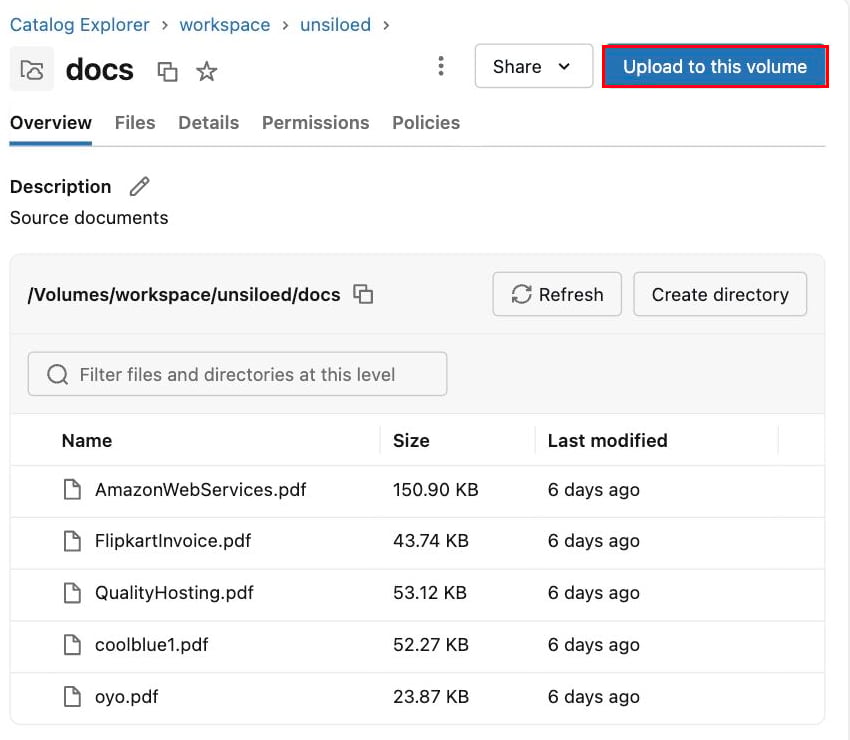
In the sidebar, click **Catalog**, then expand your catalog and schema. Volumes
sit under their own **Volumes** node, separate from **Tables**, so open that and
select `docs`. Then click **Upload to this volume**.
The catalog browser needs a running SQL warehouse to list anything. If the tree
spins, start your warehouse and try again.
You set the value itself through the [Databricks CLI](https://docs.databricks.com/aws/en/dev-tools/cli/),
the only part of this guide that needs a terminal:
```bash theme={null}
databricks secrets put-secret unsiloed api_key
```
Paste your Unsiloed API key when the CLI prompts for the secret value. The
interactive prompt keeps the key out of your shell history and process list.
Confirm it saved:
```bash theme={null}
databricks secrets list-secrets unsiloed
```
## Step 2: Put Your Documents in a Volume
Documents go in a Unity Catalog volume, which is what Databricks uses for files.
They don't go in a table, and the pipeline reads them straight out of the volume.
In a SQL editor, run:
```sql theme={null}
CREATE SCHEMA IF NOT EXISTS workspace.unsiloed;
CREATE VOLUME IF NOT EXISTS workspace.unsiloed.docs;
```
Substitute your own catalog if you aren't using `workspace`.
In the sidebar, click **Catalog**, then expand your catalog and schema. Volumes
sit under their own **Volumes** node, separate from **Tables**, so open that and
select `docs`. Then click **Upload to this volume**.
The catalog browser needs a running SQL warehouse to list anything. If the tree
spins, start your warehouse and try again.
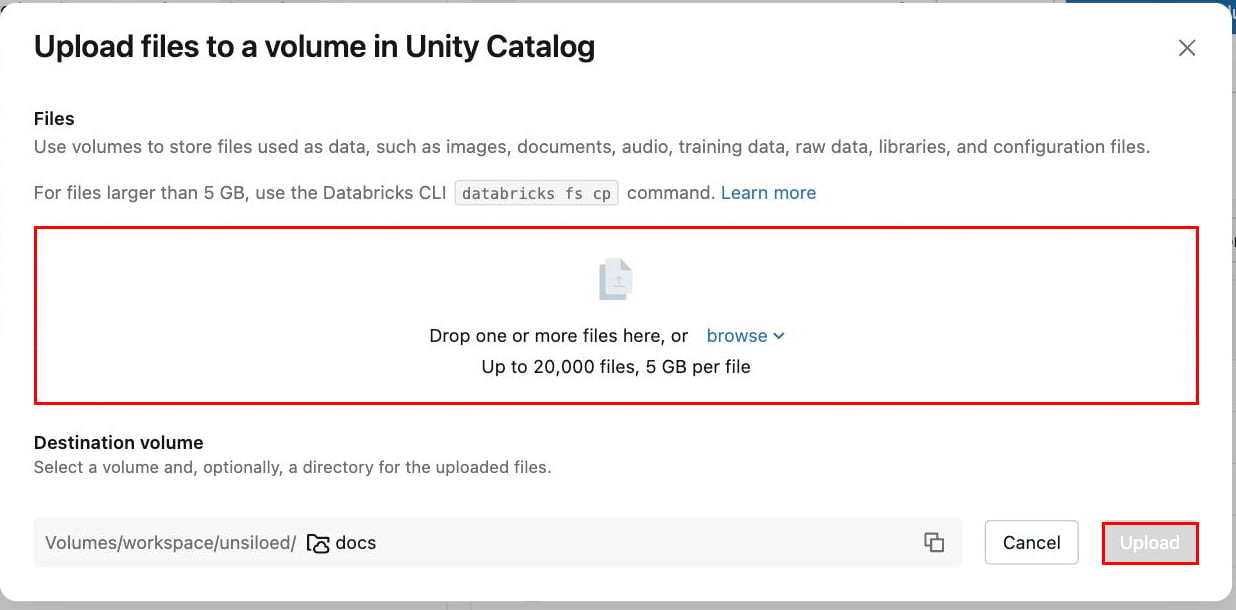
 Drop your files in and click **Upload**. Any mix of PDFs, images, and Office
documents works.
Drop your files in and click **Upload**. Any mix of PDFs, images, and Office
documents works.
 ## Step 3: Write the Pipeline
A Databricks ETL pipeline is a Python file that declares tables. You don't write
the orchestration. You write a function per table, decorate it with `@dp.table`,
and Databricks works out the dependency order and what to refresh.
**This is all one file.** The four blocks below are consecutive parts of a single
Python file, not alternatives. Append each one to the end of the last, in order.
That file is `transformations/my_transformation.py`, which Databricks creates for
you when you make the pipeline in [Step 4](#step-4-create-and-run-the-pipeline).
Draft it in your own editor as you read, then paste the finished file in when you
get there. If you'd rather build it up in place, create the pipeline first and
come back to this step.
### 3.1 Imports and Configuration
**Start the file** with the imports and the configuration block.
The `pyspark.pipelines` module declares the tables, and it's available inside a
pipeline without installing anything. We call Unsiloed with `requests`.
Four constants near the top control the pipeline. `VOLUME` is where your documents
live, and `FIELDS` defines what to extract. `MAX_FILE_BYTES` rejects files that are
too large to copy safely through a Python UDF, while `MAX_CONCURRENT_EXTRACTIONS`
bounds how many partitions submit work in parallel. Start with four concurrent
extractions and raise the value only after checking your Unsiloed rate limit.
```python my_transformation.py theme={null}
"""Turn documents in a Unity Catalog volume into a queryable Delta table with Unsiloed.
Create an ETL pipeline in Databricks, point it at this file, and click Run.
New files dropped into the volume are picked up on the next run.
"""
import json
import mimetypes
import time
import requests
from pyspark import pipelines as dp
from pyspark.sql.functions import col, element_at, split, udf
# --- Configure -------------------------------------------------------------
VOLUME = "/Volumes/workspace/unsiloed/docs"
MAX_FILE_BYTES = 50 * 1024 * 1024
MAX_CONCURRENT_EXTRACTIONS = 4
# The fields to pull from each document. Each description is an instruction to
# the model, so be specific.
FIELDS = {
"vendor_name": "Company that issued the invoice",
"invoice_number": "Invoice number or ID",
"invoice_date": "Issue date as YYYY-MM-DD",
"total_amount": "Grand total payable",
}
# ---------------------------------------------------------------------------
API_KEY = dbutils.secrets.get("unsiloed", "api_key")
BASE = "https://prod.visionapi.unsiloed.ai"
SCHEMA = json.dumps({
"type": "object",
"properties": {k: {"type": "string", "description": v} for k, v in FIELDS.items()},
})
```
The `dbutils.secrets.get` call reads the key you stored in Step 1, so the key
itself never appears in the file. The `SCHEMA` constant turns `FIELDS` into the
JSON Schema the API expects, which means adding a field later is a one-line
change.
Use `string` for amounts and dates. Real invoices carry currency symbols,
thousands separators, and European decimal commas that fail numeric coercion.
Cast them in SQL later, where a bad value stays visible instead of being
silently dropped.
### 3.2 Call Unsiloed from a UDF
**Append this below the configuration.** The extraction is an ordinary Python
function wrapped in `@udf`, which turns it into something Spark can apply to every
row. It runs in three phases: check the document, submit it, then poll until the
job finishes. The three blocks below are one continuous function, so paste them
one after the other.
#### Reject documents before spending a call
An empty file or one over the size limit can never extract, so the function
returns an error for those immediately rather than paying for a request that is
certain to fail.
```python my_transformation.py theme={null}
@udf("string")
def unsiloed_extract(file_name, content):
"""Send one document to Unsiloed and return its result as JSON text."""
if content is None:
return json.dumps({"_error": "The document has no content"})
if len(content) > MAX_FILE_BYTES:
return json.dumps({"_error": f"File exceeds the {MAX_FILE_BYTES}-byte limit"})
```
Both guards return the same `_error` shape used everywhere else, which is what
puts the document in the `extraction_errors` table later.
#### Submit the document
The `mimetypes` lookup sets the content type from the file extension, so the same
function handles PDFs, images, and Office documents without special cases. A
`requests.Session` reuses one connection for the submit and every poll that
follows.
```python my_transformation.py theme={null}
try:
content_type = mimetypes.guess_type(file_name)[0] or "application/octet-stream"
with requests.Session() as session:
submit = session.post(
f"{BASE}/v2/extract",
headers={"api-key": API_KEY},
files={"pdf_file": (file_name, bytes(content), content_type)},
data={"schema_data": SCHEMA, "model": "gamma", "enable_citations": "true"},
timeout=180,
)
if not submit.ok:
detail = submit.text.replace("\n", " ")[:240]
return json.dumps({"_error": f"Submit HTTP {submit.status_code}: {detail}"})
job_id = submit.json()["job_id"]
```
Checking `submit.ok` rather than calling `raise_for_status()` keeps a rejected
upload as a returned error instead of an exception, so the document lands in
`extraction_errors` with the HTTP status and response body attached.
#### Poll until the job finishes
Extraction is asynchronous, so the submit only returns a `job_id`. This loop asks
for the result until it arrives or the deadline passes.
```python my_transformation.py theme={null}
deadline = time.monotonic() + 240
while time.monotonic() < deadline:
remaining = deadline - time.monotonic()
poll_response = session.get(
f"{BASE}/extract/{job_id}",
headers={"api-key": API_KEY},
timeout=max(1, min(30, remaining)),
)
if poll_response.status_code == 429:
time.sleep(min(8, max(0, deadline - time.monotonic())))
continue
poll_response.raise_for_status()
poll = poll_response.json()
if poll.get("status") in ("completed", "review"):
return json.dumps(poll.get("result") or {})
if poll.get("status") == "failed":
return json.dumps({"_error": f"Job {job_id} failed: {json.dumps(poll)[:240]}"})
time.sleep(min(4, max(0, deadline - time.monotonic())))
return json.dumps({"_error": f"Job {job_id} timed out after 240 seconds"})
except Exception as e: # one bad document must not fail the pipeline
return json.dumps({"_error": f"{type(e).__name__}: {e}"})
unsiloed_extract = unsiloed_extract.asNondeterministic()
```
The deadline is measured with `time.monotonic()`, which doesn't jump if the
cluster clock changes, and every timeout is clamped to what's left of it so a
slow response can't run past the budget. A `429` means Unsiloed is rate limiting,
so the loop waits and retries rather than treating it as a failure.
Two more things about the function as a whole:
* **`enable_citations` must be `true`.** With citations off, the `alpha`, `beta`,
and `delta` tiers return a legacy flat shape (`{"value": ..., "score": }`)
with no citation, and the `extracted_fields` table would have nothing to read.
* **The UDF is marked nondeterministic.** Unsiloed scores can vary between calls,
so this stops Spark optimizing the function as though the same input always
gives the same output.
### 3.3 The `extractions` Table
**Append this below the UDF.** The `spark.readStream` call with the `cloudFiles`
format is Auto Loader. It tracks committed files, so later runs normally pick up
only new document paths. `repartition` bounds the number of partitions that can
submit documents concurrently.
```python my_transformation.py theme={null}
@dp.table(
name="extractions",
comment="One row per document, containing the Unsiloed result object",
)
def extractions():
# Auto Loader tracks which files it has already seen, so each run only
# extracts documents that are new since last time.
return (
spark.readStream.format("cloudFiles")
.option("cloudFiles.format", "binaryFile")
.load(VOLUME)
.repartition(MAX_CONCURRENT_EXTRACTIONS)
.withColumn("file_name", element_at(split(col("path"), "/"), -1))
.withColumn("result_json", unsiloed_extract(col("file_name"), col("content")))
.selectExpr(
"replace(path, 'dbfs:', '') AS path",
"file_name",
"length AS size_bytes",
"try_parse_json(result_json) AS result",
"current_timestamp() AS extracted_at")
)
```
The `binaryFile` format gives us the raw bytes of each document plus its path. We
derive `file_name` from the path, hand both to the UDF, and store the response
with `try_parse_json` so it lands as a `VARIANT` column.
That last part matters. A `VARIANT` column has no fixed shape, so adding a field
to `FIELDS` later needs no migration.
### 3.4 The Output Tables
**Append this at the end of the file.** The `extractions` table is one row per
document, which is awkward for finding the values you should check. The next table
pivots successful results to one row per field, while the final table keeps failed
documents separate.
```python my_transformation.py theme={null}
@dp.table(
name="extracted_fields",
comment="One row per extracted field, so you can triage on confidence",
)
def extracted_fields():
return spark.sql("""
SELECT path, file_name, key AS field,
value:value::string AS value,
value:score.extraction_score::double AS extraction_score,
value:score.grounding_score::double AS grounding_score,
value:citation.page::int AS citation_page,
to_json(value:citation.bbox) AS citation_bbox,
value:citation.page_width::double AS citation_page_width,
value:citation.page_height::double AS citation_page_height
FROM STREAM(extractions), LATERAL variant_explode(result)
WHERE result:_error IS NULL
""")
@dp.table(
name="extraction_errors",
comment="One row per document that Unsiloed could not extract",
)
def extraction_errors():
return spark.sql("""
SELECT path, file_name, result:_error::string AS error, extracted_at
FROM STREAM(extractions)
WHERE result:_error IS NOT NULL
""")
```
The `variant_explode` function walks whatever is inside `result` without naming a
single field, so `extracted_fields` keeps working unchanged when you revise
`FIELDS`. Each successful row includes the value, both confidence scores, and the
full citation geometry when Unsiloed could ground the value. `extraction_errors`
keeps API and file failures out of confidence-review queries.
That's the whole file. Compare it against the [full pipeline](#what-well-build)
above if you want to check you have every piece in the right order.
## Step 4: Create and Run the Pipeline
With the code written, the rest happens in the Databricks UI. Creating an ETL
pipeline gives you a starter file to paste it into.
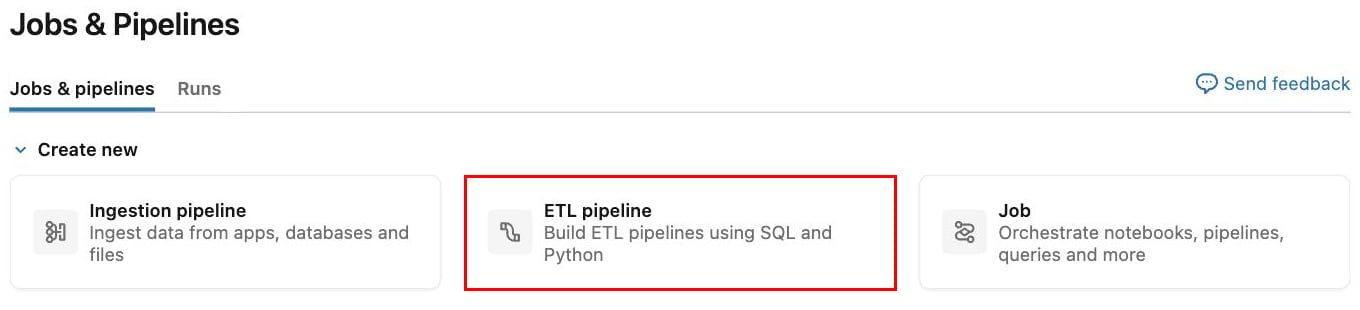
In the sidebar, click **Jobs & Pipelines**, then click **ETL pipeline** under
Create new. Databricks creates the pipeline immediately and opens its editor,
with a Python file already in place.
## Step 3: Write the Pipeline
A Databricks ETL pipeline is a Python file that declares tables. You don't write
the orchestration. You write a function per table, decorate it with `@dp.table`,
and Databricks works out the dependency order and what to refresh.
**This is all one file.** The four blocks below are consecutive parts of a single
Python file, not alternatives. Append each one to the end of the last, in order.
That file is `transformations/my_transformation.py`, which Databricks creates for
you when you make the pipeline in [Step 4](#step-4-create-and-run-the-pipeline).
Draft it in your own editor as you read, then paste the finished file in when you
get there. If you'd rather build it up in place, create the pipeline first and
come back to this step.
### 3.1 Imports and Configuration
**Start the file** with the imports and the configuration block.
The `pyspark.pipelines` module declares the tables, and it's available inside a
pipeline without installing anything. We call Unsiloed with `requests`.
Four constants near the top control the pipeline. `VOLUME` is where your documents
live, and `FIELDS` defines what to extract. `MAX_FILE_BYTES` rejects files that are
too large to copy safely through a Python UDF, while `MAX_CONCURRENT_EXTRACTIONS`
bounds how many partitions submit work in parallel. Start with four concurrent
extractions and raise the value only after checking your Unsiloed rate limit.
```python my_transformation.py theme={null}
"""Turn documents in a Unity Catalog volume into a queryable Delta table with Unsiloed.
Create an ETL pipeline in Databricks, point it at this file, and click Run.
New files dropped into the volume are picked up on the next run.
"""
import json
import mimetypes
import time
import requests
from pyspark import pipelines as dp
from pyspark.sql.functions import col, element_at, split, udf
# --- Configure -------------------------------------------------------------
VOLUME = "/Volumes/workspace/unsiloed/docs"
MAX_FILE_BYTES = 50 * 1024 * 1024
MAX_CONCURRENT_EXTRACTIONS = 4
# The fields to pull from each document. Each description is an instruction to
# the model, so be specific.
FIELDS = {
"vendor_name": "Company that issued the invoice",
"invoice_number": "Invoice number or ID",
"invoice_date": "Issue date as YYYY-MM-DD",
"total_amount": "Grand total payable",
}
# ---------------------------------------------------------------------------
API_KEY = dbutils.secrets.get("unsiloed", "api_key")
BASE = "https://prod.visionapi.unsiloed.ai"
SCHEMA = json.dumps({
"type": "object",
"properties": {k: {"type": "string", "description": v} for k, v in FIELDS.items()},
})
```
The `dbutils.secrets.get` call reads the key you stored in Step 1, so the key
itself never appears in the file. The `SCHEMA` constant turns `FIELDS` into the
JSON Schema the API expects, which means adding a field later is a one-line
change.
Use `string` for amounts and dates. Real invoices carry currency symbols,
thousands separators, and European decimal commas that fail numeric coercion.
Cast them in SQL later, where a bad value stays visible instead of being
silently dropped.
### 3.2 Call Unsiloed from a UDF
**Append this below the configuration.** The extraction is an ordinary Python
function wrapped in `@udf`, which turns it into something Spark can apply to every
row. It runs in three phases: check the document, submit it, then poll until the
job finishes. The three blocks below are one continuous function, so paste them
one after the other.
#### Reject documents before spending a call
An empty file or one over the size limit can never extract, so the function
returns an error for those immediately rather than paying for a request that is
certain to fail.
```python my_transformation.py theme={null}
@udf("string")
def unsiloed_extract(file_name, content):
"""Send one document to Unsiloed and return its result as JSON text."""
if content is None:
return json.dumps({"_error": "The document has no content"})
if len(content) > MAX_FILE_BYTES:
return json.dumps({"_error": f"File exceeds the {MAX_FILE_BYTES}-byte limit"})
```
Both guards return the same `_error` shape used everywhere else, which is what
puts the document in the `extraction_errors` table later.
#### Submit the document
The `mimetypes` lookup sets the content type from the file extension, so the same
function handles PDFs, images, and Office documents without special cases. A
`requests.Session` reuses one connection for the submit and every poll that
follows.
```python my_transformation.py theme={null}
try:
content_type = mimetypes.guess_type(file_name)[0] or "application/octet-stream"
with requests.Session() as session:
submit = session.post(
f"{BASE}/v2/extract",
headers={"api-key": API_KEY},
files={"pdf_file": (file_name, bytes(content), content_type)},
data={"schema_data": SCHEMA, "model": "gamma", "enable_citations": "true"},
timeout=180,
)
if not submit.ok:
detail = submit.text.replace("\n", " ")[:240]
return json.dumps({"_error": f"Submit HTTP {submit.status_code}: {detail}"})
job_id = submit.json()["job_id"]
```
Checking `submit.ok` rather than calling `raise_for_status()` keeps a rejected
upload as a returned error instead of an exception, so the document lands in
`extraction_errors` with the HTTP status and response body attached.
#### Poll until the job finishes
Extraction is asynchronous, so the submit only returns a `job_id`. This loop asks
for the result until it arrives or the deadline passes.
```python my_transformation.py theme={null}
deadline = time.monotonic() + 240
while time.monotonic() < deadline:
remaining = deadline - time.monotonic()
poll_response = session.get(
f"{BASE}/extract/{job_id}",
headers={"api-key": API_KEY},
timeout=max(1, min(30, remaining)),
)
if poll_response.status_code == 429:
time.sleep(min(8, max(0, deadline - time.monotonic())))
continue
poll_response.raise_for_status()
poll = poll_response.json()
if poll.get("status") in ("completed", "review"):
return json.dumps(poll.get("result") or {})
if poll.get("status") == "failed":
return json.dumps({"_error": f"Job {job_id} failed: {json.dumps(poll)[:240]}"})
time.sleep(min(4, max(0, deadline - time.monotonic())))
return json.dumps({"_error": f"Job {job_id} timed out after 240 seconds"})
except Exception as e: # one bad document must not fail the pipeline
return json.dumps({"_error": f"{type(e).__name__}: {e}"})
unsiloed_extract = unsiloed_extract.asNondeterministic()
```
The deadline is measured with `time.monotonic()`, which doesn't jump if the
cluster clock changes, and every timeout is clamped to what's left of it so a
slow response can't run past the budget. A `429` means Unsiloed is rate limiting,
so the loop waits and retries rather than treating it as a failure.
Two more things about the function as a whole:
* **`enable_citations` must be `true`.** With citations off, the `alpha`, `beta`,
and `delta` tiers return a legacy flat shape (`{"value": ..., "score": }`)
with no citation, and the `extracted_fields` table would have nothing to read.
* **The UDF is marked nondeterministic.** Unsiloed scores can vary between calls,
so this stops Spark optimizing the function as though the same input always
gives the same output.
### 3.3 The `extractions` Table
**Append this below the UDF.** The `spark.readStream` call with the `cloudFiles`
format is Auto Loader. It tracks committed files, so later runs normally pick up
only new document paths. `repartition` bounds the number of partitions that can
submit documents concurrently.
```python my_transformation.py theme={null}
@dp.table(
name="extractions",
comment="One row per document, containing the Unsiloed result object",
)
def extractions():
# Auto Loader tracks which files it has already seen, so each run only
# extracts documents that are new since last time.
return (
spark.readStream.format("cloudFiles")
.option("cloudFiles.format", "binaryFile")
.load(VOLUME)
.repartition(MAX_CONCURRENT_EXTRACTIONS)
.withColumn("file_name", element_at(split(col("path"), "/"), -1))
.withColumn("result_json", unsiloed_extract(col("file_name"), col("content")))
.selectExpr(
"replace(path, 'dbfs:', '') AS path",
"file_name",
"length AS size_bytes",
"try_parse_json(result_json) AS result",
"current_timestamp() AS extracted_at")
)
```
The `binaryFile` format gives us the raw bytes of each document plus its path. We
derive `file_name` from the path, hand both to the UDF, and store the response
with `try_parse_json` so it lands as a `VARIANT` column.
That last part matters. A `VARIANT` column has no fixed shape, so adding a field
to `FIELDS` later needs no migration.
### 3.4 The Output Tables
**Append this at the end of the file.** The `extractions` table is one row per
document, which is awkward for finding the values you should check. The next table
pivots successful results to one row per field, while the final table keeps failed
documents separate.
```python my_transformation.py theme={null}
@dp.table(
name="extracted_fields",
comment="One row per extracted field, so you can triage on confidence",
)
def extracted_fields():
return spark.sql("""
SELECT path, file_name, key AS field,
value:value::string AS value,
value:score.extraction_score::double AS extraction_score,
value:score.grounding_score::double AS grounding_score,
value:citation.page::int AS citation_page,
to_json(value:citation.bbox) AS citation_bbox,
value:citation.page_width::double AS citation_page_width,
value:citation.page_height::double AS citation_page_height
FROM STREAM(extractions), LATERAL variant_explode(result)
WHERE result:_error IS NULL
""")
@dp.table(
name="extraction_errors",
comment="One row per document that Unsiloed could not extract",
)
def extraction_errors():
return spark.sql("""
SELECT path, file_name, result:_error::string AS error, extracted_at
FROM STREAM(extractions)
WHERE result:_error IS NOT NULL
""")
```
The `variant_explode` function walks whatever is inside `result` without naming a
single field, so `extracted_fields` keeps working unchanged when you revise
`FIELDS`. Each successful row includes the value, both confidence scores, and the
full citation geometry when Unsiloed could ground the value. `extraction_errors`
keeps API and file failures out of confidence-review queries.
That's the whole file. Compare it against the [full pipeline](#what-well-build)
above if you want to check you have every piece in the right order.
## Step 4: Create and Run the Pipeline
With the code written, the rest happens in the Databricks UI. Creating an ETL
pipeline gives you a starter file to paste it into.
In the sidebar, click **Jobs & Pipelines**, then click **ETL pipeline** under
Create new. Databricks creates the pipeline immediately and opens its editor,
with a Python file already in place.
 The editor opens with an empty starter file at
`transformations/my_transformation.py`.
Before anything else, click the catalog and schema shown at the top right to
open the **Default location** panel, and set **Default catalog** and **Default
schema** to match your volume (`workspace` and `unsiloed`). The schema defaults
to `default`, so if you leave it there your tables land in the wrong place.
The editor opens with an empty starter file at
`transformations/my_transformation.py`.
Before anything else, click the catalog and schema shown at the top right to
open the **Default location** panel, and set **Default catalog** and **Default
schema** to match your volume (`workspace` and `unsiloed`). The schema defaults
to `default`, so if you leave it there your tables land in the wrong place.
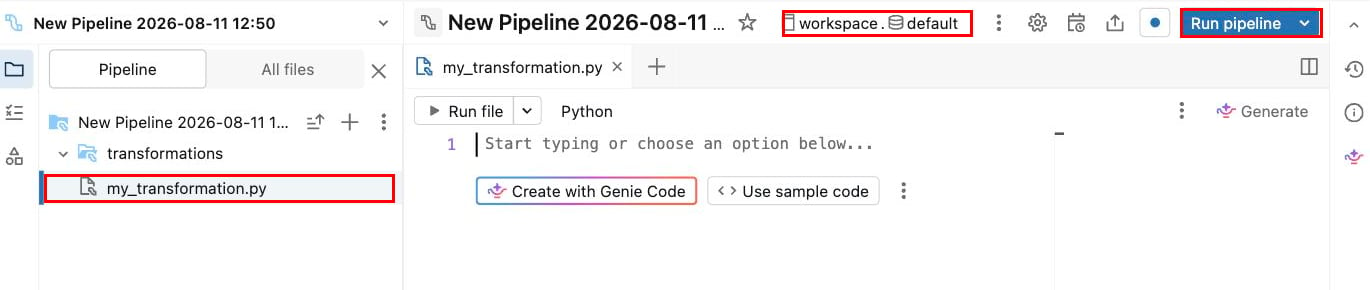 Open `transformations/my_transformation.py`. The file is empty, so the grey
text and the **Create with Genie Code** and **Use sample code** buttons are
editor prompts rather than file content, and there is nothing to delete. Paste
in the file you assembled in Step 3, then click **Run pipeline**.
The first run starts compute, reads every document in the volume, and creates
all three tables. Processing time depends on document length, model load, and
the concurrency limit. Databricks submits up to four partitions in parallel
with the configuration used here.
## Step 5: Query the Results
All three outputs are ordinary Delta tables, so query them from the SQL editor or
any connected tool:
```sql theme={null}
SELECT file_name,
result:vendor_name.value::string AS vendor,
result:total_amount.value::string AS total
FROM workspace.unsiloed.extractions
ORDER BY file_name;
```
That returns one row per document:
```
AmazonWebServices.pdf Amazon Web Services 4.11
FlipkartInvoice.pdf WS Retail Services Pvt. Ltd. 319.00
QualityHosting.pdf QualityHosting AG 34,73
coolblue1.pdf Coolblue B.V. 717,97
oyo.pdf OYO 1939
```
A grounded field arrives as an object carrying its value, both scores, and the
region it came from:
```json theme={null}
{
"total_amount": {
"value": "593.36",
"score": { "extraction_score": 0.52, "grounding_score": 0.92 },
"citation": {
"page": 1,
"bbox": [150, 577, 182, 590],
"page_width": 594.99,
"page_height": 841.89
}
}
}
```
The `bbox` array is `[x0, y0, x1, y1]` in points, measured against the
`page_width` and `page_height` in the same object, so you can scale it to whatever
size you render the page at.
## Review the Uncertain Values
The `extracted_fields` table gives one row per field, so the values worth checking
sort to the top:
```sql theme={null}
SELECT file_name, field, value, extraction_score, grounding_score, citation_page
FROM workspace.unsiloed.extracted_fields
WHERE value IS NOT NULL
ORDER BY extraction_score NULLS LAST;
```
Open `transformations/my_transformation.py`. The file is empty, so the grey
text and the **Create with Genie Code** and **Use sample code** buttons are
editor prompts rather than file content, and there is nothing to delete. Paste
in the file you assembled in Step 3, then click **Run pipeline**.
The first run starts compute, reads every document in the volume, and creates
all three tables. Processing time depends on document length, model load, and
the concurrency limit. Databricks submits up to four partitions in parallel
with the configuration used here.
## Step 5: Query the Results
All three outputs are ordinary Delta tables, so query them from the SQL editor or
any connected tool:
```sql theme={null}
SELECT file_name,
result:vendor_name.value::string AS vendor,
result:total_amount.value::string AS total
FROM workspace.unsiloed.extractions
ORDER BY file_name;
```
That returns one row per document:
```
AmazonWebServices.pdf Amazon Web Services 4.11
FlipkartInvoice.pdf WS Retail Services Pvt. Ltd. 319.00
QualityHosting.pdf QualityHosting AG 34,73
coolblue1.pdf Coolblue B.V. 717,97
oyo.pdf OYO 1939
```
A grounded field arrives as an object carrying its value, both scores, and the
region it came from:
```json theme={null}
{
"total_amount": {
"value": "593.36",
"score": { "extraction_score": 0.52, "grounding_score": 0.92 },
"citation": {
"page": 1,
"bbox": [150, 577, 182, 590],
"page_width": 594.99,
"page_height": 841.89
}
}
}
```
The `bbox` array is `[x0, y0, x1, y1]` in points, measured against the
`page_width` and `page_height` in the same object, so you can scale it to whatever
size you render the page at.
## Review the Uncertain Values
The `extracted_fields` table gives one row per field, so the values worth checking
sort to the top:
```sql theme={null}
SELECT file_name, field, value, extraction_score, grounding_score, citation_page
FROM workspace.unsiloed.extracted_fields
WHERE value IS NOT NULL
ORDER BY extraction_score NULLS LAST;
```
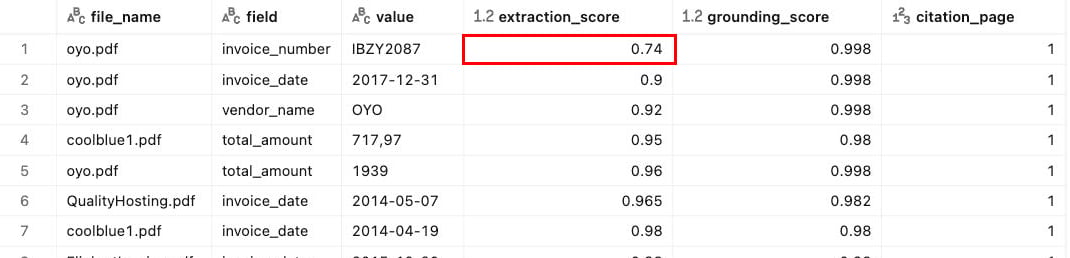 The two scores mean different things:
* **`extraction_score`:** confidence in the value that was read
* **`grounding_score`:** confidence that the value was located in the document, at the region the citation points to
They come apart usefully. A value the model inferred rather than read off the page
scores high on extraction and low on grounding, which is exactly what a human
should confirm. If you ask for a normalized value, such as an ISO currency code
when the invoice prints a symbol, grounding collapses toward zero on every
document, because there is no literal text to cite.
Ambiguity in the document is one cause worth knowing about, because it catches
people out. An invoice printing both `Subtotaal €717,97` (including VAT) and
`Exclusief BTW €593,36` will score its subtotal low whichever one it picks, even
when the value is correct. So treat a flagged value as worth checking rather than
wrong, and note the page it came from.
Scores are not deterministic. Re-extracting the same document with the same
schema can return a different score. Use them to rank and triage, not as a fixed
threshold to assert against.
## Add More Documents
Upload another file under a new path and run the pipeline again. Auto Loader tracks
what it has already committed, so the normal case extracts only the new document
and existing rows keep their original `extracted_at`:
```
AmazonWebServices.pdf 09:40:47
FlipkartInvoice.pdf 09:40:47
QualityHosting.pdf 09:40:47
coolblue1.pdf 09:40:47
oyo.pdf 09:40:47
newarrival.pdf 09:41:53 <- only this one was extracted
```
Open **Schedule** on the pipeline and set a trigger. A run with no newly discovered
files doesn't intentionally submit work to Unsiloed, although Databricks compute
and task retries still have their own cost implications.
Auto Loader ignores overwritten files by default. To process a corrected document,
upload it under a new path or run a full refresh.
To re-extract everything after changing `FIELDS`, open the **Run pipeline** menu
and select **Run pipeline with full table refresh**.
## Troubleshoot the Pipeline
Most problems on a first run come from the schema selector or from network access
rather than from the code itself.
The **Default schema** in the pipeline's **Default location** panel is
`default` until you change it, so tables land there instead. Set it to the
schema you want before the first run, or change it in **Settings** and run a
full refresh.
You changed a table between a materialized view and a streaming table, for
example by removing `spark.readStream`. Drop the existing table and run again.
Check the volume path in `VOLUME`, and that the files are really there. Also
avoid eager actions such as `spark.read.table("...").collect()` inside a table
function. Those run while Databricks plans the pipeline graph, before any table
holds data, so they return nothing and give no error.
The row still lands in `extractions`, the error is also written to
`extraction_errors`, and the rest of the batch continues. Query the error table:
```sql theme={null}
SELECT file_name, error, extracted_at
FROM workspace.unsiloed.extraction_errors
ORDER BY extracted_at DESC;
```
The error includes the HTTP status or job failure detail returned by Unsiloed.
If one document fails repeatedly while its siblings succeed, verify its format
and open it locally before retrying.
Pipeline compute needs outbound access to `prod.visionapi.unsiloed.ai`. Some
workspaces restrict serverless egress at the account level. If requests time
out or fail DNS resolution, ask your account admin about the serverless
network policy.
## What to Know Before Running at Scale
Five things are worth settling before you increase the file or concurrency limits:
* **Billing is per page processed.** A full refresh re-extracts every document in
the volume, so check what that represents before you trigger one.
* **Model choice changes cost and accuracy.** The `gamma` tier used here is the
thorough one and suits most work. Use `delta` for complex contracts and dense
tables, and `alpha` when speed matters more than accuracy on clean documents.
* **Documents leave your workspace.** The pipeline sends each file over HTTPS to
`prod.visionapi.unsiloed.ai`. Confirm that's acceptable for your data before
running this at scale.
* **External submissions are not exactly once.** Auto Loader makes the committed
Delta output incremental, but Spark can retry an HTTP side effect. Use a durable,
idempotent submission service when duplicate jobs are unacceptable.
* **Files are loaded into UDF memory.** The 50 MB limit in this guide leaves room
for Spark, Python, and multipart-upload copies. Raise it only after testing the
memory behavior of your pipeline environment.
## See Also
The `/v2/extract` call on its own, with schema options explained.
Every parameter, model tier, and the full response format.
The two scores mean different things:
* **`extraction_score`:** confidence in the value that was read
* **`grounding_score`:** confidence that the value was located in the document, at the region the citation points to
They come apart usefully. A value the model inferred rather than read off the page
scores high on extraction and low on grounding, which is exactly what a human
should confirm. If you ask for a normalized value, such as an ISO currency code
when the invoice prints a symbol, grounding collapses toward zero on every
document, because there is no literal text to cite.
Ambiguity in the document is one cause worth knowing about, because it catches
people out. An invoice printing both `Subtotaal €717,97` (including VAT) and
`Exclusief BTW €593,36` will score its subtotal low whichever one it picks, even
when the value is correct. So treat a flagged value as worth checking rather than
wrong, and note the page it came from.
Scores are not deterministic. Re-extracting the same document with the same
schema can return a different score. Use them to rank and triage, not as a fixed
threshold to assert against.
## Add More Documents
Upload another file under a new path and run the pipeline again. Auto Loader tracks
what it has already committed, so the normal case extracts only the new document
and existing rows keep their original `extracted_at`:
```
AmazonWebServices.pdf 09:40:47
FlipkartInvoice.pdf 09:40:47
QualityHosting.pdf 09:40:47
coolblue1.pdf 09:40:47
oyo.pdf 09:40:47
newarrival.pdf 09:41:53 <- only this one was extracted
```
Open **Schedule** on the pipeline and set a trigger. A run with no newly discovered
files doesn't intentionally submit work to Unsiloed, although Databricks compute
and task retries still have their own cost implications.
Auto Loader ignores overwritten files by default. To process a corrected document,
upload it under a new path or run a full refresh.
To re-extract everything after changing `FIELDS`, open the **Run pipeline** menu
and select **Run pipeline with full table refresh**.
## Troubleshoot the Pipeline
Most problems on a first run come from the schema selector or from network access
rather than from the code itself.
The **Default schema** in the pipeline's **Default location** panel is
`default` until you change it, so tables land there instead. Set it to the
schema you want before the first run, or change it in **Settings** and run a
full refresh.
You changed a table between a materialized view and a streaming table, for
example by removing `spark.readStream`. Drop the existing table and run again.
Check the volume path in `VOLUME`, and that the files are really there. Also
avoid eager actions such as `spark.read.table("...").collect()` inside a table
function. Those run while Databricks plans the pipeline graph, before any table
holds data, so they return nothing and give no error.
The row still lands in `extractions`, the error is also written to
`extraction_errors`, and the rest of the batch continues. Query the error table:
```sql theme={null}
SELECT file_name, error, extracted_at
FROM workspace.unsiloed.extraction_errors
ORDER BY extracted_at DESC;
```
The error includes the HTTP status or job failure detail returned by Unsiloed.
If one document fails repeatedly while its siblings succeed, verify its format
and open it locally before retrying.
Pipeline compute needs outbound access to `prod.visionapi.unsiloed.ai`. Some
workspaces restrict serverless egress at the account level. If requests time
out or fail DNS resolution, ask your account admin about the serverless
network policy.
## What to Know Before Running at Scale
Five things are worth settling before you increase the file or concurrency limits:
* **Billing is per page processed.** A full refresh re-extracts every document in
the volume, so check what that represents before you trigger one.
* **Model choice changes cost and accuracy.** The `gamma` tier used here is the
thorough one and suits most work. Use `delta` for complex contracts and dense
tables, and `alpha` when speed matters more than accuracy on clean documents.
* **Documents leave your workspace.** The pipeline sends each file over HTTPS to
`prod.visionapi.unsiloed.ai`. Confirm that's acceptable for your data before
running this at scale.
* **External submissions are not exactly once.** Auto Loader makes the committed
Delta output incremental, but Spark can retry an HTTP side effect. Use a durable,
idempotent submission service when duplicate jobs are unacceptable.
* **Files are loaded into UDF memory.** The 50 MB limit in this guide leaves room
for Spark, Python, and multipart-upload copies. Raise it only after testing the
memory behavior of your pipeline environment.
## See Also
The `/v2/extract` call on its own, with schema options explained.
Every parameter, model tier, and the full response format.