> ## Documentation Index
> Fetch the complete documentation index at: https://docs.unsiloed.ai/docs/llms.txt
> Use this file to discover all available pages before exploring further.
# Parse Overview
> Turn documents into ordered Markdown chunks with bounding boxes, OCR, and labeled layout segments.
Just want to run a parse? The [Quickstart](/docs/quickstart) walks through the submit-and-poll flow end to end in Python, JavaScript, and cURL.
If you don't yet know what's important in a document, parsing is where you start. You hand the `/parse` endpoint a document (PDF, image, spreadsheet, or Office document) and it returns the whole thing broken into labeled layout regions: paragraphs, tables, figures, titles, captions, list items, headers, and footers. Tables stay in one piece, and reading order is preserved across multi-column layouts. That makes parsing the right operation for loading documents into a search index, an embedding store for RAG, or a long-term archive.
For pulling specific fields out by name (invoice totals, contract dates, lab values), use [Extraction](/docs/document-processing/extraction/extraction) instead.
Parsing a spreadsheet? Excel workbooks have their own pipeline and endpoint; see [Excel Parsing](/docs/document-processing/parsing/excel). Submitting a `.xls`/`.xlsx` to `/parse` returns a `400` pointing you to `POST /parse/excel`.
## From a Dense Fund Filing to Structured Markdown
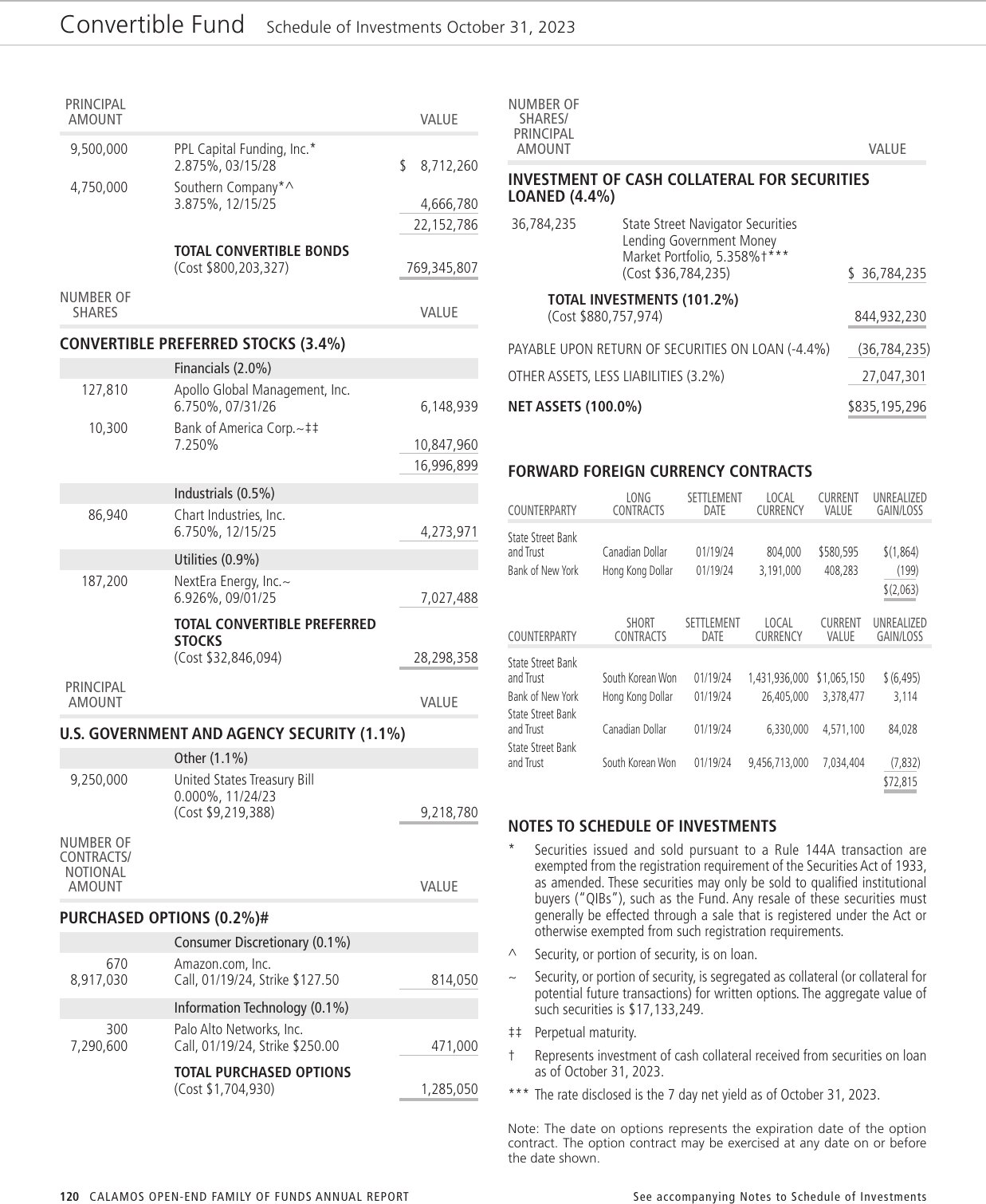
The page below is a real document we ran through `/parse`: a Schedule of Investments from the Calamos mutual funds' 2023 annual report. It's the kind of page standard parsers choke on, with two columns of holdings, each split into nested sub-tables (convertible bonds, sector-grouped preferred stocks, a government security, purchased options, and two forward foreign-currency-contract tables), threaded with footnote symbols, subtotals, and running totals. The filing also ships with a scrambled embedded text layer, so we parse it with [`ocr_strategy=force_ocr`](/docs/api-reference/parser/parse-document) to take the text from OCR of the rendered page instead of the corrupt layer. The layout model handles the column structure itself: it detects the two columns and orders segments top to bottom within each, and for layouts that still come back out of order, the [`enhance_reading_order`](/docs/api-reference/parser/parse-document) parameter re-sorts the segments explicitly. Parsing returns each column as its own table, with the sector groups, footnote markers, and totals intact.
Here's a slice of the Markdown that comes back, showing the sector-grouped convertible preferred stocks with footnote symbols and subtotals preserved:
```markdown theme={null}
| NUMBER OF SHARES | | VALUE |
| --- | --- | --- |
| **CONVERTIBLE PREFERRED STOCKS (3.4%)** | | |
| | Financials (2.0%) | |
| 127,810 | Apollo Global Management, Inc. 6.750%, 07/31/26 | 6,148,939 |
| 10,300 | Bank of America Corp.~‡‡ 7.250% | 10,847,960 |
| | | 16,996,899 |
| | Industrials (0.5%) | |
| 86,940 | Chart Industries, Inc. 6.750%, 12/15/25 | 4,273,971 |
| | Utilities (0.9%) | |
| 187,200 | NextEra Energy, Inc.~ 6.926%, 09/01/25 | 7,027,488 |
| | **TOTAL CONVERTIBLE PREFERRED STOCKS** (Cost $32,846,094) | 28,298,358 |
```
## What a Parse Returns
A successful parse organizes the document into **chunks**, each containing an array of **segments**:
* A **segment** is a single labeled layout region: one paragraph, one table, one image. Each segment carries a bounding box, a `segment_type` (`Text`, `Table`, `Picture`, and others), a confidence score, and the region rendered as Markdown, HTML, and plain text. Tables and pictures also include word-level OCR boxes and a signed image URL for the cropped region.
* A **chunk** groups one or more adjacent segments and includes an `embed` field with the chunk's Markdown rolled into one string, ready to drop straight into a vector store.
See [Response Format](/docs/document-processing/parsing/response-format) for the full field reference, and [Element Types](/docs/document-processing/parsing/element-types) for the complete list of `segment_type` values.
Parsing forms or applications? Pass [`segmentation_version=v2`](/docs/api-reference/parser/parse-document#segmentation-version) to run a form-aware layout model. It adds `KeyValuePair` segments that keep each printed label with the value filled in against it — including checkbox state — instead of scattering labels and values across separate `Text` segments.
## How a Parse Job Works
`/parse` is asynchronous. You submit the document and get back a `job_id`, then poll `GET /parse/{job_id}` until the status is `Succeeded`. Behind the scenes the parser runs OCR on every region, classifies each region's type with a vision model, and reconstructs the reading order across the page.
The [Quickstart](/docs/quickstart) walks through the submit-and-poll flow in Python, JavaScript, and cURL. If your documents live in cloud storage (S3, GCS, Azure Blob, Supabase), you can skip the upload step and point `/parse` at a [presigned URL](/docs/document-processing/parsing/presigned-urls) instead.
## Dig Deeper
The full list of `segment_type` values the parser returns.
The canonical response shape with a field-by-field reference.
Preset parameter bundles (Fast, Accurate, Agentic Lite, Agentic) and the parameters they set.
Parse documents straight from cloud storage.
The dedicated `/parse/excel` endpoint for `.xls` and `.xlsx` workbooks.
For the full request and response specification, see the [Parse API reference](/docs/api-reference/parser/parse-document).