> ## Documentation Index
> Fetch the complete documentation index at: https://docs.unsiloed.ai/docs/llms.txt
> Use this file to discover all available pages before exploring further.
# Process Documents in Batches
> Extract the same fields from a folder of documents concurrently with Python and the Unsiloed API.
An extraction job spends most of its lifetime waiting for the API to process the document. If we submit one file, wait for it to finish, and only then submit the next, that waiting time accumulates across the whole folder.
This recipe processes several documents at once. A small Python thread pool gives each document the same schema, submits it to `/v2/extract`, polls its job, and collects the result. One failed document returns an error without stopping the rest of the batch.
This recipe builds on the [Extraction quickstart](/docs/document-processing/extraction/quickstart). Read that first if you want a detailed explanation of the request, polling flow, or response fields for one document.
## What We'll Build
A Python script that:
1. Finds every PDF in a `documents/` directory.
2. Processes documents concurrently, using four workers by default.
3. Submits each PDF with one shared extraction schema.
4. Polls each job until it completes or fails.
5. Writes all results and per-file errors to `results.json`.
Our example uses fund fact sheets, but the batch-processing pattern is not specific to financial documents. Replace the PDFs and schema with one document family from your own workflow.
Save this as `batch_extract.py`, place your PDFs in `documents/`, and set `UNSILOED_API_KEY` before running it.
```python batch_extract.py theme={null}
from concurrent.futures import ThreadPoolExecutor
import json
import os
from pathlib import Path
import time
import requests
API_KEY = os.environ["UNSILOED_API_KEY"]
BASE_URL = "https://prod.visionapi.unsiloed.ai"
DOCUMENT_DIR = Path("documents")
OUTPUT_PATH = Path("results.json")
MAX_WORKERS = 4
POLL_SECONDS = 3
MAX_POLLS = 100
SCHEMA = {
"type": "object",
"properties": {
"fund_name": {
"type": "string",
"description": "Full name of the fund",
},
"ticker": {
"type": "string",
"description": "Primary fund ticker",
},
"report_date": {
"type": "string",
"description": "Fact sheet as-of date",
},
"gross_expense_ratio": {
"type": "string",
"description": "Expense ratio with %",
},
},
"required": [
"fund_name",
"ticker",
"report_date",
],
"additionalProperties": False,
}
def submit_document(path):
"""Upload a document and return its job ID."""
with path.open("rb") as document:
response = requests.post(
f"{BASE_URL}/v2/extract",
headers={"api-key": API_KEY},
files={
"pdf_file": (
path.name,
document,
"application/pdf",
)
},
data={
"schema_data": json.dumps(SCHEMA),
"model": "gamma",
"enable_citations": "true",
},
timeout=60,
)
response.raise_for_status()
return response.json()["job_id"]
def wait_for_result(job_id):
"""Poll one job until it completes or fails."""
for _ in range(MAX_POLLS):
response = requests.get(
f"{BASE_URL}/extract/{job_id}",
headers={"api-key": API_KEY},
timeout=30,
)
response.raise_for_status()
job = response.json()
status = str(job.get("status", "")).lower()
if status in ("completed", "review"):
return job["result"]
if status in ("failed", "cancelled"):
message = job.get("error")
if not message:
message = f"job {status}"
raise RuntimeError(message)
time.sleep(POLL_SECONDS)
raise TimeoutError(f"Job {job_id} timed out")
def extract_document(path):
"""Submit a document and return its result."""
job_id = submit_document(path)
result = wait_for_result(job_id)
return {
"file": path.name,
"status": "completed",
"job_id": job_id,
"result": result,
}
def process_document(path):
"""Turn an exception into a per-file error."""
try:
return extract_document(path)
except Exception as error:
return {
"file": path.name,
"status": "failed",
"error": str(error),
}
documents = sorted(
path
for path in DOCUMENT_DIR.iterdir()
if path.suffix.lower() == ".pdf"
)
if not documents:
raise RuntimeError("No PDFs in documents/")
print(
f"Found {len(documents)} documents. "
f"Using {MAX_WORKERS} concurrent workers..."
)
started = time.perf_counter()
with ThreadPoolExecutor(MAX_WORKERS) as pool:
mapped = pool.map(process_document, documents)
results = list(mapped)
output = json.dumps(results, indent=2) + "\n"
OUTPUT_PATH.write_text(output)
completed = sum(
result["status"] == "completed"
for result in results
)
failed = len(results) - completed
print(f"Completed: {completed}")
print(f"Failed: {failed}")
print(f"Wrote {OUTPUT_PATH}")
elapsed = time.perf_counter() - started
print(f"Elapsed: {elapsed:.1f} seconds")
```
## Step 1: Set Up Your Documents and Dependency
We'll create a project directory, add a group of similar PDFs, and install the only Python package the script needs.
### 1.1 Get an Unsiloed API Key
Create an API key in the [Unsiloed dashboard](https://app.unsiloed.ai), then set it in your shell:
```bash theme={null}
export UNSILOED_API_KEY="your-api-key"
```
The script reads the key from the environment, so it never needs to appear in the source file.
### 1.2 Add PDFs to the Input Directory
Create a project directory with a `documents/` subdirectory:
```bash theme={null}
mkdir batch-extraction
cd batch-extraction
mkdir documents
```
Add the PDFs you want to process to `documents/`. The files should belong to the same document family because the script applies one schema to all of them. A batch might contain invoices from different suppliers, bank statements from different institutions, or claim forms from different customers.
For this example, we used these public fund fact sheets:
* [State Street SPDR S\&P 500 ETF Trust](https://www.ssga.com/library-content/products/factsheets/etfs/us/factsheet-us-en-spy.pdf)
* [iShares Core S\&P 500 ETF](https://www.ishares.com/us/literature/fact-sheet/ivv-ishares-core-s-p-500-etf-fund-fact-sheet-en-us.pdf)
* [Oakmark Fund](https://oakmark.com/wp-content/uploads/sites/3/documents/MXFundFactSheet.pdf)
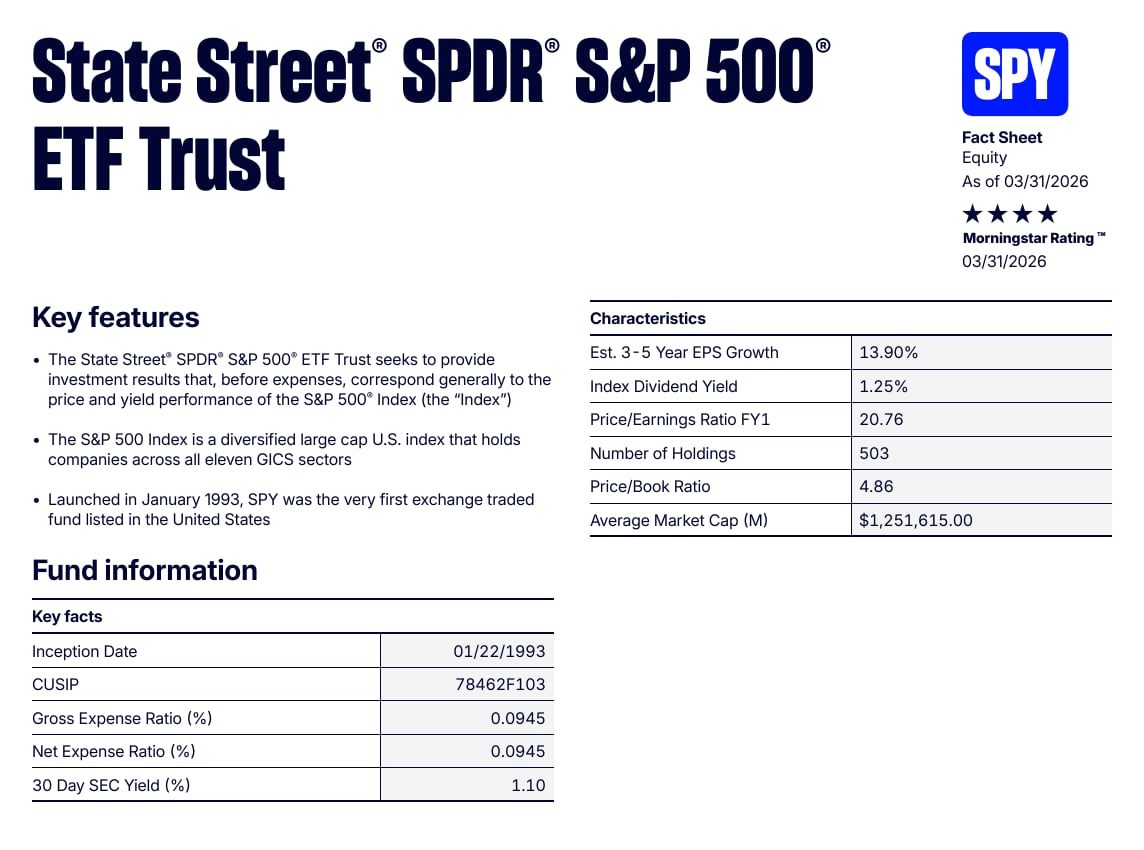
The State Street document below contains the kind of repeated fields we want to collect from every fact sheet: a fund name, ticker, report date, and expense ratio.
 The example links point to live issuer documents, so their contents can change. You don't need these exact PDFs to follow the recipe.
### 1.3 Install Requests
Create a virtual environment and install Requests:
```bash theme={null}
python3 -m venv .venv
source .venv/bin/activate
pip install requests
```
On Windows PowerShell, activate the environment with `.venv\Scripts\Activate.ps1`.
## Step 2: Configure the Batch and Its Schema
Create a file named `batch_extract.py` in the project directory. We'll build it in three pieces: imports, batch settings, and the schema for our example documents.
### 2.1 Import the Python Modules
Add these imports at the top of `batch_extract.py`:
```python batch_extract.py theme={null}
from concurrent.futures import ThreadPoolExecutor
import json
import os
from pathlib import Path
import time
import requests
```
Python includes the thread pool, JSON, path, environment, and timing modules. Requests is the only external dependency.
### 2.2 Set the Batch Limits and File Locations
In `batch_extract.py`, add the following configuration immediately below the imports:
```python batch_extract.py theme={null}
API_KEY = os.environ["UNSILOED_API_KEY"]
BASE_URL = "https://prod.visionapi.unsiloed.ai"
DOCUMENT_DIR = Path("documents")
OUTPUT_PATH = Path("results.json")
MAX_WORKERS = 4
POLL_SECONDS = 3
MAX_POLLS = 100
```
This example uses four workers as a conservative starting point so the script behaves predictably across different machines, file sizes, and API plans. Raise or lower `MAX_WORKERS` to suit your workload and account limits.
The polling settings allow each job approximately five minutes to finish. They control how long the script waits for a result, not how many documents Unsiloed can process.
### 2.3 Define the Schema for Your Documents
In `batch_extract.py`, add a `SCHEMA` dictionary immediately below the configuration:
```python batch_extract.py theme={null}
SCHEMA = {
"type": "object",
"properties": {
"fund_name": {
"type": "string",
"description": "Full name of the fund",
},
"ticker": {
"type": "string",
"description": "Primary fund ticker",
},
"report_date": {
"type": "string",
"description": "Fact sheet as-of date",
},
"gross_expense_ratio": {
"type": "string",
"description": "Expense ratio with %",
},
},
"required": [
"fund_name",
"ticker",
"report_date",
],
"additionalProperties": False,
}
```
This schema belongs to our fund-fact-sheet example. Replace the property names, descriptions, and required fields with the data shared by your own documents. If you're processing invoices, for example, you might request `invoice_number`, `vendor_name`, `invoice_date`, and `total_due` instead.
Only require a field when it should appear in every valid document. We keep `gross_expense_ratio` optional because some fact-sheet formats may omit it.
## Step 3: Submit and Poll One Document
Before adding concurrency, we'll define the three small functions that process one PDF from upload to completed result.
### 3.1 Submit a PDF for Extraction
In `batch_extract.py`, add `submit_document()` immediately below `SCHEMA`:
```python batch_extract.py theme={null}
def submit_document(path):
"""Upload a document and return its job ID."""
with path.open("rb") as document:
response = requests.post(
f"{BASE_URL}/v2/extract",
headers={"api-key": API_KEY},
files={
"pdf_file": (
path.name,
document,
"application/pdf",
)
},
data={
"schema_data": json.dumps(SCHEMA),
"model": "gamma",
"enable_citations": "true",
},
timeout=60,
)
response.raise_for_status()
return response.json()["job_id"]
```
The function opens one PDF, sends it with the shared schema, and returns the job ID from the submission response. The `gamma` model is the default, recommended Unsiloed extraction tier. See the [`model` parameter](/docs/api-reference/extraction/extract-data#body-model) for the available tiers.
The `enable_citations` option adds a page number and bounding box to each extracted field, so a reviewer can see where every value came from. Confidence scores come back either way.
### 3.2 Wait for the Job to Finish
In `batch_extract.py`, add `wait_for_result()` immediately below `submit_document()`:
```python batch_extract.py theme={null}
def wait_for_result(job_id):
"""Poll one job until it completes or fails."""
for _ in range(MAX_POLLS):
response = requests.get(
f"{BASE_URL}/extract/{job_id}",
headers={"api-key": API_KEY},
timeout=30,
)
response.raise_for_status()
job = response.json()
status = str(job.get("status", "")).lower()
if status in ("completed", "review"):
return job["result"]
if status in ("failed", "cancelled"):
message = job.get("error")
if not message:
message = f"job {status}"
raise RuntimeError(message)
time.sleep(POLL_SECONDS)
raise TimeoutError(f"Job {job_id} timed out")
```
The function checks the result endpoint every three seconds. It returns the extraction result for a completed job and raises an error for a failed, cancelled, or timed-out job.
### 3.3 Combine Submission and Polling
In `batch_extract.py`, add `extract_document()` immediately below `wait_for_result()`:
```python batch_extract.py theme={null}
def extract_document(path):
"""Submit a document and return its result."""
job_id = submit_document(path)
result = wait_for_result(job_id)
return {
"file": path.name,
"status": "completed",
"job_id": job_id,
"result": result,
}
```
This function gives the thread pool one operation to run for each path. It also adds the source filename and job ID to the result, so we can connect the output to its document later.
## Step 4: Run the Documents as a Batch
The remaining code isolates per-file errors, runs the worker pool, and writes one output file.
### 4.1 Keep One Failure From Stopping the Batch
In `batch_extract.py`, add `process_document()` immediately below `extract_document()`:
```python batch_extract.py theme={null}
def process_document(path):
"""Turn an exception into a per-file error."""
try:
return extract_document(path)
except Exception as error:
return {
"file": path.name,
"status": "failed",
"error": str(error),
}
```
Without this wrapper, an HTTP error or corrupt PDF could raise out of the thread pool and stop the script. Instead, that document becomes a failed result while the other workers continue.
### 4.2 Find the PDFs and Start the Worker Pool
In `batch_extract.py`, add the following code immediately below `process_document()`:
```python batch_extract.py theme={null}
documents = sorted(
path
for path in DOCUMENT_DIR.iterdir()
if path.suffix.lower() == ".pdf"
)
if not documents:
raise RuntimeError("No PDFs in documents/")
print(
f"Found {len(documents)} documents. "
f"Using {MAX_WORKERS} concurrent workers..."
)
started = time.perf_counter()
with ThreadPoolExecutor(MAX_WORKERS) as pool:
mapped = pool.map(process_document, documents)
results = list(mapped)
```
`ThreadPoolExecutor` calls `process_document()` once per PDF. The `MAX_WORKERS` setting determines how many of those calls the script runs concurrently.
Tune the worker count for your workload. More workers can improve throughput, but they also create more simultaneous uploads and polling requests, use more local memory, and may reach your account's rate limits. Without retry logic, the script records a rate-limit response as a failed document.
### 4.3 Save the Results and Print a Summary
At the end of `batch_extract.py`, immediately below the worker-pool block, add:
```python batch_extract.py theme={null}
output = json.dumps(results, indent=2) + "\n"
OUTPUT_PATH.write_text(output)
completed = sum(
result["status"] == "completed"
for result in results
)
failed = len(results) - completed
print(f"Completed: {completed}")
print(f"Failed: {failed}")
print(f"Wrote {OUTPUT_PATH}")
elapsed = time.perf_counter() - started
print(f"Elapsed: {elapsed:.1f} seconds")
```
The script keeps the complete API response for each successful document and the error message for each failed one. The terminal summary gives us a quick check without hiding the per-file details in `results.json`.
## Step 5: Run the Batch and Inspect the Results
Run the completed script from the project directory:
```bash theme={null}
python batch_extract.py
```
A successful run should print output shaped like this:
```text theme={null}
Found 3 documents. Using 4 concurrent workers...
Completed: 3
Failed: 0
Wrote results.json
Elapsed: 33.5 seconds
```
Timing depends on document size, complexity, model load, worker count, and account limits, so your elapsed time should differ.
Open `results.json` to inspect every API result:
```bash theme={null}
python -m json.tool results.json | less
```
Each successful entry keeps the complete extraction response:
```json theme={null}
{
"file": "spy.pdf",
"status": "completed",
"job_id": "6464ef7b-a554-4199-a549-15b6d82d0b49",
"result": {
"ticker": {
"value": "SPY",
"score": {
"grounding_score": 0.995,
"extraction_score": 0.995
},
"citation": {
"page": 1,
"bbox": [502, 40, 550, 71],
"page_width": 612.0,
"page_height": 792.0
}
}
}
}
```
Keeping the scores and citations lets the next stage flag uncertain values and show a reviewer where each value came from. Don't flatten the response to values alone unless the downstream system no longer needs that evidence.
## Where to Take This Next
The pattern stays the same when you replace the sample documents:
* Put one document family in the input directory.
* Describe its shared fields in one schema.
* Tune the worker count for your throughput target, account limits, file sizes, and available memory.
* Keep each file's error separate from the rest of the batch.
This example resubmits every PDF each time it runs. For a scheduled or high-volume production pipeline, add persistent job IDs, retries with backoff, and a queue. Those solve operational problems, but they aren't required to understand or use the core batch-processing pattern.
If the input directory contains unrelated document types, classify and route them before extraction. The [Sort and Extract cookbook](/docs/cookbooks/sort-and-extract) shows how to select a schema based on document type.
Read values, confidence scores, and citations from each completed result.
Route different document types to different schemas before processing them.
The example links point to live issuer documents, so their contents can change. You don't need these exact PDFs to follow the recipe.
### 1.3 Install Requests
Create a virtual environment and install Requests:
```bash theme={null}
python3 -m venv .venv
source .venv/bin/activate
pip install requests
```
On Windows PowerShell, activate the environment with `.venv\Scripts\Activate.ps1`.
## Step 2: Configure the Batch and Its Schema
Create a file named `batch_extract.py` in the project directory. We'll build it in three pieces: imports, batch settings, and the schema for our example documents.
### 2.1 Import the Python Modules
Add these imports at the top of `batch_extract.py`:
```python batch_extract.py theme={null}
from concurrent.futures import ThreadPoolExecutor
import json
import os
from pathlib import Path
import time
import requests
```
Python includes the thread pool, JSON, path, environment, and timing modules. Requests is the only external dependency.
### 2.2 Set the Batch Limits and File Locations
In `batch_extract.py`, add the following configuration immediately below the imports:
```python batch_extract.py theme={null}
API_KEY = os.environ["UNSILOED_API_KEY"]
BASE_URL = "https://prod.visionapi.unsiloed.ai"
DOCUMENT_DIR = Path("documents")
OUTPUT_PATH = Path("results.json")
MAX_WORKERS = 4
POLL_SECONDS = 3
MAX_POLLS = 100
```
This example uses four workers as a conservative starting point so the script behaves predictably across different machines, file sizes, and API plans. Raise or lower `MAX_WORKERS` to suit your workload and account limits.
The polling settings allow each job approximately five minutes to finish. They control how long the script waits for a result, not how many documents Unsiloed can process.
### 2.3 Define the Schema for Your Documents
In `batch_extract.py`, add a `SCHEMA` dictionary immediately below the configuration:
```python batch_extract.py theme={null}
SCHEMA = {
"type": "object",
"properties": {
"fund_name": {
"type": "string",
"description": "Full name of the fund",
},
"ticker": {
"type": "string",
"description": "Primary fund ticker",
},
"report_date": {
"type": "string",
"description": "Fact sheet as-of date",
},
"gross_expense_ratio": {
"type": "string",
"description": "Expense ratio with %",
},
},
"required": [
"fund_name",
"ticker",
"report_date",
],
"additionalProperties": False,
}
```
This schema belongs to our fund-fact-sheet example. Replace the property names, descriptions, and required fields with the data shared by your own documents. If you're processing invoices, for example, you might request `invoice_number`, `vendor_name`, `invoice_date`, and `total_due` instead.
Only require a field when it should appear in every valid document. We keep `gross_expense_ratio` optional because some fact-sheet formats may omit it.
## Step 3: Submit and Poll One Document
Before adding concurrency, we'll define the three small functions that process one PDF from upload to completed result.
### 3.1 Submit a PDF for Extraction
In `batch_extract.py`, add `submit_document()` immediately below `SCHEMA`:
```python batch_extract.py theme={null}
def submit_document(path):
"""Upload a document and return its job ID."""
with path.open("rb") as document:
response = requests.post(
f"{BASE_URL}/v2/extract",
headers={"api-key": API_KEY},
files={
"pdf_file": (
path.name,
document,
"application/pdf",
)
},
data={
"schema_data": json.dumps(SCHEMA),
"model": "gamma",
"enable_citations": "true",
},
timeout=60,
)
response.raise_for_status()
return response.json()["job_id"]
```
The function opens one PDF, sends it with the shared schema, and returns the job ID from the submission response. The `gamma` model is the default, recommended Unsiloed extraction tier. See the [`model` parameter](/docs/api-reference/extraction/extract-data#body-model) for the available tiers.
The `enable_citations` option adds a page number and bounding box to each extracted field, so a reviewer can see where every value came from. Confidence scores come back either way.
### 3.2 Wait for the Job to Finish
In `batch_extract.py`, add `wait_for_result()` immediately below `submit_document()`:
```python batch_extract.py theme={null}
def wait_for_result(job_id):
"""Poll one job until it completes or fails."""
for _ in range(MAX_POLLS):
response = requests.get(
f"{BASE_URL}/extract/{job_id}",
headers={"api-key": API_KEY},
timeout=30,
)
response.raise_for_status()
job = response.json()
status = str(job.get("status", "")).lower()
if status in ("completed", "review"):
return job["result"]
if status in ("failed", "cancelled"):
message = job.get("error")
if not message:
message = f"job {status}"
raise RuntimeError(message)
time.sleep(POLL_SECONDS)
raise TimeoutError(f"Job {job_id} timed out")
```
The function checks the result endpoint every three seconds. It returns the extraction result for a completed job and raises an error for a failed, cancelled, or timed-out job.
### 3.3 Combine Submission and Polling
In `batch_extract.py`, add `extract_document()` immediately below `wait_for_result()`:
```python batch_extract.py theme={null}
def extract_document(path):
"""Submit a document and return its result."""
job_id = submit_document(path)
result = wait_for_result(job_id)
return {
"file": path.name,
"status": "completed",
"job_id": job_id,
"result": result,
}
```
This function gives the thread pool one operation to run for each path. It also adds the source filename and job ID to the result, so we can connect the output to its document later.
## Step 4: Run the Documents as a Batch
The remaining code isolates per-file errors, runs the worker pool, and writes one output file.
### 4.1 Keep One Failure From Stopping the Batch
In `batch_extract.py`, add `process_document()` immediately below `extract_document()`:
```python batch_extract.py theme={null}
def process_document(path):
"""Turn an exception into a per-file error."""
try:
return extract_document(path)
except Exception as error:
return {
"file": path.name,
"status": "failed",
"error": str(error),
}
```
Without this wrapper, an HTTP error or corrupt PDF could raise out of the thread pool and stop the script. Instead, that document becomes a failed result while the other workers continue.
### 4.2 Find the PDFs and Start the Worker Pool
In `batch_extract.py`, add the following code immediately below `process_document()`:
```python batch_extract.py theme={null}
documents = sorted(
path
for path in DOCUMENT_DIR.iterdir()
if path.suffix.lower() == ".pdf"
)
if not documents:
raise RuntimeError("No PDFs in documents/")
print(
f"Found {len(documents)} documents. "
f"Using {MAX_WORKERS} concurrent workers..."
)
started = time.perf_counter()
with ThreadPoolExecutor(MAX_WORKERS) as pool:
mapped = pool.map(process_document, documents)
results = list(mapped)
```
`ThreadPoolExecutor` calls `process_document()` once per PDF. The `MAX_WORKERS` setting determines how many of those calls the script runs concurrently.
Tune the worker count for your workload. More workers can improve throughput, but they also create more simultaneous uploads and polling requests, use more local memory, and may reach your account's rate limits. Without retry logic, the script records a rate-limit response as a failed document.
### 4.3 Save the Results and Print a Summary
At the end of `batch_extract.py`, immediately below the worker-pool block, add:
```python batch_extract.py theme={null}
output = json.dumps(results, indent=2) + "\n"
OUTPUT_PATH.write_text(output)
completed = sum(
result["status"] == "completed"
for result in results
)
failed = len(results) - completed
print(f"Completed: {completed}")
print(f"Failed: {failed}")
print(f"Wrote {OUTPUT_PATH}")
elapsed = time.perf_counter() - started
print(f"Elapsed: {elapsed:.1f} seconds")
```
The script keeps the complete API response for each successful document and the error message for each failed one. The terminal summary gives us a quick check without hiding the per-file details in `results.json`.
## Step 5: Run the Batch and Inspect the Results
Run the completed script from the project directory:
```bash theme={null}
python batch_extract.py
```
A successful run should print output shaped like this:
```text theme={null}
Found 3 documents. Using 4 concurrent workers...
Completed: 3
Failed: 0
Wrote results.json
Elapsed: 33.5 seconds
```
Timing depends on document size, complexity, model load, worker count, and account limits, so your elapsed time should differ.
Open `results.json` to inspect every API result:
```bash theme={null}
python -m json.tool results.json | less
```
Each successful entry keeps the complete extraction response:
```json theme={null}
{
"file": "spy.pdf",
"status": "completed",
"job_id": "6464ef7b-a554-4199-a549-15b6d82d0b49",
"result": {
"ticker": {
"value": "SPY",
"score": {
"grounding_score": 0.995,
"extraction_score": 0.995
},
"citation": {
"page": 1,
"bbox": [502, 40, 550, 71],
"page_width": 612.0,
"page_height": 792.0
}
}
}
}
```
Keeping the scores and citations lets the next stage flag uncertain values and show a reviewer where each value came from. Don't flatten the response to values alone unless the downstream system no longer needs that evidence.
## Where to Take This Next
The pattern stays the same when you replace the sample documents:
* Put one document family in the input directory.
* Describe its shared fields in one schema.
* Tune the worker count for your throughput target, account limits, file sizes, and available memory.
* Keep each file's error separate from the rest of the batch.
This example resubmits every PDF each time it runs. For a scheduled or high-volume production pipeline, add persistent job IDs, retries with backoff, and a queue. Those solve operational problems, but they aren't required to understand or use the core batch-processing pattern.
If the input directory contains unrelated document types, classify and route them before extraction. The [Sort and Extract cookbook](/docs/cookbooks/sort-and-extract) shows how to select a schema based on document type.
Read values, confidence scores, and citations from each completed result.
Route different document types to different schemas before processing them.