Best Layout-Aware OCR Solutions for Complex Documents (April 2026 Update)
If your table extraction API struggles with nested tables or multi-column layouts, you're not alone. Most OCR solutions handle straightforward documents well but break down when structure becomes complex. A financial statement where tables reference footnotes across pages, or a clinical form mixing


If your table extraction API struggles with nested tables or multi-column layouts, you're not alone. Most OCR solutions handle straightforward documents well but break down when structure becomes complex. A financial statement where tables reference footnotes across pages, or a clinical form mixing text blocks with embedded charts, will come back scrambled. The parser sees text but misses how spatial relationships define meaning. For workflows where a misread table or dropped clause has real consequences, that gap becomes the deciding factor in what tool you pick.
TLDR:
- Layout-aware OCR preserves document structure like tables and reading order, including the text itself
- Traditional OCR breaks on multi-column layouts and nested tables common in finance and legal docs
- Vision-based systems outperform text-only parsers on complex documents with charts and formulas
- Field-level confidence scores and bounding boxes support production-ready extraction workflows
- Unsiloed AI processes 10M+ pages weekly with word-level citations for Fortune 150 banks and healthcare
What Are Layout-Aware OCR Solutions for Complex Documents?
Layout-aware OCR is built to understand documents, going beyond simply reading them.
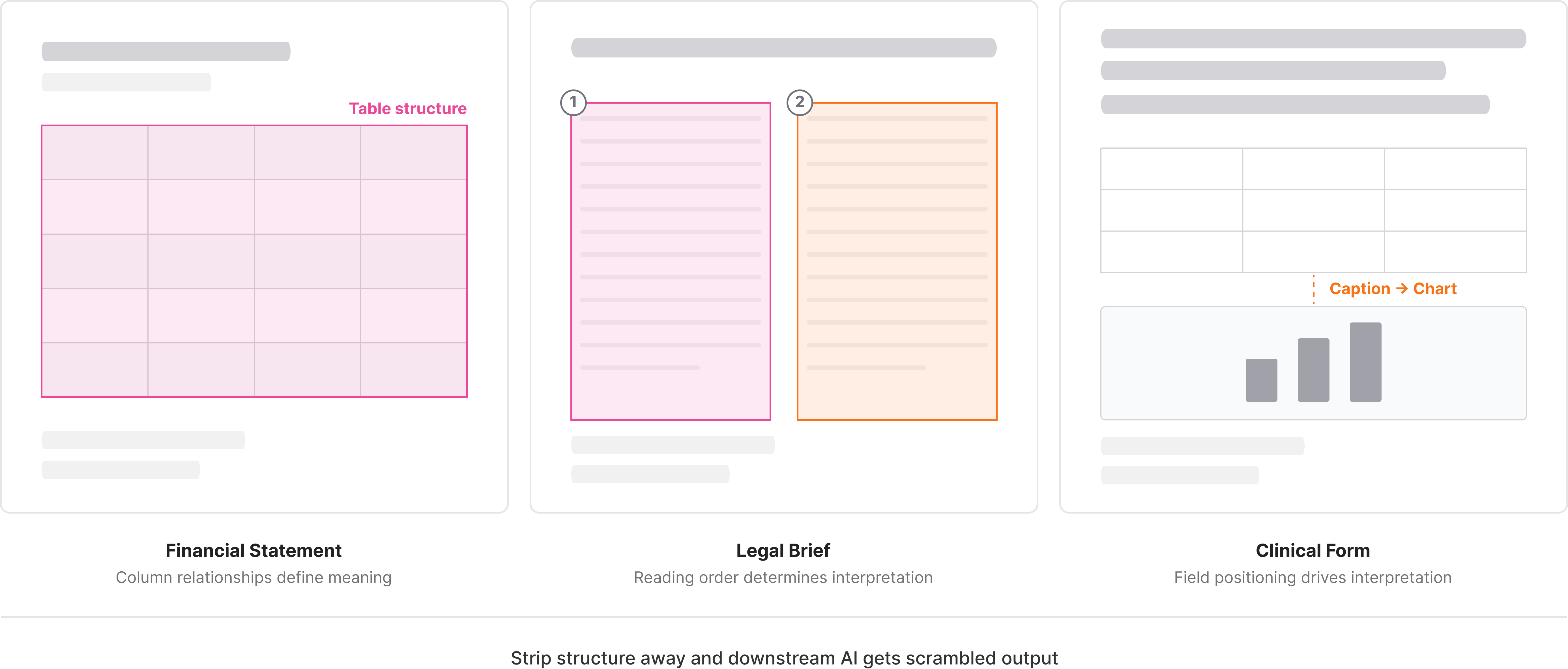
A scanned financial statement, a multi-column legal brief, a clinical form with nested tables carries meaning through structure: where headers sit, how tables are organized, which caption belongs to which chart. Strip that away and downstream AI gets scrambled output it cannot reliably use.
These systems detect document regions, classify element types, preserve reading order, and maintain spatial relationships. The goal is a machine-readable representation that reflects what a human sees on the page. Research on layout-aware OCR approaches shows how preserving structural context improves downstream AI accuracy.
How We Tested Layout-Aware OCR Solutions
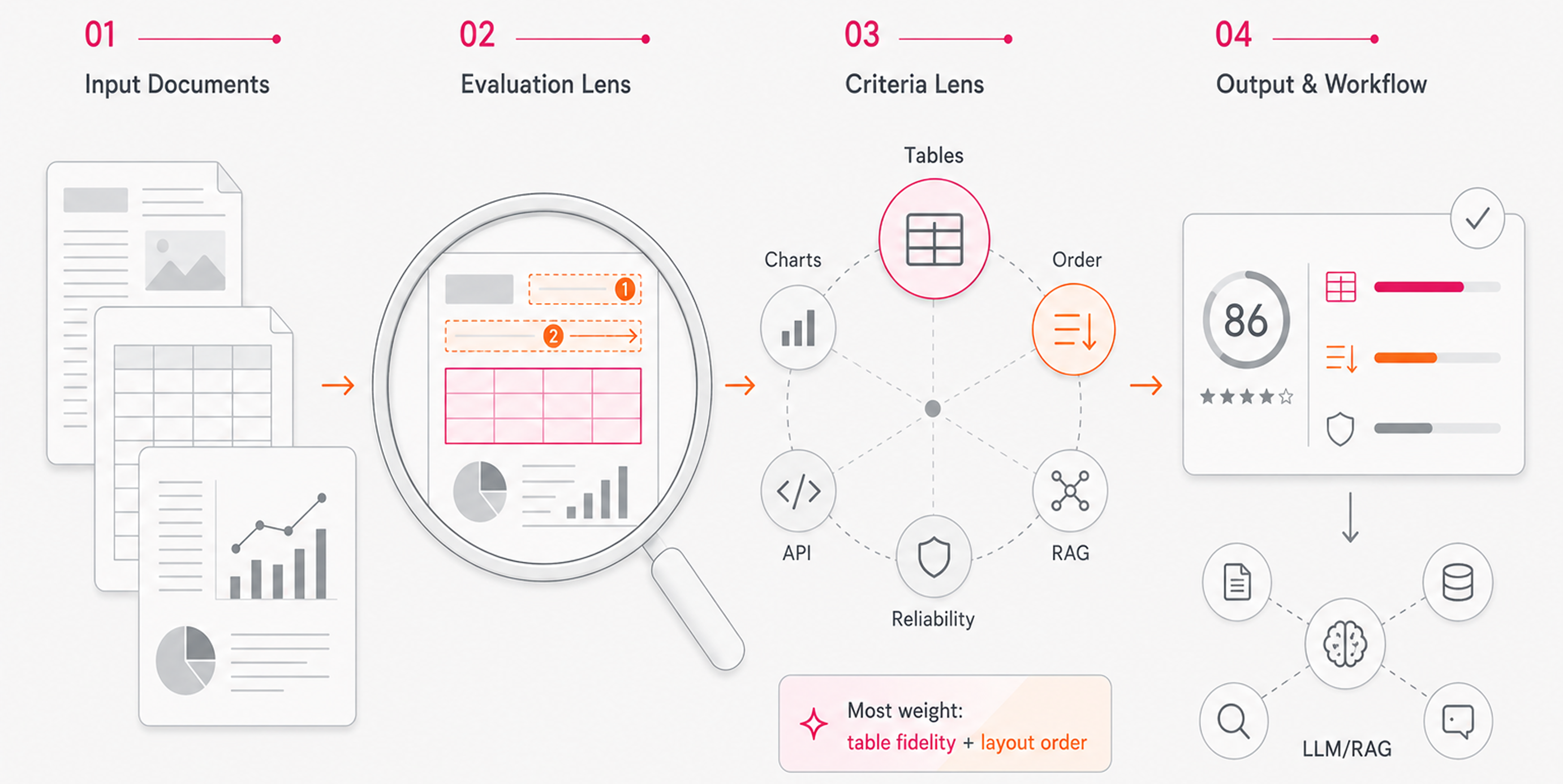
Every solution in this roundup was assessed against the same criteria, drawing from publicly available benchmarks, technical documentation, and verified capabilities. No independent lab testing was conducted.
The factors we weighted:
- Accuracy on complex layouts including multi-column documents, dense tables, and embedded charts
- Preservation of document structure, reading order, and element hierarchy
- Support for multimodal content types: text, tables, images, and formulas
- Output format quality for downstream use in RAG pipelines and LLM workflows
- API integration, developer experience, and production reliability
- Performance on real-world enterprise documents in finance, legal, and healthcare
Table extraction and structural fidelity carried the most weight. For AI teams building on top of documents, losing table structure or misreading reading order tends to break everything downstream.
Best Overall Layout-Aware OCR Solution: Unsiloed AI
Unsiloed AI was built for the documents that break everything else. Dense financial statements, nested legal tables, clinical forms with mixed content: these are the inputs that generic OCR and text-only parsers consistently fail on in production.
- Dual-stream vision model that processes image tokens alongside text, capturing semantic content and structural layout simultaneously
- Schema-driven extraction with word-level citations, bounding boxes, and confidence scores for full traceability back to the source document
- Native support for 20+ file formats including PDFs, PPTs, spreadsheets, and images, with built-in handling for tables, charts, formulas, and complex layouts
- Built-in reinforcement learning pipeline that continuously improves accuracy based on confidence signals
We process millions of pages weekly for Fortune 150 banks, NASDAQ-listed companies, and 10+ YC startups across finance, legal, and healthcare. Charts, embedded images, and complex tables are understood structurally. Every extracted value carries a confidence score and word-level bounding box, so you can audit outputs and flag uncertain fields before they reach downstream systems.
"The accuracy, particularly for tables, is great. We tried 15+ closed and open-source solutions in total. Unsiloed was the only one that seemed to work effectively." (Head of AI, Fortune 150 Bank)
Best for teams in finance, legal, or healthcare with high-stakes parsing needs. If you're building RAG pipelines, vertical AI products, or document-driven automation and need production-grade reliability, start here.
Hyperscience
Hyperscience builds its document processing around ORCA, a Vision Language Model framework designed to handle varied documents without prior model training. The vendor claims 99% accuracy and 98.5% automation rates on structured and semi-structured inputs.
It tends to work well in high-volume enterprise back-office workflows where form types stay relatively consistent. That said, Hyperscience is positioned as an intelligent automation suite, so teams needing a clean REST interface may find the integration surface heavier than expected.
Best for large enterprises running document-heavy back-office operations who want a managed solution with strong SLA commitments.
What they offer:
Trainable and pretrained models with continuous learning through human feedback, plus a no-code trainer for specialized model building
- Proprietary ML models and OCR for handwritten forms, structured, and semi-structured documents
- Auto-splitting for long documents using rule-based logic and regex pattern matching
- Cloud, on-premises, and air-gapped deployment with FedRAMP High certification for government use
Good for organizations processing high volumes of handwritten forms, like government agencies or universities handling applications.
Limitation: Multi-vendor cloud support across AWS, Azure, and GCP adds deployment complexity, and the focus on handwriting leaves gaps for charts, equations, or mixed multimodal content.
Bottom line: Hyperscience is strong for handwriting recognition and structured form workflows, but falls short on complex multimodal documents common in finance, legal, and healthcare.
ABBYY
ABBYY FineReader is one of the older names in commercial OCR, with roots in recognition tech going back decades. It covers scanned document conversion, PDF editing, and structured data extraction across a range of document types.
It performs well on clean, text-heavy documents and standard form layouts, but struggles with complex multimodal content: nested tables spanning multiple pages, charts embedded in PDFs, or documents where layout carries as much meaning as the text itself.
- AI-powered OCR supporting 200+ languages with document comparison and redlining tools
- PDF conversion to Word, Excel, and other editable formats with formatting preservation
- Automated document classification and basic field extraction for structured forms
- Cloud and on-premise deployment with volume licensing for enterprise teams
Limitation: ABBYY is built around conversion workflows instead of AI-ready outputs. JSON and Markdown support is limited, confidence scores are not field-level, and there is no native schema-driven extraction API designed for RAG pipelines or LLM ingestion.
What they offer:
- Document structure preservation that maintains original formatting, table structures, and multi-column layouts
- Support for up to 190 languages for text recognition and document conversion
- API support and pre-built connectors for popular business applications and document management systems
- FineReader Server for mid- to high-volume batch processing and automated document capture
Good for organizations processing high volumes of standard business documents across multiple languages where layout preservation and business system integration matter most.
Limitation: Traditional OCR struggles as documents get more complex, requires frequent retraining when layouts change, and cannot interpret charts or images. ABBYY's text-based approach lacks the vision-first architecture needed for documents with embedded visual data.
Bottom line: ABBYY FineReader delivers reliable performance on text-heavy documents with strong language support, but its approach falls short on the multimodal documents that dominate enterprise workflows in finance, legal, and healthcare.
Docling
Docling is an open-source library from IBM Research that parses PDFs and other document formats into structured outputs for AI pipelines. It handles multi-column layouts, tables, and reading order reasonably well for a free tool.
- PDF, DOCX, PPTX, and image parsing into Markdown and JSON
- Table structure recovery and reading order detection
- Integrations with LlamaIndex and LangChain
One notable gap: no hosted API, no confidence scores, and limited multimodal support for charts or formulas.
What they offer:
Parses PDF, DOCX, PPTX, XLSX, HTML, and images into Markdown and JSON with layout, reading order, and table structure preserved. Powered by DocLayNet for layout analysis and TableFormer for table structure recognition. Ships under an MIT license with integrations for LangChain, Langflow, an MCP server, and a Kubernetes operator at no licensing cost.
Good for development teams and startups wanting a cost-free starting point for general document parsing.
Limitation: Requires Python 3.10+ as of version 2.70.0, which can complicate existing deployments. No hosted API, no SLAs, and no enterprise support make it a poor fit for accuracy-sensitive production workflows.
Unstructured
Unstructured offers both an open-source library and a hosted API for document parsing, targeting teams building retrieval-augmented generation and LLM pipelines. It covers a wide range of file types with basic layout detection, chunking, and element classification.
- Parsing for PDFs, HTML, DOCX, images, and other common formats into structured JSON elements
- Partition functions that identify titles, narrative text, tables, and list items
- Hosted API with higher throughput and connectors for cloud storage and vector databases
Table extraction degrades on complex nested layouts, and there is no field-level confidence scoring or bounding box output for individual extracted values. For financial filings or clinical forms, outputs typically require heavy post-processing before they are usable in production.
A reasonable starting point for general-purpose ingestion, but teams in finance, legal, or healthcare will hit its ceiling fast.
What they offer:
- REST API built with FastAPI supporting 26+ file formats
- Four processing strategies: hi_res, fast, ocr_only, and auto. The hi_res mode handles PDFs with embedded image text but runs 20x slower than fast
- Pre-built connectors for AWS S3, Google Cloud Storage, Azure Blob Storage, and more
- Self-hosted via Docker or hosted at api.unstructured.io
Good for teams already using the unstructured open-source library who want API access with cloud storage connectors.
Limitation: The hi_res strategy struggles with reading order in multi-column documents. For multi-column PDFs without extractable text, the API falls back to ocr_only, which fails if Tesseract is unavailable. That's a real reliability gap for enterprise documents.
Bottom line: Broad format support and useful connectors, but multi-column handling and slow hi_res processing make it a poor fit for high-accuracy production workflows.
Reducto
Reducto is a document parsing API built around a hybrid pipeline that combines vision-language models, traditional OCR, and layout detection. Its architecture is tuned for technical documents with complex layouts.
- Hybrid parsing pipeline combining specialized VLMs, OCR engines, and layout detection for structured output
- PDF, image, and common document format support with table extraction and reading order preservation
- Chunk-based output designed for RAG ingestion with configurable chunking strategies
- Hosted API with async processing
Where it shows cracks is on documents that mix dense tables, embedded images, and multi-column text simultaneously, which are common in financial filings and clinical records. There is no schema-driven extraction with field-level confidence scores or word-level bounding boxes, so teams in compliance-heavy industries have to build that traceability layer themselves.
Good for developer teams wanting a capable hosted parsing API for general document ingestion. Lacks native classification or splitting, has limited multimodal depth for formulas or embedded charts, and provides no confidence-scored field extraction, making it a harder fit for high-stakes workflows in finance, legal, or healthcare.
What they offer:
- Hybrid approach treating documents as visual objects using Vision-Language Models for deep understanding of tables, multi-column layouts, and embedded forms
- Agentic OCR with multi-pass self-correction that acts as an automated reviewer to improve robustness on complex documents
- Pixel-level grounding that maintains a location map of every parsed element, unlike generic OCR services that output text without positional data
- Parse API supporting 30+ formats including PDFs, Excel, and PowerPoint, with additional split, extract, and document editing endpoints
Good for teams requiring pixel-level citations and document editing as part of their parsing workflow in finance, healthcare, or legal.
Limitation: Reducto's benchmarks showing higher accuracy than AWS Textract, Azure Document Intelligence, and Google Cloud OCR are proprietary instead of standardized public evaluations. Multiple specialized models and routing logic also add system complexity compared to unified vision architectures.
Feature Comparison Table of Layout-Aware OCR Solutions
Use this table as a quick reference across the six solutions covered above.
| Feature | Unsiloed AI | Hyperscience | ABBYY | Docling | Unstructured | Reducto |
| Vision-First Architecture | Yes | Yes | No | Yes | No | Yes |
| Multimodal Document Support | Yes | Yes | No | Yes | Yes | Yes |
| Word-Level Citations | Yes | No | No | No | No | Yes |
| Confidence Scoring | Yes | Yes | Yes | No | No | Yes |
| Open Source | No | No | No | Yes | Yes | No |
| Multi-Column Layout Handling | Yes | Yes | Yes | Yes | No | Yes |
| Handwriting Recognition | Yes | Yes | Yes | Yes | No | Yes |
| On-Premise Deployment | Yes | Yes | Yes | Yes | Yes | Yes |
| Table Extraction | Yes | Yes | Yes | Yes | Yes | Yes |
| Real-Time Processing | Yes | Yes | Yes | No | Yes | Yes |
Why Unsiloed AI Is the Best Layout-Aware OCR Solution
Most layout-aware OCR solutions handle clean, well-formatted documents without issue. The real test is a forty-page financial filing where tables span multiple columns, charts carry numeric data, and footnotes reference figures three pages back.
Unsiloed's dual-stream architecture processes image tokens directly alongside text, reading structure the same way a trained analyst would. You get deterministic output with word-level bounding boxes and confidence scores on every extracted field, giving you full traceability back to the source without building that layer yourself.
For teams where a misread table or dropped clause has real downstream consequences, that reliability gap decides the choice.
Final Thoughts on Document Processing for AI Workflows
The difference between decent OCR and production-ready table extraction shows up fast when you're processing real enterprise documents at scale. You need outputs that don't require hours of cleanup, confidence scores that let you flag uncertain fields, and bounding boxes that trace every value back to the source page. If your documents are breaking your current stack, try Unsiloed on your toughest examples to see where the gaps actually are.
FAQ
How do I choose the right layout-aware OCR solution for my use case?
Start by identifying your document types and accuracy requirements. If you're processing financial statements, clinical forms, or legal contracts where structure matters and errors have real consequences, choose solutions with field-level confidence scoring and word-level citations. For general document ingestion with less stringent accuracy needs, open-source options may suffice.
Which layout-aware OCR tool works best for developers building retrieval-augmented generation pipelines?
Solutions with clean REST APIs, structured JSON outputs, and native chunking support fit most RAG workflows. If your documents include complex tables or embedded charts that break traditional parsers, look for vision-first architectures that understand document structure beyond just extracting text.
Can layout-aware OCR handle handwritten forms and scanned documents?
Yes, but capabilities vary widely across solutions. Some specialize in handwriting recognition for structured forms like applications or surveys, while others focus on typed text with complex layouts. Check whether the solution explicitly supports handwriting if that's a requirement for your workflow.
What's the difference between traditional OCR and layout-aware OCR?
Traditional OCR converts images of text into machine-readable characters but often loses spatial relationships, reading order, and document structure. Layout-aware OCR preserves how elements relate to each other: which header corresponds to which table, how columns flow, and where captions connect to charts.
When should I consider on-premise deployment for document processing?
On-premise deployment makes sense when you handle compliance-sensitive data in healthcare, finance, or legal contexts where data cannot leave your environment. It's also worth considering if you process high volumes of sensitive documents and need full control over data residency and compliance.